Fix RuntimeError: Failed to import transformers 'NoneType' object has no attribute 'split'
Error message
RuntimeError: Failed to import transformers ('NoneType' object has no attribute 'split') with Python 3.11, TensorFlow 2.15 & Docker
This error occurs when the transformers library (version 4.39.3) attempts to parse CUDA device environment variables during import, but one of those variables is None instead of a string. The exact error message is:
RuntimeError: Failed to import transformers.models.auto.modeling_auto because of the following error (look up to see its traceback):
'NoneType' object has no attribute 'split'
The most common cause is running a Python 3.11 Docker container based on a slim image (like python:3.11-slim) that lacks the NVIDIA CUDA runtime libraries. The transformers library expects these libraries to be present to query CUDA capabilities, and when they are missing, it returns None for certain device queries, causing the .split() method to crash.
What Causes This Error
1. Missing CUDA Runtime Libraries in the Docker Image
According to the accepted solution on Stack Overflow (source 1), the root cause is that the transformers library (specifically the modeling_auto module) attempts to list or parse CUDA device environment variables during import. In a standard python:3.11-slim Docker image, these libraries are absent. The library fails silently or returns None for certain device queries, and when it tries to call .split() on that None value, the error is raised.
2. Environment Variable CUDA_VISIBLE_DEVICES Being None
In the original question (source 2), the user suspected that CUDA_VISIBLE_DEVICES might be None in the Docker environment. They tried setting it to "-1" (which disables CUDA), but the error persisted. This suggests that the issue is not just one variable, but the absence of the underlying CUDA libraries that transformers uses to query device information.
3. Keras 2 vs Keras 3 Conflict (Ruled Out)
The user also suspected a conflict between Keras 2 and Keras 3. They uninstalled the standalone keras package and kept only tf-keras==2.15.1 (compatible with TensorFlow 2.15.0). They also set TF_USE_LEGACY_KERAS=1 and TRANSFORMERS_NO_TF=1. Despite these measures, the error persisted, indicating that the Keras conflict was not the cause.
How to Fix It
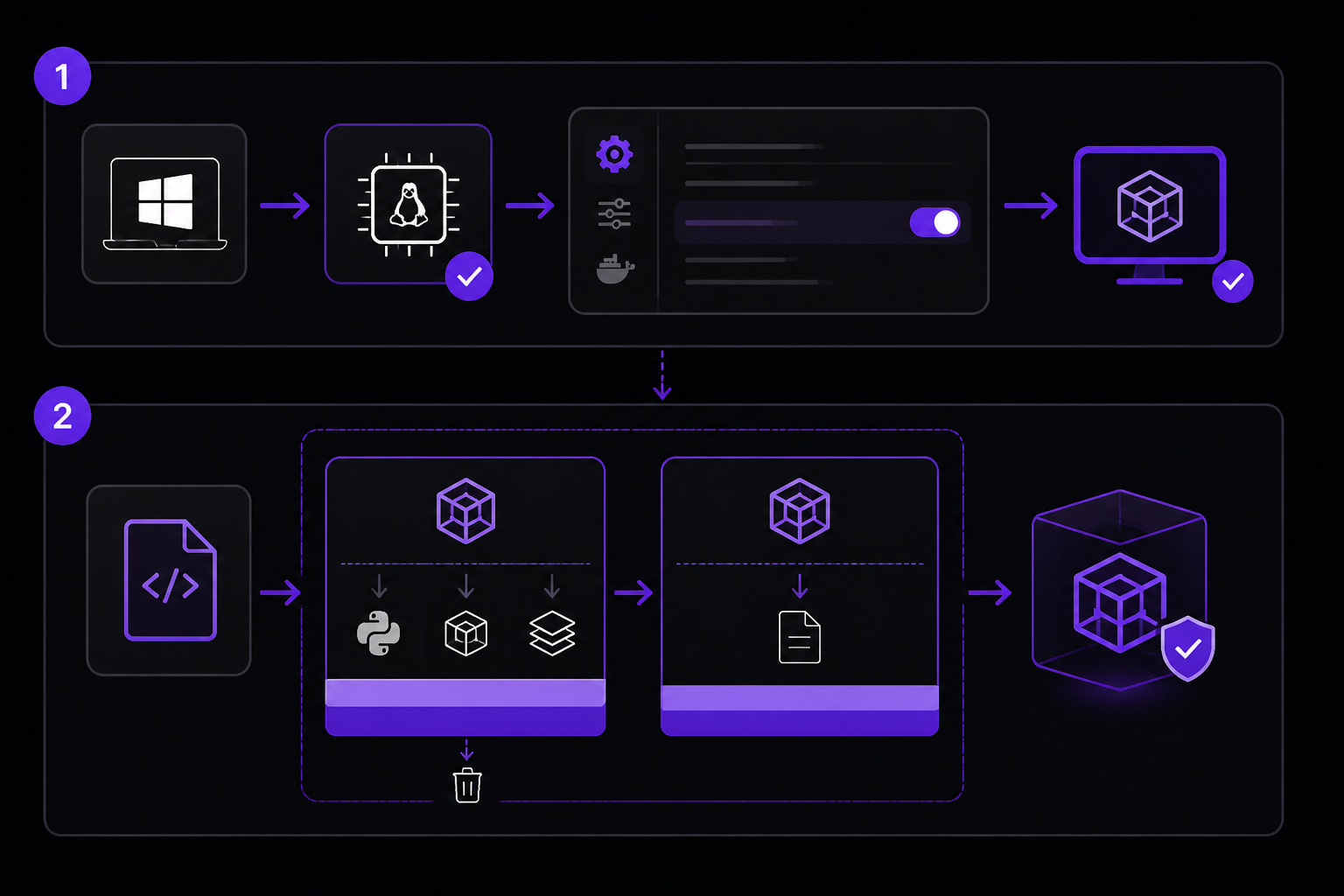
Solution 1: Switch to an NVIDIA CUDA Base Image with Multi-Stage Build (Recommended)
This fix comes from the accepted answer on Stack Overflow (source 1). It involves replacing the generic Python slim image with an official NVIDIA CUDA runtime image and using a multi-stage Docker build to keep the final image size manageable.
Step 1: Host Preparation
If you are on Windows, ensure WSL2 is installed and Docker Desktop has WSL integration enabled for your distribution (e.g., Ubuntu). Go to Docker Desktop -> Settings -> Resources -> WSL Integration and toggle on your distribution.
Step 2: Create a Multi-Stage Dockerfile
Replace your existing Dockerfile with the following:
# Stage 1: Builder
FROM nvidia/cuda:12.1.1-cudnn8-runtime-ubuntu22.04 as builder

ENV DEBIAN_FRONTEND=noninteractive

# Install Python 3.11 and build tools
RUN apt-get update && apt-get install -y --no-install-recommends \
    python3.11 \
    python3.11-dev \
    python3.11-venv \
    build-essential \
    gcc \
    wget \
    curl \
    git \
    libffi-dev \
    libssl-dev \
    && rm -rf /var/lib/apt/lists/*

# Setup Virtual Environment to isolate dependencies
RUN python3.11 -m venv /opt/venv
ENV PATH="/opt/venv/bin:$PATH"

COPY requirements.txt .
RUN pip install --no-cache-dir -r requirements.txt

# Stage 2: Runtime
FROM nvidia/cuda:12.1.1-cudnn8-runtime-ubuntu22.04 as runtime

ENV DEBIAN_FRONTEND=noninteractive
# Crucial: Map the venv path to the new container's environment
ENV PATH="/opt/venv/bin:$PATH"

# Copy only the compiled venv from builder
COPY --from=builder /opt/venv /opt/venv

WORKDIR /app
COPY . .

CMD ["python", "grpc_server.py"]
Step 3: Build and Run
Build the image:
docker build -t my-app .
Run the container with GPU support (if you have an NVIDIA GPU and the NVIDIA Container Toolkit installed):
docker run --gpus all my-app
If you do not have a GPU, you can still run the container without the --gpus flag. The CUDA libraries will still be present, and transformers will detect that no GPU is available without crashing.
Why This Works
The nvidia/cuda:12.1.1-cudnn8-runtime-ubuntu22.04 image provides the system-level CUDA drivers (.so files) that transformers expects to be present. When transformers scans for CUDA capabilities during import, it can now properly query the device information and return a valid string (or an empty string if no GPU is present) instead of None. The multi-stage build ensures that the final image only contains the compiled Python virtual environment, keeping the image size reasonable.
Solution 2: Set Environment Variables (Partial Fix, Not Sufficient Alone)
This approach was attempted by the user in the original question (source 2) but did not resolve the error. It is included here for completeness and may help in edge cases where the CUDA libraries are present but the environment variables are misconfigured.
Add the following environment variables to your docker-compose.yml or set them in your Python script before importing transformers:
import os
os.environ["TRANSFORMERS_NO_TF"] = "1"
os.environ["TF_USE_LEGACY_KERAS"] = "1"
os.environ["CUDA_VISIBLE_DEVICES"] = "-1"
In docker-compose.yml:
services:
  my-app:
    environment:
      - TRANSFORMERS_NO_TF=1
      - TF_USE_LEGACY_KERAS=1
      - CUDA_VISIBLE_DEVICES=-1
Why This May Not Be Enough
As reported in source 2, setting these variables did not fix the error. The transformers library still crashed because the underlying CUDA libraries were missing. This solution is only useful if you already have the CUDA runtime installed but need to disable TensorFlow or GPU usage for other reasons.
If Nothing Works
If switching to the NVIDIA CUDA base image does not resolve the error, consider the following escalation paths:
-
Check the
transformersversion: The error was reported withtransformers==4.39.3. Try upgrading or downgrading to a different version. You can check the Hugging Face Transformers GitHub issues for similar reports. -
Use a CPU-only image: If you do not need GPU support, consider using a CPU-only base image like
ubuntu:22.04and install Python 3.11 manually. This avoids the CUDA dependency entirely. However, this may not work iftransformersstill tries to probe for CUDA. -
Report the issue: File a bug report on the Hugging Face Transformers issue tracker with your exact environment details (Python version, TensorFlow version, Docker image, and full traceback).
-
Community support: Post on Stack Overflow with the tag
huggingface-transformersor ask in the Hugging Face Discord community.
How to Prevent It
-
Always use an NVIDIA CUDA base image when your application depends on
transformersand runs in Docker, even if you do not plan to use a GPU. The presence of the CUDA libraries prevents theNoneTypeerror during import. -
Use multi-stage builds to keep the final image size small while still benefiting from the CUDA runtime in the builder stage.
-
Pin your dependency versions: In your
requirements.txt, pintransformers,sentence-transformers,tensorflow, andtf-kerasto known compatible versions. The versions that produced this error were:- transformers==4.39.3
- sentence-transformers==2.7.0
- tensorflow==2.15.0
- tf-keras==2.15.1
-
Test your Docker image locally before deploying. Run a simple Python script that imports
sentence_transformersto catch this error early. -
Avoid slim Python images for ML workloads. The
python:3.11-slimimage is stripped of many system libraries that ML frameworks expect.
The #1 AI Newsletter
The most important ai updates, guides, and fixes — one weekly email.
No spam, unsubscribe anytime. Privacy policy
Sources & References
This page was researched from 2 independent sources, combined and verified for completeness.
- 1.Answer by Erdinç Erdogan (score 2, accepted)Stack Overflow · primary source
- 2.
Related Error Solutions
Keep exploring
Latest AI answers
Skip the manual work
Ready-made AI workflows and automation templates — import and run instead of building from scratch.