How to Fine-Tune Projection Layer in CLIP Model Using LoRA
Original question: How to Fine-Tune Projection Layer in CLIP Model Using LoRA?
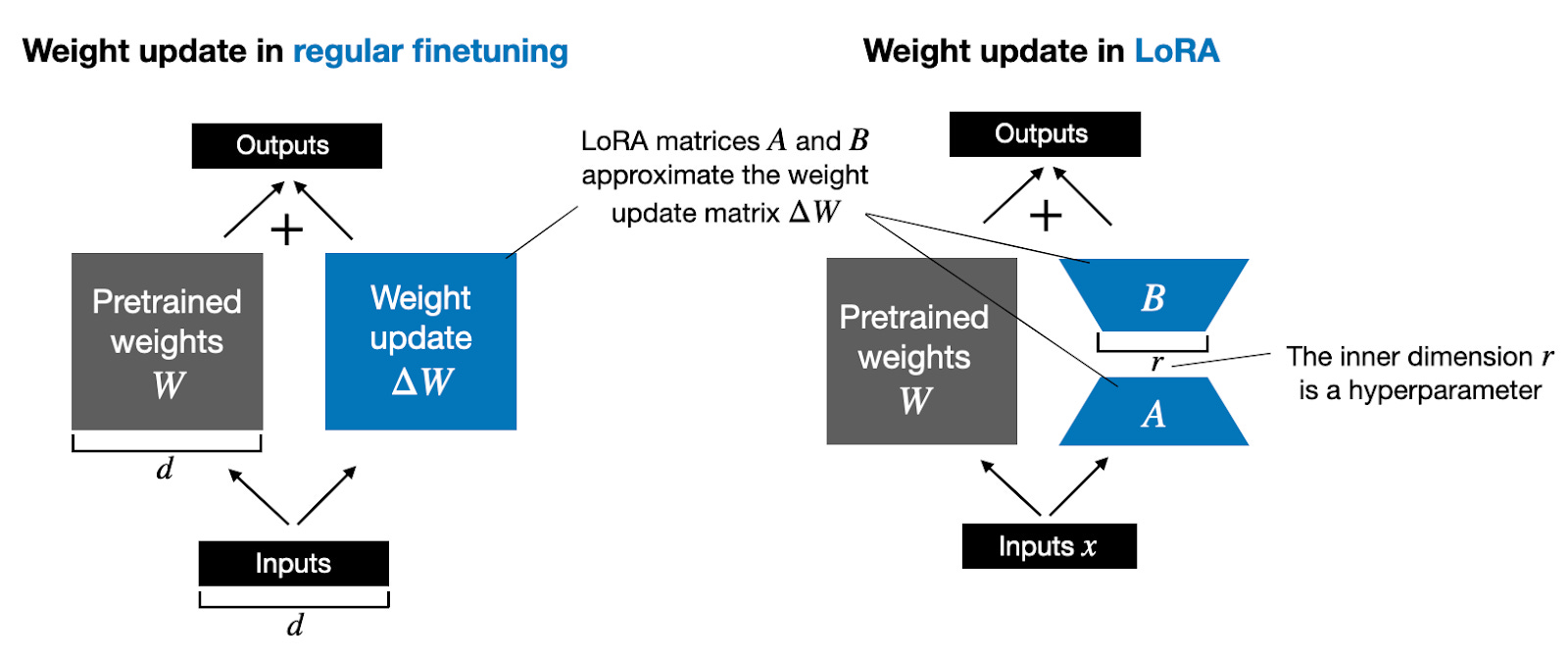
To fine-tune the projection layers in a CLIP model using LoRA, you must use the Hugging Face Transformers implementation of CLIP, not the original OpenAI repository. The OpenAI CLIP code defines projection layers as nn.Parameter objects, which the PEFT (Parameter-Efficient Fine-Tuning) library does not support for LoRA. By switching to the Hugging Face CLIPModel, you get standard nn.Linear layers named visual_projection and text_projection that are fully compatible with LoRA. A minimal configuration targeting those two modules yields 18,432 trainable parameters out of 151 million total, a 0.0122% trainable rate.
The Full Answer
Why the OpenAI CLIP Projection Layers Are Invisible to LoRA
When you load a CLIP model using the official OpenAI repository and print its architecture with print(model), you will not see the projection layers listed among the submodules. This is because the OpenAI implementation initializes the projection layers as nn.Parameter objects directly, not as nn.Linear layers. The visual projection layer is stored as visual.proj and the text projection layer as text_projection, but they do not appear as named children of the model.
You can still inspect these parameters by iterating over model.named_parameters(). The following code prints every parameter name and its shape:
for name, param in model.named_parameters():
    print(f'{name}: {param.shape}')
Output:
text_projection: torch.Size([512, 512])
visual.proj: torch.Size([768, 512])
...
This confirms that the parameters exist, but they are not wrapped in a nn.Module subclass that PEFT's LoRA implementation can target. The PEFT library requires that the target modules be instances of nn.Linear (or other supported layer types) so that LoRA adapters can be injected. nn.Parameter objects are raw tensors, not layers, and cannot be adapted with LoRA directly.
Solution: Use the Hugging Face CLIP Implementation
To apply LoRA to the projection layers, you must use the Hugging Face Transformers version of CLIP, which implements both projections as nn.Linear layers with different names. The following code loads the model, configures LoRA to target those layers, and prints the trainable parameter count:
from transformers import CLIPModel
from peft import LoraConfig, get_peft_model

transformers_model = CLIPModel.from_pretrained("openai/clip-vit-base-patch32")

config = LoraConfig(
    target_modules=["visual_projection", "text_projection"],
)

peft_model = get_peft_model(transformers_model, config)
peft_model.print_trainable_parameters()
Output:
trainable params: 18,432 || all params: 151,295,745 || trainable%: 0.0122
This configuration adds LoRA adapters to both the visual and text projection layers. The default LoRA rank is 8, which gives 18,432 trainable parameters. You can adjust the rank, alpha, and dropout by passing additional arguments to LoraConfig.
Alternative: Modify the OpenAI CLIP Code
If you must use the original OpenAI CLIP repository, you can modify the source code to replace nn.Parameter with nn.Linear layers. This approach is more invasive and requires you to maintain a fork of the repository. The changes involve:
- Locating the visual projection definition in the CLIP source (typically in
clip/model.py). - Replacing
self.visual.proj = nn.Parameter(...)withself.visual.proj = nn.Linear(...). - Doing the same for the text projection layer.
- Adjusting the forward pass to call the linear layer instead of using the parameter directly.
This approach is not recommended unless you have a specific reason to avoid Hugging Face Transformers. The Hugging Face implementation is more actively maintained and integrates with PEFT.
Step-by-Step: Fine-Tuning with LoRA on Hugging Face CLIP
- Install the required libraries:
pip install transformers peft torch
- Load the model and processor:
from transformers import CLIPModel, CLIPProcessor

model = CLIPModel.from_pretrained("openai/clip-vit-base-patch32")
processor = CLIPProcessor.from_pretrained("openai/clip-vit-base-patch32")
- Configure LoRA:
from peft import LoraConfig, get_peft_model

lora_config = LoraConfig(
    r=8,
    lora_alpha=32,
    target_modules=["visual_projection", "text_projection"],
    lora_dropout=0.1,
    bias="none",
)

peft_model = get_peft_model(model, lora_config)
-
Prepare your dataset. For CLIP fine-tuning, you typically need image-text pairs. Use the processor to tokenize text and preprocess images.
-
Train the model with your preferred optimizer and loss function. Only the LoRA parameters will be updated.
-
Save the adapters:
peft_model.save_pretrained("./clip-lora-projections")
- Load the adapters later:
from peft import PeftModel

base_model = CLIPModel.from_pretrained("openai/clip-vit-base-patch32")
loaded_model = PeftModel.from_pretrained(base_model, "./clip-lora-projections")
Common Pitfalls
Using the Wrong Model Variant
If you load the model with clip.load("ViT-B/32") from the OpenAI repo, you will not be able to apply LoRA to the projection layers. The PEFT library will raise an error or silently fail to find the target modules. Always use CLIPModel.from_pretrained("openai/clip-vit-base-patch32") from Hugging Face.
Layer Name Mismatch
The Hugging Face CLIP model uses different layer names than the OpenAI version. The visual projection is called visual_projection and the text projection is called text_projection. If you try to use visual.proj or text_projection (as seen in named_parameters), LoRA will not find them. The correct names are confirmed in the PEFT documentation and community reports.
Forgetting to Freeze Base Parameters
By default, get_peft_model freezes all base model parameters and only makes LoRA parameters trainable. If you manually set requires_grad on other layers, you may inadvertently train the full model, defeating the purpose of LoRA. Check that peft_model.print_trainable_parameters() shows a small fraction of trainable parameters.
Batch Size and Memory
LoRA reduces memory usage, but CLIP models are still large. If you encounter out-of-memory errors, reduce the batch size or use gradient accumulation. The projection layers are small (512x512 for text, 768x512 for visual), so the LoRA adapters add negligible memory overhead.
Related Questions
Can I apply LoRA to other CLIP layers like the vision transformer or text transformer?
Yes. You can target any nn.Linear layer in the Hugging Face CLIP model. Common choices include the attention query, key, value, and output projections in the vision and text transformers. To do this, add layer name patterns like "q_proj", "k_proj", "v_proj", and "out_proj" to the target_modules list in LoraConfig. This allows you to fine-tune the entire model with very few parameters.
What is the difference between LoRA and full fine-tuning for CLIP?
Full fine-tuning updates all 151 million parameters of the CLIP model, requiring significant GPU memory and training time. LoRA fine-tuning updates only a small set of low-rank matrices (e.g., 18,432 parameters for the projection layers), reducing memory usage by up to 80% and training time proportionally. The performance of LoRA fine-tuning is often comparable to full fine-tuning for many downstream tasks, especially when the adaptation is limited to specific layers.
How do I choose the LoRA rank (r) for CLIP projection layers?
The rank determines the number of trainable parameters and the capacity of the adaptation. A rank of 8 (the default) is a good starting point for most tasks. For very similar domains (e.g., fine-tuning on a specific subset of ImageNet), rank 4 may suffice. For tasks requiring significant adaptation (e.g., medical images), rank 16 or 32 may be beneficial. Higher ranks increase trainable parameters linearly: rank 16 gives 36,864 parameters, rank 32 gives 73,728 parameters. Monitor validation performance to find the optimal rank.
Can I use LoRA with the OpenAI CLIP repository by converting nn.Parameter to nn.Linear?
Yes, but it requires modifying the source code of the OpenAI CLIP repository. You need to replace the nn.Parameter definitions with nn.Linear layers and adjust the forward pass accordingly. This is error-prone and not recommended unless you have a strong reason to avoid Hugging Face Transformers. The Hugging Face implementation is a drop-in replacement that works with PEFT out of the box.
The #1 AI Newsletter
The most important ai updates, guides, and fixes — one weekly email.
No spam, unsubscribe anytime. Privacy policy
Sources & References
This page was researched from 2 independent sources, combined and verified for completeness.
- 1.Answer by cronoik (score 2, accepted)Stack Overflow · primary source
- 2.
Related Answers
Keep exploring
Latest error solutions
Skip the manual work
Ready-made AI workflows and automation templates — import and run instead of building from scratch.