
Back to Guides features
 features
 features
 features
 getting-started
GitHub Copilot Workspace: Issue-to-PR Workflows with Premium Requests
Neura Market Research July 19, 2026
0 views
Learn how to use GitHub Copilot to convert issues into pull requests while managing premium request quotas. Covers model selection, step-by-step implementation, and community-tested workflow patterns.
This guide covers how to use GitHub Copilot to go from a GitHub issue to a pull request, with a focus on managing premium request quotas, selecting the right AI model for each stage, and applying practical workflow patterns drawn from official documentation and community experience. It is for developers using Copilot Pro, Business, or Enterprise who want to build complete features without wasting their monthly request budget.
What You Need
Before you start, confirm you have the following prerequisites drawn from the sources:
- A GitHub Copilot subscription: Pro, Business, or Enterprise. The free tier does not include premium requests. According to the community source, GitHub Spark is currently available only with Enterprise or Pro+ subscriptions, and historically access expands to Business, then Pro, then Free.
- A GitHub account with access to the repository you want to work on. You need write access to create branches and open pull requests.
- VS Code or another supported IDE with the GitHub Copilot extension installed and enabled. The community source mentions VS Code Insiders specifically for the premium request monitoring view, but the standard VS Code release also works.
- The Copilot Coding Agent enabled. This is the feature that can triage issues, debug, run tests, and build code from issues you assign. It is part of the Copilot extension and does not require a separate install.
- A GitHub repository with at least one open issue that you want to convert into a pull request. The issue should have a clear description and ideally acceptance criteria.
- Familiarity with Git basics: committing, pushing, and opening pull requests. The agent will handle most of the Git operations, but you should understand what it is doing.
- A link to the GitHub Changelog filtered for Copilot: https://github.blog/changelog/?label=copilot&opened-months=10. The community source stresses that billing rules change often and are rarely broadcast beyond this changelog.
Understanding Premium Requests
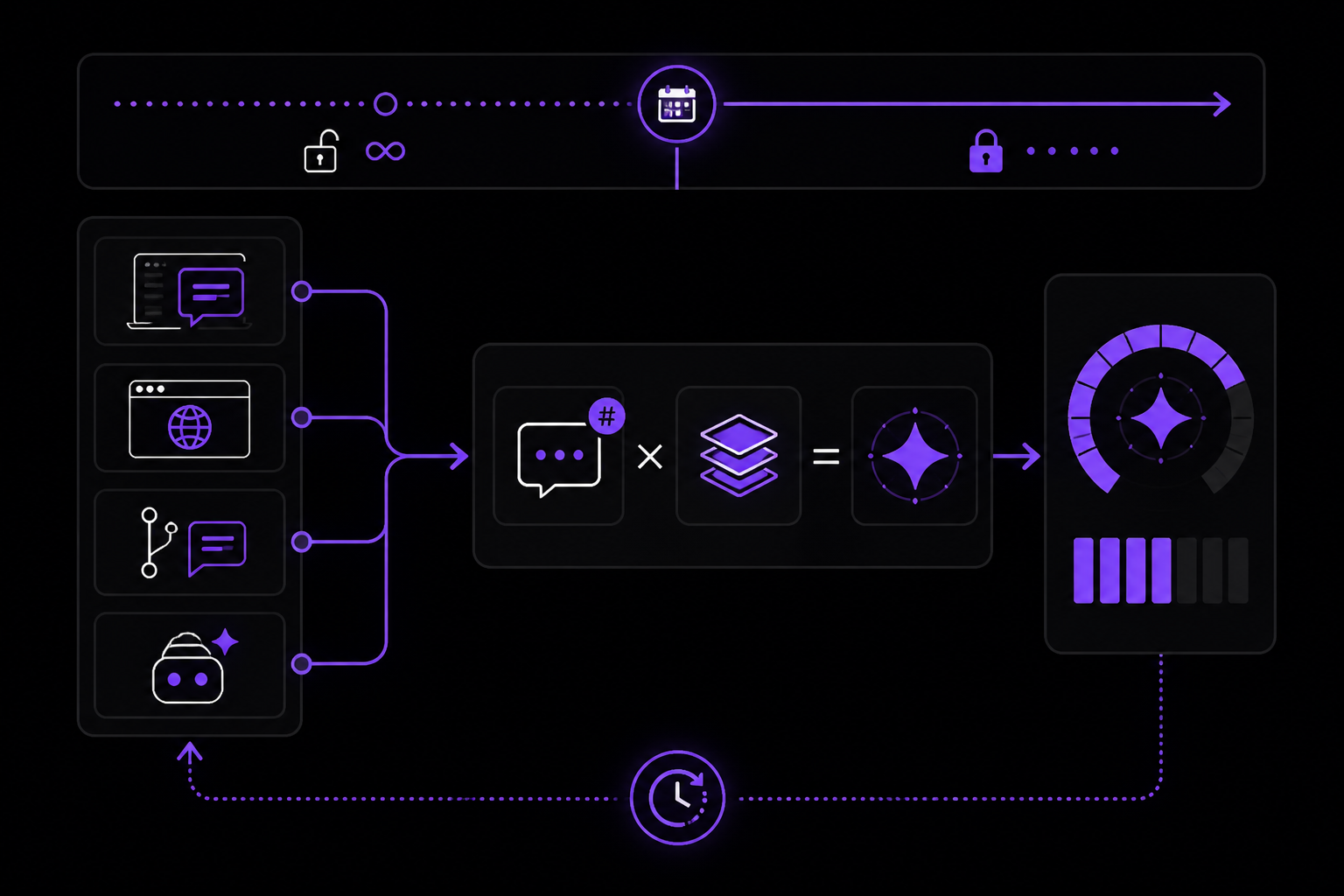
Premium requests are the unit of billing for GitHub Copilot usage that started enforcement on June 18, 2025. Before that date, users had unrestricted prompting. After that date, every prompt you send deducts from your monthly quota, which resets at midnight UTC on the first of each month.
How the Calculation Works
The community source provides a simplified formula:
(Number of Prompts Sent) x (Model's Multiplier) = Premium Requests Deducted
Key points:
- One prompt equals one request regardless of where you send it: IDE chat, GitHub.com, a pull request that auto-triggers a Copilot review, the Coding Agent working autonomously, or the CLI. The community source confirms this rule.
- The request is multiplied by the model's multiplier. Some models cost 0x (free), some cost 0.33x, 1x, or even 10x. The multiplier is set by GitHub and can change.
- Exceptions exist and are subject to change without warning, especially for preview features. As of the community source's publication date (October 22, 2025), two exceptions are documented:
- Auto model selection is billed at 90% cost. This feature automatically selects the most available model to reduce rate limits, but the community source warns that "most available" is not the same as "most appropriate." It is good for small, non-critical tasks.
- GitHub Spark is billed at 4x cost for every prompt. Spark is not a chat bot; it generates code directly from your prompt.
Monitoring Your Usage
The community source describes two ways to monitor premium request usage:
- IDE status bar: A tiny Copilot button in your status bar shows a quick view. It does not provide detailed metrics.
- GitHub settings: Go to https://github.com/settings/billing/premium_requests_usage for individual accounts. For organization or enterprise accounts, this view is usually routed to admins.
Models and Their Multipliers
The community source provides a tested model lineup with multipliers, best uses, and caveats. This is community-reported advice, not official GitHub documentation, but it is based on extensive daily use.
| Model | Multiplier | Best For | Beware Of |
|---|---|---|---|
| GPT-4.1 | 0x = Free | Exploring ideas, acting as a rubber duck, surprisingly creative | Weak on structured implementation unless carefully guided, even with Beast Mode chat mode |
| o4-mini | 0.33x | Finding obscure patterns in small, focused data sets, root-cause analysis | Overwhelmed by large context windows; keep inputs tight |
| Grok Code Fast 1 | 0x = Free | Speedy, accurate edits when given clear instructions | Trades reasoning for speed; logic decisions become coin flips |
| GPT-5-mini | 0x = Free | Small-to-medium tasks, can handle smallish leaps of logic | Constant stream of chaos in chat output; do not read mid-generation |
| Gemini 2.5 Pro | 1x | Strong at complex mid-sized tasks with reliable results | Availability fluctuates wildly |
| Claude Sonnet 4.5 | 1x | Excellent at visual reasoning and UI logic | Loves building glitter-bomb tangents of documentation you never asked for |
| Claude Opus 4.1 | 10x | Planning large epics, solving hard problems | Only runs in "Ask" mode; no agent execution |
The community source notes that model availability depends on your license tier, environment, and chat mode. Always check the official GitHub Docs for supported models: https://docs.github.com/en/enterprise-cloud@latest/copilot/reference/ai-models/supported-models
The Issue-to-PR Workflow
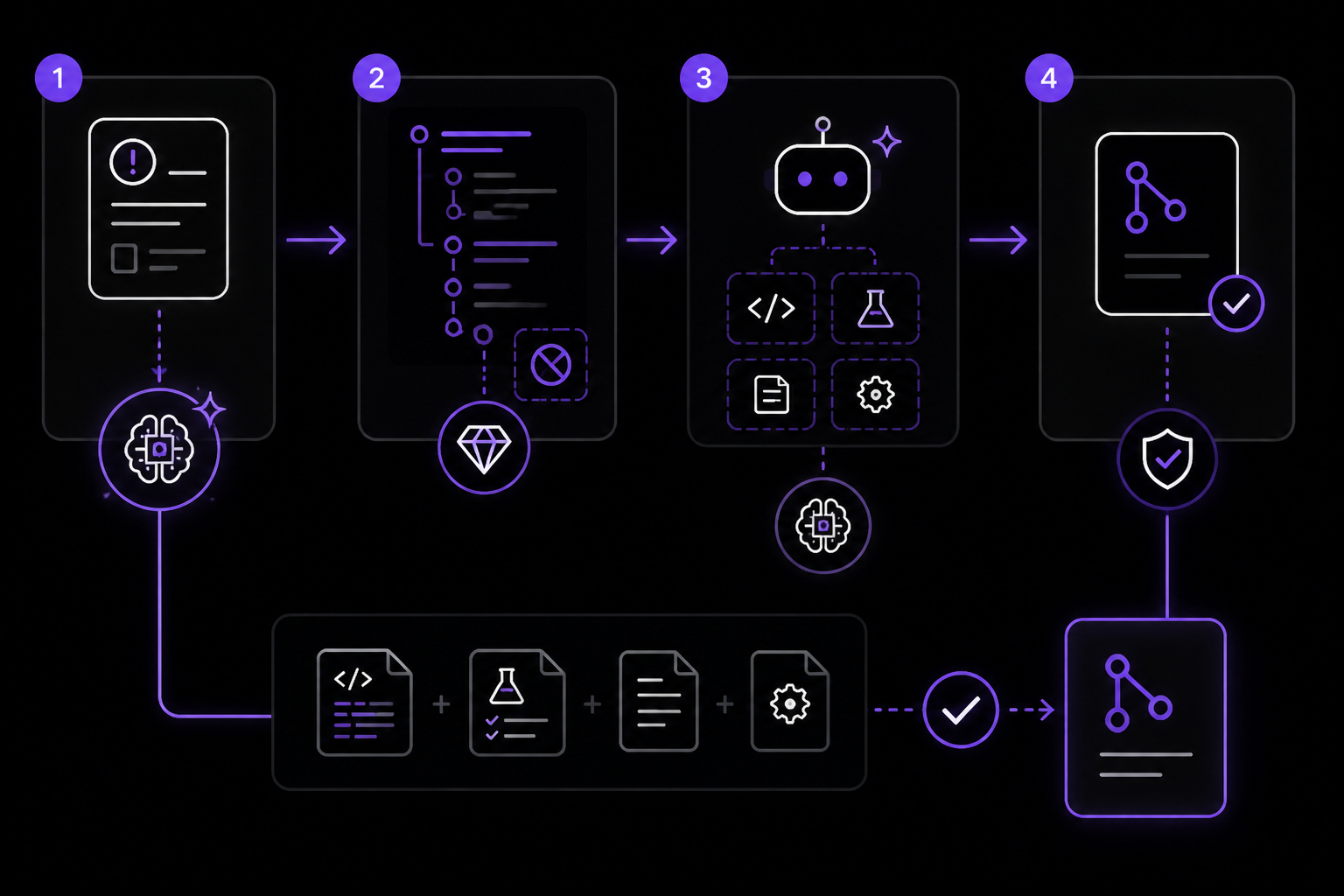
This workflow is based on the community source's practical approach combined with the video description's demonstration of the Copilot Coding Agent. The goal is to take a GitHub issue and produce a pull request with working code, tests, and documentation, while minimizing premium request consumption.
Step 1: Plan with an Expensive Model (But Only Once)
The community source recommends starting with a powerful model like Claude Opus 4.1 (10x cost) or Claude Sonnet 4.5 (1x cost) to create a detailed implementation plan. Do not let the model make any changes yet. Instead, prompt it to break the issue into small, testable steps.
Example prompt from the community source:
# ─────────────── CONTEXT ───────────────
- Using #atlassian/atlassian-mcp-server, pull info for JIRA-123, including any linked documentation in Confluence.
- Gather info to assess changes required in this #codebase.

# ─────────────── TASK BREAKDOWN ───────────────
- DO NOT MAKE CHANGES YET.
- Break this story into concise iterative pieces that include testing at every step.

# ─────────────── OUTPUT STRUCTURE ───────────────
- Document all iterative steps required to meet all acceptance criteria as an ordered list of individual steps with an accompanying unordered checklist.
- Each numbered step should be clear enough that any AI agent can be prompted one step at a time to complete and fully test with both integration and unit tests, whenever applicable.

# ─────────────── SCOPE GUARDRAIL ───────────────
- DO NOT break down tasks unnecessarily, the goal is for each step to be both meaningful and fully testable.

# ─────────────── COMPLETION CRITERIA ───────────────
- When all items are marked complete, acceptance criteria for this story should be met and all happy, sad, and edge-case paths accounted for.

# ─────────────── ADMIN NOTES ───────────────
- Include documentation updates and any relevant deployment tasks.
- Save this concise story breakdown in a new file named `./progress.tmp`.
Line-by-line explanation:
- The
# ─────────────── CONTEXT ───────────────section tells the model where to find information. The#symbol is a markdown heading, but the community source uses it as a section delimiter. The#atlassian/atlassian-mcp-serveris a reference to an MCP server that the model can query. The#codebaseis a Copilot chat variable that references the current workspace. - The
DO NOT MAKE CHANGES YETinstruction is critical. It prevents the model from spending premium requests on code generation before the plan is reviewed. - The output structure demands an ordered list of steps with checklists. Each step must be testable with both integration and unit tests.
- The scope guardrail prevents over-engineering. Steps should be meaningful, not tiny.
- The completion criteria ensure all acceptance criteria are met, including happy, sad, and edge-case paths.
- The admin notes include documentation and deployment tasks. The plan is saved to
./progress.tmpso it can be referenced later.
After the model generates the plan, the community source stresses the importance of human-in-the-loop (HITL) review. Read through the plan and make quick corrections yourself. This is cheaper than iterating with the model.
ProTip from the community source: Add a short instruction reminding Copilot not to touch the ./progress.tmp file without asking first. It is not bulletproof, but it helps prevent unexpected map rewrites.
Step 2: Switch to a Free Model for Implementation
Once the plan is reviewed and saved, close all open files, run /clear in chat to reset the context, and double-check that only the tools needed for Step 1 are active. The community source recommends keeping the context window as small as possible to improve accuracy and reduce iterations.
For implementation, the community source recommends free models:
- Grok Code Fast 1 (0x): Best when the step-by-step plan is already defined and you just need fast, accurate edits.
- GPT-5-mini (0x): Good when the step requires logical decision-making. Be aware of its chaotic chat output.
- o4-mini (0.33x): Use for data-heavy or analytical tasks where you need pattern finding.
- Auto model selection (0.90x): Use for slightly bloated but non-critical tasks.
- Claude Sonnet 4.5 or GPT-5 (1x): Reserve for truly complex or experimental steps.
The community source's rule: pick the cheapest model that can actually finish the job.
Step 3: Implement One Step at a Time
Prompt the model with something like "Implement step N defined in #progress.tmp." After each response, do a mini code review in the chat. The community source recommends:
- Click to "keep" all changes immediately. Git is your safety net.
- Review every change, starting with anything that evokes a "where's your proof?" reaction.
- Continue adding feedback using clearly separated points.
- Stage acceptable changes using context markers via
#selection. - For anything that is clearly wrong, provide direct correction.
Warning from the community source: If you get frustrated and start arguing with the model, you will waste premium requests and sanity. Take a break instead.
Step 4: Fix Tests and Dependencies
As shown in the video description, the Copilot Coding Agent can fix tests and dependencies automatically. After implementing a step, ask the agent to run the tests and fix any failures. The agent can also update package.json, requirements.txt, or other dependency files.
Step 5: Write Commits and Pull Requests
The video description demonstrates that the agent can write commits and pull requests. After all steps are implemented and tests pass, ask the agent to:
- Commit the changes with a descriptive message.
- Push the branch.
- Open a pull request with a summary of the changes, referencing the original issue.
Step 6: Review Copilot's Work
The video description includes a step for reviewing Copilot's work. Before merging, review the pull request thoroughly. The community source recommends using a free model for this review to save premium requests.
Using Spec Kit for Complex Planning
The community source mentions Spec Kit (https://github.github.com/spec-kit/) as an alternative planning tool. Spec Kit writes ultra-detailed requirements, but it costs at least five premium requests per spec. It is worth it for complex work, but overkill for small stories.
Community advice: If you are dealing with serious complexity, Spec Kit is a must-have. For quick stories, you will spend more defining the spec than just prompting Copilot to code it in one shot.
Advanced Tips for Stretching Premium Requests
Keep Context Clean
The community source emphasizes that clean context leads to better results with fewer iterations. Best practices:
- Commit often.
- Close open files that are not relevant to the current step.
- Reset chats with
/clearbetween steps. - Start every new step like a brand-new session.
Use Chain of Thought Prompting (Simplified)
The community source provides a simplified version of Chain of Thought (CoT) prompting:
CoT is nothing more than step-by-step directions.
Sometimes, it looks like the prompt example above.
But that's not a requirement of any kind.
You start at the beginning.
Explain the first logical step.
Then move to the next.
Repeat, as needed.
Keep clear separation between each point.
Stay disciplined about using a consistent structure.
Continue until you're finished.
But you can abandon ship at any point, before anything gets too complicated.
In practice, the community source uses this style of prompting more often than any other recommended pattern. The key is to break the task into clear, sequential steps and present them to the model one at a time.
Human-in-the-Loop Review
The community source cannot stress enough how important human-in-the-loop review is. The plan output becomes your map for Copilot from start to finish. There is rarely reason to waste premium requests iterating on accuracy; you will fix more by reading through and making quick corrections yourself.
Model Selection by Scenario
The community source provides a decision table for model selection:
| Use Case | Model | Cost |
|---|---|---|
| Requires logical decision-making | GPT-5-mini | FREE |
| Step-by-step plan already defined | Grok | FREE |
| Data-heavy or analytical task | o4-mini | 0.33 |
| Slightly bloated but non-critical | Auto | 0.90 |
| Truly complex or experimental | Claude/GPT | 1x |
This list does not cover every case, but it reflects the scenarios the community source sees most often.
Troubleshooting
Premium Request Quota Exhausted
If you run out of premium requests before the end of the month, the community source recommends:
- Check your usage at https://github.com/settings/billing/premium_requests_usage.
- Switch to free models (GPT-4.1, Grok Code Fast 1, GPT-5-mini) for the remainder of the month.
- Reduce context size to improve accuracy and reduce iterations.
- Use Auto model selection (0.90x) for non-critical tasks.
Model Not Available
If a model you want to use is not available, check:
- Your license tier. Some models require Pro, Business, or Enterprise.
- Your environment. Some models are only available in certain IDEs or on GitHub.com.
- The official supported models list: https://docs.github.com/en/enterprise-cloud@latest/copilot/reference/ai-models/supported-models
Agent Not Following the Plan
If the Copilot Coding Agent deviates from the plan in ./progress.tmp:
- Remind it to follow the plan explicitly.
- Reset the chat with
/clearand start fresh. - If the problem persists, the community source suggests the plan may be too vague. Add more detail to each step.
Tests Still Failing After Agent Fixes
If the agent cannot fix failing tests:
- Check if the test environment is set up correctly. The agent may have missed a dependency.
- Ask the agent to explain the failure and suggest a fix.
- If the agent is stuck, fix the test manually and move on. The community source notes that sometimes manual intervention is faster than iterating with the model.
Going Further
To deepen your understanding of GitHub Copilot and premium request management, explore these resources from the sources:
- GitHub Changelog for Copilot: https://github.blog/changelog/?label=copilot&opened-months=10. This is the official source for billing changes, new models, and feature updates.
- Auto model selection documentation: https://docs.github.com/en/copilot/concepts/auto-model-selection. Learn how to use this feature to reduce rate limits and save on premium requests.
- GitHub Spark documentation: https://docs.github.com/en/copilot/concepts/spark. If you have access, experiment with Spark for rapid prototyping, but be aware of the 4x cost.
- Spec Kit: https://github.github.com/spec-kit/. Try it for complex planning tasks where you need ultra-detailed requirements.
- Reusable and experimental prompts: The community source mentions a series on reusable prompts. Search for "GitHub Copilot Everything You Wanted to Know About Reusable and Experimental Prompts" to learn how to create your own prompt templates.
- Beast Mode chat mode for GPT-4.1: https://github.com/github/awesome-copilot/blob/main/chatmodes/4.1-Beast.chatmode.md. If you need to use GPT-4.1 for structured implementation, this chat mode may help.
The video description also hints at the broader capabilities of the Copilot Coding Agent, including environment setup, prioritizing work, and acting as a peer developer. Experiment with these features to see how they fit into your workflow.
Remember that the community source's advice is based on daily use and may not reflect official GitHub behavior. Always verify critical information against the official documentation. The key to success with issue-to-PR workflows is planning with an expensive model once, then executing with free models and human review at every step.
Comments
More Guides
View allfeaturesGitHub Copilot CLI: Terminal Command Suggestions and Usage Guide
Learn how to use GitHub Copilot for terminal command suggestions, including setup in Windows Terminal and VS Code, custom keybindings for commit messages, usage tracking with community tools, and creative CLI projects.
N
Neura Market ResearchfeaturesGitHub Copilot Extensions: Building and Using Custom Instructions
Learn how to build and use GitHub Copilot custom instructions to make the AI behave predictably in your repos. Covers setup, writing techniques, three generation methods, and real-world troubleshooting.
N
Neura Market ResearchfeaturesGitHub Copilot Code Review: Automated PR Feedback Setup Guide
Learn how to set up and tune GitHub Copilot Code Review for automated PR feedback. Covers enabling the feature, writing custom instructions to reduce noise, and iterating on the setup for long-term value.
N
Neura Market Researchgetting-startedGitHub Copilot Setup in VS Code, JetBrains, and Neovim: A Complete Guide
Learn how to set up GitHub Copilot in VS Code, JetBrains IDEs, and Neovim. This guide covers installation, authentication, inline suggestions, Copilot Chat, best practices, and advanced configuration with custom instructions for code review.
N
Neura Market ResearchAgent Mode
GitHub Copilot Agent Mode: Complete Guide 2026
Master Copilot Agent Mode with practical examples for multi-file editing, terminal commands, and autonomous coding workflows.
G
GitHub DocsExtensions
Copilot Extensions: Building Custom Tools and Integrations
Learn to build GitHub Copilot Extensions using the Extensions API to create custom chat participants, slash commands, and MCP integrations.
G
GitHub DocsReady-made automations for this
Workflows from the Neura Market marketplace related to this CoPilot resource
- Automated AI-Powered Workflow Maintenance with Google Workspace Integrationn8n · $24.99 · Related topic
- Automate Clockify Workspace Backups to GitHub with Monthly Reportsn8n · $14.99 · Related topic
- Automate GDPR-Compliant AI Model Selection with Requesty and Google Sheetsn8n · $14.99 · Related topic
- Automate Meeting Notes into Actionable Tasks with Google Workspace and AIn8n · $9.99 · Related topic