Fix 403 PERMISSION_DENIED for Google One AI Premium Subscribers on Gemini CLI
Error message
403 PERMISSION_DENIED for Google One AI Premium subscriber - account correctly identified but API access blocked
The 403 PERMISSION_DENIED error in the Gemini CLI occurs when your Google One AI Premium subscription is correctly identified by the tool, but the backend API rejects all requests before any tokens are consumed. The exact error message returned is:
[{
  "error": {
    "code": 403,
    "message": "The caller does not have permission",
    "errors": [
      {
        "message": "The caller does not have permission",
        "domain": "global",
        "reason": "forbidden"
      }
    ],
    "status": "PERMISSION_DENIED"
  }
}]
This is not a local configuration problem. OAuth authentication succeeds, the subscription tier is correctly shown as "Gemini Code Assist in Google One AI Pro", but every API call is blocked server-side. The /stats output confirms zero tokens consumed, with a 0% success rate.
What Causes This Error
According to the GitHub issue discussion, there are two distinct causes, both originating from Google's backend systems:
1. Account Flagged by Abuse Detection System
The most common cause, as reported by the original issue author and confirmed by Google One support, is that the user's Google account has been incorrectly flagged by an automated abuse detection system. This flag prevents the cloudcode-pa.googleapis.com API path from authorizing requests, even though the subscription entitlement is valid. The support representative explicitly stated that the Google Cloud team should check whether the account has been flagged by their abuse detection system.
2. Backend Entitlement / Authorization Bug
Community member starinzlob, whose issue received 7 reactions, reports that the problem is reproducible across different operating systems and versions. One Google account fails while another works on the same machine and network. This strongly points to an account-side entitlement or backend authorization problem rather than a local configuration issue. The error has escalated from an earlier 429 RESOURCE_EXHAUSTED to a 403 PERMISSION_DENIED, suggesting that repeated abuse detection triggers may have hardened the block.
3. Support Dead-End for Consumer Subscribers
A secondary cause of frustration is structural: Google One support states that Gemini CLI and VS Code extension issues are developer tools that must be handled by Google Cloud support. However, Google Cloud support requires a paid support plan, which consumer Google One subscribers do not have. This creates a loop where no support channel will accept the case.
How to Fix It
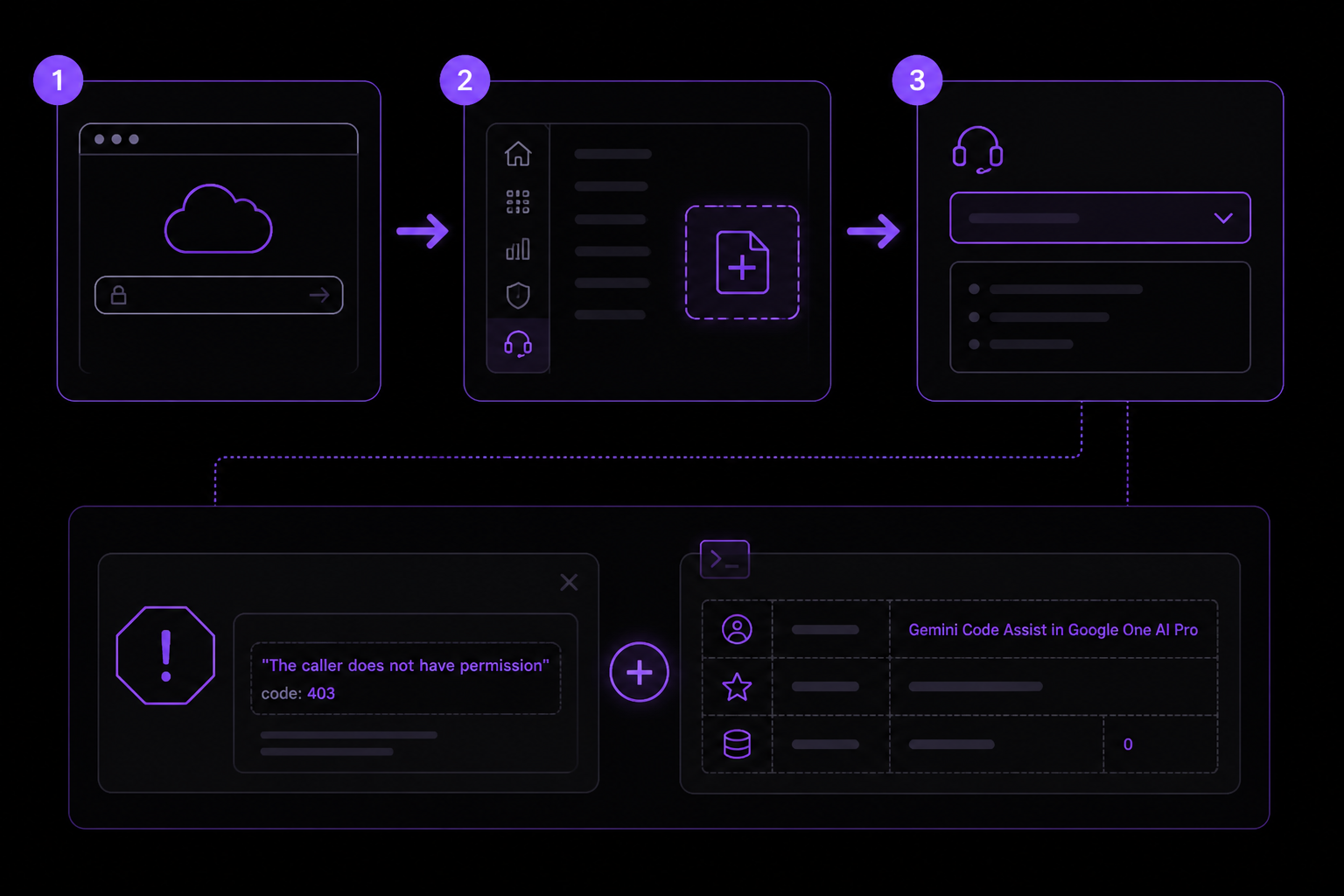
Solution 1: Request Account Review via Google Cloud Support (Official Path)
This is the only officially recognized path, though it requires a paid support plan. If you have a Google Cloud support plan, follow these steps:
- Go to the Google Cloud Console at https://console.cloud.google.com/.
- Navigate to Support > Create a case.
- Select Technical Support and provide the following details:
- The exact error message: "The caller does not have permission" with code 403.
- The
/statsoutput showing your tier as "Gemini Code Assist in Google One AI Pro" and 0 tokens consumed. - Mention that Google One support has confirmed this is an API/OAuth issue and recommended the Cloud team investigate abuse detection flags on your account.
- Reference the
cloudcode-pa.googleapis.comAPI path as the likely blocked endpoint.
- Request that the backend/entitlement team check whether your account has incorrect permission or abuse-related flags.
If you do not have a paid support plan, you will receive the error: "You do not have permission to create support cases." In that case, proceed to Solution 2.
Solution 2: Escalate Through Google One Support with Specific Instructions
If you cannot access Google Cloud support, contact Google One support again with the following script, based on the GitHub issue author's experience:
- Contact Google One support via the Google One app or website.
- Explain that you are a paying AI Premium subscriber and the Gemini CLI returns 403 PERMISSION_DENIED.
- State that you have already been told this is a Google Cloud issue, but you cannot create a Cloud support case without a paid plan.
- Specifically request that they escalate to the Google Cloud team internally, asking them to check whether your account has been flagged by the abuse detection system on the
cloudcode-pa.googleapis.compath. - Provide the exact error JSON and
/statsoutput from your terminal. - Note that the same issue affects the VS Code Gemini extension, which may help them understand the scope.
According to the issue author, Google One support did investigate and confirmed it was an API/OAuth issue, but they refused to handle it further. Persistence and the specific request to check abuse flags may yield a different result.
Solution 3: Use a Different Google Account (Community Workaround)
Community member starinzlob reports that the issue is account-specific. If you have access to another Google account (even a free one), you can test whether the problem follows your account or your machine:
- Sign out of the Gemini CLI:
gemini auth logout - Sign in with a different Google account:
gemini auth login - Run a test request:
gemini "Hello, world" - Check
/statsto confirm tokens are being consumed.
If the second account works, the problem is definitively account-side. This does not fix your primary account, but it confirms the diagnosis and may let you continue working.
Solution 4: Wait for Backend Resolution (No Action Required)
Both sources note that the error escalated from 429 RESOURCE_EXHAUSTED to 403 PERMISSION_DENIED over several days. This suggests an automated system that may eventually clear the flag or be corrected by a backend update. The GitHub issue is open and has received attention from the community. You can monitor the issue at https://github.com/google-gemini/gemini-cli/issues/24517 for updates or a fix from Google.
If Nothing Works
If none of the above solutions resolve the error, you have two escalation paths:
-
GitHub Issue Tracker: Add a comment to the existing issue at https://github.com/google-gemini/gemini-cli/issues/24517. Include your
/aboutoutput,/statsoutput, and the exact error JSON. Mention that you are also stuck in the support dead-end. The more affected users report, the more likely Google is to prioritize a fix. -
Google One Support Escalation: As a last resort, request a supervisor or manager at Google One support. Explain that you are a paying customer who cannot use the service, and that the current support structure leaves you with no recourse. Ask them to create an internal ticket with the Google Cloud team on your behalf.
-
Workaround: Use the Gemini web interface at https://gemini.google.com/ instead of the CLI. The web interface uses a different authentication path and may not be affected by the same abuse flags. This is not a permanent fix, but it lets you use your subscription while the backend issue is resolved.
How to Prevent It
Based on the sources, there is no guaranteed prevention method because the error is caused by backend systems outside your control. However, the following practices may reduce the risk:
-
Avoid Rapid API Calls: The error started as 429 RESOURCE_EXHAUSTED (rate limit exceeded) before escalating to 403. If you are making automated or very frequent requests, add delays between them. For example, use
sleep(1)between calls in scripts. -
Monitor
/statsOutput: Regularly check the Gemini CLI/statscommand. If you see a sudden drop in success rate or a spike in 429 errors, pause usage for a few hours to avoid triggering abuse detection. -
Use a Single Account: If you have multiple Google accounts, avoid switching between them frequently on the same machine. The abuse detection system may interpret account switching as suspicious behavior.
-
Keep CLI Updated: Ensure you are running the latest version of the Gemini CLI. Run
gemini versionto check, and update via your package manager if needed. Newer versions may include fixes or better error handling. -
Document Your Subscription: Keep a screenshot of your Google One AI Premium subscription status and the
/statsoutput showing your tier. This evidence is critical when contacting support.
The #1 Gemini Newsletter
The most important gemini updates, guides, and fixes — one weekly email.
No spam, unsubscribe anytime. Privacy policy
Sources & References
This page was researched from 2 independent sources, combined and verified for completeness.
- 1.
- 2.Solution comment by starinzlob (7 reactions)GitHub issue
Keep exploring Gemini
Gemini resources
Latest AI answers
Skip the manual work
Ready-made AI workflows and automation templates — import and run instead of building from scratch.