

ChatGPT Function Calling and Tool Use for Developers: Complete Guide
Learn how to build applications that let ChatGPT models call external functions and use tools. Covers defining function schemas, handling tool call responses, managing multi-turn conversations, and best practices.
This guide covers everything you need to build applications that let ChatGPT models call external functions and use tools. You will learn how to define function schemas, handle tool call responses, manage multi-turn conversations, and apply best practices from official OpenAI documentation. This guide is for developers who already know how to make basic API calls to OpenAI and want to extend their applications with custom data and actions.
What You Need
Before you start, you need the following:
- An OpenAI API key. Set it as the environment variable
OPENAI_API_KEYor pass it directly when creating the client. The code examples in the sources use both approaches. - An OpenAI SDK installed for your language. The sources provide examples for Python (
openai), JavaScript/TypeScript (openai), Go (github.com/openai/openai-go/v3), Java (com.openai.client), .NET (OpenAI), and Ruby (openai). - A model that supports function calling. The sources use
gpt-5.6andgpt-5.4(for tool search). Check the latest model availability on the OpenAI platform. - Basic familiarity with JSON schema, as function parameters are defined using it.
Core Concepts: Tools, Function Calls, and the Tool Calling Flow
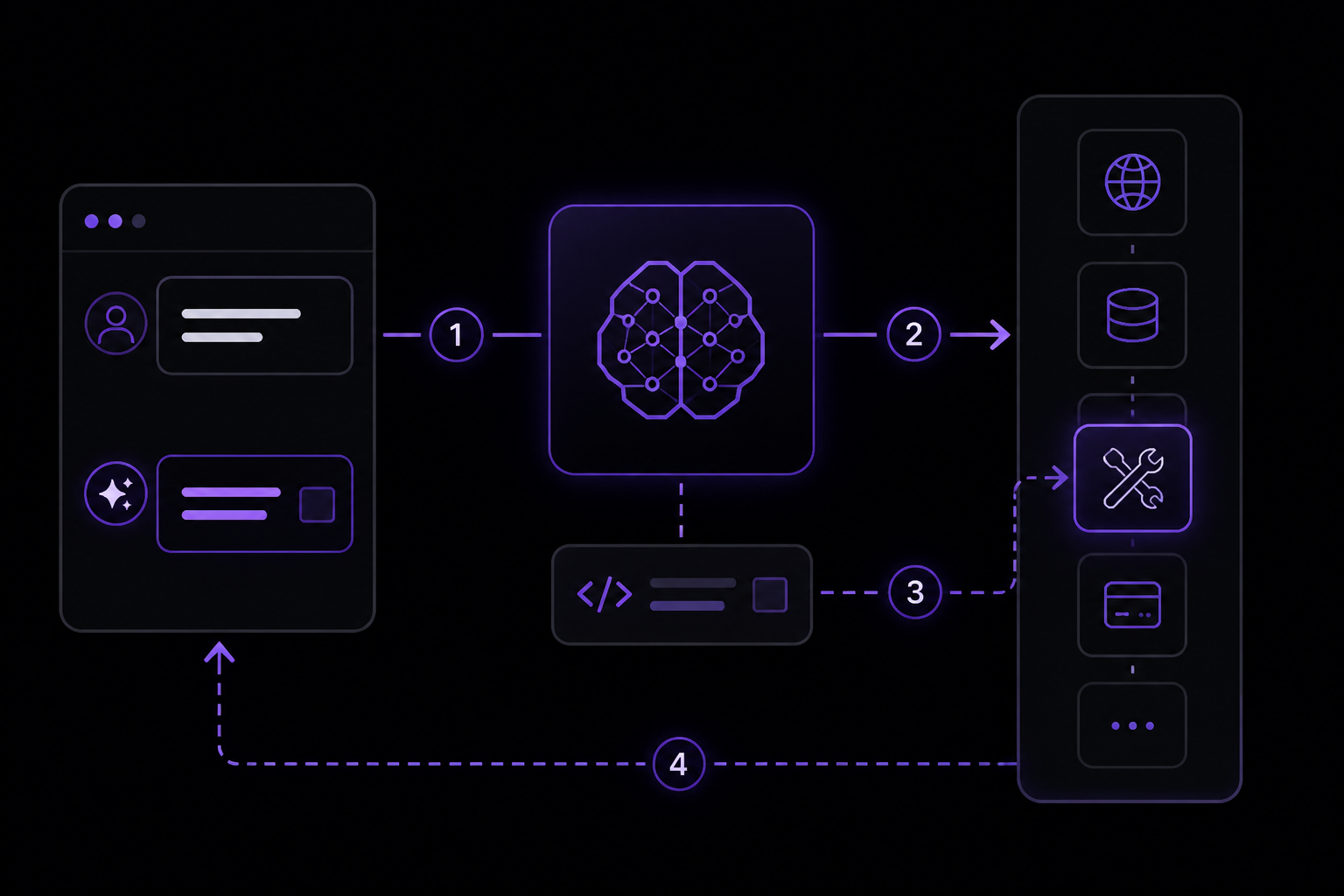
Function calling (also called tool calling) is a multi-step conversation between your application and a model via the OpenAI API. Understanding the vocabulary is the first step.
What Is a Tool?
A tool is a piece of functionality you tell the model it has access to. As the model generates a response to a prompt, it may decide it needs data or functionality provided by a tool to follow the prompt's instructions. You could give the model access to tools that get the current weather for a location, access account details for a given user ID, issue refunds for a lost order, or anything else you want the model to be able to know or do.
When you make an API request with a prompt, you can include a list of tools the model could consider using. For example, if you want the model to answer questions about the current weather, you might give it access to a get_weather tool that takes location as an argument.
What Is a Tool Call?
A tool call is a special kind of response from the model. If the model examines a prompt and determines that to follow the instructions it needs to call one of the tools you made available, it returns a tool call instead of a final text response. For instance, if the model receives a prompt like "what is the weather in Paris?", it could respond with a tool call for the get_weather tool, with Paris as the location argument.
What Is a Tool Call Output?
A tool call output is the response your application generates using the input from the model's tool call. The output can be structured JSON or plain text, and it must contain a reference to the specific tool call (by call_id). To complete the weather example: the model returns a tool call with location = Paris, your application executes the get_weather function, and the tool call output might be {"temperature": "25", "unit": "C"}. You then send the tool definition, the original prompt, the model's tool call, and the tool call output back to the model to finally receive a text response like "The weather in Paris today is 25C."
Functions Versus Tools
A function is a specific kind of tool, defined by a JSON schema. A function definition allows the model to pass data to your application, where your code can access data or take actions suggested by the model. In addition to function tools, there are custom tools that work with free text inputs and outputs. There are also built-in tools that are part of the OpenAI platform, enabling the model to search the web, execute code, or access the functionality of an MCP server.
The Tool Calling Flow
The tool calling flow has five high-level steps:
- Make a request to the model with tools it could call.
- Receive a tool call from the model.
- Execute code on the application side with input from the tool call.
- Make a second request to the model with the tool output.
- Receive a final response from the model (or more tool calls).
With the Responses API, your application can continue this flow for as many tool calls as the task requires. If you want a framework that packages recurring orchestration around that loop, see how the Responses API compares with the Agents SDK.
Setting Up Your First Function Call: A Complete Example
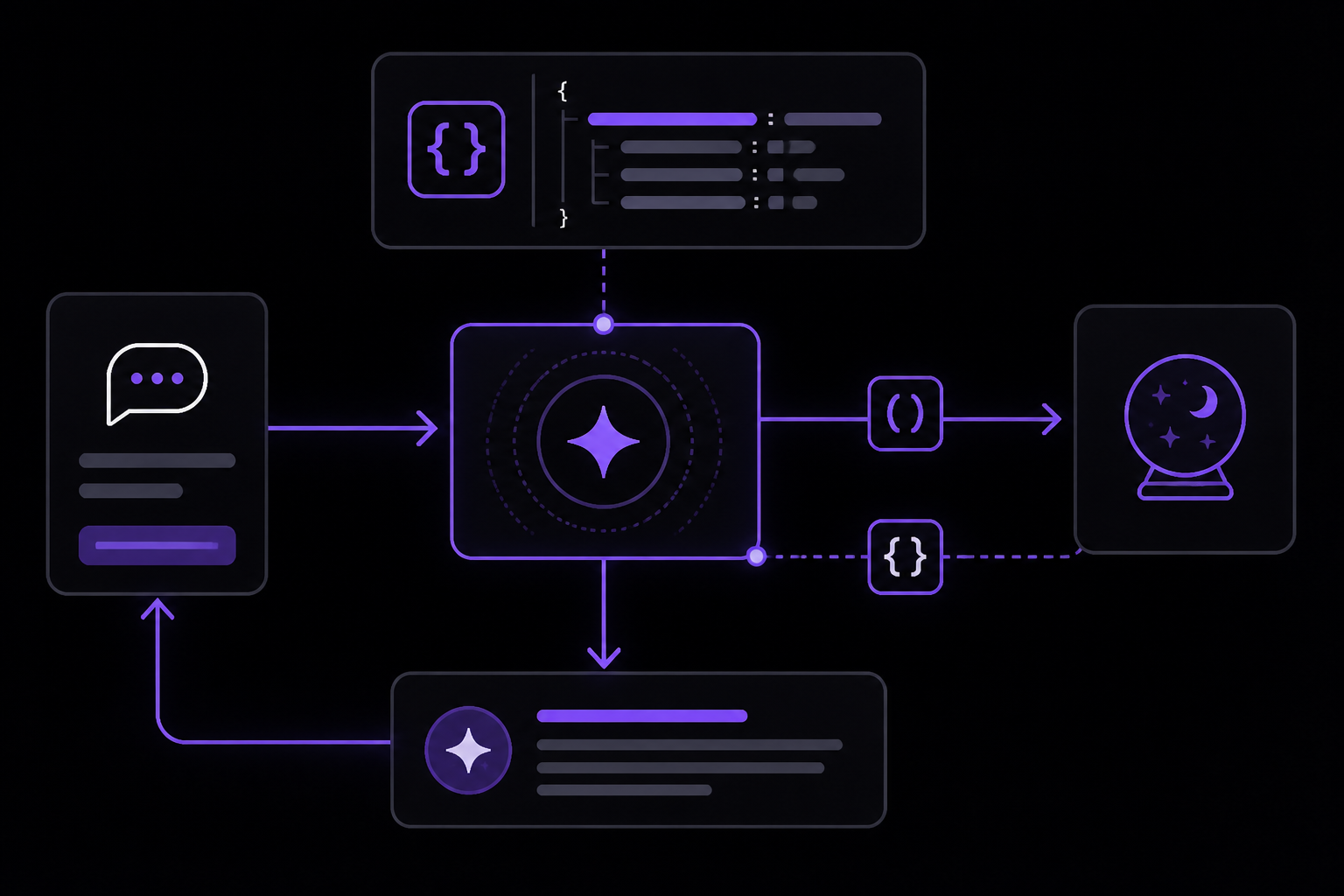
Let's walk through an end-to-end tool calling flow for a get_horoscope function that gets a daily horoscope for an astrological sign. The sources provide examples for both the Chat Completions API and the Responses API. This guide focuses on the Responses API, which is recommended for new work.
Step 1: Define a List of Callable Tools
You define tools in the tools parameter of each API request. Each function definition uses a JSON schema. Here is the tool definition for get_horoscope:
from openai import OpenAI
import json

client = OpenAI()

tools = [
    {
        "type": "function",
        "name": "get_horoscope",
        "description": "Get today's horoscope for an astrological sign.",
        "parameters": {
            "type": "object",
            "properties": {
                "sign": {
                    "type": "string",
                    "description": "An astrological sign like Taurus or Aquarius",
                },
            },
            "required": ["sign"],
        },
    },
]
import OpenAI from "openai";
const openai = new OpenAI();

/** @type {OpenAI.Responses.Tool[]} */
const tools = [
  {
    type: "function",
    name: "get_horoscope",
    description: "Get today's horoscope for an astrological sign.",
    parameters: {
      type: "object",
      properties: {
        sign: {
          type: "string",
          description: "An astrological sign like Taurus or Aquarius",
        },
      },
      required: ["sign"],
      additionalProperties: false,
    },
    strict: true,
  },
];
Key points about this definition:
typemust always be"function".nameis the function's name, likeget_horoscope. Use clear, descriptive names.descriptiontells the model when and how to use the function. Be explicit.parametersis a JSON schema defining the function's input arguments. The sources use rich JSON schema features like property types, enums, descriptions, nested objects, and recursive objects.strict(optional, shown in the JavaScript example) enforces strict mode for the function call, meaning the model will only generate arguments that match the schema exactly.additionalPropertiesset tofalse(shown in the JavaScript example) prevents the model from passing extra properties not defined in the schema.
Step 2: Implement the Function Logic
You need to write the actual function that will be called. In this example, it is a simple placeholder:
def get_horoscope(sign):
    return f"{sign}: Next Tuesday you will befriend a baby otter."
function getHoroscope(sign) {
  return `${sign}: Next Tuesday you will befriend a baby otter.`;
}
In a real application, this function would call an external API, query a database, or perform any other action.
Step 3: Make the Initial Request and Handle the Tool Call
Create a running input list that you will add to over time. Make the first request with the tools defined.
input_list = [
    {"role": "user", "content": "What is my horoscope? I am an Aquarius."}
]

response = client.responses.create(
    model="gpt-5.6",
    tools=tools,
    input=input_list,
)

input_list += response.output

for item in response.output:
    if item.type == "function_call":
        if item.name == "get_horoscope":
            sign = json.loads(item.arguments)["sign"]
            horoscope = get_horoscope(sign)
            input_list.append({
                "type": "function_call_output",
                "call_id": item.call_id,
                "output": horoscope,
            })
let input = [
  { role: "user", content: "What is my horoscope? I am an Aquarius." },
];

let response = await openai.responses.create({
  model: "gpt-5.6",
  tools,
  input,
});

input.push(...response.output);

for (const item of response.output) {
  if (item.type !== "function_call") continue;
  if (item.name === "get_horoscope") {
    const { sign } = JSON.parse(item.arguments);
    const horoscope = getHoroscope(sign);
    input.push({
      type: "function_call_output",
      call_id: item.call_id,
      output: horoscope,
    });
  }
}
Important details:
- You must preserve the model's output for the next turn. The code appends
response.outputtoinput_list(orinput). This includes the function call request itself. - The
item.typeis"function_call"when the model requests a function. - The
item.argumentsis a JSON string. You must parse it to get the arguments. - The
item.call_idis a unique identifier for this specific tool call. You must include it in thefunction_call_outputyou send back. - The
outputfield infunction_call_outputis the result of your function execution. It can be a string (plain text or JSON).
Step 4: Make the Second Request and Get the Final Response
Send the updated input list back to the model. You can also include instructions to guide the model's behavior.
response = client.responses.create(
    model="gpt-5.6",
    instructions="Respond only with a horoscope generated by a tool.",
    tools=tools,
    input=input_list,
)

print(response.output_text)
response = await openai.responses.create({
  model: "gpt-5.6",
  instructions: "Respond only with a horoscope generated by a tool.",
  tools,
  input,
});

console.log(response.output_text);
The model should now be able to give a final response that incorporates the tool output.
Important Note for Reasoning Models
For reasoning models like GPT-5 or o4-mini, any reasoning items returned in model responses with tool calls must also be passed back with tool call outputs. This means you need to preserve the entire output array, not just the function call items.
Defining Functions in Detail
Functions are usually declared in the tools parameter of each API request. With tool search, your application can also load deferred functions later in the interaction. Either way, each callable function uses the same schema shape.
Function Definition Fields
| Field | Description |
|---|---|
type | This should always be function. |
name | The function's name (e.g. get_weather). |
description | Details on when and how to use the function. |
parameters | JSON schema defining the function's input arguments. |
strict | Whether to enforce strict mode for the function call. |
Here is an example function definition for a get_weather function:
{
  "type": "function",
  "name": "get_weather",
  "description": "Retrieves current weather for the given location.",
  "parameters": {
    "type": "object",
    "properties": {
      "location": {
        "type": "string",
        "description": "City and country e.g. Bogotá, Colombia"
      },
      "units": {
        "type": "string",
        "enum": ["celsius", "fahrenheit"],
        "description": "Units the temperature will be returned in."
      }
    },
    "required": ["location", "units"],
    "additionalProperties": false
  },
  "strict": true
}
Because the parameters are defined by a JSON schema, you can use many of its rich features like property types, enums, descriptions, nested objects, and recursive objects.
Defining Namespaces
Use namespaces to group related tools by domain, such as crm, billing, or shipping. Namespaces help organize similar tools and are especially useful when the model must choose between tools that serve different systems or purposes, such as one search tool for your CRM and another for your support ticketing system.
{
  "type": "namespace",
  "name": "crm",
  "description": "CRM tools for customer lookup and order management.",
  "tools": [
    {
      "type": "function",
      "name": "get_customer_profile",
      "description": "Fetch a customer profile by customer ID.",
      "parameters": {
        "type": "object",
        "properties": {
          "customer_id": {
            "type": "string"
          }
        },
        "required": ["customer_id"],
        "additionalProperties": false
      }
    },
    {
      "type": "function",
      "name": "list_open_orders",
      "description": "List open orders for a customer ID.",
      "defer_loading": true,
      "parameters": {
        "type": "object",
        "properties": {
          "customer_id": {
            "type": "string"
          }
        },
        "required": ["customer_id"],
        "additionalProperties": false
      }
    }
  ]
}
Key points:
- The
typefield for a namespace is"namespace". - The
namefield is the namespace name (e.g.,"crm"). - The
descriptionfield helps the model understand what the namespace contains. - The
toolsarray contains the function definitions within the namespace. - The
defer_loadingfield on a function (set totrue) indicates that this function should be loaded only when needed, using tool search.
Tool Search
If you need to give the model access to a large ecosystem of tools, you can defer loading some or all of those tools with tool_search. The tool_search tool lets the model search for relevant tools, add them to the model context, and then use them. Only gpt-5.4 and later models support it. Read the tool search guide to learn more.
Using Pydantic and Zod for Function Schemas (Optional)
While the sources encourage you to define your function schemas directly, the SDKs have helpers to convert pydantic and zod objects into schemas. Not all pydantic and zod features are supported.
Python with Pydantic
from openai import OpenAI, pydantic_function_tool
from pydantic import BaseModel, Field

client = OpenAI()

class GetWeather(BaseModel):
    location: str = Field(..., description="City and country e.g. Bogotá, Colombia")

tools = [pydantic_function_tool(GetWeather)]

completion = client.chat.completions.create(
    model="gpt-5.6",
    messages=[{"role": "user", "content": "What's the weather like in Paris today?"}],
    tools=tools
)

print(completion.choices[0].message.tool_calls)
JavaScript with Zod
import OpenAI from "openai";
import { z } from "zod";
import { zodFunction } from "openai/helpers/zod";

const openai = new OpenAI();

const GetWeatherParameters = z.object({
  location: z.string().describe("City and country e.g. Bogotá, Colombia"),
});

const tools = [
  zodFunction({ name: "getWeather", parameters: GetWeatherParameters }),
];

/** @type {OpenAI.ChatCompletionMessageParam[]} */
const messages = [
  { role: "user", content: "What's the weather like in Paris today?" },
];

const response = await openai.chat.completions.create({
  model: "gpt-5.6",
  messages,
  tools,
  store: true,
});

console.log(response.choices[0].message.tool_calls);
Note that the JavaScript example uses store: true to store the conversation for later retrieval.
Best Practices for Defining Functions
The sources provide a comprehensive list of best practices:
- Write clear and detailed function names, parameter descriptions, and instructions.
- Explicitly describe the purpose of the function and each parameter (and its format), and what the output represents.
- Use the system prompt to describe when (and when not) to use each function. Generally, tell the model exactly what to do.
- Include examples and edge cases, especially to rectify any recurring failures. Note that adding examples may hurt performance for reasoning models.
- For deferred tools, put detailed guidance in the function description and keep the namespace description concise. The namespace helps the model choose what to load; the function description helps it use the loaded tool correctly.
- Apply software engineering best practices.
- Make the functions obvious and intuitive (principle of least surprise).
- Use enums and object structure to make invalid states unrepresentable. For example,
toggle_light(on: bool, off: bool)allows for invalid calls. - Pass the intern test. Can an intern or human correctly use the function given nothing but what you gave the model? If not, what questions do they ask you? Add the answers to the prompt.
- Offload the burden from the model and use code where possible.
- Don't make the model fill arguments you already know. For example, if you already have an
order_idbased on a previous menu, don't have anorder_idparameter. Instead, have no paramssubmit_refund()and pass theorder_idwith code. - Combine functions that are always called in sequence. For example, if you always call
mark_location()afterquery_location(), just move the marking logic into the query function call. - Keep the number of initially available functions small for higher accuracy.
- Evaluate your performance with different numbers of functions.
- Aim for fewer than 20 functions available at the start of a turn at any one time, though this is just a soft suggestion.
- Use tool search to defer large or infrequently used parts of your tool surface instead of exposing everything up front.
- Generate and iterate on function schemas in the Playground.
- Consider fine-tuning to increase function calling accuracy for large numbers of functions or difficult tasks.
Token Usage
Under the hood, functions are injected into the system message in a syntax the model has been trained on. This means callable function definitions count against the model's context limit and are billed as input tokens. If you run into token limits, the sources suggest limiting the number of functions loaded up front, shortening descriptions where possible, or using tool search so deferred tools are loaded only when needed. It is also possible to use fine-tuning to reduce the number of tokens used if you have many functions defined in your tools specification.
Message Roles and Instruction Following
The sources explain how to use message roles to control model behavior. You can provide instructions to the model with differing levels of authority using the instructions API parameter along with message roles.
The instructions parameter gives the model high-level instructions on how it should behave while generating a response, including tone, goals, and examples of correct responses. Any instructions provided this way will take priority over a prompt in the input parameter.
response = client.responses.create(
    model="gpt-5.6",
    reasoning={"effort": "low"},
    instructions="Talk like a pirate.",
    input="Are semicolons optional in JavaScript?",
)

print(response.output_text)
const response = await client.responses.create({
  model: "gpt-5.6",
  reasoning: { effort: "low" },
  instructions: "Talk like a pirate.",
  input: "Are semicolons optional in JavaScript?",
});

console.log(response.output_text);
This is roughly equivalent to using the following input messages in the input array:
input = [
    {
        "role": "developer",
        "content": "Talk like a pirate."
    },
    {
        "role": "user",
        "content": "Are semicolons optional in JavaScript?"
    }
]
const input = [
  {
    role: "developer",
    content: "Talk like a pirate.",
  },
  {
    role: "user",
    content: "Are semicolons optional in JavaScript?",
  },
];
Note that the instructions parameter only applies to the current response generation request. If you are managing conversation state with the previous_response_id parameter, the instructions used on previous turns will not be present in the context.
The OpenAI model spec describes how models give different levels of priority to messages with different roles:
developermessages are instructions provided by the application developer, prioritized ahead of user messages.usermessages are instructions provided by an end user, prioritized behind developer messages.- Messages generated by the model have the
assistantrole.
You could think about developer and user messages like a function and its arguments in a programming language. developer messages provide the system's rules and business logic, like a function definition. user messages provide inputs and configuration to which the developer message instructions are applied, like arguments to a function.
Versioning Prompts in Code
The sources recommend storing production prompts in your application code instead of creating reusable prompt objects. Code-managed prompts let you use typed inputs, code review, tests, and your normal deployment process to change model behavior.
OpenAI is deprecating reusable prompt objects in the API. Prompt creation will be de-emphasized beginning June 3, 2026, and v1/prompts is scheduled to shut down on November 30, 2026. See the deprecations page for the current timeline.
For new text-generation work:
- Keep prompt builders in a small module near the feature they support.
- Use typed function arguments or schemas for dynamic values such as customer data, files, or task options.
- Pass the generated
instructionsandinputdirectly to the Responses API. - Add representative fixtures, tests, and evaluation checks before changing production prompts.
- Roll out prompt changes through your deployment system, using feature flags or configuration when you need staged releases.
If your integration already calls a saved prompt with a prompt ID or version, use the prompt object migration guide to move that prompt into code.
Troubleshooting
The Model Does Not Call a Function
If the model returns a text response instead of a tool call when you expected one, check the following:
- Ensure the function description clearly tells the model when to use it. The model needs to understand the use case.
- Check that the prompt explicitly asks for something the function can provide. The model will not call a function if it thinks it can answer from its training data.
- Verify that the function name and parameter names are descriptive and match what the prompt asks for.
Token Limit Errors
If you get token limit errors, the sources suggest:
- Limiting the number of functions loaded up front.
- Shortening function descriptions where possible.
- Using tool search so deferred tools are loaded only when needed.
- Considering fine-tuning to reduce the number of tokens used for function definitions.
The Model Calls the Wrong Function
If the model calls an incorrect function, review your function descriptions and names. Make them more specific and distinct. Use the system prompt to provide guidance on when to use each function. Consider using namespaces to group related functions.
Tool Call Output Is Not Accepted
If the model does not seem to use the tool call output correctly, ensure that:
- The
call_idin thefunction_call_outputmatches thecall_idfrom the model's function call. - The
outputis a string. If you return JSON, serialize it to a string. - You have included all items from the model's
outputarray in the subsequent request, especially for reasoning models.
Going Further
Now that you understand the basics of function calling and tool use, you can explore these resources from the source material:
- Build a prompt in the Playground to develop and iterate on prompts.
- Generate JSON data with Structured Outputs to ensure JSON data emitted from a model conforms to a JSON schema.
- Check the full API reference for all the options for text generation.
- Read the tool search guide to learn how to defer loading large numbers of tools.
- Explore the Agents SDK for a framework that packages recurring orchestration around the tool calling loop.
- Consider fine-tuning to increase function calling accuracy for large numbers of functions or difficult tasks.
Comments
More Guides
View all api
apiOpenAI Batch API: Cut Costs for Bulk Processing
Learn how to use the OpenAI Batch API to cut costs by 50% for bulk processing tasks. Covers setup, request formatting, job creation, monitoring, error handling, and troubleshooting.
 prompting
ChatGPT for Coding: Prompt Patterns That Produce Working Code
Learn how to write prompts for ChatGPT that reliably generate working code. Covers core concepts, setup, and specific patterns for different coding tasks.
 api
apiOpenAI Vision API: Processing Images with GPT Models
Learn how to use the OpenAI Vision API to analyze images with GPT models. Covers setup, sending images via URL, Base64, or file ID, controlling detail levels, cost calculation, and troubleshooting.
 api
apiStreaming ChatGPT Responses in Web Applications: A Complete Guide
Learn how to stream ChatGPT responses in web applications using the OpenAI API. This guide covers setup, implementation in JavaScript and Python, event handling, and troubleshooting for real-time text generation.
 api
apiOpenAI Embeddings for Semantic Search: A Practical Guide
Learn how to use OpenAI's text embedding models for semantic search, clustering, recommendations, and classification. This guide covers concepts, setup, API usage, dimension reduction, and practical tips from official documentation and community experience.
 api
apiHandling OpenAI API Rate Limits and Quota Errors: A Complete Guide
Learn how to handle OpenAI API rate limits (429) and quota errors. Covers error types, exponential backoff, Python library exceptions, and troubleshooting steps for production applications.