YouTube Automation Workflows
438 ready-made YouTube workflows for n8n, Make, Zapier, Activepieces, and Pipedream. Content pipelines: transcripts, uploads, analytics, and repurposing workflows.
YouTube Comment Sentiment Analyzer with Google Sheets & OpenAI
# YouTube Comment Sentiment Analyzer with Google Sheets & OpenAI --- ### Who Should Use This? Influencers, marketers, and data teams who need **instant insights** into audience sentiment without manual exports or scattered tools. --- ### The Challenge - **Manual exports** from YouTube Studio - **Time-consuming** sentiment tagging - **Data scattered** across multiple platforms Our workflow automates **everything**: from fetching comments to logging analysis—so you can focus on insights, not spreadsheets. --- ### What You'll Get 1. **Dynamic Input** Read a list of YouTube URLs from your Google Sheet. 2. **Full Comment Harvest** Pull **all** top-level comments (handles pagination 100/page). 3. **Deep Sentiment Scan** Classify each comment as **Positive**, **Neutral**, or **Negative** using OpenAI. 4. **Smart Formatting** Capture metadata (author, likes, timestamp) alongside sentiment. 5. **Seamless Storage** Append or update rows in your Google Sheet—ready for reporting. --- ### Easy Setup 1. **Prepare Google Sheet** - Create a sheet with a `video_urls` column (full YouTube links). - Add and authorize a Google Sheets OAuth or service-account credential in n8n. 2. **Enable YouTube API** - Activate Data API v3 in Google Cloud, grab an API key, and save as an HTTP credential in n8n. 3. **Configure OpenAI** - Enter your API key under the “OpenAI Chat” credential in n8n. 4. **Import the Workflow** - Paste the provided JSON into n8n. 5. **Run Manually** - Use the **Manual Trigger** node to start fetching and analyzing comments on demand. --- ### Customize to Your Needs - **Filter Comments**: Add an IF node to process only comments with specific keywords or minimum likes. - **Automate Schedule**: Swap the Manual Trigger for a Cron node if you later want periodic runs. - **Extended Analysis**: Swap sentiment classification for topic extraction, summarization, or translation by tweaking the LLM prompt. - **Alternate Destinations**: Replace Google Sheets with Airtable, Notion, or any database node. --- ### Tags ``YouTube`` ``Google Sheets`` ``OpenAI`` ``Sentiment Analysis`` ``n8n`` ``Manual Trigger``
n8n$14.99Seamlessly Sync YouTube Channel Videos with Airtable for Analytics and Management
Effortlessly manage and analyze your YouTube channel content by syncing video data with Airtable, enabling comprehensive analytics and bulk updates.
n8n$14.99Automated YouTube Subscription Notifications with RSS and Email
## Who is this template for? Are you in the bad habit of always checking your feed to see if there are new videos? This workflow will help you get rid of this habit by delivering an email notification for each new video posted from the channels you are subscribed to. No need to check your feed again: no email = no new video. ### Example email  ## How it works Every hour (by default), we: - Fetch all your YouTube subscriptions from the YouTube Data v3 API. - Get a list of the latest videos of each channel through RSS (we don't use YouTube's API for this step as it would put us over the daily quota). - Send you a simple yet beautiful email for each new video that was published since the last run of the workflow. To go to the video, simply click on the thumbnail. ### Caveats Because of the way this workflow is implemented, if your n8n instance stops, you will not get emails for the videos you missed when your instance is back online. The situation could be improved if n8n gave us an easy way to access the last successful execution's timestamp. ## Set up instructions 1. Complete the `Set up credentials` step when you first open the workflow. You'll need YouTube OAuth2 API and SMTP credentials. 2. In the `Send an email for each new video` step, set the email address from which the email will be sent (an email address that your SMTP credentials allow sending from) and the email address to which you are going to send the email to (can be the same). ### Optional steps 3. From the `Schedule Trigger` step, you can change the check frequency (default: every hour). 4. If there are channels that you do not want notifications from, you can add their channel ID to the list in the `Filter out channels` step. To get a channel's ID, go to its main page, click on the description, then Share channel and finally Copy channel ID. 5. By default, shorts are excluded. But if you want them, simply remove the `Filter out shorts` step from the workflow. Template was created in n8n v1.84.0
n8n$14.99Integrate YouTube Reporting API with AI Agents via MCP Server
Set up an MCP server to expose YouTube Reporting API operations to AI agents, enabling seamless data retrieval and management.
n8n$9.99API that Extracts Engaging Moments from YouTube Videos
# How it works This template takes a YouTube video ID and identifies potentially engaging moments based on the intensity of specific timestamps.  Ideal for vloggers and YouTube content creators, it serves as a foundation for various automations to streamline content calendars or highlight popular moments in your videos. You can leverage it for: - Automatic processes to analyze YouTube videos and create sizzle reels or clips for social media, particularly effective for microcontent strategies like those endorsed by Gary Vee. - Instant alerts via Slack, Telegram, Email, or WhatsApp when significant moments occur in your videos. - Utilizing transcripts of these moments with AI to refine content ideas or brainstorm chatbots in your editorial workflow. ### Example response from the Workflow-as-an-API A GET request to `{your instance URL}/webhook/youtube-engaging-moments-extractor?ytID=IZsQqarWXtYy` returns  The workflow generates multiple moments; the screenshot above shows a truncated version. Not all videos contain timestamp intensity data, the workflow handles this case as well.  # How to use 1. Import the template into your n8n workspace or self-hosted instance, then activate the workflow. 2. Open the Webhook trigger node and copy the Production URL. 3. In a web browser or any tool capable of consuming HTTP Requests (e.g., native code, Bubble app, n8n workflow, another automation tool, Postman, etc.), pass along the URL parameter `?ytID={youtube video ID}` when invoking the API endpoint. Your URL should resemble something like `https://acme.app.n8n.cloud/webhook/youtube-engaging-moments-extractor?ytID=IZsQqarWXtYy`. **Keep in mind** This workflow relies on an unofficial YouTube API graciously hosted for free by the folks at lemnoslife.com. It's not recommended for high-volume production use cases.
n8n$14.99Effortlessly Update YouTube Video Descriptions in Bulk
Streamline the process of updating YouTube video descriptions by automating bulk edits. This workflow allows you to maintain consistency across your channel with minimal effort.
n8n$9.99Automatically Save New YouTube Playlist Items to Raindrop
This workflow fetches items from a specified YouTube playlist every 30 minutes and saves new entries to a Raindrop collection, ensuring you never miss an update.
n8n$4.99Send New YouTube Channel Videos to Telegram
A simple node to send new YouTube videos from a channel to a Telegram chat (private, group, or channel). **CheckTime**: Set how often videos should be fetched from YouTube. Default is 30 minutes. **GetVideos**: This node will fetch the list of videos from a given channel. Here you need to specify the number of videos to fetch in "Limit", and in "Channel ID" the ID of the desired channel (it should be the ending part of the URL). You need Google OAuth2 credentials to make it work. A guide is available [here](https://docs.n8n.io/integrations/credentials/google/). (If you use n8n's tunneling, you may need to adjust the OAuth callback URL on Google Cloud Platform.) **Set**: This node will set some variables to work easily with the next nodes. You shouldn't edit this. **Function**: This node checks if the video was seen previously by the workflow, so that it won't be published a second time on Telegram. You shouldn't edit this. **SendVideo**: This node sends the message to Telegram. You need to set your bot's credentials ([guide here](https://docs.n8n.io/integrations/credentials/telegram)), specify the Chat ID to send the message ([how to get](https://docs.n8n.io/integrations/nodes/n8n-nodes-base.telegram/?utm_source=n8n_app&utm_medium=node_settings_modal-credential_link&utm_campaign=n8n-nodes-base.telegram#how-do-i-get-the-chat-id)) and personalize the text of your message. This workflow works correctly only when it's activated. If you manually execute the workflow, it will send every time the latest videos.
n8n$4.99Automate YouTube Comment Monitoring and AI Responses
Automatically monitor new YouTube comments and generate AI-powered replies using ChatGPT to enhance viewer engagement.
Make$3.99Automate Bulk Deletion of YouTube Playlists
Effortlessly delete all playlists from your YouTube channel in one go, saving time and avoiding manual deletions.
n8n$4.99Automate YouTube Channel RSS Feed Generation with Webhook Integration
This workflow automates the process of generating RSS feeds for YouTube channels by utilizing a webhook trigger. It simplifies the task of collecting user inputs and fetching channel details from the YouTube API, making it a valuable tool for cont...
n8n$11.28AI-Powered YouTube Video Summarization & Analysis Workflow
This workflow leverages AI technology to provide users with automated summarization and analysis of YouTube videos. By integrating a webhook, the workflow initiates upon receiving a YouTube URL, which is then processed to extract relevant content....
n8n$15.59YouTube Video Summarization Automation Workflow
The YouTube Video Summarization Automation Workflow is designed to streamline the process of extracting and summarizing content from YouTube videos. By leveraging advanced AI capabilities, this workflow transforms lengthy video transcripts into co...
n8n$19.99Automate YouTube Video Publishing to Facebook & Instagram with AI Captions
This workflow automates the process of publishing YouTube videos to social media platforms, specifically Facebook and Instagram, while generating engaging captions using AI. By monitoring your YouTube channel's RSS feed, it ensures that every new ...
n8n$15.99Optimize YouTube uploads with AI-generated descriptions and tags from OneDrive
A ready-to-use Make workflow that connects Onedrive, Openai-gpt-3, Json. Optimize YouTube uploads with AI-generated descriptions and tags from OneDrive. Customize and deploy in minutes.
Make$4.99Convert Webpages and YouTube Videos to WordPress Blog Drafts Instantly
Effortlessly transform any webpage or YouTube video into a WordPress blog draft with a single click. This workflow streamlines content creation by automating the conversion process and sending drafts directly to WordPress.
Make$2.99YouTube Comment Sentiment Analysis with Google Gemini AI and Google Sheets
This workflow automatically **collects all comments from a specified YouTube video and analyzes the sentiment of each comment using an AI model** (e.g., GPT, Claude, or Gemini). The sentiment (**Positive, Neutral, or Negative**), its strength, and confidence score are extracted and saved into a connected **Google Sheet** for easy access, reporting, and visualization. --- ### **Advantages:** **AI-Powered Sentiment Analysis** * Uses modern language models (LLMs) to categorize comments with high accuracy. **Ideal for YouTube Creators & Marketers** * Provides insights into audience perception of videos, campaigns, or products. **Real-Time Feedback Monitoring** * Quickly identify trends in viewer sentiment across large comment volumes. **Automatic Reporting** * Saves results in Google Sheets for easy sharing or dashboard integration. **Handles Pagination** * Automatically fetches all comments, even from multi-page videos. **No-Code Customization** * Easily adaptable to other platforms (e.g., TikTok, Instagram) or data sources. **Simple Setup** * Requires just a YouTube video ID and API key - no coding needed. **Loop and Update Logic** * Continuously updates sheet with new results, avoiding duplicate processing. **Modular Design** * Easy to expand (e.g., reply classification, toxic comment detection, translation). **Multi-Language Compatibility** * AI can be configured to analyze comments in different languages with minimal setup. 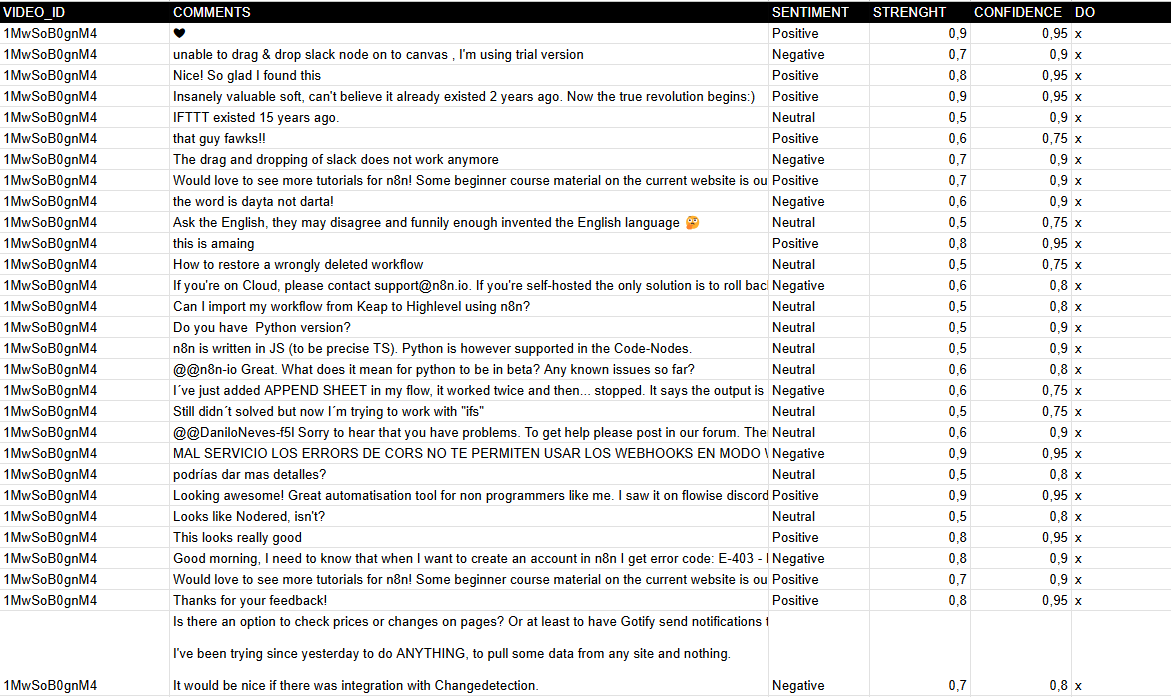 --- ### **How It Works** 1. **Trigger**: The workflow starts manually (When clicking "Test workflow") or can be scheduled. 2. **Fetch Comments**: The Get API Comments node retrieves comments from a YouTube video using the YouTube API. 3. **Process Comments**: - Extracts comments and replies via the Comments node. - Splits them into individual entries (Split comments). - Saves raw comments to Google Sheets (Save comments). 4. **Sentiment Analysis**: - Uses **Google Gemini AI** (or another model) to classify each comment as **Positive, Neutral, or Negative**. - Captures **strength** and **confidence** metrics for deeper insights. 5. **Update Results**: The Update sentiment node writes the analysis back to Google Sheets, marking processed rows. 6. **Pagination Handling**: Checks for multiple pages of comments (Multipage?) and loops until all are processed. --- ### **Set Up Steps** 1. **Prepare Google Sheet**: - Clone the template: [YouTube Comments Sheet](https://docs.google.com/spreadsheets/d/14lAY5CjoYHqqFODiLGg636Gqw4JwWqb2CX10E8ZS6Uo/edit). - Ensure columns exist: `VIDEO_ID`, `COMMENTS`, `SENTIMENT`, `STRENGTH`, `CONFIDENCE`, and `DONE` (tracking column). 2. **Configure YouTube API**: - Obtain a **YouTube API key** from [Google Developers Console](https://developers.google.com/youtube/registering_an_application). - Add it to the Get API Comments node under **Youtube Query Auth** (parameter: `key`). 3. **Set Video ID**: - Replace the default `xxxxxxxx` in the ID Video node with your target YouTube video ID. 4. **AI Integration**: - Ensure **Google Gemini API** credentials are configured in the Google Gemini node. 5. **Run the Workflow**: - Test manually or automate execution (e.g., hourly/daily) to analyze new comments. **Output**: A Google Sheet with categorized sentiments, enabling **trend analysis and audience engagement tracking**. --- ### **Need help customizing?** [Contact me](mailto:info@n3w.it) for consulting and support or add me on [Linkedin](https://www.linkedin.com/in/davideboizza/).
n8n$9.99Multi-User Telegram Bot: YouTube Summaries & Repurposing with GPT-4o
Telegram bot for content creators that instantly summarizes YouTube videos, repurposes into posts/tweets, and acts as multi-user AI chatbot with memory.
n8n$24.99Ultimate AI Chatbot for YouTube Summarization & Analysis
AI-powered n8n workflow that fetches YouTube video transcripts and details, enabling conversational analysis and summarization via an intelligent agent.
n8n$22.99Automate YouTube Video Promotion on Reddit with AI-Generated Comments and Email Digest
This n8n workflow automates the promotion of YouTube videos on Reddit by identifying relevant posts, generating AI-driven comments, and sending a weekly email digest of marketing opportunities.
n8n$14.99Auto-Create Podcast Scripts from YouTube Videos with Dumpling AI & GPT-4o
Automates extracting YouTube transcripts via Dumpling AI, generating polished podcast scripts with GPT-4o, and saving to Airtable. Ideal for content repurposing without manual effort.
n8n$14.99Autonomous YouTube to SEO-Optimized WordPress Blog Publisher
Fully autonomous workflow converts YouTube videos into unique, SEO-optimized blog articles using ChatGPT, Apify, Pexels, and Google Sheets, then auto-publishes to WordPress. Manages keywords and generates new ones to run indefinitely at low cost ($0.01-$0.03/post).
n8n$24.99Multi-Platform Content Generator from YouTube using AI & RSS
Automates YouTube channel monitoring via RSS, AI transcript extraction, and generates optimized content for LinkedIn, X/Twitter, Threads, and Instagram with Telegram previews.
n8n$24.99YouTube Video Summarizer with AI Transcription & Google Sheets
Automates fetching YouTube transcripts via Supadata.ai, generating AI summaries with DeepSeek, and updating Google Sheets. Perfect for quick insights from videos without watching them.
n8n$14.99
More integrations
Need a custom YouTube workflow?
Our automation experts build tailored YouTube integrations for your exact stack.
Request a Custom Workflow