WordPress Automation Workflows
309 ready-made WordPress workflows for n8n, Make, Zapier, Activepieces, and Pipedream. Content publishing, post syncs, and site-event automations.
Automate Blog Post Creation and Publishing with GPT, Leonardo AI, and WordPress
This workflow automates the creation and publishing of blog posts by extracting topics, generating content with GPT, creating images with Leonardo AI, and publishing to WordPress.
n8n$14.99Automate Customer Support with Multi-LLM Chatbot for WordPress
This workflow automates customer support and lead generation by integrating a versatile AI chatbot into WordPress live chat interfaces. It leverages multiple large language models to handle user queries efficiently.
n8n$9.99Auto-Generate SEO Blog Posts with Perplexity, GPT, Leonardo & WordPress
## “SEO Blog Post Automation with Perplexity, GPT, Leonardo AI & WordPress This workflow automates the creation and publishing of weekly SEO-optimized blog posts using AI and publishes them directly to WordPress - with featured images and tracking in Google Sheets. --- ## Who is this for This automation is ideal for: - Startup platforms and tech blogs - Content creators and marketers - Solopreneurs who want consistent blog output - Spanish-speaking audiences focused on startup trends --- ## What it does - Runs every Monday at 6:00 AM via CRON - Uses Perplexity AI to research trending startup topics - Generates a 1000-1500 word article with GPT in structured HTML - Creates a cinematic blog image using Leonardo AI - Uploads the image to WordPress with alt text and SEO-friendly filename - Publishes the post in a pre-defined category - Logs the post in Google Sheets for tracking --- ## How to set it up 1. **Connect your credentials**: - Perplexity API - OpenAI (GPT-4.1 Mini or similar) - Leonardo AI (Bearer token) - WordPress (Basic Auth) - Google Sheets (OAuth2) 2. **Customize your content**: - Adjust the prompt inside the GPT node to fit your tone or focus - Change the WordPress category ID - Update scheduling if you want a different publishing day 3. **Test the workflow manually** to ensure all steps function correctly --- ## Pro tips - Add Slack or email nodes to get notified when a post goes live - Use multiple categories or RSS feeds for content diversification - Adjust GPT prompt to support different languages or tones - Add post-validation rules if needed before publishing --- ## Why this matters This workflow gives you a full editorial process on autopilot: research, writing, design, publishing, and tracking - all powered by AI. No more blank pages or manual posting. **Use it to scale your content strategy, boost your SEO, and stay relevant - 100% hands-free.**
n8n$14.99Automate AI-Powered Blog Creation and Publishing to WordPress
This workflow automates the creation and publishing of AI-generated blog posts to WordPress, enhancing SEO with images, charts, and tables.
n8n$19.99Automate SEO-Optimized Blog Creation and Publishing for WordPress
Streamline the process of creating and publishing SEO-optimized blogs on WordPress using AI-driven keyword analysis, content generation, and media integration.
n8n$19.99Automate Blog Creation & Publishing with Gemini, Ideogram AI, and WordPress
## **Overview:** This n8n workflow automates the complete blog publishing process from topic research to WordPress publication. It researches topics, writes SEO-optimized content, generates images, publishes posts, and notifies teams—all automatically from Google Sheets input. ## **How It Works:** **Step 1: Client Management & Scheduling** - **Client Data Retrieval:** Scans master Google Sheet for clients with Active project status and Automation blog publishing setting. - **Publishing Schedule Validation:** Checks if the current day matches clients' weekly frequency (Mon, Tue, Wed, Thu, Fri, Sat, Sun) or if set to Daily. - **Content Source Access:** Connects to client-specific Google Sheet using stored document ID and sheet name. **Step 2: Content Planning & Selection** - **Topic Filtering:** Retrieves rows where Status for Approval = Approved and Live Link = Pending. - **Content Validation:** Ensures the Focus Keyword field is populated before proceeding. - **Single Topic Processing:** Selects the first available topic to maintain quality and prevent API rate limits. **Step 3: AI-Powered Research & Writing** - **Comprehensive Research:** Google Gemini analyzes search intent, competitor content, audience needs, trending subtopics, and LSI keywords. - **Content Generation:** Creates 800-1000 word articles with natural keyword integration, internal linking, and conversational tone optimized for Indian investors. - **Quality Assessment:** Evaluates content for human-like writing, conversational tone, readability, and engagement factors. - **Content Optimization:** Automatically fixes grammar, punctuation, sentence flow, and readability issues while maintaining HTML structure. **Step 4: Visual Content Creation** - **Image Prompt Generation:** OpenAI creates detailed prompts based on blog title and content for professional visuals. - **Image Generation:** Ideogram AI produces 1248x832 resolution images with realistic styling and professional appearance. - **Binary Processing:** Downloads and converts generated images to binary format for WordPress upload. **Step 5: WordPress Publication** - **Media Upload:** Uploads generated image to WordPress media library with proper filename and headers. - **Content Publishing:** Creates a new WordPress post with title, optimized content, and embedded image. - **Featured Image Assignment:** Sets uploaded image as the post's featured thumbnail for proper display. - **Category Assignment:** Automatically assigns posts to a predefined category. **Step 6: Tracking & Communication** - **Status Updates:** Updates Google Sheet with live blog URL in the Live Link column using S.No. as an identifier. - **Team Notification:** Sends a Discord message to the designated channel with the published blog link and review request. - **Process Completion:** Triggers the next iteration or workflow conclusion based on remaining topics. ## **Setup Steps:** **Estimated Setup Time:** 45-60 minutes **Required API Credentials:** **1. Google Sheets API** - Service account with sheets access. - OAuth2 credentials for client-specific sheets. - Proper sharing permissions for all target sheets. **2. Google Gemini API** - Active API key with sufficient quota. - Access to Gemini Pro model for content generation. - Rate limiting considerations for bulk processing. **3. OpenAI API** - GPT-4 access for creative prompt generation. - Sufficient token allocation for daily operations. - Fallback handling for API unavailability. **4. Ideogram AI API** - Premium account for quality image generation. - API key with generation permissions. - Understanding of rate limits and pricing. **5. WordPress REST API** - Application passwords for each client site. - Basic authentication setup with proper encoding. - REST API enabled in WordPress settings. - User permissions for post creation and media upload. **6. Discord Bot API** - Bot token with message sending permissions. - Channel ID for notifications. - Guild access and proper bot roles. ## **Master Sheet Configuration:** **Document Structure:** Create a primary tracking sheet with columns - **Client Name:** Business identifier. - **Project Status:** Active/Inactive/Paused. - **Blog Publishing:** Automation/Manual/Disabled. - **Website URL:** Full WordPress site URL with trailing slash. - **Blog Posting Auth Code:** Base64 encoded username: password. - **On Page Sheet:** Google Sheets document ID for content planning. - **Weekly Frequency:** Daily/Mon/Tue/Wed/Thu/Fri/Sat/Sun. - **Discord Channel:** Channel ID for notifications. ## **Content Planning Sheet Structure:** **Required Columns** (exact naming required): - **S.No.:** Unique identifier for tracking. - **Focus Keyword:** Primary SEO keyword. - **Content Topic:** Article title/subject. - **Target Page:** Internal linking target. - **Words:** Target word count. - **Brief URL:** Content brief reference. - **Content URL:** Draft content location. - **Status for Approval:** Pending/Approved/Rejected. - **Live Link:** Published URL (auto-populated). ## **WordPress Config**
n8n$24.99Generate SEO Blog Content with GPT-4, Perplexity & WordPress Auto-Publishing
This n8n workflow automates the creation of high-quality, SEO-optimized blog posts using AI. It pulls keyword data from Google Sheets, conducts research via Perplexity AI, generates structured content (title, introduction, key takeaways, body, conclusion, and FAQs) with OpenAI and Anthropic models, assembles the post, performs final edits, converts to HTML, and publishes directly to WordPress. Ideal for content marketers, bloggers, or agencies looking to scale content production while maintaining relevance and engagement. **Key Features** - **Keyword-Driven Generation**: Fetches primary keywords, search intent, and related terms from a Google Sheets spreadsheet to inform content strategy. - **AI Research & Structuring**: Uses Perplexity for in-depth topic research and OpenAI/Anthropic for semantic analysis, outlines, and full content drafting. - **Modular Content Creation**: Generates sections like introductions, key takeaways, outlines, body, conclusions, and FAQs with tailored prompts for tone, style, and SEO. - **Assembly & Editing**: Combines sections into a cohesive Markdown post, adds internal/external links, and applies final refinements for readability and flow. - **Publishing Automation**: Converts Markdown to styled HTML and posts drafts to WordPress. - **Customization Points**: Easily adjust AI prompts, research depth, or output formats via Code and Set nodes. **Requirements** - **Credentials**: OpenAI API (for GPT models), Perplexity API (for research), Google Sheets OAuth2 (for keyword input), WordPress API (for publishing). - **Setup**: Configure your Google Sheets with columns like keyword, search intent, related keyword, etc. Ensure the sheet is shared with your Google account. - **Dependencies**: No additional packages needed; relies on n8n's built-in nodes for AI, HTTP, and data processing. **How It Works** - **Trigger & Input**: Start manually or schedule; pulls keyword data from Google Sheets. - **Research Phase**: Uses Perplexity to gather topic insights and citations from reputable sources. - **Content Generation**: AI nodes create title, structure, intro, takeaways, outline, body, conclusion, and FAQs based on research and SEO guidelines. - **Assembly & Refinement**: Merges sections, embeds links, edits for polish, and converts to HTML. - **Output**: Publishes as a WordPress draft or outputs the final HTML for manual use. **Benefits** - **Time Savings**: Automate 80-90% of content creation, reducing manual writing from hours to minutes. - **SEO Optimization**: Incorporates primary/related keywords naturally, aligns with search intent, and includes semantic structures for better rankings. - **Scalability**: Process multiple keywords in batches; perfect for content calendars or high-volume blogging. - **Quality Assurance**: Built-in editing ensures engaging, error-free content with real-world examples and data-backed insights. - **Versatility**: Adaptable for any niche (e.g., marketing, tech, finance) by tweaking prompts or sheets. **Potential Customizations** - Add more AI models (e.g., via custom nodes) for varied tones. - Integrate image generation or social sharing for full content pipelines. - Filter sheets for specific topics or add notifications on completion.
n8n$14.99Automate SEO-Optimized WordPress Blog Creation with AI and Perplexity Research
Streamline the creation of SEO-optimized WordPress blog posts by integrating AI-driven content generation and Perplexity research. This workflow automates research, content creation, image handling, and publishing, reducing manual effort while ensuring professional-grade output.
n8n$14.99Convert YouTube Videos to SEO Articles with Supadata, Claude Sonnet 4, and WordPress
## Problem This Solves Content creators, digital marketers, and website owners struggle with the time-consuming process of creating fresh, SEO-optimized blog content consistently. Manually writing articles, researching keywords, and maintaining a regular publishing schedule can take hours per piece of content. ## Target Audience This workflow is perfect for: - **Bloggers and Content Creators** who want to repurpose video content into written articles - **Content Marketing Agencies** managing multiple client websites - **Digital Marketing Teams** looking to scale their content production - **Small Business Owners** who need **regular blog content** but lack time or writing resources - **SEO Specialists** seeking to maximize content output while maintaining quality - **YouTube Channel Owners** who want to expand their content reach across different platforms ## What This Workflow Does This n8n automation transforms popular YouTube videos into high-quality, SEO-optimized articles that appear completely human-written. The workflow intelligently selects trending content from your chosen YouTube channels, transcribes the videos, and uses advanced AI to craft engaging articles optimized for search engines. ## How It Works - The user selects YouTube channels from which the workflow retrieves the most popular videos. - The videos are transcribed and converted into SEO-optimized articles. - Generated articles are automatically published to your WordPress website. ## Setup Steps - Connect your Google Account to all YouTube nodes. - Integrate your Supabase account. - Customize White-labeled prompt in the Compose Article node according to your brand. - Configure the Create WordPress Post node with your WordPress website API. - Set your target YouTube channels and activate the workflow. - Detailed instructions and tutorials can be found in the workflow's sticky notes. ## Requirements - Google account. - supabase.ai account (used for video transcription). - Anthropic subscription (GPT models are also supported, but I personally recommend using Anthropic Claude Sonnet 4 for text generation).
n8n$14.99End-to-End Blog Generation for WordPress with LLM Agents & Image - GP-5 Optimized
# n8n Blog Automation Workflow - GP-5 Optimized This is a **ready-to-use, single workflow** - you can copy and paste it directly into n8n and start working. It handles **end-to-end SEO blog automation** with triggers, orchestration, AI-powered writing, metadata, tags, excerpts, WordPress publishing, and Google Sheets updates. --- ## Overview The system accepts blog parameters either from a **form submission** or from a **Google Sheet row (via scheduled trigger)**, dynamically fetches WordPress categories, and produces a complete, publication-ready post through an orchestrated sequence of GP-5 agents. Each agent executes **once** in a strict order with clearly defined responsibilities. ### Core Capabilities - Real-time search and fact retrieval (OpenRouter / Perplexity Sonar) - SEO-focused outline planning - Structured section creation - Expert-level section writing with inline HTML citations - Editorial refinement into cohesive, polished HTML - Metadata, excerpt, and featured-image prompt generation - Automated category, **tag creation/update**, and **excerpt update** - Draft publishing to WordPress - Updates the corresponding Google Sheet row with `created = yes` --- ## Triggers ### 1. **Form Trigger** Collects: - Keywords - Word count - Number of sections - Writing style - Website URL - About Website (used for context) - Featured image toggle ### 2. **Google Sheets + Schedule Trigger** Automatically pulls rows on schedule from a Google Sheet with the following columns: - `Keywords` - `wordCount` - `Number of sections` - `Generate a featured image` - `Writing Style` - `Website` - `About Website` - `created` – initially set to **no**, automatically updated to **yes** once the blog post is created and uploaded to WordPress. --- ## Orchestration Agent (GP-5) Central **Director agent** optimized for GP-5 that coordinates the pipeline: 1. **GetOnlineInfo** - Current Q&A and search-driven insights 2. **OutlinePlanner** - SEO-structured Table of Contents 3. **CreateSections** - Detailed section definitions 4. **SectionsWriter** - Expert, citation-rich content 5. **Editor** - Full HTML assembly, SEO and legal compliance 6. **MetaInfo** - Title, slug, excerpt, meta description, category selection 7. **Tags Agent** - Creates or updates SEO-friendly WordPress tags 8. **ImagePrompt** - Realistic cover image prompt + alt text (if enabled) --- ## Writing Flow 1. Input parsing (from Form or Google Sheets row) 2. Real-time data retrieval 3. SEO-optimized outline creation 4. Section breakdown with clear descriptions 5. Detailed section drafting with verified sources 6. Editorial polishing into publish-ready HTML 7. Metadata and excerpt generation (title, slug, description, category) 8. Tag creation and update in WordPress 9. Optional image prompt creation and upload 10. Automatic WordPress draft publishing with excerpt and tags updated 11. **Google Sheet row update - set `created = yes`** --- ## Output Format ```json { "toc": "Table of Contents", "post_html": "<final HTML content>", "meta_data": { "title": "...", "slug": "...", "excerpt": "...", "category_id": 0 }, "image_data": { "image_prompt": "...", "alt_text": "..." }, "tags": [ { "name": "...", "description": "..." } ], "ready": true } ``` --- ## WordPress Integration - Authenticated API calls to `/wp-json/wp/v2/posts`, `/wp-json/wp/v2/media`, and `/wp-json/wp/v2/tags` - Draft mode publishing with category & author assignment - Featured image creation, resizing, and metadata linking (if enabled) - Automatic **creation and update of tags** - Automatic **creation and update of excerpts** --- ## Setup Instructions ### 1. Required Credentials - WordPress API credentials - OpenAI API key - OpenRouter API key (optional) - Google Sheets API credentials (if using scheduled trigger) ### 2. Sub-Workflows Required - OutlinePlanner - CreateSections - SectionsWriter - Editor - MetaInfo - Tags Agent - ImagePrompt (if enabled) ### 3. Dynamic Inputs - Categories fetched via WP REST API and shown in the form - Tags generated and updated dynamically by Tags Agent - Excerpt automatically created and updated in WordPress - Image creation can be toggled (`true` / `false`) --- ## Optional Image Pipeline If enabled: 1. Generate image prompt and alt text 2. Create realistic cover image (1024x1024) 3. Resize and upload image to WordPress 4. Set image metadata and assign featured image --- ## Notes - Workflow is **production-ready** - just copy-paste into n8n as a single workflow. - GP-5 prompts embedded in each agent ensure **high-quality, context-aware output** - All HTML, JSON, excerpts, and tags are validated before publication - Modular sub-workflows allow isolated testing and debugging - Workflow supports **legal accuracy**
n8n$24.99Automate SEO-Optimized WordPress Blog Posts with AI and Google Sheets
Streamline the creation of SEO-friendly WordPress blog posts by automating content generation, image creation, and meta tag optimization using AI models and Google Sheets.
n8n$14.99Auto-Generate Tech News Blog Posts with NewsAPI & Google Gemini to WordPress
## WordPress Daily News Digest Generator **Overview:** This automation automatically fetches trending tech news every morning, uses AI to create engaging blog posts from each article, and publishes them directly to your WordPress site. **What it does:** - Fetches top 10 US technology news stories every day at 8 AM via NewsAPI - Splits articles into individual items for processing - Processes each article through a loop system - AI creates expanded, engaging blog posts (600-800 words) from each news article - Parses AI response to extract clean titles and content - Publishes individual blog posts to WordPress automatically **Setup Required:** 1. **NewsAPI Configuration** - Get a free API key from newsapi.org (1,000 requests/day free) - Replace `YOUR_API_KEY` in the HTTP Request URL with your actual key - Customize country/category parameters in URL if needed 2. **WordPress Connection** - Configure WordPress credentials in the Publish to WordPress node - Enter your WordPress site URL, username, and password/app password 3. **AI Configuration** - Set up Google Gemini API credentials - Connect the Gemini model to the AI News Summarizer node 4. **Customization Options** - Publishing Schedule: Modify schedule trigger (default: daily at 8 AM) - News Sources: Change country, category, or pageSize in NewsAPI URL - Content Style: Adjust AI system message for different writing tones - Post Status: Change from publish to draft for manual review 5. **Testing** - Run workflow manually to test all connections - Verify news articles are fetched correctly - Check that blog posts appear properly on your WordPress site **Features:** - Automatic daily content creation - AI-generated unique titles and expanded content - Loop processing for multiple articles per day - Duplicate content filtering (removes incomplete articles) - SEO-optimized blog post formatting - Automatic tagging and categorization **Customization:** - Change news categories (technology, business, science, etc.) - Adjust posting frequency (hourly, twice daily, etc.) - Modify AI prompts for different writing styles - Add custom categories and tags - Change article limits (currently 5 articles max) **Need Help?** For [n8n coaching or one-on-one consultation](mailto:david@daexai.com)
n8n$9.99Automate Social Media Publishing from WordPress with AI-Generated Content
This workflow automates the creation and publication of social media posts on Twitter, Facebook, LinkedIn, and Instagram using content from WordPress posts. AI models generate platform-specific captions and images, ensuring optimized and consistent content across channels.
n8n$14.99Automate Content Creation and Publishing on WordPress
This n8n workflow automates content generation, image selection, and scheduled publishing to a self-hosted WordPress site, ideal for bloggers and marketers.
n8n$14.99Automate SEO Content Creation and Publishing on WordPress
This workflow automates the generation of SEO-friendly content using DeepSeek, publishes it on WordPress, and updates a Google Sheets document with post details.
n8n$14.99Automate End-to-End Blog Content Creation with GPT-4, Perplexity, and WordPress
Streamline your blog content creation process from research to publication using GPT-4, Perplexity, and WordPress. Ideal for content creators and marketers, this workflow automates SEO-optimized article generation, publishing, and notifications.
n8n$14.99Automate SEO Content Creation from Keyword to WordPress Draft
Streamline your SEO content creation by transforming a single keyword into a complete WordPress draft using Google SERP analysis and AI-powered content generation.
n8n$14.99Automate SEO-Optimized WordPress Blog Posts with AI
This n8n workflow automates the creation and publishing of SEO-optimized blog posts to WordPress, leveraging AI to generate content and images, saving time and ensuring consistent quality.
n8n$14.99Automate SEO Blog Creation + Social Media with GPT-4, Perplexity, and WordPress
# AI Blog & Social Media Publisher - Fully Automated Workflow This workflow is ideal for individuals, marketers, agencies, and brands who want to effortlessly automate the entire blogging and social media process—from idea generation to promotion. Its primary goal is to consistently deliver engaging, SEO-optimized blog posts directly to WordPress, accompanied by professionally crafted social media content ready for Instagram, Facebook, and Twitter. No writers, editors, designers, or social media managers required. Save countless hours and resources while boosting your brand's online presence. ## Workflow Capabilities: - Automated Blog Topic Generation: Instantly generates unique, high-value blog ideas tailored to your brand. - SEO Content Creation: Produces comprehensive, 2000-2500 word articles optimized for search engines. - Real-Time Research: Integrates Perplexity AI to ensure factually accurate, authoritative content. - Visual Content Generation: Creates custom, AI-generated featured images via GPT-4, with automatic fallback to Pexels. - WordPress Publishing: Automatically publishes articles directly to WordPress with complete formatting (HTML), meta descriptions, featured images, and proper categorization. - Social Media Automation: Generates and schedules engaging, platform-specific posts for Instagram, Facebook, and Twitter, complete with relevant hashtags, calls-to-action, and links. - Detailed Logging & Reporting: Logs every step transparently into Google Sheets and optionally sends publication reports to Gmail. ## How It Works: When activated, the workflow checks your content calendar in Google Sheets to avoid duplicate topics. It generates fresh, brand-aligned blog ideas, conducts live research, and creates complete, ready-to-publish articles. It then automatically designs and sources appropriate visuals, publishes content seamlessly to WordPress, and prepares engaging social media posts optimized for each platform. ## Easy Setup Steps: - Connect your APIs: OpenAI, WordPress, Google Sheets, Gmail, and optionally Pexels. - Replace placeholders (WordPress URLs, Google Sheets ID/tab, workflow IDs). - Customize AI prompts with your brand's tone, keywords, and CTAs for personalized content. - Configure scheduling to automate daily, weekly, or custom publishing intervals. ## Additional Features: - Modular workflow design for easy customization and scalability. - Comprehensive Markdown and PDF setup guides included. - Bonus: Reference placeholders and quick-edit Sticky Notes for effortless adjustments. ## Launch today. Automate permanently. Amplify your reach effortlessly.
n8n$24.99Automate Blog Content Creation with Notion MCP, DeepSeek AI, and WordPress
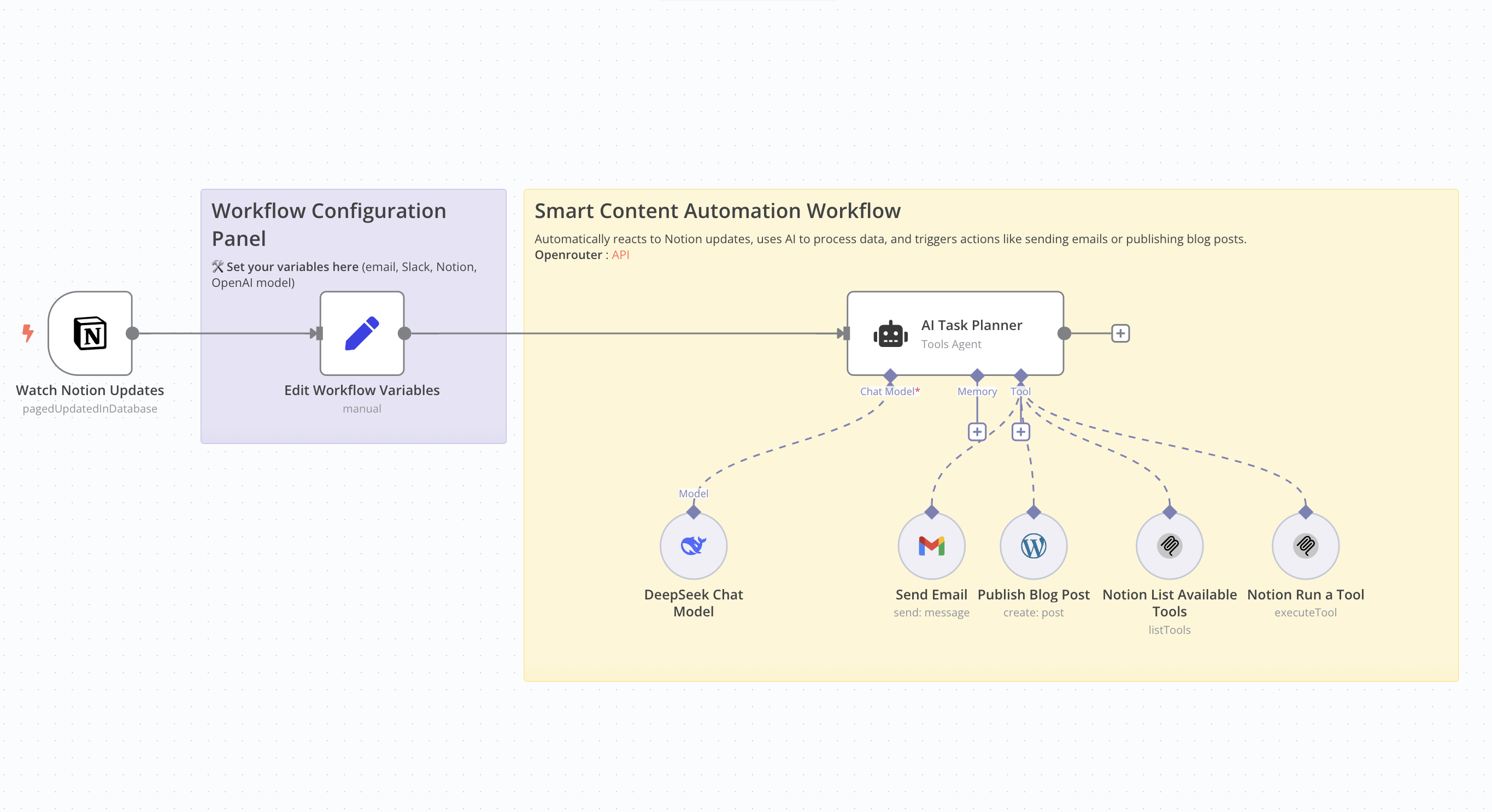 # Who Is This For This workflow is ideal for content creators, bloggers, marketers, and professionals seeking to automate the creation and publication of SEO-optimized articles. It's particularly beneficial for those utilizing Notion for content management and WordPress for publishing. # What Problem Does This Workflow Solve Manually creating SEO-friendly articles is time-consuming and requires consistent effort. This workflow streamlines the entire process—from detecting updates in Notion to publishing on WordPress—by leveraging AI for content generation, thereby reducing the time and effort involved. # What This Workflow Does - Monitor Notion Updates: Detects changes in a specified Notion database. - AI Content Generation: Utilizes an AI model to produce an SEO-optimized article based on Notion data. - Publish to WordPress: Automatically posts the generated article to a WordPress site. - Email Notification: Sends an email containing the article's title and URL. Update Notion Database: Updates the corresponding entry in the Notion database with the article details. # Setup Guide ## Prerequisites - WordPress account with API access. - API key for the AI model used. - Notion integration with the relevant database ID. - Credentials for the email service used (e.g., Gmail). Community Node Requirement: This workflow utilizes the n8n-nodes-mcp community node, which is only compatible with self-hosted instances of n8n. For more information on installing and managing community nodes, refer to the n8n documentation. n8n Docs ## Steps 1. Import the workflow into your self-hosted n8n instance. 2. Install the required community node (n8n-nodes-mcp). 3. Configure API credentials for WordPress, the AI service, Notion, and the email service. 4. Define necessary variables, such as the notification email address and Notion database IDs. 5. Activate the workflow to automate the process. # How to Customize This Workflow - AI Prompt: Adjust the prompt used for content generation to align with your preferred tone and style. - Article Structure: Modify the structure of the generated article by tweaking settings in the content generation node. - Notifications: Customize the content and recipients of the emails sent post-publication. - Notion Updates: Tailor the fields updated in Notion to suit your specific requirements.
n8n$9.99Automate SEO Article Creation and Drafting in WordPress with AI
This workflow automates the generation and uploading of SEO-optimized articles as drafts in WordPress using AI for both content and visuals, streamlining content management for various users.
n8n$14.99Automate SEO Blog Creation and Publishing with WordPress and AI Tools
This workflow automates the creation and publishing of SEO-optimized blog posts on WordPress using data from Google Sheets. It leverages OpenAI for content generation, Cloudinary for image hosting, and integrates with Perplexity for research, ensuring a seamless and visually engaging blogging experience.
n8n$24.99Auto-Generate Platform-Optimized Social Media Posts from WordPress with Claude & Postiz
This workflow automates the process of **generating and scheduling social media posts using content from a WordPress blog**. It leverages advanced AI (OpenAI & Anthropic Claude), Google Sheets, and the [Postiz](https://postiz.com/?ref=n3witalia) platform to create and publish platform-specific posts across **LinkedIn, Facebook, Instagram, and Twitter (X)**. This system streamlines cross-platform social media publishing, ensuring consistent branding and AI-optimized content. --- ### **Key Features** 1. **Content Source: WordPress** Automatically fetches the content of a WordPress post by its **Post ID**. 2. **Content Transformation via AI** Uses Anthropic Claude and OpenAI to generate unique, optimized captions for each platform: - **LinkedIn**: professional and insight-driven - **Instagram**: creative with emojis and storytelling - **Facebook**: community-oriented and friendly - **Twitter (X)**: concise, hashtag-optimized 3. **Visual Generation (Optional)** Uses OpenAI's DALL·E (via OpenRouter) to generate **custom images** based on the AI-generated Instagram and Facebook/LinkedIn captions. 4. **Post Management with Google Sheets** Uses a Google Sheet as the control panel: - Simply input the WordPress **Post ID** - Marks each post as “done” by updating corresponding columns (TWITTER, FACEBOOK, INSTAGRAM, LINKEDIN) 5. **Publishing via Postiz** Uses the **Postiz API** to schedule or immediately publish posts to your connected social accounts. - Handles image uploads and scheduling time for each platform. --- ### **Benefits** - **Intelligent automation**: Saves time by removing manual copywriting and platform formatting. - **Platform optimization**: Ensures posts are tailored to each platform's audience and algorithm. - **No-code friendly**: Simple setup via Google Sheets + Postiz + WordPress. - **Repeatable & Scalable**: Ideal for agencies or content creators managing multiple posts per week. - **+20 Social Media Platforms**: Easy to start with social integrations. --- ### **How It Works** 1. **Input & Data Fetching**: - The workflow starts with a manual trigger (e.g., test workflow) or scheduled execution. - It retrieves a WordPress post ID from a Google Sheets document, then fetches the full post content (title and body) via the WordPress API. 2. **AI-Powered Content Generation**: - The Social Media Manager node (powered by Claude Opus 4.1) analyzes the post and generates **platform-optimized captions** for: - **Twitter/X**: Concise, hashtag-rich text (≈150 chars). - **Facebook/LinkedIn**: Professional yet engaging copy with CTAs. - **Instagram**: Visual-focused captions with emojis and hashtags. - AI-generated images are created for Instagram (square) and Facebook/LinkedIn (landscape) using OpenAI's image model. 3. **Publishing Automation**: - Captions and images are uploaded to **Postiz**, a social media scheduler. - Postiz publishes the content to connected platforms (Twitter, Facebook, LinkedIn, Instagram) at the specified time. - Google Sheets is updated with status markers (e.g., x in columns like `TWITTER`, `FACEBOOK`) to track published posts. --- ### **Set Up Steps** 1. **Prerequisites**: - **Postiz Account**: Sign up for [Postiz](https://postiz.com/?ref=n3witalia) (free trial available). - **API Keys**: Configure Postiz API credentials in the Postiz and Upload Image nodes. - **Social Channels**: Link your social accounts in Postiz's dashboard and note their `integrationId` values (replace XXX in Postiz nodes). 2. **Google Sheets Setup**: - Clone the [template Sheet](https://docs.google.com/spreadsheets/d/1suPQNdgoAzrklleN4ok2mZnsq0GK1dt59oIHv8JWX5U/edit) and add WordPress post IDs to the POST ID column. 3. **Configure Nodes**: - **WordPress**: Add credentials for your WordPress site in the Get Post node. - **AI Models**: Ensure API keys for Claude (Anthropic) and OpenAI (for images) are valid. - **Postiz Nodes**: Replace placeholder `integrationId` values with your actual Postiz channel IDs. 4. **Test & Deploy**: - Trigger the workflow manually to verify captions, images, and Postiz scheduling. - Activate the workflow for automation (e.g., run daily to publish new WordPress posts). **Note**: This workflow requires **self-hosted n8n** due to community nodes (Postiz, LangChain). --- ### **Need help customizing?** [Contact me](mailto:info@n3w.it) for consulting and support or add me on [Linkedin](https://www.linkedin.com/in/davideboizza/).
n8n$14.99Automate Publishing of PR News Articles with Featured Images to WordPress
Streamline the process of publishing PR News articles to your WordPress site by automatically extracting content and featured images from an RSS feed.
n8n$9.99
More integrations
Need a custom WordPress workflow?
Our automation experts build tailored WordPress integrations for your exact stack.
Request a Custom Workflow