Telegram Automation Workflows
1,646 ready-made Telegram workflows for n8n, Make, Zapier, Activepieces, and Pipedream. Bots, alerts, and AI assistants delivered straight to Telegram chats and channels.
Automate Data Extraction via Telegram with AI and Bright Data MCP
Leverage AI to automate data extraction tasks through a Telegram bot using Bright Data MCP tools. This workflow simplifies complex operations by allowing natural language commands.
n8n$14.99Automate Professional Tasks with Telegram AI Assistant and Google Services
Streamline your professional communication using a Telegram AI assistant integrated with Gmail, Google Calendar, and Google Sheets. This workflow automates email management, calendar scheduling, and contact information retrieval.
n8n$14.99Custom Pomodoro Tracker using Telegram and Google Sheets
**Tags**: Productivity, Pomodoro, Organization ### Context Hey! I'm Samir, a Supply Chain Engineer and Data Scientist from Paris, founder of [LogiGreen Consulting](https://logi-green.com). A significant improvement in my productivity came from following the **Pomodoro Technique**. ### What is the Pomodoro Technique? The Pomodoro Technique is a time management method that breaks your workday into 25-minute focus intervals followed by short breaks. After 4 cycles, you take a longer break to recharge. It helps maintain concentration while preventing burnout. 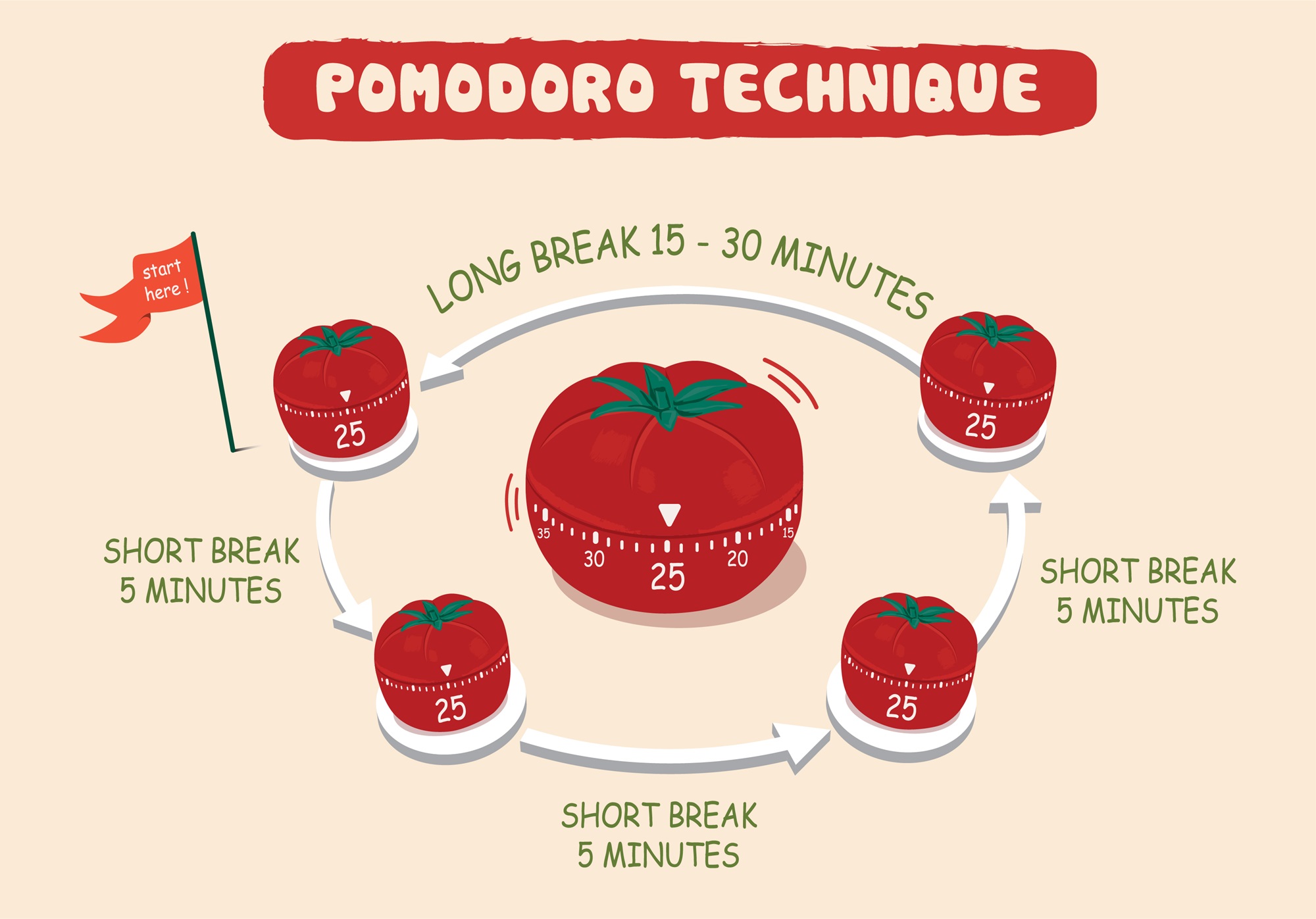 I've used this technique with web apps to receive break/work notifications. But I always wished I had a way to **track my sessions** for self-assessment. > Let's use **n8n** to boost our productivity and log our deep work sessions automatically! For business inquiries, you can add me on [Here](https://www.linkedin.com/in/samir-saci) ### Who Is This Template For? I built this workflow for creators, freelancers, students, and professionals who love the Pomodoro technique but want more than just timers - they want data. This template helps you: - Track every deep work session automatically - Store logs in Google Sheets for later analysis - Stay in control via Telegram commands - There is no need to pay for premium apps. It's all **free** and powered by **n8n**. ### How Does It Work? This Telegram bot tracks your Pomodoro sessions and sends you alerts during the process. **Here's what happens:** 1. A user sends `/start` to the bot. 2. It launches a 25-minute deep work timer. 3. After 25 minutes, the bot sends a break reminder. 4. **After four cycles**, a long break is triggered and the session is logged. 5. The session is **automatically recorded to Google Sheets** with (Date & Time, User ID, Pomodoro count, Session ID, Duration of focus and breaks) 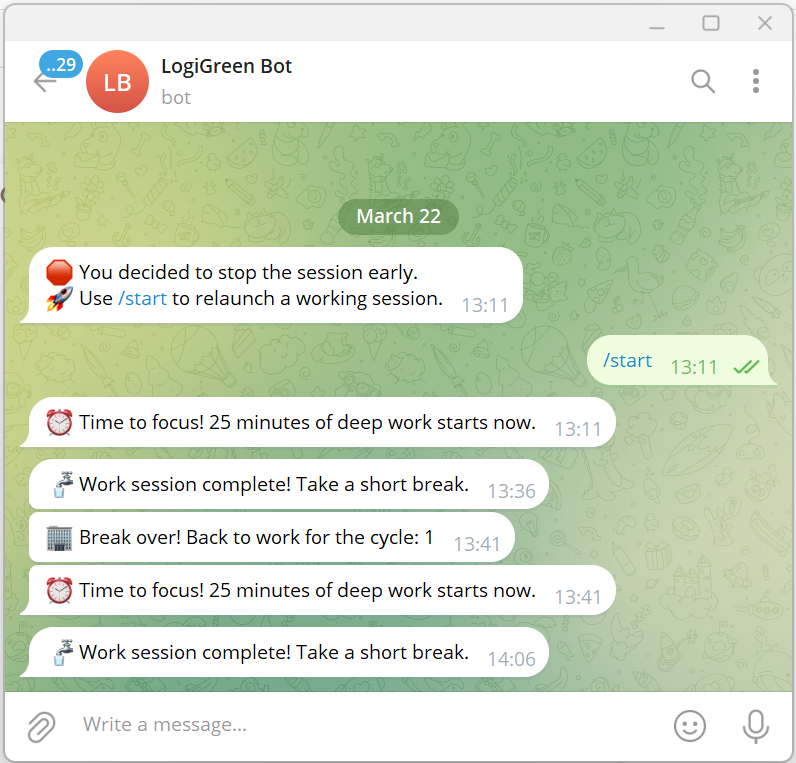 ### What Gets Tracked? | Field | Description | |-------------------|-----------------------------------| | Date & Time | When the session was logged | | User ID | Your Telegram ID | | Block Type | Deep Work or Short Break | | Pomodoro Count | Number of cycles completed | | Working Session ID| Unique ID for each session | | Focus Duration | Length of each deep work session | | Break Duration | Short or long break info | You can use this workflow as a base to bring additional features like: - Connecting with tasks from **Google Tasks** - Send automated productivity reports to monitor your activity - Link a Pomodoro with a task using **Google Calendar** ### What Do I Need to Start? This workflow is beginner-friendly - **no coding required**. - **Google Drive API** and **Google Sheets API** credentials - A Google Sheet set up to log sessions (with the columns of the table above) - API Credentials: - **Google Sheets API** (OAuth2) - **Telegram Bot Token** - Telegram app to chat with the bot > The template is plug-and-play. Just follow the sticky notes in the n8n editor to configure it. ### Next Steps Follow the sticky notes in the n8n workflow editor to: - Set your credentials - Connect your Google Sheet - Initialize the static data - Launch your first `/start` command on Telegram  [**Watch My Tutorial**](https://www.youtube.com/watch?v=ztMMrmbgGEo) Curious how n8n can supercharge **productivity and learning skills?** Let's connect on [**LinkedIn**](https://www.linkedin.com/in/samir-saci) This workflow has been created with N8N 1.82.1 Submitted: March 24th, 2025
n8n$14.99Automate Task Management in Notion via AI-Powered Telegram Assistant
Leverage AI to manage your Notion tasks through Telegram. This workflow processes natural language and voice commands, maintaining context for efficient task management.
n8n$14.99Automated Crypto Intelligence Alerts via Telegram
This n8n workflow provides real-time crypto intelligence by monitoring multiple data sources to identify potential opportunities and risks, sending alerts directly to Telegram.
n8n$19.99Automate AI Image Editing and Delivery via Google Drive and Telegram
Streamline your image editing workflow by automatically processing images with OpenAI's DALL-E 2, storing them in Google Drive, and delivering the results via Telegram.
n8n$9.99Automate Website Tool Analysis with Telegram, Apify, AI & Google Sheets
#### Description This powerful workflow automates the evaluation of new digital tools, websites, or platforms with the goal of assessing their potential impact on your business. By leveraging Telegram for user input, Apify for deep content extraction, advanced AI for contextual analysis, and Google Sheets for personalized data integration and record-keeping, this tool delivers clear, actionable verdicts that help you determine whether a tool is worth adopting or exploring further. #### Key Features and Workflow User-Friendly Input: Submit URLs of tools or websites directly through Telegram for quick and easy evaluation requests. - Dynamic Content Extraction: The workflow retrieves detailed content from the submitted URLs using the Apify web crawler, capturing rich data for analysis. - AI-Powered Cleaning & Analysis: Sophisticated AI models filter out noise, distill meaningful insights, and contextualize findings based on your business profile and goals stored in Google Sheets. - Personalized Business Context: Integration with Google Sheets brings in your company's specialization, current focus, and strategic objectives to tailor the analysis specifically to your needs. - Structured Analysis Output: Receive a thorough, structured report including concise summaries, key considerations, business impact, benefits, risks, actionable insights, and an easy-to-understand final verdict on the tool's relevance. - Decision Support: The tool estimates effort, time to value, urgency, and confidence levels, enabling informed prioritization and strategic decision-making. - Seamless Communication: Results are sent back via Telegram, ensuring you get timely and direct feedback without needing to leave your messaging app. - Record Keeping & Tracking: All analyses and decisions are logged automatically into Google Sheets, creating a searchable knowledge base for ongoing reference and reporting. #### Setup Instructions for Key Nodes Telegram Trigger Node: 1. Configure your Telegram bot API credentials here. 2. Link the bot to your Telegram account to receive messages for URL submissions. URL Extraction Node: No credentials needed. This node extracts URLs from incoming messages for processing. Apify Web Crawler Node Setup Guide: Go to Apify's website, sign up for an account if you don't have one, and get your API token from your profile's API tokens section. Then, paste this token into the Apify Node's API Key field in n8n. AI Cleaning and Analysis Nodes: 1. Configure OpenAI or compatible AI service API keys for content processing. 2. Customize prompts or models if desired to align analysis style. Google Sheets Nodes: 1. Connect using your Google account and provide access to the specified Google Sheet. 2. Ensure sheets for Company Details and Analysis Results exist with proper columns as per this workflow. Telegram Reply Node: Use the Telegram bot API credentials to send analysis summaries and verdicts back to users. ###### Access and Edit the Google Sheet You can access the Google Sheet used by this workflow here: [Access the Google Sheet here](https://docs.google.com/spreadsheets/d/1RCMapKv9IPdwNz4Rp-Ma2iKzdWDEbxggYrq9K2_pU-w/edit?usp=sharing) Please make a copy of the sheet to your own Google Drive before connecting it with this workflow. This allows you to customize the sheets, update company information, and manage analysis results securely without affecting the original template. #### Extendibility Beyond manual URL submissions, you can enhance this workflow by scheduling automated daily checks of new product launches from platforms like Product Hunt. The system can proactively analyze emerging tools and deliver timely updates via Telegram, email, or other channels, helping you stay ahead of innovation effortlessly.
n8n$14.99Implement Role-Based Access Control for AI Agents with Airtable and Telegram
This workflow enables precise control over AI agent tool access using Role-Based Access Control (RBAC) with Airtable and Telegram. It ensures users can only access tools they are authorized for, enhancing security and management of AI interactions.
n8n$24.99Automate Telegram AI Assistant with Google and OpenAI Integration
Create a smart AI assistant in Telegram using n8n, integrating with Google services and OpenAI for seamless task automation.
n8n$19.99Create 5-Minute Wikipedia Podcasts from Telegram Messages
Transform Telegram messages into engaging 5-minute podcasts using Wikipedia research and AI voice synthesis. This workflow supports both text and voice inputs, providing a seamless experience for users.
n8n$9.99Automate Contact Enrichment from Google Sheets with Apollo and Telegram Alerts
Streamline your procurement contact enrichment by automatically fetching and updating contact details from Google Sheets using Apollo's API, and receive notifications via Telegram.
n8n$14.99Extract Data from YAPE Receipts via Telegram OCR and Store in Google Sheets
## Detailed Technical Description This **n8n** workflow automates [Yape](https://www.yape.com.pe/) payment receipt processing, integrating [Telegram bot](https://core.telegram.org/bots), AI-powered OCR, and [Google Sheets](https://support.google.com/docs/answer/6000292) automation. By leveraging **[ChatGPT](https://chatgpt.com/)** Vision Computing, it extracts and structures transaction details, eliminating the need for manual entry. Ideal for freelancers, businesses, and finance teams, this workflow ensures error-free, real-time financial tracking. The AI agent powered by **[DeepSeek](https://www.deepseek.com/)** refines and formats the extracted text, storing it in [Google Sheets](https://support.google.com/docs/answer/6000292) for easy accessibility and reporting. Users can track payments, monitor cash flow, and generate financial reports without any manual work. This seamless integration boosts efficiency, reduces errors, and automates financial record-keeping with 100% accuracy. ### Technologies Used: - **n8n** - Workflow orchestrator. - **Telegram** - Handles image reception and notifications. - **Google Drive** - Manages file creation and storage. - **Google Sheets** - Automatically logs extracted data into spreadsheets. ### Artificial Intelligence: - **ChatGPT** Vision Computing - Performs OCR on payment receipts. - **DeepSeek** AI - Organizes and converts extracted data into a structured format. --- ## Pre-conditions: - `A Telegram Bot` - Must be created to receive images. [Setup Guide](https://core.telegram.org/bots/features#creating-a-new-bot) - `Google Sheets API Key` - Required to store extracted data. [Setup Guide](https://docs.n8n.io/integrations/builtin/app-nodes/n8n-nodes-base.googlesheets/) - `ChatGPT API Key` - Used for OCR and AI text extraction. [Get it here](https://help.openai.com/en/articles/4936850-where-do-i-find-my-openai-api-key) - `DeepSeek API Key` - Processes extracted text into structured data. [Get it here](https://platform.deepseek.com/api_keys) #### 1. Image Reception & OCR Processing The user attaches a Yape payment receipt image to the Telegram bot conversation.  #### 2. Analyze Image (OCR) A **ChatGPT** Vision Computing model processes the image and extracts all visible text, ensuring high-accuracy OCR for structured data extraction.  #### 3. Analyze and format text Intelligent Data Processing with AI The extracted text is sent to a **DeepSeek-based** AI agent that: - Identifies and structures key transaction details (amount, date, sender, transaction ID, etc.). - Converts the data into a structured JSON format.  #### 4. Data Storage in Google Sheets **Google Drive** integration is established. If the Google Sheets file does not exist, it is automatically created. Extracted data is automatically recorded in the corresponding spreadsheet, enabling effortless tracking and streamlined financial organization.  ## Benefits: - Time-saving - Eliminates manual payment processing. - Error-free data entry - Reduces human mistakes in record-keeping. - 100% automation - No manual intervention required. - Seamless integration - Easily connects with other workflows. **NOTE**: _The extracted transaction data will be stored in a Google Sheets file with the following columns:_ | Column Name | Description | |:---------------------:|-----------------------------------------------------------| | **id** | Unique identifier for each transaction. | | **beneficiaryName** | Name of the recipient of the payment. | | **amount** | Payment amount in the specified currency. | | **currency** | Currency used for the transaction (e.g., PEN, USD). | | **company** | The entity or service handling the transaction. | | **date** | Date of the transaction in a human-readable format. | | **hour** | Time of the transaction. | | **originalDate** | The exact date extracted from the receipt. | | **dateISO** | Standardized ISO 8601 date format. | | **operation** | Type of financial operation (e.g., deposit, transfer). | | **operationNumber** | Unique operation number provided by the payment system. | | **beneficiaryNumber** | Account or phone number of the recipient. | | **commission** | Any commission or fee charged for the transaction. | | **account** | Account number or reference used for the payment. | | **channel** | Payment method used (e.g., app, POS, bank transfer). | | **agentCode** | Identifier of the agent or entity processing the payment. | --- This workflow is perfect for
n8n$24.99Transform Meeting Notes into Tasks with GPT-4.1, Notion, and TickTick via Telegram
Automate the conversion of raw meeting notes into structured tasks and documents using GPT-4.1, syncing them to Notion and TickTick through a Telegram bot.
n8n$9.99Automated Error Alerts with Google Sheets, Telegram, and Gmail in n8n
This workflow automates error handling in n8n by logging errors to Google Sheets, notifying a Telegram channel, and sending email alerts via Gmail, ensuring prompt awareness of issues.
n8n$4.99Publish LinkedIn & X Posts with Telegram Bot, Gemini AI & Vector Memory
This workflow contains community nodes that are only compatible with the self-hosted version of n8n. # Overview This is a Telegram Bot capable of receiving information from the user in the form of text messages, voice messages, images, or documents (e.g., presentations, PDFs, HTML pages), and publishing posts to the user's social platforms. The bot always sends the user a draft of the post for verification before publishing it. The bot saves relevant information to its long-term memory (vector store), so you don't need to repeat it in every interaction (e.g., who you are, your company, product, etc.). This template supports creating posts on LinkedIn and X. # Setup ## Requirements To use this template you will need: 1. Google's AI Studio API key. Get one here: https://aistudio.google.com/app/apikey 2. Telegram Bot API key. You receive one when you register a new Telegram Bot via @BotFather bot in Telegram. 3. LinkedIn API key. Follow the instructions here to create one: https://docs.n8n.io/integrations/builtin/credentials/linkedin/ 4. X API key. Follow the instructions here to create one: https://docs.n8n.io/integrations/builtin/credentials/twitter/ ## Step-by-step instruction 1. Import this template. 2. Create a new Telegram Bot or get an API key for an existing one. 3. Configure Telegram nodes with Telegram API key. 4. Obtain a Google's AI Studio API key. Set it in Describe document, Describe audio, and Google Gemini Chat Model. 5. Create an API key for LinkedIn. 6. Create an API key for X. 7. Set your LinkedIn key in Create post in LinkedIn nodes. 8. Set your X key in Create X (Twitter) post node. ## Other Bright-colored notes in the template highlight information that needs to be set before launching the template.
n8n$24.99Automate Email Sending with AI via Telegram and Gmail
Transform your Telegram bot into an AI-powered email assistant that generates and sends emails through Gmail based on user messages.
n8n$9.99Automatically Forward Important Gmail Emails to Telegram
This workflow forwards Gmail emails to a Telegram chat when the subject contains specific keywords, ensuring you never miss critical updates.
n8n$4.99Automated Invoice Processing and Approval with AI and Telegram Integration
This workflow automates the extraction, validation, and approval of invoice data using AI and integrates with Telegram for notifications. It streamlines the processing of invoices from multiple sources and ensures compliance with business rules.
n8n$14.99Daily Calendar Digest: Format Google Calendar Events with Claude 3.5 Sonnet for Telegram
## How it works Every day at 6:00 AM, the workflow pulls all events from your Google Calendar scheduled for that day. It extracts each event's ID, title, and start time, aggregates them into one list, and converts them into a text string. This text is passed to an AI-powered Information Extractor (using Claude 3.5 Sonnet) to format the events into a clear daily summary. Finally, the summary is sent as a Telegram message to your chosen chat ID, giving you a ready-to-read daily to-do list. ## How to use - Connect your Google Calendar account to the Get many events node. - Set the correct calendar in the calendar field. - Link your Telegram account and set your chatId in the Send a text message node. - Adjust the Schedule Trigger node if you want a different reminder time. - Activate the workflow - it will run daily and send your event summary to Telegram automatically. ## Customising this workflow - Reminder time: Change triggerAtHour in the Schedule Trigger node for morning, evening, or multiple reminders per day. - Calendar source: Switch to another Google Calendar or add multiple Get many events nodes for different calendars. - Message style: Edit the Information Extractor system prompt to change language, formatting, or level of detail in your summary. - Delivery channel: Replace or add another messaging node (e.g., Email, Slack, WhatsApp) if you want your to-do list in different apps. - Event filtering: Add a filter before aggregation to include only certain event types or keywords (e.g., "Meeting", "Deadline").
n8n$9.99Auto-Post Medium.com Articles to LinkedIn with Telegram Alerts
**Problem This Solves** Manually sharing Medium articles to LinkedIn daily can be repetitive and time-consuming. This automation: - Fetches the latest Medium articles based on a tag (e.g., android) - Posts them on LinkedIn twice daily - Uses Airtable to prevent duplicates - Sends a confirmation to Telegram once posted Stay consistently active on LinkedIn without lifting a finger. **Who This Template Is For** - Developers who write or follow Medium content - Tech creators or founders looking to grow an audience - Community or page managers needing regular curated posts - Busy professionals who want hands-free LinkedIn engagement **Workflow Breakdown** This automation runs at 9:00 AM and 7:00 PM daily and performs these steps: - Fetch articles from MediumAPI.com by tag - Check Airtable to prevent reposting the same article - Post on LinkedIn if it's new - Store the article ID in Airtable - Send a Telegram message after successful posting **Step-by-Step Setup Instructions** 1. **Airtable Configuration** Create a base with: - Table Name: PostedArticles - Column: ArticleID (Single line text - to track posted articles) 2. **MediumAPI Setup** Go to https://mediumapi.com - Sign up and generate your API key from the dashboard - Use this API endpoint in an HTTP node: - GET https://mediumapi.com/api/tag/YOUR_TAG/latest - Headers: Authorization: Bearer YOUR_API_KEY - Replace YOUR_TAG with a topic like android, ai, webdev, etc. 3. **Telegram Bot Setup** Go to @BotFather and create a new bot - Save the bot token - Use @userinfobot to get your Telegram chat ID - Add a Telegram node in n8n with the token + chat ID 4. **LinkedIn Setup** Create a LinkedIn Developer App - Connect it via OAuth2 in n8n - Choose to post on your profile or company page 5. **n8n Workflow Structure** - Node Type: Description - Cron: Triggers the flow twice a day - HTTP Request: Fetches articles from MediumAPI.com - Airtable Search: Checks if article ID already exists - IF Node: Skips duplicates - LinkedIn Post: Publishes to your LinkedIn profile/page - Airtable Create: Stores posted article ID - Telegram Node: Sends success notification **Customization Tips** - Change the tag in the API URL to match your niche - Add hashtags or personal comments to the LinkedIn message - Schedule different posting times in the Cron node - Filter Medium posts based on length or title keywords (optional)
n8n$9.99Automate ClickUp Task Management via Telegram and OpenAI
Streamline your task management by using a Telegram bot to create, update, and delete ClickUp tasks through natural language commands interpreted by OpenAI.
n8n$9.99Automate YouTube Video Summarization and Interactive Q&A with GPT-4o-mini via Telegram
This n8n workflow automates the extraction and summarization of YouTube video transcripts, allowing users to interact with the content through AI-driven Q&A via Telegram.
n8n$14.99Telegram Bot with Supabase Memory and OpenAI Assistant Integration
### Video Guide I prepared a detailed guide that showed the whole process of building an AI bot, from the simplest version to the most complex in a template. [.png)](https://www.youtube.com/watch?v=QrZxuWgFqBI) ### Who is this for? This workflow is ideal for developers, chatbot enthusiasts, and businesses looking to build a dynamic Telegram bot with memory capabilities. The bot leverages OpenAI's assistant to interact with users and stores user data in Supabase for personalized conversations. ### What problem does this workflow solve? Many simple chatbots lack context awareness and user memory. This workflow solves that by integrating Supabase to keep track of user sessions (via `telegram_id` and `openai_thread_id`), allowing the bot to maintain continuity and context in conversations, leading to a more human-like and engaging experience. ### What this workflow does This Telegram bot template connects with OpenAI to answer user queries while storing and retrieving user information from a Supabase database. The memory component ensures that the bot can reference past interactions, making it suitable for use cases such as customer support, virtual assistants, or any application where context retention is crucial. 1. **Receive New Message:** The bot listens for incoming messages from users in Telegram. 2. **Check User in Database:** The workflow checks if the user is already in the Supabase database using the `telegram_id`. 3. **Create New User (if necessary):** If the user does not exist, a new record is created in Supabase with the telegram_id and a unique `openai_thread_id`. 4. **Start or Continue Conversation with OpenAI:** Based on the user's context, the bot either creates a new thread or continues an existing one using the stored `openai_thread_id`. 5. **Merge Data:** User-specific data and conversation context are merged. 6. **Send and Receive Messages:** The message is sent to OpenAI, and the response is received and processed. 7. **Reply to User:** The bot sends OpenAI's response back to the user in Telegram. ### Setup 1. **Create a Telegram Bot** using the [Botfather](https://t.me/botfather) and obtain the bot token. 2. **Set up Supabase:** 1. Create a new project and generate a `SUPABASE_URL` and `SUPABASE_KEY`. 2. Create a new table named `telegram_users` with the following SQL query: ``` create table public.telegram_users ( id uuid not null default gen_random_uuid(), date_created timestamp with time zone not null default (now() at time zone 'utc'), telegram_id bigint null, openai_thread_id text null, constraint telegram_users_pkey primary key (id) ) tablespace pg_default; ``` 3. **OpenAI Setup:** 1. Create an OpenAI assistant and obtain the `OPENAI_API_KEY`. 2. Customize your assistant's personality or use cases according to your requirements. 4. **Environment Configuration in n8n:** 1. Configure the Telegram, Supabase, and OpenAI nodes with the appropriate credentials. 2. Set up triggers for receiving messages and handling conversation logic. 3. Set up OpenAI assistant ID in **OPENAI - Run assistant** node.
n8n$14.99Conversational Google Calendar Management with Claude 3.5, Haiku & Telegram
**Conversational Calendar Bot for Telegram** This workflow creates an AI chatbot on Telegram that intelligently manages your Google Calendar using natural language. It even checks for conflicts before scheduling!  --- **AI Models:** Anthropic Claude 3.5 Haiku (Primary) & OpenAI GPT-4.1-mini (Fallback) **How It Works** - **Listen**: Triggered by a message in your Telegram chat. - **Understand**: An AI Agent extracts the event details (title, date, time). - **Check**: It first checks Google Calendar for any conflicting events. - **Decide**: If the slot is free, it creates the event. If not, it asks you for a new time. - **Confirm**: Sends a final confirmation message back to you. **Nodes Used** - Telegram Trigger - LangChain Agent - Anthropic & OpenAI Models - Google Calendar & Telegram Tools **Setup** - **Credentials**: Add API keys for Telegram, Google Calendar, Anthropic, and OpenAI. - **Configure Nodes**: - **Telegram Trigger**: Add your specific Chat ID. - **Google Calendar Nodes (Create & Get)**: Select your calendar from the dropdown list. **Example Usage** To create a timed event: - **Add an appointment to pick up graduation certificates on July 17th at 9 AM** To create an all-day event: - **Remind me to renew my passport on August 20th**
n8n$9.99
More integrations
Need a custom Telegram workflow?
Our automation experts build tailored Telegram integrations for your exact stack.
Request a Custom Workflow