Google Sheets Automation Workflows
3,632 ready-made Google Sheets workflows for n8n, Make, Zapier, Activepieces, and Pipedream. Spreadsheet-driven automations: logging, reporting, syncing rows to and from every tool in your stack.
Discord Channel Creation from Google Sheets with Member Notifications
# Discord Channel Creation Automation - n8n Workflow A comprehensive n8n automation that monitors Google Sheets for new project entries, automatically creates dedicated Discord channels, and sends formatted member notifications with all essential project details. ## Overview This workflow provides an automated Discord channel creation solution that eliminates manual channel setup and ensures consistent team communication. Perfect for agencies, development teams, and project-based organizations that need to streamline their Discord workspace management. ## Key Features - **Automated Monitoring:** Continuously watches Google Sheets for new entries requiring Discord channels - **Discord Integration:** Creates dedicated channels using Discord API for organized communication - **Smart Filtering:** Only processes valid entries without existing Discord channels - **Member Notifications:** Sends formatted announcements with key project details - **Status Tracking:** Updates Google Sheets with Discord channel IDs and completion status - **Sequential Processing:** Handles multiple channel requests with proper workflow sequencing - **Error Handling:** Built-in validation and error management - **Customizable Messages:** Flexible Discord notification templates ## What This Workflow Does ### Input - **Sheet Data:** New entries in Google Sheets requiring Discord channels - **Discord Configuration:** Server and category settings for channel creation - **Notification Settings:** Member notification preferences and mentions ### Processing 1. **Monitor Trigger:** Watches Google Sheets for new row additions 2. **Data Validation:** Filters entries that need Discord channel creation 3. **Channel Creation:** Creates new Discord channel with specified naming convention 4. **Sheet Update:** Records Discord channel ID and status in Google Sheets 5. **Status Check:** Verifies successful channel creation before messaging 6. **Member Notification:** Sends formatted announcement to Discord channel 7. **Additional Details:** Sends follow-up message with supplementary information 8. **Completion Tracking:** Marks channel creation process as complete ### Output Data Points | Field | Description | Example | |-------|-------------|---------| | Entry ID | Unique identifier for the entry | ENTRY-2025-001 | | Title/Name | Name or title from the sheet entry | New Marketing Campaign | | Category/Type | Category or type of entry | Marketing Project | | Discord Channel ID | ID of created Discord channel | 123456789012345678 | | Channel URL | Direct link to Discord channel | https://discord.com/channels/... | | Creation Status | Current status of channel creation process | Discord Created, Message Sent | | Timestamp | When the channel creation was completed | 2025-06-06 09:00:00Z | ## Setup Instructions ### Prerequisites - n8n instance (self-hosted or cloud) - Google account with Sheets access - Discord server with bot permissions - 10-15 minutes for setup ### Step 1: Import the Workflow 1. Copy the JSON workflow code from the provided file 2. In n8n: **Workflows** → **+ Add workflow** → **Import from JSON** 3. Paste JSON and click **Import** ### Step 2: Configure Discord Integration 1. **Create Discord Bot:** - Go to Discord Developer Portal - Create new application and bot - Copy bot token for credentials - Add bot to your Discord server with proper permissions 2. **Set up Discord credentials:** - In n8n: **Credentials** → **+ Add credential** → **Discord Bot API** - Enter your Discord bot token - Test the connection 3. **Configure Discord settings:** - Note your Discord server (guild) ID - Create or identify the category for new project channels - Update guild ID and category ID in workflow nodes ### Step 3: Configure Google Sheets Integration 1. **Create Channel Request Sheet:** - Go to Google Sheets - Create new spreadsheet named Discord Channel Requests or similar - Copy the Sheet ID from URL: `https://docs.google.com/spreadsheets/d/SHEET_ID_HERE/edit` 2. **Set up Google Sheets credentials:** - In n8n: **Credentials** → **+ Add credential** → **Google Sheets OAuth2 API** - Complete OAuth setup and test connection 3. **Prepare your data sheet with required columns:** - **Column A:** Timestamp (auto-filled by form) - **Column B:** Entry Name/Title - **Column C:** Category/Type - **Column D:** Description - **Column E:** Contact/Owner Information - **Column F:** Entry ID - **Column G:** Discord ID (will be auto-filled) - **Column H:** Discord Channel Creation Status (will be auto-filled) ### Step 4: Update Workflow Settings 1. **Update Google Sheets nodes:** - Open Monitor New Project Entries node - Replace document ID with your Sheet ID - Select your Google Sheets credential - Choose the correct sheet/tab name 2. **Update Discord nodes:** - Open all Discord nodes - Replace guild ID with your Discord server ID
n8n$9.99Anonymize & Reformat CVs with Gemini AI, Google Sheets & Apps Script
Automates CV anonymization, structuring, and reformatting using Gemini AI, Google Sheets, and Apps Script for privacy-compliant sharing in HR workflows.
n8n$24.99Enrich Domains with SimilarWeb Traffic Analytics in Google Sheets & Airtable
Automates enriching new domains in Google Sheets with SimilarWeb traffic data like ranks, visits, bounce rate, and sources. Optionally syncs to Airtable for advanced tracking.
n8n$19.99Automate Gumroad Sales to Beehiiv Subscriptions with Google Sheets and Telegram Alerts
Streamline your workflow by automatically converting Gumroad sales into Beehiiv newsletter subscriptions, logging the data in Google Sheets, and receiving instant notifications via Telegram.
n8n$9.99Automate Expense Receipt Processing to Google Sheets
Streamline your expense tracking by automatically extracting data from receipt photos and adding it to Google Sheets using Telegram, Mindee API, and Twilio.
n8n$4.99Create new rows in a Google Sheets spreadsheet from new documents in Outline
A ready-to-use Make workflow that connects Outline, Google-sheets. Create new rows in a Google Sheets spreadsheet from new documents in Outline. Customize and deploy in minutes.
Make$2.99Automate Google Sheets to Dropbox XLS Upload Every 15 Minutes
This workflow automates the process of reading data from a Google Sheet, converting it to an XLS file, and uploading it to Dropbox every 15 minutes.
n8n$4.99Ozki: AI-Powered Google Sheets Data Analyst Agent
Deploys Ozki, a chat-based AI agent that analyzes Google Sheets data using OpenAI, delivering KPIs and insights on demand.
n8n$17.99YouTube Comment Sentiment Analysis with Google Gemini AI and Google Sheets
This workflow automatically **collects all comments from a specified YouTube video and analyzes the sentiment of each comment using an AI model** (e.g., GPT, Claude, or Gemini). The sentiment (**Positive, Neutral, or Negative**), its strength, and confidence score are extracted and saved into a connected **Google Sheet** for easy access, reporting, and visualization. --- ### **Advantages:** **AI-Powered Sentiment Analysis** * Uses modern language models (LLMs) to categorize comments with high accuracy. **Ideal for YouTube Creators & Marketers** * Provides insights into audience perception of videos, campaigns, or products. **Real-Time Feedback Monitoring** * Quickly identify trends in viewer sentiment across large comment volumes. **Automatic Reporting** * Saves results in Google Sheets for easy sharing or dashboard integration. **Handles Pagination** * Automatically fetches all comments, even from multi-page videos. **No-Code Customization** * Easily adaptable to other platforms (e.g., TikTok, Instagram) or data sources. **Simple Setup** * Requires just a YouTube video ID and API key - no coding needed. **Loop and Update Logic** * Continuously updates sheet with new results, avoiding duplicate processing. **Modular Design** * Easy to expand (e.g., reply classification, toxic comment detection, translation). **Multi-Language Compatibility** * AI can be configured to analyze comments in different languages with minimal setup. 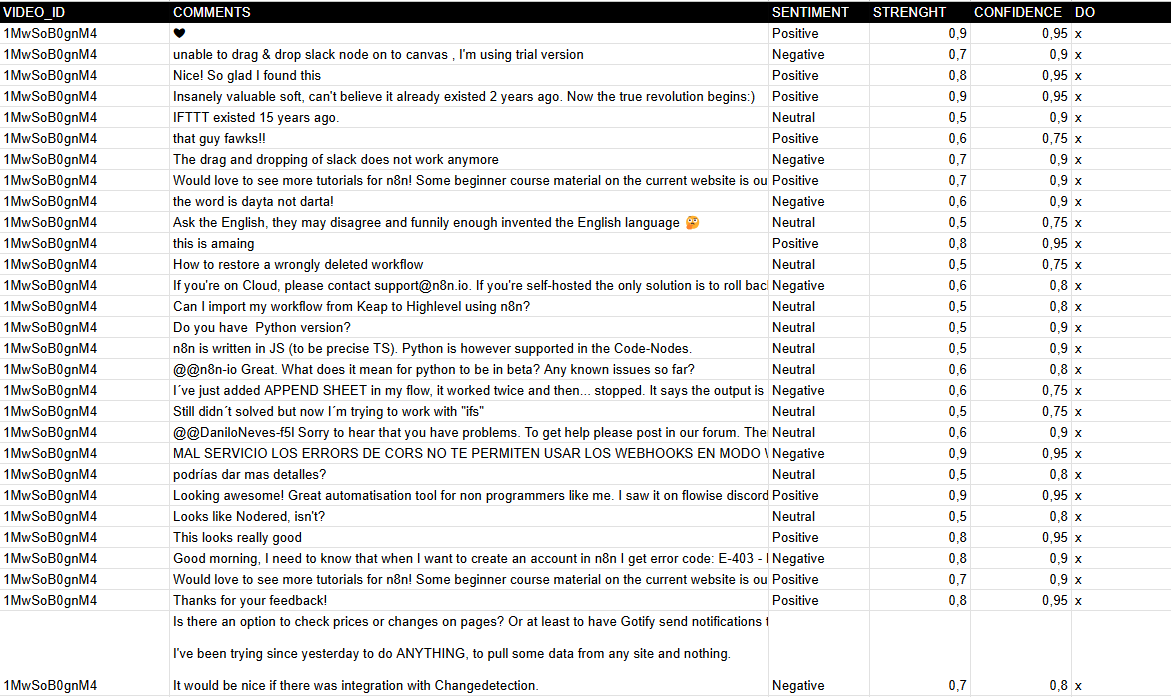 --- ### **How It Works** 1. **Trigger**: The workflow starts manually (When clicking "Test workflow") or can be scheduled. 2. **Fetch Comments**: The Get API Comments node retrieves comments from a YouTube video using the YouTube API. 3. **Process Comments**: - Extracts comments and replies via the Comments node. - Splits them into individual entries (Split comments). - Saves raw comments to Google Sheets (Save comments). 4. **Sentiment Analysis**: - Uses **Google Gemini AI** (or another model) to classify each comment as **Positive, Neutral, or Negative**. - Captures **strength** and **confidence** metrics for deeper insights. 5. **Update Results**: The Update sentiment node writes the analysis back to Google Sheets, marking processed rows. 6. **Pagination Handling**: Checks for multiple pages of comments (Multipage?) and loops until all are processed. --- ### **Set Up Steps** 1. **Prepare Google Sheet**: - Clone the template: [YouTube Comments Sheet](https://docs.google.com/spreadsheets/d/14lAY5CjoYHqqFODiLGg636Gqw4JwWqb2CX10E8ZS6Uo/edit). - Ensure columns exist: `VIDEO_ID`, `COMMENTS`, `SENTIMENT`, `STRENGTH`, `CONFIDENCE`, and `DONE` (tracking column). 2. **Configure YouTube API**: - Obtain a **YouTube API key** from [Google Developers Console](https://developers.google.com/youtube/registering_an_application). - Add it to the Get API Comments node under **Youtube Query Auth** (parameter: `key`). 3. **Set Video ID**: - Replace the default `xxxxxxxx` in the ID Video node with your target YouTube video ID. 4. **AI Integration**: - Ensure **Google Gemini API** credentials are configured in the Google Gemini node. 5. **Run the Workflow**: - Test manually or automate execution (e.g., hourly/daily) to analyze new comments. **Output**: A Google Sheet with categorized sentiments, enabling **trend analysis and audience engagement tracking**. --- ### **Need help customizing?** [Contact me](mailto:info@n3w.it) for consulting and support or add me on [Linkedin](https://www.linkedin.com/in/davideboizza/).
n8n$9.99Telegram DALL-E Image Generator with Google Sheets Logging
Generate AI images from Telegram prompts using OpenAI DALL-E, log requests to Google Sheets, and send images back to users instantly.
n8n$14.99Automated EU Events Scraper to Google Sheets
Daily cron-triggered workflow that scrapes EU official events portal, extracts metadata like title, date, location, handles pagination and duplicates, then logs new events to Google Sheets.
n8n$14.99Automate Email Expense Tracking with Google Sheets Integration
This workflow automates the process of extracting expense data from emails and logs it into Google Sheets.
n8n$16.67Automate LinkedIn Posts Using Google Sheets and OpenAI
Create a seamless LinkedIn content workflow that utilizes Google Sheets, OpenAI, and the LinkedIn API to automate post creation and publishing.
n8n$14.99Automate Strava Activity Data Export to Google Sheets
Automatically export and organize your Strava activity data into Google Sheets for easy tracking and analysis.
n8n$9.99Implement a Double Opt-In Email Verification System Using Google Sheets
Create a secure double opt-in email verification system using Google Sheets to manage user data and verification codes, ensuring data integrity and user consent.
n8n$14.99Export Cloudflare Domain Data to Google Sheets for Comprehensive Analysis
This workflow exports all your Cloudflare domains, along with their DNS records and settings, to a Google Sheet. It provides a comprehensive overview for easy debugging and analysis.
n8n$14.99Automate Physician Order Extraction to Google Sheets with AI
Streamline the extraction of physician orders from Google Drive documents into structured Google Sheets rows using VLM Run's AI capabilities.
n8n$4.99Invite new members to a Circle community from new rows in a Google Sheets spreadsheet
A ready-to-use Make workflow that connects Google-sheets, Circle-so. Invite new members to a Circle community from new rows in a Google Sheets spreadsheet. Customize and deploy in minutes.
Make$2.99Create a Google Calendar event for every new row in Google Sheets
A ready-to-use Make workflow that connects Google-sheets, Google-calendar. Create a Google Calendar event for every new row in Google Sheets. Customize and deploy in minutes.
Make$2.99Create iCalendar events from Google Sheets rows
A ready-to-use Make workflow that connects Google-sheets, Ios. Create iCalendar events from Google Sheets rows. Customize and deploy in minutes.
MakeFreeCapture Gumroad Sales, Add to MailerLite Group, Log to Google Sheets CRM
Automates capturing Gumroad sales to add buyers to MailerLite groups and log details in Google Sheets CRM, ensuring seamless lead nurturing without manual work.
n8n$14.99Track OpenAI Token Usage & AI Agent Metrics with Google Sheets
Monitors OpenAI LLM token usage, costs, and tool calls from AI agents, logging everything to Google Sheets for easy observability and billing transparency.
n8n$22.99Hourly Crypto Rates Monitor: Alpha Vantage API & Google Sheets
Automates hourly tracking of BTC/ETH rates vs EUR using Alpha Vantage API, logs to Google Sheets tabs, and sends Telegram alerts for real-time monitoring.
n8n$12.99Convert JSON File to Google Sheets Rows
Reads a local JSON file and appends its data as rows to a Google Sheet, effectively transferring JSON to CSV-like spreadsheet format.
n8n$4.99
More integrations
Custom AI Systems & Services
Our team of experienced AI builders will help build custom AI systems, workflows, and solutions.
Request Custom Work