Google Sheets Automation Workflows
3,632 ready-made Google Sheets workflows for n8n, Make, Zapier, Activepieces, and Pipedream. Spreadsheet-driven automations: logging, reporting, syncing rows to and from every tool in your stack.
Automate Google Events Data Collection to Google Sheets via SerpApi
Effortlessly scrape and organize Google Events data using SerpApi and store it in Google Sheets for streamlined analysis and tracking.
n8n$9.99Automate Internal Phishing Simulations with OpenAI and Google Sheets
Leverage OpenAI to generate realistic phishing emails, send them via Gmail, and track engagement through webhooks. Ideal for security teams to enhance phishing awareness and training.
n8n$9.99Automate Facebook Group Posts with Airtable, Google Sheets, and Telegram
Streamline your social media management by automating posts to multiple Facebook groups using Airtable for browser automation, Google Sheets for group management, and Telegram for notifications. This workflow eliminates manual posting, ensuring consistent and timely updates across all groups.
n8n$14.99Create new DocuGenerate PDFs from new Google Sheets spreadsheet rows
A ready-to-use Make workflow that connects Google-sheets, Docugenerate. Create new DocuGenerate PDFs from new Google Sheets spreadsheet rows. Customize and deploy in minutes.
Make$2.99Automate WordPress Article Summarization and Email Distribution with OpenAI and Google Sheets
This workflow automatically fetches the latest article from a WordPress blog, summarizes it using OpenAI's GPT-4, and emails the summary to subscribers listed in Google Sheets. Ideal for content creators seeking to streamline content distribution.
n8n$4.99Automate Competitor SWOT Analysis with ChatGPT and Google Sheets
Streamline your competitor analysis by automatically conducting SWOT analysis using ChatGPT and storing the results in Google Sheets for easy access and strategic decision-making.
Make$4.99Implement a Double Opt-In Email Verification System Using Google Sheets
Create a secure double opt-in email verification system using Google Sheets to manage user data and verification codes, ensuring data integrity and user consent.
n8n$14.99Automate AI Content Generation from Google Sheets Data
Streamline your content creation by automatically generating AI-driven completions from Google Sheets data. Enhance productivity and content quality with seamless integration between Google Sheets and Make AI Tools.
Make$3.99Send automated replies on Line for new messages filtered in Google Sheets
A ready-to-use Make workflow that connects Line, Google-sheets. Send automated replies on Line for new messages filtered in Google Sheets. Customize and deploy in minutes.
Make$3.99Automate LinkedIn Outreach with Unipile and Google Sheets
Streamline your LinkedIn outreach by automating contact requests and follow-up icebreakers using Unipile and Google Sheets.
n8n$19.99YouTube Comment Sentiment Analysis with Google Gemini AI and Google Sheets
This workflow automatically **collects all comments from a specified YouTube video and analyzes the sentiment of each comment using an AI model** (e.g., GPT, Claude, or Gemini). The sentiment (**Positive, Neutral, or Negative**), its strength, and confidence score are extracted and saved into a connected **Google Sheet** for easy access, reporting, and visualization. --- ### **Advantages:** **AI-Powered Sentiment Analysis** * Uses modern language models (LLMs) to categorize comments with high accuracy. **Ideal for YouTube Creators & Marketers** * Provides insights into audience perception of videos, campaigns, or products. **Real-Time Feedback Monitoring** * Quickly identify trends in viewer sentiment across large comment volumes. **Automatic Reporting** * Saves results in Google Sheets for easy sharing or dashboard integration. **Handles Pagination** * Automatically fetches all comments, even from multi-page videos. **No-Code Customization** * Easily adaptable to other platforms (e.g., TikTok, Instagram) or data sources. **Simple Setup** * Requires just a YouTube video ID and API key - no coding needed. **Loop and Update Logic** * Continuously updates sheet with new results, avoiding duplicate processing. **Modular Design** * Easy to expand (e.g., reply classification, toxic comment detection, translation). **Multi-Language Compatibility** * AI can be configured to analyze comments in different languages with minimal setup. 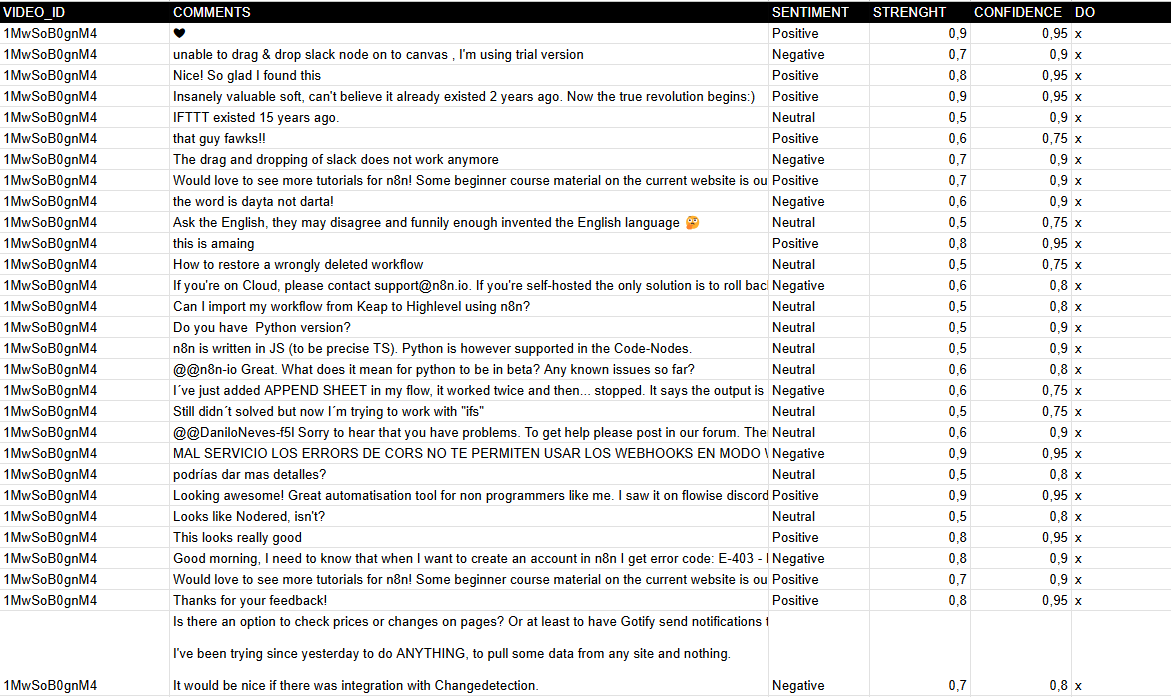 --- ### **How It Works** 1. **Trigger**: The workflow starts manually (When clicking "Test workflow") or can be scheduled. 2. **Fetch Comments**: The Get API Comments node retrieves comments from a YouTube video using the YouTube API. 3. **Process Comments**: - Extracts comments and replies via the Comments node. - Splits them into individual entries (Split comments). - Saves raw comments to Google Sheets (Save comments). 4. **Sentiment Analysis**: - Uses **Google Gemini AI** (or another model) to classify each comment as **Positive, Neutral, or Negative**. - Captures **strength** and **confidence** metrics for deeper insights. 5. **Update Results**: The Update sentiment node writes the analysis back to Google Sheets, marking processed rows. 6. **Pagination Handling**: Checks for multiple pages of comments (Multipage?) and loops until all are processed. --- ### **Set Up Steps** 1. **Prepare Google Sheet**: - Clone the template: [YouTube Comments Sheet](https://docs.google.com/spreadsheets/d/14lAY5CjoYHqqFODiLGg636Gqw4JwWqb2CX10E8ZS6Uo/edit). - Ensure columns exist: `VIDEO_ID`, `COMMENTS`, `SENTIMENT`, `STRENGTH`, `CONFIDENCE`, and `DONE` (tracking column). 2. **Configure YouTube API**: - Obtain a **YouTube API key** from [Google Developers Console](https://developers.google.com/youtube/registering_an_application). - Add it to the Get API Comments node under **Youtube Query Auth** (parameter: `key`). 3. **Set Video ID**: - Replace the default `xxxxxxxx` in the ID Video node with your target YouTube video ID. 4. **AI Integration**: - Ensure **Google Gemini API** credentials are configured in the Google Gemini node. 5. **Run the Workflow**: - Test manually or automate execution (e.g., hourly/daily) to analyze new comments. **Output**: A Google Sheet with categorized sentiments, enabling **trend analysis and audience engagement tracking**. --- ### **Need help customizing?** [Contact me](mailto:info@n3w.it) for consulting and support or add me on [Linkedin](https://www.linkedin.com/in/davideboizza/).
n8n$9.99Generate Multispeaker Podcasts with AI Natural-Sounding Voices & Google Sheets
This workflow automates the generation of multi-speaker podcasts using AI-powered text-to-speech technology. It starts by retrieving a podcast script from a Google Sheets document, where each speaker's lines are clearly defined. The workflow then processes the script, generates a natural-sounding audio file with different voices for each speaker, and stores the final audio file in Google Drive. The workflow is designed to save time and resources by automating the podcast production process, making it ideal for content creators, marketers, and businesses that need to produce high-quality audio content regularly. ### **How It Works** 1. **Triggering the Workflow**: - The workflow starts with the **When clicking the 'Test workflow'** node, which can be triggered manually to begin the process. 2. **Data Retrieval**: - The **Get Podcast Text** node retrieves data from a Google Sheets document containing the podcast script. The document includes columns for the speaker's name and the corresponding text. 3. **Data Aggregation**: - The **Get All Rows** node aggregates the data from the Google Sheets document, combining the speaker names and their respective text into a single dataset. 4. **Text Formatting**: - The **Full Podcast Text** node processes the aggregated data, formatting it into a single string where each speaker's text is prefixed with their name. 5. **Audio Generation**: - The **Create Audio** node sends a request to the API to generate a multi-speaker podcast audio file. The request includes the formatted text and specifies the voices for each speaker. When you register for the API service, you will get $1 for free. For continuous work, add API credits to your account. 6. **Status Check**: - The **Get Status** node checks the status of the audio generation request. If the status is COMPLETED, the workflow proceeds; otherwise, it waits again. 7. **Audio Retrieval**: - The **Get URL Audio** node retrieves the URL of the generated audio file. - The **Get File Audio** node downloads the audio file from the provided URL. 8. **Audio Storage**: - The **Upload Audio** node uploads the generated audio file to a specified Google Drive folder for storage. --- ### **Key Features** - **Multi-Speaker Support**: Generates podcasts with different voices for each speaker, creating a more dynamic and engaging listening experience. - **Google Sheets Integration**: Retrieves podcast scripts from a Google Sheets document, making it easy to manage and update content. - **AI-Powered Text-to-Speech**: Uses advanced AI models to generate natural-sounding audio from text. - **Automated Audio Generation**: Streamlines the process of creating podcast audio files, reducing the need for manual recording and editing. - **Google Drive Storage**: Automatically uploads the generated audio files to Google Drive for easy access and sharing. This workflow is ideal for businesses and content creators looking to automate the production of multi-speaker podcasts. It leverages AI to handle the complex task of generating natural-sounding audio, allowing users to focus on creating compelling content.
n8n$9.99Automate Personalized Messages for New Facebook Leads Using ChatGPT and Google Sheets
Automatically generate personalized introduction messages for new Facebook leads using ChatGPT and store them in Google Sheets for streamlined review and follow-up.
Make$3.99Save a Gmail email to Google Sheets as a new row
A ready-to-use Make workflow that connects Google-email, Google-sheets. Save a Gmail email to Google Sheets as a new row. Customize and deploy in minutes.
Make$2.99Automate Google Sheets Row Updates with ChatGPT Text and Image Generation
This workflow filters Google Sheets rows, generates text and images using ChatGPT, and updates the rows, streamlining dynamic content management.
Make$4.99Track Crypto Prices, New Listings & Transactions with CoinGecko & Google Sheets
# How It Works This workflow is a **comprehensive crypto automation system** that combines three critical functions for traders and investors into one powerful tool: ## Price Monitor - A `Cron` trigger runs on a schedule (e.g., every minute). - A `HTTP Request` node checks the cryptocurrency's price. - An `If` node compares the price against a defined threshold. - If the condition is met, a `Telegram` node sends an alert. ## New Listing Notifier - An `RSS Feed Trigger` monitors exchange announcements. - When a new listing is published, a `Telegram` node sends a real-time notification. ## Automated Crypto Transaction Logger - A second `Cron` trigger runs daily (or as scheduled). - A `HTTP Request` node fetches trade history from your exchange's API. - A `Code` node formats the transaction data. - A `Google Sheets` node logs it in your spreadsheet. --- # How to Set Up ## 1. Configure Credentials You will need credentials for: - **Telegram**: To send alerts and notifications. - **Google Sheets**: To log transaction history. - **Exchange API** (e.g., Binance): To fetch your trade history. ## 2. Customize the Price Monitor - **Node 2**: `HTTP Request (Check BTC Price)` Change the `url` to monitor a different crypto (e.g., Ethereum). - **Node 3**: `If (Price > $50k)` Adjust `rightValue` to set your target price threshold. - **Node 4**: `Telegram (Send Alert)` Replace `[YOUR TELEGRAM CHAT ID]` with your actual ID. ## 3. Customize the Listing Notifier - **Node 1**: `RSS Feed (New Listing Trigger)` Replace `feedUrl` with your preferred exchange's RSS feed. - **Node 2**: `Telegram (Listing Notif)` Replace `[YOUR TELEGRAM CHAT ID]` with your actual ID. ## 4. Customize the Transaction Logger - **Node 2**: `HTTP Request (Get Binance Trades)` Set the `url` to your exchange's trade history endpoint. Configure `headerParameters` for Authorization with your API key. - **Node 4**: `Google Sheets (Log Transactions)` Replace `[YOUR SPREADSHEET ID]` and `[YOUR SHEET NAME]` accordingly. ## 5. Final Activation Once credentials and parameters are configured: - “Save the workflow - Activate it! --- Ready to give this a visual punch with icons or a mini preview for the n8n template gallery? I can help dress it up in seconds!
n8n$14.99Automate Property Link Shortening & QR Code Generation with Google Sheets and Bitly
### How It Works This workflow automatically takes a long property URL from your Google Sheet, shortens it, generates a QR code, and then updates your sheet with the new links. 1. **Google Sheets (New/Updated Row Trigger):** The workflow starts by constantly monitoring a specified Google Sheet. It triggers when a new property listing row is added, or when an existing row's Property Link column is updated. 2. **Shorten URL (HTTP Request - Bitly):** This node takes the long property URL from the Google Sheet. It then makes an API call to a URL shortening service (like Bitly) to generate a much shorter, shareable URL. 3. **Generate QR Code (HTTP Request - QR Code API):** Using the shortened URL from the previous step, this node makes another API call to a QR code generation service. It generates an image link for a QR code that, when scanned, directs users to your property. 4. **Update Google Sheet (Update Row):** Finally, this node takes the newly generated short URL and the QR code image link and writes them back into the corresponding row in your Google Sheet. This centralizes all the necessary links for your property listings. ### How to Set Up Follow these steps carefully to get your Property Link Shortener & QR Code Generator workflow up and running in n8n: 1. **Import Workflow JSON:** - Open your n8n instance. - Click on Workflows in the left sidebar. - Click the + button or New to create a new workflow. - Click the ... (More Options) icon in the top right. - Select Import from JSON and paste the entire JSON code for this workflow. 2. **Prepare your Google Sheet:** - Create a Google Sheet with columns for your property listings. - **Crucially**, ensure you have a column for the **original long property URL** (e.g., `Property Link`), a column for the **shortened URL** (e.g., `Short URL`), a column for the **QR code image URL** (e.g., `QR Code URL`), and a **unique identifier** for each row (e.g., `Property ID`). 3. **Configure Google Sheets (New/Updated Row Trigger):** - Locate the Google Sheets (New/Updated Row Trigger) node. - **Credentials:** Select your existing Google Sheets OAuth2 credential or click Create New to set one up. - **Spreadsheet ID:** **Replace `YOUR_SPREADSHEET_ID`** with the ID of your Google Sheet. You can find this ID in the Google Sheets URL. - **Sheet Name:** Enter the exact name of the sheet (tab) within your spreadsheet (e.g., `Listings` or `Properties`). - **Trigger On:** Choose `Updated Row` and select the column where your original long property link is located (e.g., `Property Link`). This ensures the workflow runs when you add or update a property link. 4. **Configure Shorten URL (HTTP Request - Bitly):** - Locate the Shorten URL (HTTP Request - Bitly) node. - **Method:** Set to `POST`. - **URL:** `https://api-ssl.bitly.com/v4/shorten` - **Headers:** - Add `Authorization` with value `Bearer YOUR_BITLY_ACCESS_TOKEN`. (You'll need to generate a Generic Access Token from your Bitly account settings > Generic Access Token). - Add `Content-Type` with value `application/json`. - **Body:** Select `Raw` and `JSON`. - In the JSON body, enter: `{long_url: {{ $json["Property Link"] }}}`. **Ensure `Property Link` exactly matches your Google Sheet column header for the original URL.** - **Response Format:** Set to `JSON`. 5. **Configure Generate QR Code (HTTP Request - QR Code API):** - Locate the Generate QR Code (HTTP Request - QR Code API) node. - **Method:** Set to `GET`. - **URL:** `https://api.qrserver.com/v1/create-qr-code/?size=150x150&data={{ encodeURIComponent($(1. Shorten URL (HTTP Request - Bitly)).item.json.link) }}` - Here, `{{ $(1. Shorten URL (HTTP Request - Bitly)).item.json.link }}` refers to the output of the previous Bitly node. - You can adjust `size=150x150` as needed. - `encodeURIComponent` is important to handle special characters in the URL. - **Response Format:** Set to `Binary`. (This API directly returns the image, but we just need its URL which is in the `url` property of the response). 6. **Configure Update Google Sheet (Update Row):** - Locate the Update Google Sheet (Update Row) node. - **Credentials:** Select the same Google Sheets OAuth2 credential as in step 3. - **Spreadsheet ID:** Use the same `YOUR_SPREADSHEET_ID`. - **Sheet Name:** Use the same `YOUR_SHEET_NAME_E.G._Listings`. - **Key Column:** Set this to a unique identifier for your rows, e.g., `Property ID` (assuming you have one in your sheet). - **Key Column Value:** `={{ $json["Property ID"] }}`. **Make sure this matches your unique ID column from the Google Sheet.** - **Update Columns:** - Add an entry: - **Column:** `Short URL` (exact name of your short URL column in Google Sheet)
n8n$4.99Create a new Google Sheets row for every new article from RSS feed using OpenAI GPT-3
A ready-to-use Make workflow that connects Rss, Openai-gpt-3, Google-sheets. Create a new Google Sheets row for every new article from RSS feed using OpenAI GPT-3. Customize and deploy in minutes.
Make$3.99[AI Tools 101] Asset creation with OpenAI and Google Sheets
A ready-to-use Make workflow that connects Google-sheets, Openai-gpt-3. [AI Tools 101] Asset creation with OpenAI and Google Sheets. Customize and deploy in minutes.
Make$4.99Automate WordPress Blog Posts from Google Sheets with OpenAI GPT-3
Streamline your content creation by automatically generating and publishing WordPress blog posts from data in Google Sheets using OpenAI GPT-3. This workflow updates the Google Sheet with post details after publishing.
Make$4.99Automatically Add New Google Sheets Entries as Wix Products
Streamline your product management by automatically creating Wix products whenever a new row is added to your Google Sheets. Ensure your inventory is always up-to-date with minimal effort.
Make$2.99Filter the Feedback from Typeform and Store in Google Sheets
This workflow allows you to filter positive and negative feedback received from a Typeform and insert the data into Google Sheets.  **Typeform Trigger node:** Start the workflow when a new form is submitted via Typeform. **Set node:** Extract the information submitted in Typeform. **IF node:** Filter positive and negative reviews (i.e., ratings above or below 3 out of 5). **Google Sheets node:** Store the positive and negative reviews and ratings in two different sheets for each case.
n8n$4.99Analyze Google Sheets data with MonkeyLearn sentiment analysis models
A ready-to-use Make workflow that connects Google-sheets, Monkeylearn. Analyze Google Sheets data with MonkeyLearn sentiment analysis models. Customize and deploy in minutes.
Make$3.99Collect and Label Images and Send to Google Sheets
This workflow collects images from a web search on a specific query, detects labels in them, and stores this information in a Google Sheet. 
n8n$4.99
More integrations
Custom AI Systems & Services
Our team of experienced AI builders will help build custom AI systems, workflows, and solutions.
Request Custom Work