Google Sheets Automation Workflows
3,632 ready-made Google Sheets workflows for n8n, Make, Zapier, Activepieces, and Pipedream. Spreadsheet-driven automations: logging, reporting, syncing rows to and from every tool in your stack.
Auto-Generate Platform-Specific Marketing Content with GPT-4, Google Sheets & Docs
This workflow automates marketing content creation by using AI to generate high-quality, platform-specific posts for social media, blogs, and ad campaigns. It combines OpenAI-powered content generation with dynamic templates to produce SEO-optimized text aligned with your brand voice. The workflow ensures posts follow platform character limits, saves them in Google Docs, and updates the source sheet to mark topics as completed. ### Key Features - Automated triggering: Starts whenever the Status column is updated in the Topics Google Sheet. - Platform compliance: Retrieves platform-specific character limits to ensure posts fit requirements. - Dynamic AI prompts: Builds custom prompts based on topic details and platform rules. - AI-generated content: Uses OpenAI GPT to produce engaging, SEO-friendly posts. - Centralized storage: Creates a Google Document for each completed topic and updates the sheet. ### Nodes in Use - Google Sheets Trigger: Monitors sheet updates. - Google Sheets: Fetches topic details and platform rules. - Set Node: Structures data for AI input. - OpenAI: Generates platform-specific content. - Google Docs: Stores final content. - Google Sheets (Update): Marks topic as completed. ### Who's it for - Social media managers who need quick, on-brand content. - Marketing teams looking to scale campaigns with minimal manual effort. - Freelancers or agencies managing multiple clients' content. ### How to set up - Add your Google Sheets and Google Docs credentials. - Configure the OpenAI node with your API key. - Prepare a Google Sheet with topic ideas and platform details. - Connect Google Docs to store the generated content. ### Requirements - OpenAI API: For AI content generation. - Google Sheets & Google Docs: For managing input and storing output. ### How to customize - Adjust the AI prompt template to better match your brand's tone. - Add extra nodes for additional platforms (e.g., LinkedIn, YouTube). - Extend the workflow with translation nodes for multilingual campaigns. ### Use Case Ideal for marketers or agencies who want to automate content creation across platforms, ensuring SEO alignment and brand consistency. It saves hours of manual work and helps maintain a steady publishing schedule. ### Powered By: Concept Recall [https://conceptrecall.com/](https://conceptrecall.com/)
n8n$14.99Automate Daily Swing Trade Ideas with GPT-4, Yahoo Finance, Google Sheets, and Telegram
This workflow automates the generation of daily swing trade ideas using end-of-day data, scored by an LLM, logged to Google Sheets, and sent as alerts to Telegram.
n8n$9.99Convert YouTube Videos to MP4 & MP3 with RapidAPI and Google Sheets Logging
### YouTube to MP4 Downloader This n8n workflow allows users to submit a YouTube video URL, automatically fetches multiple MP4 and MP3 download links using **[YouTube Video Downloader Fast API](https://rapidapi.com/skdeveloper/api/youtube-video-downloader-fast)**. It logs all links into Google Sheets for easy access and tracking. With **YouTube Video Downloader Fast API**, users can securely download videos in different resolutions without manual tools. --- ## Node-by-Node Explanation ### 1. **On Form Submission** - Displays a form to collect the YouTube video URL. - Triggers the workflow when a URL is submitted for processing. ### 2. **HTTP Request** - Sends the provided URL to [**YouTube Video Downloader Fast API**](https://rapidapi.com/skdeveloper/api/youtube-video-downloader-fast) via RapidAPI. - Retrieves downloadable links for multiple resolutions (360p, 720p, 1080p) and MP3 format. - Ensures the download process is fast and secure with [**YouTube Video Downloader Fast API**](https://rapidapi.com/skdeveloper/api/youtube-video-downloader-fast). ### 3. **If Node** - Checks if the API response from [**YouTube Video Downloader Fast API**](https://rapidapi.com/skdeveloper/api/youtube-video-downloader-fast) is successful. - Proceeds only if valid downloadable links are available. ### 4. **Google Sheets** - Saves the original YouTube URL and all MP4/MP3 download links in Google Sheets. - Provides a permanent log for future access and tracking. --- ## Use Cases - Content managers can bulk-download YouTube videos in different formats. - Educators/trainers can easily organize video links for offline teaching. - Marketing agencies can prepare high-quality video assets for campaigns. - Developers can customize the workflow to integrate with other storage solutions. --- ## Benefits - Fully automated video downloading process with [**YouTube Video Downloader Fast API**](https://rapidapi.com/skdeveloper/api/youtube-video-downloader-fast). - Multiple resolutions and MP3 download options. - Centralized, structured download logs in Google Sheets. - Saves time, secure, and customizable for different needs. --- ## Problem Solved - Eliminates the need for unsafe third-party downloaders. - Provides fast and secure YouTube downloads using [**YouTube Video Downloader Fast API**](https://rapidapi.com/skdeveloper/api/youtube-video-downloader-fast). - Offers multiple video/audio formats without manual extraction. - Ensures easy tracking and future accessibility of downloaded content.
n8n$9.99Scrape Business Leads from Google Maps Using OpenAI and Google Sheets
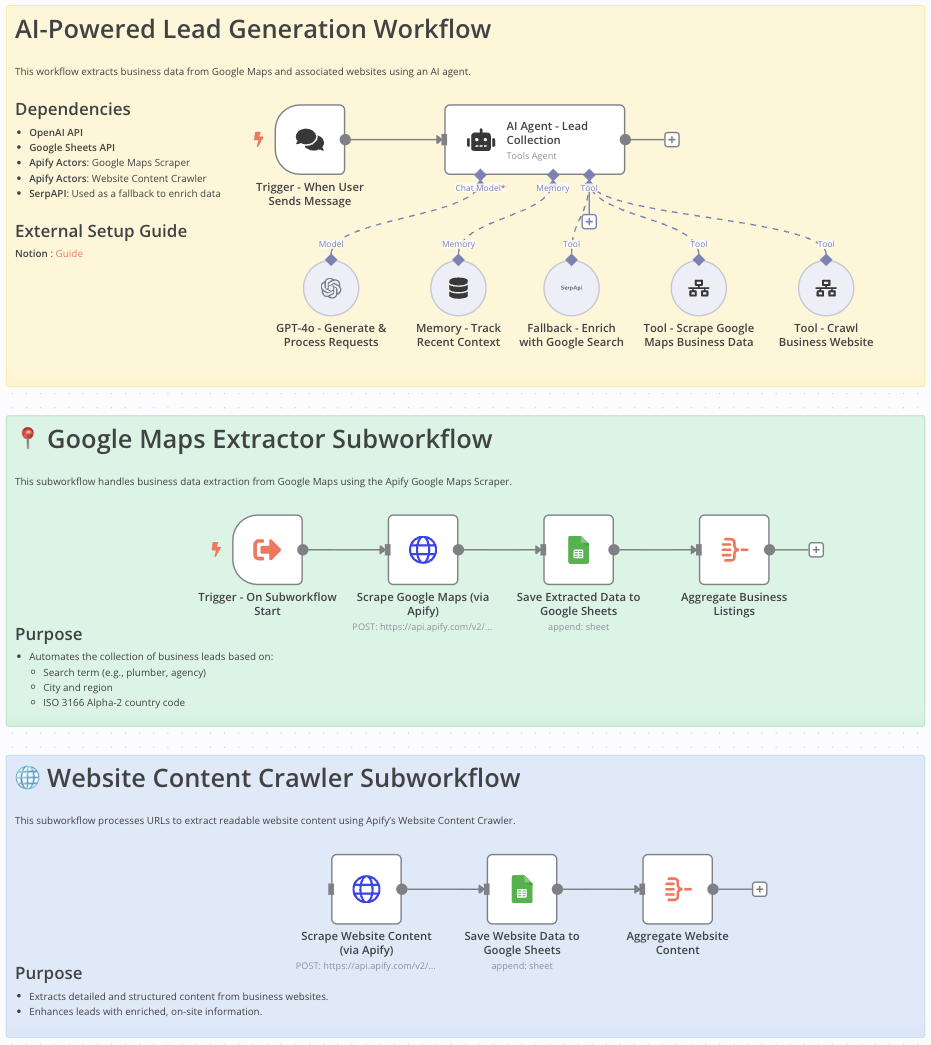 # Google Maps Data Extraction Workflow for Lead Generation This workflow is ideal for **sales teams, marketers, entrepreneurs, and researchers** looking to efficiently gather detailed business information from Google Maps for: - Lead generation - Market analysis - Competitive research --- # Who Is This Workflow For? - **Sales professionals** aiming to build targeted contact lists - **Marketers** looking for localized business data - **Researchers** needing organized, comprehensive business information --- # Problem This Workflow Solves Manually gathering business contact details from Google Maps is: - Tedious - Error-prone - Time-consuming This workflow **automates** data extraction to **increase efficiency, accuracy, and productivity**. --- # What This Workflow Does - Automates extraction of business data (name, address, phone, email, website) from **Google Maps** - Crawls and extracts **additional website content** - Integrates **OpenAI** to enhance data processing - Stores structured results in **Google Sheets** for easy access and analysis - Uses **Google Search API** to fill in missing information --- # Setup 1. **Import** the provided n8n workflow JSON into your **n8n instance**. 2. Set your **OpenAI** and **Google Sheets API** credentials. 3. Provide your **Google Maps Scraper** and **Website Content Crawler** API keys. 4. Ensure **SerpAPI** is configured to enhance data completeness. --- # Customizing This Workflow to Your Needs - Adjust scraping parameters: - Location - Business category - Country code - Customize **Google Sheets output format** to fit your current data structure - Integrate additional **AI processing steps or APIs** for richer data enrichment --- # Final Notes This structured approach ensures: - **Accurate and compliant data extraction** from Google Maps - Streamlined **lead generation** - Actionable and well-organized data ready for business use ➜ **Documentation**: [Notion Guide](https://automatisation.notion.site/GOOGLE-MAPS-SCRAPER-1cc3d6550fd98005a99cea02986e7b05?pvs=4) ## Demo Video Watch the full tutorial here: [YouTube Demo](https://www.youtube.com/watch?v=DoBRufiwElU)
n8n$14.99Automate Multilingual News Summarization with NewsAPI, OpenAI, and Google Sheets
This workflow automatically gathers the latest news articles from English and Japanese sources using NewsAPI, summarizes them with OpenAI, and stores the results in Google Sheets. It provides concise summaries in Japanese, facilitating quick review of news highlights.
n8n$14.99Extract Business Emails from Google Maps to Google Sheets for Lead Generation
## How it Works This workflow builds a **free lead generation system** that scrapes emails from Google Maps listings and exports them directly into **Google Sheets**. It's built in **n8n** using HTTP requests and JavaScript—no paid APIs required. Here's what it does at a high level: - Scrapes business listings from Google Maps based on search queries (e.g., "Miami lawyers") - Extracts real business website URLs using regex filtering - Finds and validates email addresses from each website - Cleans data by removing duplicates and invalid entries - Exports clean email lists into Google Sheets automatically --- ## Set Up Steps - Estimated setup time: **1-2 hours** - Create a Google Sheet with two tabs: - `searches` — add your search queries (e.g., "Calgary dentist") - `emails` — results will be stored here automatically - Connect Google Sheets credentials in n8n - Update your Google Sheet document ID in the workflow nodes - Test with small batches first, then scale up --- ## Get More Resources & Advanced Workflows For additional resources, advanced automation tutorials, and business strategies that help you **generate more leads and grow your agency**, check out my website: ☀️ [Noman Mohammad](https://nomanmohammad.com) You'll find **downloads, guides, and proven systems** used by successful marketers and entrepreneurs.
n8n$14.99AI-Generated LinkedIn Posts with OpenAI, Google Sheets, & Email Approval Workflow
### How it works This workflow automates the process of creating, approving, and optionally posting LinkedIn content from a Google Sheet. Here's a high-level overview: 1. **Scheduled Trigger**: Runs automatically based on your defined time interval (daily, weekly, etc.). 2. **Fetch Data from Google Sheets**: Pulls the first row from your sheet where Status is marked as Pending. 3. **Generate LinkedIn Post Content**: Uses OpenAI to create a professional LinkedIn post using the Post Description and Instructions from the sheet. 4. **Format & Prepare Data**: Formats the generated content along with the original instruction and post description for email. 5. **Send for Approval**: Sends an email to a predefined user (e.g., marketing team) with a custom form for approval, including a dropdown to accept/reject and an optional field for edits. 6. **(Optional) Image Fetch**: Downloads an image from a URL (if provided in the sheet) for future use in post visuals. ### Set up steps You'll need the following before you start: - A Google Sheet with the following columns: Post Description, Instructions, Image (URL), Status - Access to an OpenAI API key - A connected Gmail account for sending approval emails - Your own Google Sheets and Gmail credentials added in n8n ### Steps: 1. **Google Sheet Preparation**: - Create a new Google Sheet with the mentioned columns (Post Description, Instructions, Image, Status, Output, Post Link). - Add a row with test data and set Status to Pending. 2. **Credentials**: - In n8n, create OAuth2 credentials for: a. Google Sheets b. Gmail c. OpenAI (API Key) - Assign these credentials to the respective nodes in the JSON. 3. **OpenAI Model**: - Choose a model like gpt-4o-mini (used here) or any other available in your plan. - Adjust the prompt in the Generate Post Content node if needed. 4. **Email Configuration**: - In the Gmail node, set the recipient email to your own or your team's address. - Customize the email message template if necessary. 5. **Schedule the Workflow**: - Set the trigger interval (e.g., every morning at 9 AM). 6. **Testing**: - Run the workflow manually first to confirm everything works. - Check Gmail for the approval form, respond, and verify the results.
n8n$14.99Automate RSS News Summarization and Storage with Google Sheets and Gemini AI
This workflow automates the process of fetching articles from RSS feeds, summarizing them using Google Gemini AI, and storing the results in Google Sheets. It ensures only recent articles are processed and avoids duplicates.
n8n$14.99Automate Invoice Processing from Telegram to SAP with OCR and Google Sheets
Streamline your invoice processing by automatically extracting data from invoices received via Telegram, logging it in Google Sheets, and optionally pushing it to SAP Business One.
n8n$14.99Automate LinkedIn Post Creation with AI and Google Sheets
Streamline your LinkedIn content creation by automating the entire post lifecycle, from idea generation to publishing, using AI tools and Google Sheets.
n8n$19.99Automate AI-Driven Instagram Content Creation from Google Sheets
This n8n workflow automates the generation and publishing of Instagram content using AI, based on ideas stored in Google Sheets. It transforms your content strategy into reality with minimal manual effort.
n8n$14.99Automate B2B Lead Qualification and Outreach with AI and Google Sheets
Capture and qualify B2B leads using AI, enrich data with Apollo.io, and send personalized emails via Gmail. Log results in Google Sheets for streamlined lead management.
n8n$9.99Automate Personal Finance Management with Telegram and Google Sheets
Streamline your personal finance tracking by automating transaction logging, editing, and querying through Telegram messages, integrated with Google Sheets for comprehensive data management.
n8n$14.99Automate Multi-Speaker Podcast Creation with Google Sheets and ElevenLabs
This workflow streamlines the production of multi-speaker podcasts by converting scripts from Google Sheets into expressive audio using the ElevenLabs API, and storing the output in Google Drive.
n8n$4.99Automate Multi-Platform Content Publishing with Blotato and Google Sheets
Streamline your content distribution by automating the publishing process across multiple social media platforms using Blotato and Google Sheets.
n8n$14.99Automate Lead Scraping and Data Cleaning from Apify to Google Sheets
This n8n workflow automates the process of scraping business leads using Apify, cleans the extracted data, and exports it to Google Sheets. Ideal for sales and marketing teams looking to streamline their lead generation process.
n8n$4.99Compare Multi-Period Financial Data from Google Sheets with DeepSeek AI Analysis
Overview This workflow generates automated revenue and expense comparison reports from a structured Google Sheet. It enables users to compare financial data across the current period, last month, and last year, then uses an AI agent to analyze and summarize the results for business reporting. 1. Prerequisites - A connected Google Sheets OAuth2 credential. - A valid DeepSeek AI API (or replaceable with another Chat Model). - A sub-workflow (child workflow) that handles processing logic. - Properly structured Google Sheets data (see below). 2. Required Google Sheet Structure - Column headers must include at least: Date, Amount, Type. - Data format for Date must be in dd/MM/yyyy or dd-MM-yyyy. - Entries should span over multiple time periods (e.g., current month, last month, last year). 3. Setup Steps - Import the workflow into your n8n instance. - Connect your Google Sheets and DeepSeek API credentials. - Update: - Sheet ID and Tab Name (already embedded in node: Get revenue from Google Sheet). - Custom sub-workflow ID (in the Call n8n Workflow Tool node). - Optionally configure chatbot webhook in the When chat message received node. 4. What the Workflow Does - Accepts date inputs via AI chat interface (Chattrigger + AI Agent). - Fetches raw transaction data from Google Sheets. - Segments and pivots revenue by classification for: - Current period - Last month - Last year - Aggregates totals and applies custom titles for comparison. - Merges all summaries into a final unified JSON report. 5. Customization Options - Replace DeepSeek with OpenAI or other LLMs. - Change the date fields or cycle comparisons (e.g., quarterly, weekly). - Add more AI analysis steps such as sentiment scoring or forecasting. - Modify the pivot logic to suit specific KPI tags or labels. 6. Troubleshooting Tips - If Google Sheets fetch fails: ensure the document is shared with your n8n Google credential. - If parsing errors: verify that all dates follow the expected format. - Sub-workflow must be active and configured to accept the correct inputs (6 dates). 7. SEO Keywords: - google sheets report, AI financial report, compare revenue by month, expense analysis automation, chatbot n8n report generator, n8n Google Sheet integration
n8n$14.99Automate LinkedIn Company Search and Scoring with AI for Google Sheets CRM
Streamline your lead generation by automatically searching LinkedIn for companies, scoring them with AI, and adding qualified prospects to your Google Sheets CRM.
n8n$14.99Automate Twitter Posting with AI-Generated Content and Google Sheets Tracking
This n8n workflow automates your Twitter presence by using AI to generate unique content, check for duplicates, and post tweets on a schedule. It integrates with Google Sheets to log and track tweets, ensuring a consistent and engaging social media strategy.
n8n$14.99Automate SEO Blog Content Creation with AI and Google Sheets
Streamline your blog content production by automating topic retrieval, AI-driven writing, and email-based approval processes using OpenAI and Google Sheets.
n8n$14.99Automate AI Image Creation from Google Sheets with Gemini and Drive
This n8n workflow automates the generation of high-quality images from text prompts in Google Sheets using AI. It processes entries, generates artistic prompts, creates images, and manages file storage and sharing.
n8n$9.99Automate Invoice Processing and Validation with OCR, AI, and Google Sheets
Streamline your invoice processing workflow by automating the extraction, validation, and logging of invoice data using OCR, AI, and Google Sheets.
n8n$14.99Automate Marketing Spend Summaries with Google Sheets and n8n
This workflow automates the transformation of raw marketing data into a pivot-style summary in Google Sheets. It combines lookup data, aggregates spend by name, and updates a reporting tab automatically.
n8n$9.99Manage AI Assistant Usage with Google Sheets and Telegram
This workflow limits AI assistant interactions via Telegram, using Google Sheets to track and reset message counts, ensuring cost control and preventing abuse.
n8n$14.99
More integrations
Need a custom Google Sheets workflow?
Our automation experts build tailored Google Sheets integrations for your exact stack.
Request a Custom Workflow