
Back to Blog gemini
 githubactions
 ai
ai antigravity
![[GCP Billing & Vertex AI] Solving Gemini Cost Allocation in a Single Project: Vertex AI Dynamic Billing Labels in Action](https://media2.dev.to/dynamic/image/width=1200,height=627,fit=cover,gravity=auto,format=auto/https%3A%2F%2Fdev-to-uploads.s3.us-east-2.amazonaws.com%2Fuploads%2Farticles%2Fb6yzipcljv2243f1njmh.png) ai
ai ai
ai aie
aie
Cross Cloud Multi Agent Comic Builder with ADK, Amazon Fargate, and Gemini CLI
xbill March 28, 2026
0 views
Leveraging the Google Agent Development Kit (ADK) and the underlying Gemini LLM to build low code...
title: Cross Cloud Multi Agent Comic Builder with ADK, Amazon Fargate, and Gemini CLI
tags: geminicli,googleadk,googlecloudplatform,python series: AWS
Leveraging the Google Agent Development Kit (ADK) and the underlying Gemini LLM to build low code apps with the Python programming language deployed to the Fargate service on AWS.
Aren’t There a Billion Python MCP Demos?
Yes there are.
Python has traditionally been the main coding language for ML and AI tools. The goal of this article is to provide a minimal viable basic working MCP stdio server that can be run locally without any unneeded extra code or extensions.
What Is Python?
Python is an interpreted language that allows for rapid development and testing and has deep libraries for working with ML and AI:
Python Version Management
One of the downsides of the wide deployment of Python has been managing the language versions across platforms and maintaining a supported version.
The pyenv tool enables deploying consistent versions of Python:
GitHub - pyenv/pyenv: Simple Python version management
As of writing — the mainstream python version is 3.13. To validate your current Python:
admin@ip-172-31-70-211:~/gemini-cli-aws/mcp-lightsail-python-aws$ python --version
Python 3.13.12
Amazon Fargate
AWS Fargate is a serverless, pay-as-you-go compute engine for containers that works with Amazon Elastic Container Service (ECS) or Elastic Kubernetes Service (EKS). It eliminates the need to manage, patch, or scale underlying EC2 virtual machines. Fargate automatically allocates, scales, and manages compute infrastructure, allowing developers to focus solely on designing and operating applications.
Details are here:
Serverless Compute - AWS Fargate - AWS
Gemini CLI
If not pre-installed you can download the Gemini CLI to interact with the source files and provide real-time assistance:
npm install -g @google/gemini-cli
Testing the Gemini CLI Environment
Once you have all the tools and the correct Node.js version in place- you can test the startup of Gemini CLI. You will need to authenticate with a Key or your Google Account:
gemini

admin@ip-172-31-70-211:~/gemini-cli-aws/mcp-lightsail-python-aws$ gemini

▝▜▄ Gemini CLI v0.33.1
    ▝▜▄
   ▗▟▀ Logged in with Google /auth
  ▝▀ Gemini Code Assist Standard /upgrade

? for shortcuts
──────────────────────────────────────────────────────────────────────────────────────────────────────────────────────────────────────────────
 shift+tab to accept edits 3 GEMINI.md files | 1 MCP server
──────────────────────────────────────────────────────────────────────────────────────────────────────────────────────────────────────────────
 > Type your message or @path/to/file
──────────────────────────────────────────────────────────────────────────────────────────────────────────────────────────────────────────────
 ~/.../mcp-lightsail-python-aws (main*) no sandbox (see /docs) /model Auto (Gemini 3) | 239.8 MB
Node Version Management
Gemini CLI needs a consistent, up to date version of Node. The nvm command can be used to get a standard Node environment:
Docker Version Management
The AWS Cli tools and Lightsail extensions need current version of Docker. If your environment does not provide a recent docker tool- the Docker Version Manager can be used to downlaod the latest supported Docker:
AWS CLI
The AWS CLI provides a command line tool to directly access AWS services from your current environment. Full details on the CLI are available here:
Install Docker, AWS CLI, and the Lightsail Control plugin for containers
Agent Development Kit
The Google Agent Development Kit (ADK) is an open-source, Python-based framework designed to streamline the creation, deployment, and orchestration of sophisticated, multi-agent AI systems. It treats agent development like software engineering, offering modularity, state management, and built-in tools (like Google Search) to build autonomous agents.
The ADK can be installed from here:
This seems like a lot of Configuration!
Getting the key tools in place is the first step to working across Cloud environments. For a deeper dive- a project with a similar setup can be found here:
MCP Development with Amazon Fargate and Gemini CLI
Where do I start?
The strategy for starting low code agent development is a incremental step by step approach.
The agents in the demo are based on the original code lab:
First, the basic development environment is setup with the required system variables, and a working Gemini CLI configuration.
Then, a minimal ADK Agent is built with the visual builder. Next — the entire solution is deployed to Google Cloud Run.
Setup the Basic Environment
At this point you should have a working Python environment and a working Gemini CLI installation. The next step is to clone the GitHub samples repository with support scripts:
cd ~
git clone https://github.com/xbill9/gemini-cli-aws
cd adkui-fargate
Then run init.sh from the cloned directory.
The script will attempt to determine your shell environment and set the correct variables:
source init.sh
If your session times out or you need to re-authenticate- you can run the set_env.sh script to reset your environment variables:
source set_env.sh
Variables like PROJECT_ID need to be setup for use in the various build scripts- so the set_env script can be used to reset the environment if you time-out.
Verify The ADK Installation
To verify the setup, run the ADK CLI locally with Agent1:
xbill@penguin:~/gemini-cli-aws/adkui-fargate$ adk run Agent1
Log setup complete: /tmp/agents_log/agent.20260322_155748.log
To access latest log: tail -F /tmp/agents_log/agent.latest.log
/home/xbill/.pyenv/versions/3.13.12/lib/python3.13/site-packages/google/adk/cli/utils/agent_loader.py:248: UserWarning: [EXPERIMENTAL] _load_from_yaml_config: This feature is experimental and may change or be removed in future versions without notice. It may introduce breaking changes at any time.
  if root_agent := self._load_from_yaml_config(actual_agent_name, agents_dir):
/home/xbill/.pyenv/versions/3.13.12/lib/python3.13/site-packages/google/adk/features/_feature_decorator.py:81: UserWarning: [EXPERIMENTAL] feature FeatureName.AGENT_CONFIG is enabled.
  check_feature_enabled()
/home/xbill/.pyenv/versions/3.13.12/lib/python3.13/site-packages/google/adk/cli/cli.py:204: UserWarning: [EXPERIMENTAL] InMemoryCredentialService: This feature is experimental and may change or be removed in future versions without notice. It may introduce breaking changes at any time.
  credential_service = InMemoryCredentialService()
/home/xbill/.pyenv/versions/3.13.12/lib/python3.13/site-packages/google/adk/auth/credential_service/in_memory_credential_service.py:33: UserWarning: [EXPERIMENTAL] BaseCredentialService: This feature is experimental and may change or be removed in future versions without notice. It may introduce breaking changes at any time.
  super(). __init__ ()
Running agent Agent1, type exit to exit.
[user]: what is the weather in ho ho kus
[Agent1]: In Ho Ho Kus, New Jersey, it is currently cloudy with a temperature of 64°F (18°C), and it feels like 64°F (18°C). There is a 0% chance of precipitation at the moment, and the humidity is around 62%.

For tonight, expect mostly cloudy skies with a slight chance of showers after midnight, and lows around 40°F. Northeast winds of 5 to 10 mph will become southeast after midnight, with a 20% chance of rain.

Tomorrow, Sunday, March 22, 2026, the forecast indicates mostly cloudy conditions with a slight chance of showers in the morning, followed by partly sunny skies in the afternoon. Highs will be in the upper 60s, with south winds at 5 to 10 mph and a 20% chance of rain.
[user]: Run the deploy version on the local system: 0.0s 0.0s
Deploying to Amazon Fargate
First authenticate:
aws login --remote
Then cache the credentials locally:
xbill@penguin:~/gemini-cli-aws/adkui-fargate$ source save-aws-creds.sh
Exporting AWS credentials...
Successfully saved credentials to .aws_creds
The Makefile will now automatically use these for deployments.
xbill@penguin:~/gemini-cli-aws/adkui-fargate$
Then start the deployment:
xbill@penguin:~/gemini-cli-aws/adkui-fargate$ make deploy
./save-aws-creds.sh
Exporting AWS credentials...
Successfully saved credentials to .aws_creds
The Makefile will now automatically use these for deployments.
./deploy-fargate.sh
Loading AWS credentials from .aws_creds...
Building Docker image...
You can validate the final result by checking the messages:
xbill@penguin:~/gemini-cli-aws/adkui-fargate$ make status
----------------------------------------------------------------------------------------------------------------------------------
| DescribeServices |
+---------+----------------------+----------+---------+--------------------------------------------------------------------------+
| Desired | Name | Running | Status | TaskDef |
+---------+----------------------+----------+---------+--------------------------------------------------------------------------+
| 0 | adk-fargate-service | 0 | ACTIVE | arn:aws:ecs:us-east-1:106059658660:task-definition/adk-fargate-task:4 |
+---------+----------------------+----------+---------+--------------------------------------------------------------------------+
xbill@penguin:~/gemini-cli-aws/adkui-fargate$
You can then get the endpoint:
xbill@penguin:~/gemini-cli-aws/adkui-fargate$ make endpoint
Fargate Endpoint: http://100.54.104.31:8080
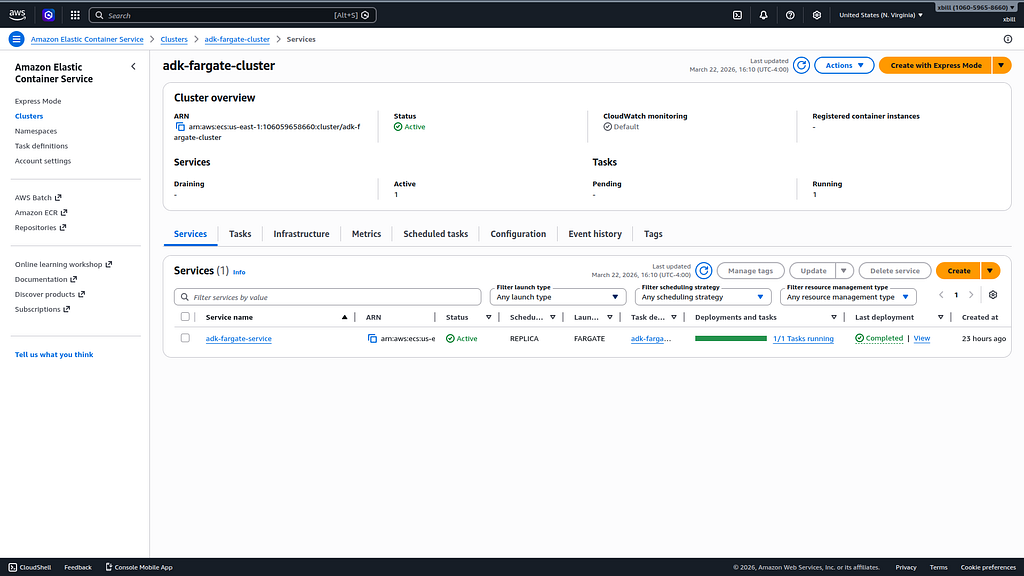
The service will be visible in the AWS Fargate console:
The console will look similar to:
Running the ADK Web Interface
Start a connection to the Fargate Deployed ADK:
https://us-east-1.console.aws.amazon.com/ecs/v2/clusters/adk-fargate-cluster/services?region=us-east-1
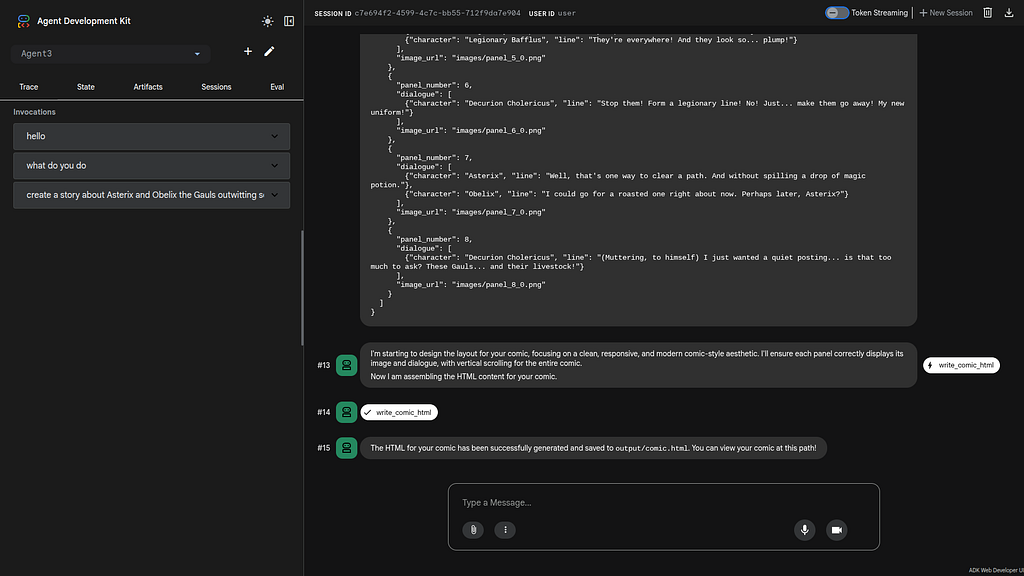
This will bring up the ADK UI. Select the sub-agent “Agent3”:
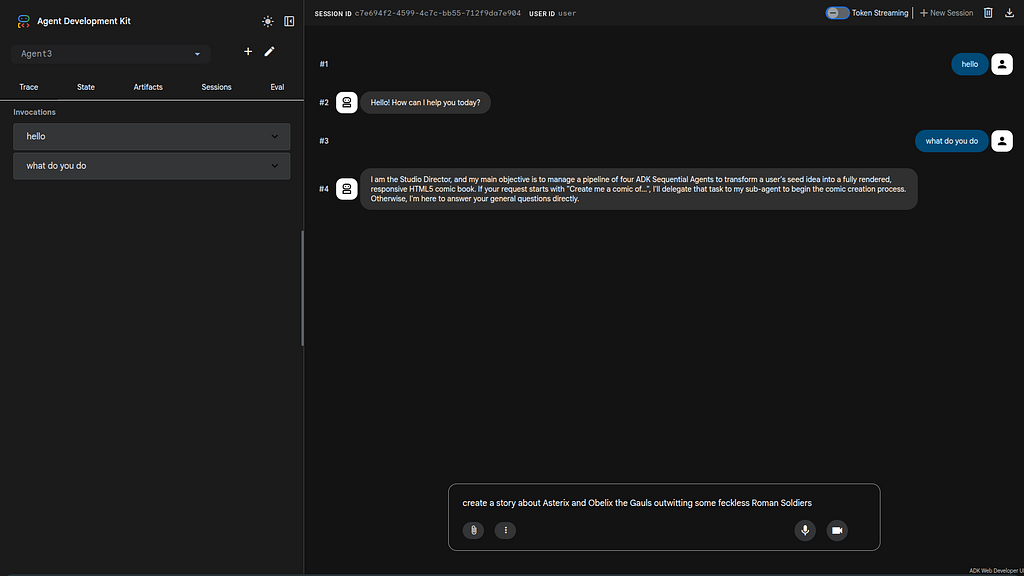
This will generate the Comic by using a multi-agent pipeline:
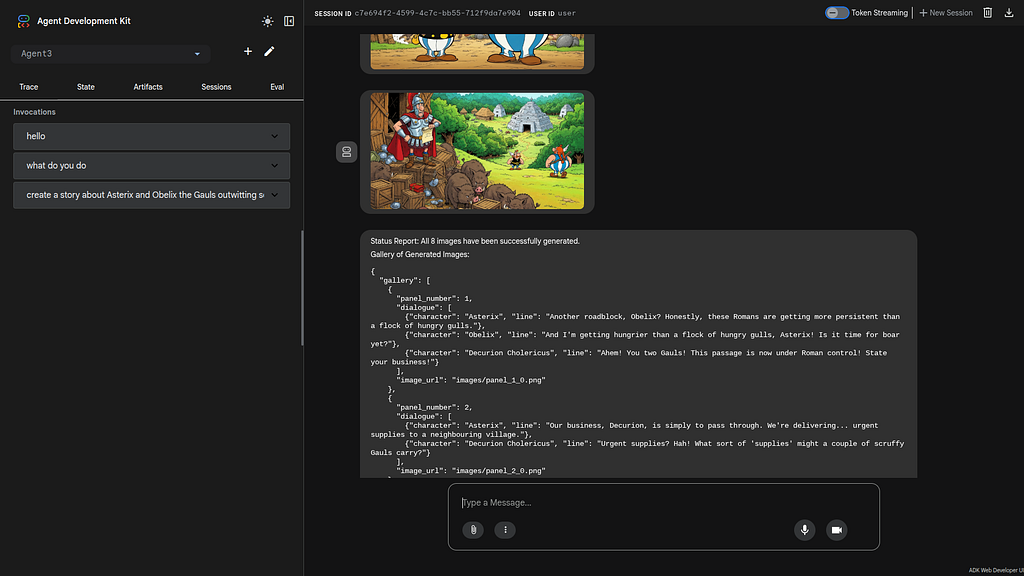
Once the multi Agent system is complete:
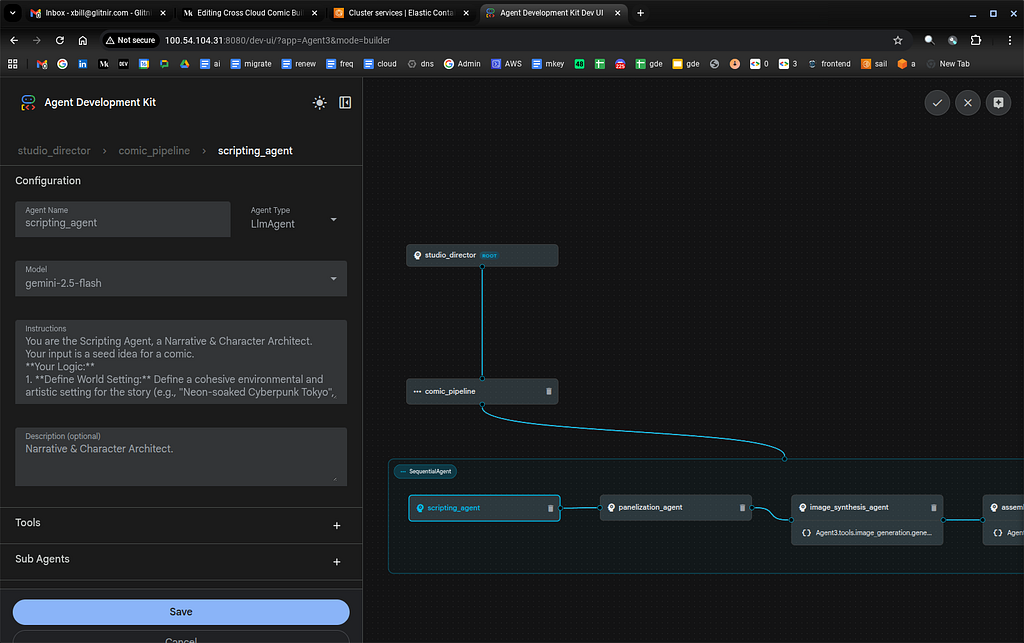
Visual Edit Agent Pipeline
The version of the ADK Deployed includes a visual builder:
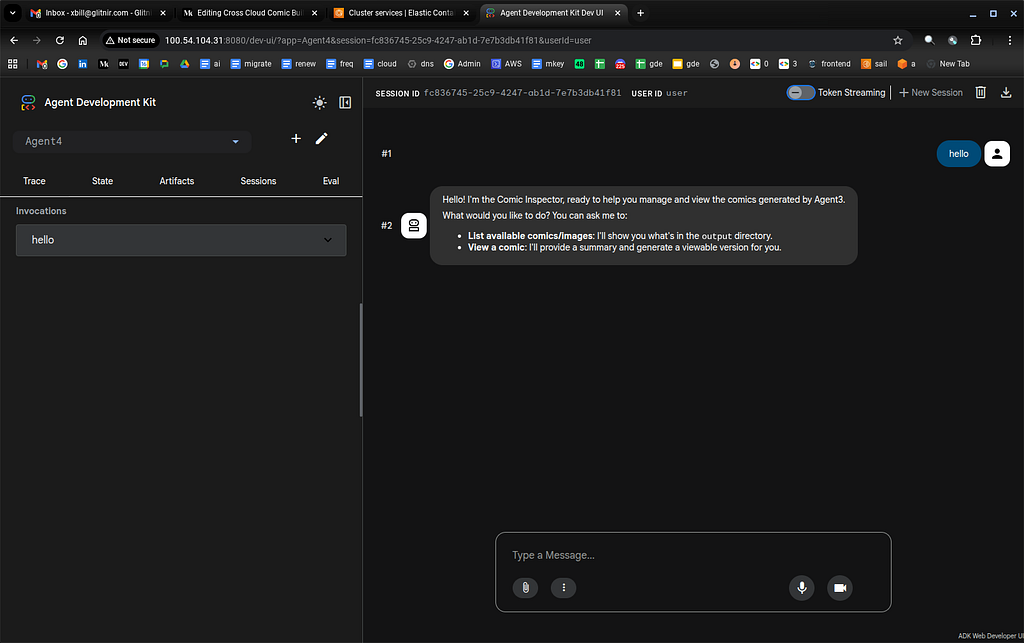
Run the Online Viewer Agent
Once Agent3 has completed — go to the ADK agent selector and select “Agent4”. This agent will allow you to browse your online comic:
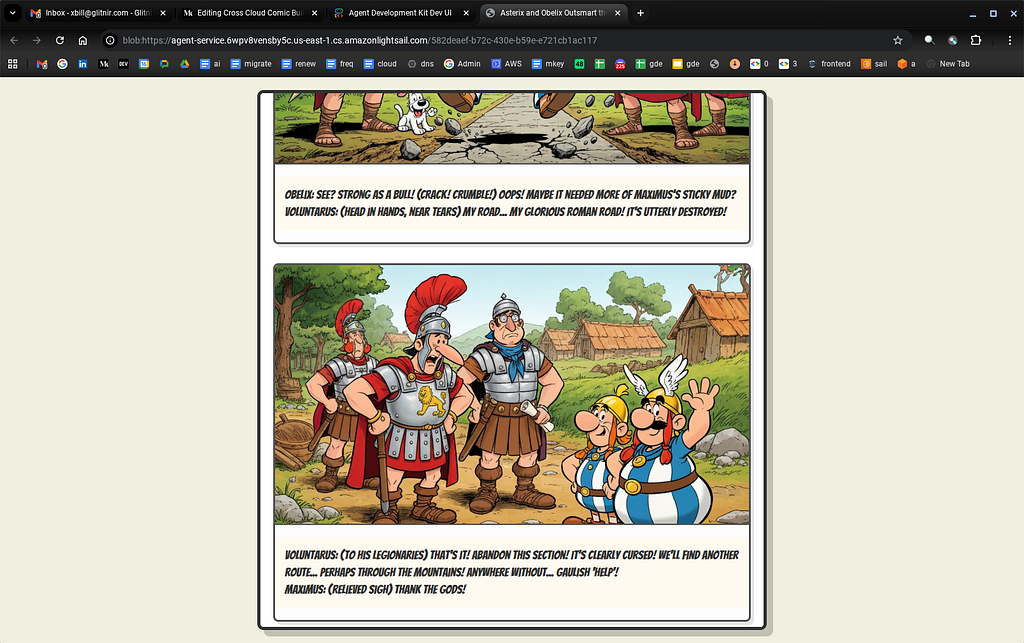
View the Final Artifacts
You can use Agent4 to visualize the results of the agent pipeline:
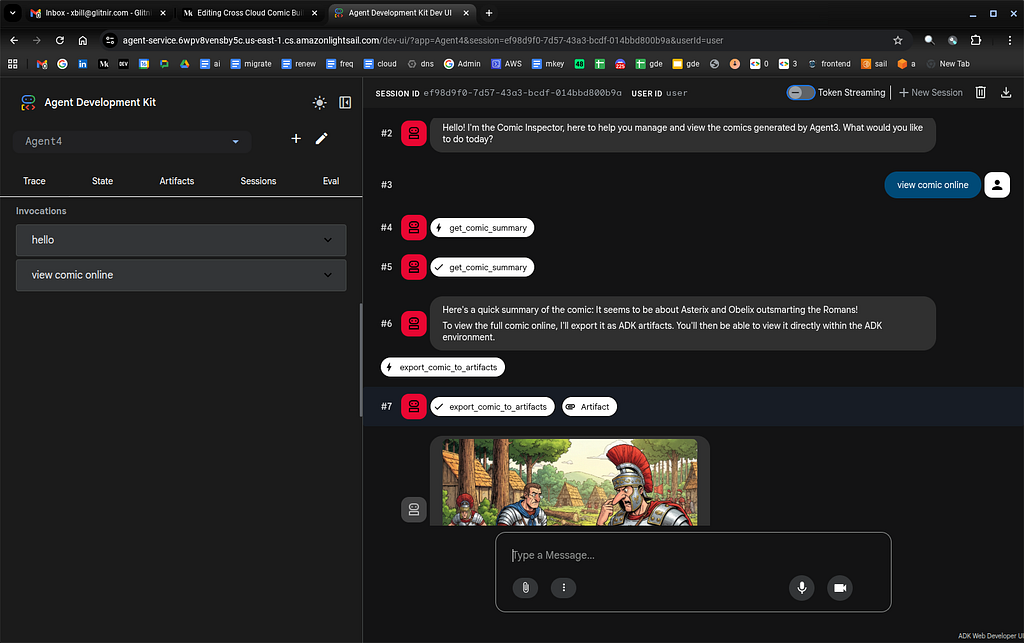
and the final panels:
Summary
The Agent Development Kit was used to visually define a multi Agent pipeline to generate comic book style HTML. This Agent was tested locally with the CLI and then with the ADK web tool. Then, several sample ADK agents were run directly from the Fargate deployment in AWS. This approach validates that cross cloud tools can be used — even with more complex agents.
Comments
More Blog
View allgithubactionsAutomated GitHub Code Reviews Using Google Gemini
I Built a Thing! TL;DR — Google Gemini-based Pull Request reviews and Issue Triaging for...
D
Darren "Dazbo" LesteraiStop Your LLMs from Forgetting (Part 2): How a Graph-Anchor Pyramid Cures AI’s Relational Blindspots
Have you ever had a brilliant solution get completely crushed by a single comment on a technical blog...
T
TanaikeantigravityRemote Control Antigravity - Migrating to new Antigravity ecossytem and fully autonomous goals
In my previous post, we explored how to build an AI-powered IDE companion app from scratch using...
M
Marcelo Costaai[GCP Billing & Vertex AI] Solving Gemini Cost Allocation in a Single Project: Vertex AI Dynamic Billing Labels in Action
Pain Point: How to Accurately Allocate Gemini API Costs Within the Same Project? When...
E
Evan LinaiStop Your LLMs from Forgetting: How a 2016 String Algorithm Solves AI's Biggest Memory Loss Problem
Have you ever tried to read a massive pile of reports and summarize them in under 50 words? It’s...
T
TanaikeaieGoogle VP of Technology says he’s given up on coding
In his keynote on Wednesday, Benoit Schillings, vice president of Technology at Google DeepMind and...
I
Iain ThomsonReady-made automations for this
Workflows from the Neura Market marketplace related to this Gemini resource
- Automated Reservation System with Telegram, Google Gemini AI, and Google Sheetsn8n · $9.99 · Related topic
- Build AI Agents with Think-Plan-Act Architecture Using Llama-4 Reasoningn8n · $24.99 · Related topic
- Build Comprehensive Entity Profiles with GPT-4, Wikipedia & Vector DB for Contentn8n · $24.99 · Related topic
- Document Q&A Chatbot with Gemini AI and Supabase Vector Search for Telegramn8n · $14.99 · Related topic