
Back to Blog gemini
 githubactions
 ai
ai antigravity
![[GCP Billing & Vertex AI] Solving Gemini Cost Allocation in a Single Project: Vertex AI Dynamic Billing Labels in Action](https://media2.dev.to/dynamic/image/width=1200,height=627,fit=cover,gravity=auto,format=auto/https%3A%2F%2Fdev-to-uploads.s3.us-east-2.amazonaws.com%2Fuploads%2Farticles%2Fb6yzipcljv2243f1njmh.png) ai
ai ai
ai aie
aie
Teaching a Robot to Play a Toddler Game: VLAs, Gemini 3 Flash, and First Orchard
Paul Ruiz February 9, 2026
0 views
As we think about the future of AI, we often land on robotics, or "Embodied AI", as the next logical...
As we think about the future of AI, we often land on robotics, or "Embodied AI", as the next logical frontier. It is the quest to take the reasoning capabilities of Large Language Models (LLMs) and make them physically useful in the real world.
That said, the robotics field is vast. It spans everything from mechanical and electrical engineering to software control systems, computer vision, and the complex math required just to handle basic movement.
While I come from a general IoT hobbyist background, I am still getting my bearings in the robotics space. To learn, I decided to dive into a project where I could run head-first into these challenges and work through them in real-time. For this experiment, I am using an SOARM101 robot arm to play the toddler board game First Orchard.
This project brings together two powerful AI components:
- A newly trained vision-language-action (VLA) model to control the robot's physical movements.
- Gemini 3 Flash to act as the "brain" tracking the game state and rules.
{% youtube zZHCAc5Sb-4 %}
In this post, I will walk you through exactly what this project is, the hurdles I faced, and how I built it.
The Game: First Orchard
First Orchard is a simple, cooperative game designed for two-year-olds. It consists of four circular tree tiles, each holding wooden fruit pieces, a path made of tiles, a crow game piece, and a six-sided die.
The die faces include:
- Four Colors: Matching the four fruit types (Red, Blue, Green, Yellow).
- The Basket: Allows the player to remove any fruit piece from the board.
- The Crow: Moves the crow game piece one step forward along the path.
The Objective: Roll the die and harvest all the fruit pieces before the crow reaches the end of the path.
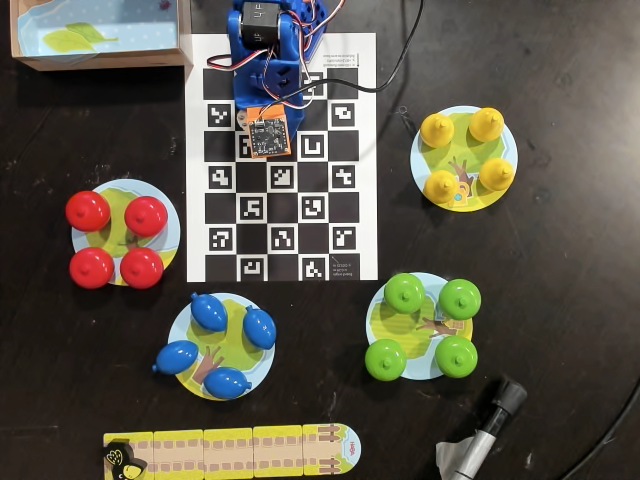
The Setup
For this project, I used an overhead webcam to provide a "God's eye view" of the board and a wrist camera mounted on the SOARM101 for close-up manipulation.
To keep the environment consistent for the VLA model, I taped down the path tiles, the tree tiles, and a small box used as the "harvest" area where the robot drops removed pieces. While the robot can reach every tree tile, the crow path was intentionally placed out of reach due to table space. For this iteration of the project, the crow is moved manually by a human player when its face is rolled.
Data Collection: The Grind
Data collection was, by far, the most tedious part of this project. After spending hours on it, I have a newfound respect for the teams that collect hundreds of thousands of hours of footage to train foundation models.
I originally considered two approaches:
- Task Decomposition: Breaking the movement down into smaller chunks (reaching, gripping, lifting) and solving them via individual policies or inverse kinematics.
- End-to-End Policy: Training a single policy that handles the entire sequence—moving to the fruit, gripping it, lifting, moving to the box, dropping it, and returning to the home position.
Since my goal was to push the boundaries of VLA capabilities in a home environment, I opted for the end-to-end flow. I defined four specific tasks to record:
- "Place the red fruit in the box"
- "Place the blue fruit in the box"
- "Place the green fruit in the box"
- "Place the yellow fruit in the box"
I aimed for 100 episodes per task, totaling 400 episodes. To get through it, I put on a TV show and settled into the task of teleoperating the arm using a leader/follower robot combination.
Here is the command I used to configure the cameras, robot IDs, and dataset settings:
 lerobot-record \
    --robot.type=so101_follower \
    --robot.port=/dev/ttyACM0 \
    --robot.id=follower_arm \
    --robot.cameras="{ wrist_cam_left: {type: opencv, index_or_path: 8, width: 640, height: 480, fps: 30}, overhead_cam: {type: opencv, index_or_path: 4, width: 640, height: 480, fps: 30}}"  \
    --teleop.type=so101_leader \
    --robot.port=/dev/ttyACM1 \
    --teleop.id=leader_arm \
    --display_data=true \
    --dataset.repo_id=paultr/first-orchard \
    --dataset.num_episodes=25 \
    --dataset.single_task="Place the blue fruit in the box"
I recorded the data in smaller batches, using the --resume=true flag to continue adding to the dataset. This was a lifesaver, allowing me to take breaks or recover if a session failed. When I finally finished, I had a library of short video clips capturing every nuance of the harvest.
You can explore the full dataset on HuggingFace here, or watch a set of episodes in action below:
{% youtube 8lKZ9YhLA9M %}
VLA Training: Trials, Errors, and Hardware Gore
With the data collected, the next step was training a model to handle the actual pick-and-place operation. This was the part of the project I was most curious about, so I ran multiple iterations to see how different models and parameters would behave in this specific environment.
Iteration 1: The Quick Test
I started with a very fast (~2 hour) refinement of SmolVLA. I used a small batch size of 8 and only 20,000 steps. I also renamed my camera inputs to camera1 and camera2 to match the SmolVLA convention.
!lerobot-train \
  --policy.path=lerobot/smolvla_base \
  --policy.repo_id=paultr/tmp_smolvla \
  --dataset.repo_id=paultr/first-orchard \
  --batch_size=8 \
  --steps=20000 \
  --output_dir=outputs/train/tmp_smolvla \
  --job_name=my_smolvla_training \
  --policy.device=cuda \
  --rename_map='{"observation.images.overhead_cam": "observation.images.camera1", "observation.images.wrist_cam_left": "observation.images.camera2"}'
The results were mixed. Some episodes worked amazingly well given the short training time:
{% youtube TbiwvgS5Jw4 %}
Others were off-target, "twitchy," or resulted in the robot hovering indefinitely:
{% youtube zrOAkdSBBQ4 %} {% youtube _d1iOvM1dcU %}
Iteration 2: Pushing the Boundary with SmolVLA
While I was convinced that the model could work, I was curious to see if more resources would yield a smoother result. For the next step, I trained SmolVLA for 100,000 steps with a much larger batch size (64). I ran this on an A-100 high-memory Colab session because, as truth would have it, I appreciate being able to spend Google’s money to see just how far I can take a project. You can find the colab I used here.
!lerobot-train \
  --policy.path=lerobot/smolvla_base \
  --dataset.repo_id=paultr/first-orchard \
  --batch_size=64 \
  --steps=100000 \
  --save_freq=10000 \
  --output_dir=/content/drive/MyDrive/outputs/first-orchard-smolvla \
  --job_name=smolvla_first_orchard \
  --policy.device=cuda \
  --policy.push_to_hub=true \
  --policy.repo_id=paultr/first-orchard-smolvla \
  --rename_map='{"observation.images.overhead_cam": "observation.images.camera1", "observation.images.wrist_cam_left": "observation.images.camera2"}'
The quality for this new model was significantly better. It still wasn't perfect, but it was reliable enough to play a real game.
{% youtube 8LGIwl8U_lU %}
Iteration 3: The Pi0 Disaster
Still curious about alternative architectures, I decided to try training a Pi0-Fast model. I spent about five days training on an A-100 for 200,000 steps. Since Colab sessions shut down after about 24 hours on the Pro plan, I had to link my Google Drive to save and resume checkpoints periodically. You can find the Colab that I used here.
!lerobot-train \
  --dataset.repo_id=paultr/first-orchard \
  --policy.type=pi0_fast \
  --policy.pretrained_path=lerobot/pi0fast-base \
  --output_dir=/content/drive/MyDrive/outputs/first-orchard_pi0_fast \
  --policy.repo_id=paultr/first-orchard_pi_fast \
  --steps=200000 \
  --batch_size=16 \
  --policy.chunk_size=32 \
  --policy.n_action_steps=8 \
  --policy.device=cuda \
  --save_freq=5000
When the model was finally done, I had a real bad time.
During testing, the arm folded in on itself and snapped the 3D-printed camera mount. Luckily, I had extras printed, so it was a quick swap, but no amount of code changes or camera adjustments that I could figure out were able to get this model to behave.
{% youtube ZOc1B3c2jVU %} {% youtube lcdf8gbI69k %}
On the plus side, I learned a lot about LeRobot’s optional training flags while trying to debug the carnage. Ultimately, I decided to finish the project with the SmolVLA model, but I'll revisit other models at some point.
Setting up the Python App
Now that the training is out of the way, we can get into the actual code! We’ll start by setting up the base project structure. This handles the fundamental connection to the SOARM101 and establishes a "Home" pose. Even though it's simple, there’s always a little thrill the first time you run a script and the robot moves to a pose on its own.
import sys
import time
import random
import torch
import numpy as np
from PIL import Image
from pydantic import BaseModel, Field

from lerobot.cameras.opencv.configuration_opencv import OpenCVCameraConfig
from lerobot.datasets.utils import hw_to_dataset_features
from lerobot.policies.factory import make_pre_post_processors
from lerobot.policies.smolvla.modeling_smolvla import SmolVLAPolicy
from lerobot.policies.utils import build_inference_frame, make_robot_action
from lerobot.robots.so_follower import SO101Follower, SO101FollowerConfig

FOLLOWER_PORT = "/dev/ttyACM0"
FOLLOWER_ID = "follower_arm"
ROBOT_TYPE = "so101_follower"

# Pre-defined motor positions to bring the arm to a safe starting state
HOME_VALUES = {
    'shoulder_pan.pos': -3.7974683544303787, 'shoulder_lift.pos': -98.51155503329416,
    'elbow_flex.pos': 98.1199641897941, 'wrist_flex.pos': 76.095278604849,
    'wrist_roll.pos': -51.585014409221905, 'gripper.pos': 0.990099009901
}

device = None
robot = None

def home():
    if robot:
        robot.send_action(HOME_VALUES)
        time.sleep(1)

def init():
    global robot
    print("Connecting to Robot...")
    # In the final version, camera_config will be defined here
    robot_cfg = SO101FollowerConfig(port=FOLLOWER_PORT, id=FOLLOWER_ID, cameras=camera_config)
    robot = SO101Follower(robot_cfg)
    robot.connect()
    home()

def main():
    init()
    if robot:
        robot.disconnect()

if __name__ == "__main__":
    main()
Integrating the VLA
With the foundation laid, we need to update the script to load the VLA model that we worked so hard to train. First, we’ll add some configuration constants to the top of the file, including the model ID and camera settings.
Note the MAX_STEPS value: 900 steps at 30 FPS gives the robot roughly 30 seconds to complete a pick-and-place task before it "gives up."
MAX_STEPS = 900
TOP_CAM_INDEX = 6
TOP_CAM_WIDTH = 640
TOP_CAM_HEIGHT = 480
TOP_CAM_FPS = 30

WRIST_CAM_INDEX = 4
WRIST_CAM_WIDTH = 640
WRIST_CAM_HEIGHT = 480
WRIST_CAM_FPS = 30

MODEL_ID = "paultr/first-orchard-smolvla-run2"
TASK_TEMPLATE = "Place the {} fruit in the box"

model = None
preprocess = None
postprocess = None
dataset_features = None
Next, let's refine the init() function. This version loads the model into GPU memory and sets up the pre- and post-processors that bridge the gap between raw camera pixels and the model's action outputs.
def init():
    global device, robot, model, preprocess, postprocess, dataset_features
    device = torch.device("cuda" if torch.cuda.is_available() else "cpu")

    model = SmolVLAPolicy.from_pretrained(MODEL_ID)
    model.to(device)

    preprocess, postprocess = make_pre_post_processors(
        model.config,
        MODEL_ID,
        preprocessor_overrides={"device_processor": {"device": str(device)}},
    )

    camera_config = {
        "camera1": OpenCVCameraConfig(
            index_or_path=TOP_CAM_INDEX, width=TOP_CAM_WIDTH, height=TOP_CAM_HEIGHT, fps=TOP_CAM_FPS),
        "camera2": OpenCVCameraConfig(
            index_or_path=WRIST_CAM_INDEX, width=WRIST_CAM_WIDTH, height=WRIST_CAM_HEIGHT, fps=WRIST_CAM_FPS),
    }

    print("Connecting to Robot...")
    robot_cfg = SO101FollowerConfig(port=FOLLOWER_PORT, id=FOLLOWER_ID, cameras=camera_config)
    robot = SO101Follower(robot_cfg)
    robot.connect()

    home()

    # Map hardware features to dataset features for the VLA
    action_features = hw_to_dataset_features(robot.action_features, "action")
    obs_features = hw_to_dataset_features(robot.observation_features, "observation")
    dataset_features = {**action_features, **obs_features}
Executing the Action
Finally, we add run_task(). This is the core VLA inference loop. It takes a color (red, blue, green, or yellow), formats it into the task template, and asks the model to generate robot actions step-by-step until the harvest is complete.
def run_task(color):
    for i in range(MAX_STEPS):
        obs = robot.get_observation()

        # Build the frame for the model to "see" and "read" the task
        obs_frame = build_inference_frame(
            observation=obs,
            ds_features=dataset_features,
            device=device,
            task=TASK_TEMPLATE.format(color),
            robot_type=ROBOT_TYPE
        )

        processed_obs = preprocess(obs_frame)
        action = model.select_action(processed_obs)
        action = postprocess(action)

        # Convert model output back into physical motor commands
        robot_action = make_robot_action(action, dataset_features)
        robot.send_action(robot_action)
Building a Game Loop with Gemini
Now that the foundational infrastructure is in place, it’s time to actually play the game. First Orchard turns are driven by a speciality die, so we’ll start by simulating that in code.
def roll_dice():
    outcomes = {1: 'crow', 2: 'blue', 3: 'red', 4: 'green', 5: 'yellow', 6: 'basket'}
    res = outcomes[random.randint(1, 6)]
    print(f"Dice Roll: {res}")
    return res
Next, we update the main() function to react to these outcomes. If we roll a color (2-5), we call our VLA task. If we roll a crow or a basket, we’ll need some specialized logic.
def main():
    init()
    try:
        while True:
            home()

            result = roll_dice()

            if result == 'crow':
                move_crow()
            elif result == 'basket':
                basket_rolled()
            else:
                run_task(result)
    except KeyboardInterrupt:
        print("\nStopping game...")
    finally:
        if robot:
            robot.disconnect()
Adding the "Brain": Gemini 3 Flash
For the crow and basket options to work, the robot needs to do some higher-level reasoning. For example, if the crow moves to the final tile, the game is over. If a basket is rolled, the robot needs to look at the board and decide which fruit color is the most "urgent" to harvest.
To handle this, I brought in Gemini 3 Flash.
from google import genai
from google.genai import types

GEMINI_MODEL_NAME = "gemini-3-flash-preview"
GENAI_CLIENT = genai.Client()
Note: You'll need to install the dependency via pip install -q -U google-genai and export your API key with export GEMINI_API_KEY="your_key". This is the step I almost always forget, so double-check your environment variables before running!
Defining the Rules
To get accurate results, I provided Gemini with a detailed set of system instructions and prompts. This helps the model distinguish between the wooden fruit pieces, the circular tree tiles, and the robot arm itself.
SYSTEM_INSTRUCTIONS = "You will receive images from a top-down perspective of a simple game called First Orchard. There are four circular tiles that can each have between 0 and 4 game pieces shaped like a fruit with the colors green, blue, red, and yellow. All fruit of the same color will be grouped together on their own circle tile. There is also a line of tiles representing a path with a crow game piece on one of the tiles at all times. The end of that path is represented by the tile with a rounded end. There will be a blue robot arm on the edge of the image that should not be relevant to the tasks you will be asked to perform. There is also a box beside that robot arm that may be empty or may contain fruit game pieces. Fruit game pieces in the box are considered out of play and should be ignored during counting operations."

BASKET_PROMPT = "Locate the game pieces shaped like red, blue, green, and yellow fruit. Ignore any that are in the box besides the robot. Count how many pieces are in play per group. You should return the 'color' of whichever grouping has the most pieces. Select at random if there is a tie for the most pieces in a group."
Structured Output & Agentic Vision
To make the response easy to handle in Python, I’m using Gemini's Structured Output feature. Instead of parsing messy strings, Gemini will return a clean object based on a Pydantic model.
class BasketColor(BaseModel):
    color: str = Field(description="Color of the group with the most pieces in play.")
Now we can implement basket_rolled(). You’ll notice two key settings here:
- Thinking Level: For simple perception, I keep this at
lowto save on latency. - ToolCodeExecution: This enables Agentic Vision. Gemini can actually "zoom in" and crop the image to get a better look at the tiles before it makes a decision. This is perfect for correctly counting small wooden fruits.
def basket_rolled():
    image = get_image_from_robot()

    response = GENAI_CLIENT.models.generate_content(
        model=GEMINI_MODEL_NAME,
        contents=[BASKET_PROMPT, image],
        config=types.GenerateContentConfig(
            system_instruction=SYSTEM_INSTRUCTIONS,
            response_mime_type="application/json",
            response_json_schema=BasketColor.model_json_schema(),
            thinking_config=types.ThinkingConfig(include_thoughts=False, thinking_level="low"),
            tools=[types.Tool(code_execution=types.ToolCodeExecution())]
        )
    )

    basket_data = BasketColor.model_validate_json(response.text)
    run_task(basket_data.color)
Connecting the Eyes
To send an image to Gemini, we need a way to grab a frame from the robot's cameras. Since the VLA is already using them, we can just pull the latest observation from the camera1 (overhead) feed and convert it into a format Gemini understands.
def get_image_from_robot():
    obs = robot.get_observation()
    pixel_values = obs["camera1"]

    if torch.is_tensor(pixel_values):
        img_np = pixel_values.to(torch.uint8).cpu().numpy()
    else:
        img_np = pixel_values.astype(np.uint8)

    # Ensure the dimensions are correct for PIL (H, W, C)
    if img_np.ndim == 3:
        if img_np.shape[0] == 3:
            img_np = np.transpose(img_np, (1, 2, 0))

    return Image.fromarray(img_np)
Finally, we handle the crow. Because the crow's path was out of reach for my specific robot setup, I opted for a "human-in-the-loop" approach.
def move_crow():
    print("ACTION REQUIRED: Move the crow one step forward manually!")
    time.sleep(10)
End Game Conditions
At this point, the robot can move fruit and handle the die, but it doesn't actually know when the game is over. If the trees are empty or the crow reaches the final tile, the loop would just keep running. To fix this, we need Gemini to act as the referee after every turn.
First, let's define a new prompt and a Pydantic model to handle the game's win/loss state.
GAME_END_PROMPT = "Analyze the image to determine the current state of the game. Look at the path tiles: if the crow piece is on the final tile (rounded edge with 'HABA'), the game is lost (result: 'crow'). Look at the four circular fruit tiles: if all fruit pieces have been removed from these tiles, ignoring any in the box, the game is won (result: 'empty'). If neither of these conditions is met, the game continues (result: 'continue'). Return the corresponding string result. Zoom in and crop on the path tiles and circular tiles to get a clearer view if needed."

class GameState(BaseModel):
    status: str = Field(description="The current state of the game: 'crow', 'empty', or 'continue'.")
Now, we can implement check_game_state(). This function asks Gemini to look at the overhead view and tell us if we should keep playing or stop.
def check_game_state():
    print("Checking game state...")
    image = get_image_from_robot()

    response = GENAI_CLIENT.models.generate_content(
        model=GEMINI_MODEL_NAME,
        contents=[GAME_END_PROMPT, image],
        config=types.GenerateContentConfig(
            system_instruction=SYSTEM_INSTRUCTIONS,
            response_mime_type="application/json",
            response_json_schema=GameState.model_json_schema(),
            thinking_config=types.ThinkingConfig(include_thoughts=False, thinking_level="low"),
            tools=[types.Tool(code_execution=types.ToolCodeExecution())]
        )
    )

    game_data = GameState.model_validate_json(response.text)

    if game_data.status == 'crow':
        print("GAME OVER: The crow has reached the orchard!")
        sys.exit(0)
    elif game_data.status == 'empty':
        print("GAME OVER: You win! All fruits are harvested.")
        sys.exit(0)
Optimizing the Game Flow
Calling Gemini every single turn is effective, but we can be a bit smarter about it. For instance, if the robot rolls "Red" but we already know the red tree is empty, it’s a wasted turn—and a wasted API call if we ask Gemini to check the whole board.
To optimize this, I introduced a should_check_game_state flag and a set called EMPTY_FRUITS to cache the state of the board locally.
should_check_game_state = True
EMPTY_FRUITS = set()

# We update run_task and move_crow to set should_check_game_state = True
# whenever a physical change happens on the board.
Next, I added check_fruit_exists(). This function specifically checks if a rolled color is still available on the board. If Gemini sees that a tree is empty, we add that color to our EMPTY_FRUITS set so we can skip the check next time that color is rolled.
FRUIT_CHECK_PROMPT = "Look at the four circular tiles. Is there at least one {} fruit piece remaining on its designated tile? Ignore pieces inside the box. Return True if at least one is present, otherwise return False. Crop and zoom in on the individual circular tiles to help ignore the box and correctly identify the presence of fruit game pieces."

class FruitExists(BaseModel):
    exists: bool = Field(description="True if the specified fruit color is still on the circular tiles, False otherwise.")

def check_fruit_exists(color):
    if color in EMPTY_FRUITS:
        print(f"Skipping: {color} fruit is already gone.")
        return False

    image = get_image_from_robot()
    print(f"Gemini: Checking if {color} fruit is available...")

    response = GENAI_CLIENT.models.generate_content(
        model=GEMINI_MODEL_NAME,
        contents=[FRUIT_CHECK_PROMPT.format(color), image],
        config=types.GenerateContentConfig(
            system_instruction=SYSTEM_INSTRUCTIONS,
            response_mime_type="application/json",
            response_json_schema=FruitExists.model_json_schema(),
            tools=[types.Tool(code_execution=types.ToolCodeExecution())]
        )
    )

    fruit_data = FruitExists.model_validate_json(response.text)
    if not fruit_data.exists:
        EMPTY_FRUITS.add(color)

    return fruit_data.exists
The Final Loop
Finally, we update the main() loop to tie all these pieces together. The robot now homes itself, verifies the game isn't over, rolls the die, and uses Gemini to confirm the move is valid before handing control over to the VLA for the physical harvest.
def main():
    init()
    try:
        while True:
            home()
            check_game_state()

            result = roll_dice()

            if result == 'crow':
                move_crow()
            elif result == 'basket':
                basket_rolled()
            else:
                if check_fruit_exists(result):
                    run_task(result)
                else:
                    continue
    except KeyboardInterrupt:
        print("\nStopping game...")
    finally:
        if robot:
            robot.disconnect()

if __name__ == "__main__":
    main()
Future Explorations: Beyond "Done"
While I’m very happy with how this project turned out, I’m a big believer in the saying, "Perfection is the enemy of done." In robotics, you could spend a lifetime tweaking a single movement, so I’ve decided to treat this as a successful baseline and keep a "wishlist" of things I’d love to explore in future iterations.
- Dynamic Termination: Currently, the VLA runs for a fixed number of steps. I really want to update the loop so the robot stops the moment the task is complete. I have some ideas about using the Gemini Live API to provide real-time visual feedback to the robot.
- Exploring VLA Architectures: I want to experiment with additional VLA models and action techniques to see how they compare. While SmolVLA was a great starting point, I’m curious to revisit the Pi0-Fast model or explore ACT (Action Chunking with Transformers). Documentation for these in the LeRobot ecosystem is still relatively sparse, and I think getting more successful implementations out there would be a general win for the robotics community.
- Local State Tracking: The game relies heavily on Gemini to understand the board state. If the VLA is working successfully and the robot isn't crashing (admittedly big "ifs"!), I’d like to modify the code to track the fruit count locally. This would allow me to only trigger a Gemini "referee" call when a count hits zero or the crow is moved, making the game much faster.
Final Thoughts
At the end of the day, this was an experiment with toys, but the problems I ran into like data scarcity, hardware failures, and model inference quirks, are the same ones facing "real" robotics engineers every day. There isn't anything drastic I’d change about this project as I think it served its purpose as a learning project very well.
I’m looking forward to taking what I learned here and applying it to my next project, so hopefully I catch you there too.
Thanks for following
Comments
More Blog
View allgithubactionsAutomated GitHub Code Reviews Using Google Gemini
I Built a Thing! TL;DR — Google Gemini-based Pull Request reviews and Issue Triaging for...
D
Darren "Dazbo" LesteraiStop Your LLMs from Forgetting (Part 2): How a Graph-Anchor Pyramid Cures AI’s Relational Blindspots
Have you ever had a brilliant solution get completely crushed by a single comment on a technical blog...
T
TanaikeantigravityRemote Control Antigravity - Migrating to new Antigravity ecossytem and fully autonomous goals
In my previous post, we explored how to build an AI-powered IDE companion app from scratch using...
M
Marcelo Costaai[GCP Billing & Vertex AI] Solving Gemini Cost Allocation in a Single Project: Vertex AI Dynamic Billing Labels in Action
Pain Point: How to Accurately Allocate Gemini API Costs Within the Same Project? When...
E
Evan LinaiStop Your LLMs from Forgetting: How a 2016 String Algorithm Solves AI's Biggest Memory Loss Problem
Have you ever tried to read a massive pile of reports and summarize them in under 50 words? It’s...
T
TanaikeaieGoogle VP of Technology says he’s given up on coding
In his keynote on Wednesday, Benoit Schillings, vice president of Technology at Google DeepMind and...
I
Iain ThomsonReady-made automations for this
Workflows from the Neura Market marketplace related to this Gemini resource
- Build AI Agents with Think-Plan-Act Architecture Using Llama-4 Reasoningn8n · $24.99 · Related topic
- Document Q&A Chatbot with Gemini AI and Supabase Vector Search for Telegramn8n · $14.99 · Related topic
- AI-Powered Upwork Cover Letter Generator - Pinecone, Groq, Google Gemini, SerpAPIn8n · $14.99 · Related topic
- Discover Business Leads with Gemini, Brave Search, and Web Scrapingn8n · $14.99 · Related topic