
Back to Blog ai
ai
 gemma
gemma community
 ai
ai ai
ai githubactions
 ai
ai
The (no longer) missing multi-agent pattern: triggering dynamic workflows from an agent
Remigiusz Samborski July 9, 2026
0 views
When building multi-agent systems, rigid state graphs quickly fall apart in the face of dynamic user...
When building multi-agent systems, rigid state graphs quickly fall apart in the face of dynamic user inputs. Imagine building a smart assistant: a user hands you a checklist of three household chores today, but tomorrow it might be a list of ten software debugging tasks. Because the number of tasks, their sequence, and their execution details are entirely runtime-dependent, you cannot hardcode this path at design time. Forcing dynamic lists of work into a static graph-based workflow can lead to fragile, over-engineered code. You need a workflow that adapts dynamically at runtime.
The Google Agent Development Kit (ADK) provides a flexible programming model to define dynamic workflows. With the release of ADK 2.4.0, triggering these workflows has become even more seamless: you can register a Workflow directly in an agent's tools list, allowing the coordinator agent to execute it automatically as a first-class tool.
In this article, you learn how to configure and trigger a dynamic workflow directly from a coordinator agent. This guide uses a task list coordination example, but you can adjust this pattern to other dynamic orchestration needs.
The architecture of a dynamic workflow
Static workflows define the execution path at design time. Dynamic workflows, however, allow agents to invoke tools, spawn other nodes, and schedule sub-agents conditionally at runtime.
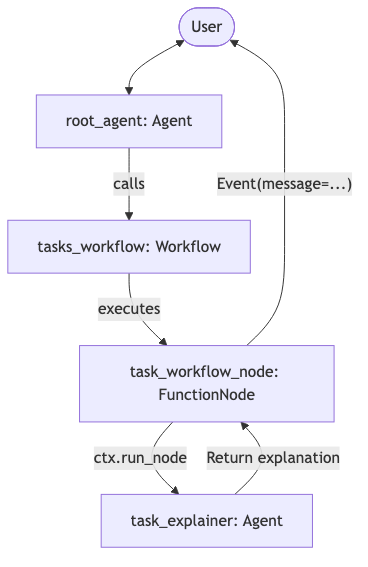
The system consists of three main components:
- Root agent (
root_agent): Gathers the list of tasks from the user, requests final approval, and directly calls thetasks_workflowtool. - The workflow (
tasks_workflow): AWorkflowthat iterates over the approved tasks. - Sub-agent (
task_explainer): AnAgenttasked with generating a step-by-step execution plan for each task.
Here is the architectural diagram of the solution:
Technical implementation
Let's break down how to implement this solution using the Google ADK library in Python. The complete code resides in the devrel-demos repository with core logic in the agent.py file.
1. Initialize the environment and model
First, import the required ADK modules and set up the Gemini model. This example uses gemini-3.5-flash with Gemini Enterprise Agent Platform APIs:
import os

import google.auth
from google.adk import Agent, Context, Event, Workflow
from google.adk.apps import App
from google.adk.models import Gemini
from google.adk.workflow import node
from google.genai import types

# ==============================================================================
# Initialize the environment
# ==============================================================================
_, project_id = google.auth.default()
if project_id:
    os.environ["GOOGLE_CLOUD_PROJECT"] = project_id
os.environ["GOOGLE_CLOUD_LOCATION"] = "global"
os.environ["GOOGLE_GENAI_USE_VERTEXAI"] = "True"

# ==============================================================================
# Model Definition
# ==============================================================================
model = Gemini(
    model="gemini-3.5-flash",
    retry_options=types.HttpRetryOptions(attempts=3),
)
2. Define the sub-agent
The sub-agent task_explainer takes a task description and writes a step-by-step execution plan:
task_explainer = Agent(
    name="task_explainer",
    model=model,
    instruction="""
    You are a task execution planner subagent.
    Given a task description, write a short, step-by-step execution plan
    explaining how you would perform the task. Be concise and clear.
    """,
)
3. Implement the dynamic workflow node
To support dynamic execution, define two functions decorated with @node. First node accepts the parent context ctx and a list of task strings. This is the main node that iterates over the list of tasks and explains them:
@node(rerun_on_resume=True)
async def task_workflow_node(ctx: Context, node_input: list[str]):
    """Workflow that iterates over the list of tasks and explains them."""
    for task in node_input:
        # Yield progress update
        yield Event(message=f"⏳ Starting task: {task}...")  # type: ignore

        # Dynamically trigger subagent
        explanation = await ctx.run_node(task_explainer, node_input=task)
        explanation_content = getattr(explanation, "text", None) or str(explanation)

        # Mark as done
        yield Event(
            message=(
                f"✅ Task Done: {task}\n\n"
                f"**Execution Explanation:**\n{explanation_content}"
            )  # type: ignore
        )
The second node is just returning a message that all tasks were completed. It’s used here to demonstrate a sequential workflow execution:
@node
async def task_workflow_end(ctx: Context):
    yield Event(message="🎉🚀 All tasks executed successfully! ✨")  # type: ignore
4. Define the workflow
Next, define the Workflow object. A Workflow consists of nodes and directed edges between them. Since ADK 2.4.0, a Workflow can be registered directly as a first-class tool for an agent. To do so, make sure to define the name, description, and input_schema so the parent agent knows how to call it. Whereas edges describes the order of workflow steps execution:
tasks_workflow = Workflow(
    name="tasks_workflow",
    description="Iterates over the list of tasks and explains them.",
    input_schema=list[str],
    edges=[
        ("START", task_workflow_node, task_workflow_end),
    ],
)
5. Define the root coordinator agent
Finally, the root_agent coordinator manages user interaction. The agent collects the list of tasks, asks for confirmation, and, once approved, executes the tasks_workflow directly. Notice how we pass tasks_workflow directly to the tools array:
root_agent = Agent(
    name="root_agent",
    model=model,
    instruction="""
    You are a task coordinator agent.
    Your goal is to gather a list of tasks that the user wants to execute.
    Talk to the user to gather the list of tasks.
    Once you have a list of tasks, present them clearly to the user and ask
    for their final approval to execute them.
    Do NOT execute anything until the user explicitly approves.
    Once the user approves the list of tasks, call the tool `tasks_workflow` with
    the list of tasks.
    """,
    tools=[tasks_workflow],
)
Testing the flow locally
You can run and test this agent locally using the agents-cli playground.
-
If you haven't already installed
agents-cliand its skills, run the setup command:uvx google-agents-cli setup -
Clone and enter the demo directory:
npx -y giget@latest gh+git:google/adk-samples/python/agents/workflow-dynamic workflow-dynamic cd workflow-dynamic -
Install required packages::
agents-cli install -
Start the playground:
agents-cli playground -
Interact with the Agent:
- Open http://localhost:8080 in your browser.
- Select app from the dropdown list at the top.
- Type a list of tasks in the chat box. For example:
1. Empty the trash. 2. Feed the dog. 3. Do the laundry. - The coordinator agent lists the tasks and asks for your approval.
- Once you reply with "Yes" or "Approved", the
tasks_workflowtool fires. - The playground console streams live updates as
tasks_workflowiterates through each task and returns plans generated by thetask_explainersub-agent.
Screencast demo
The following screencast demonstrates the working solution:
{% embed https://www.youtube.com/watch?v=umYYAmMcd8c %}
Summary
Dynamic workflows in Google ADK allow agents to perform complex, runtime-determined orchestrations. By leveraging Workflow and the @node decorator, you can build adaptable multi-agent applications that respond to dynamic requirements.
Continue exploring:
- ADK 2.0 dynamic workflows documentation
- ADK 2.0 announcement
- Workflow as Tool core feature
- Sample code in GitHub
Thanks for reading
If you found this article helpful, please consider sharing it with your friends on socials.
I'm always eager to share my learnings or chat with fellow developers and AI enthusiasts, so feel free to follow me on LinkedIn, X or Bluesky.
Comments
More Blog
View allgemmaFive Gemma-4 models, one accelerator: what porting E2B 31B to AWS Inferentia2 taught me
I ported the whole Gemma-4 family — E2B, E4B, 12B, 31B, and the 26B-A4B MoE — to run on...
X
xbillcommunityHey DEV, I'm Tobore. Let's actually connect.
Hey DEV, I'm Tobore. Let's actually connect. I've been on here for a while now, mostly writing and...
L
Laurina AyarahaiI burned through thousands of AI tokens. Then a friend did it for free
(yep, kinda clickbait, just for the funsies 😊) At the beginning of the year, I relaunched my...
P
Paulo HenriqueaiClaude might be saturating your machine
My laptop was sitting idle with the fan at full tilt. Nothing was running that I knew of. The culprit...
S
Sidhant PandagithubactionsAutomated GitHub Code Reviews Using Google Gemini
I Built a Thing! TL;DR — Google Gemini-based Pull Request reviews and Issue Triaging for...
D
Darren "Dazbo" LesteraiWhat is an "agentic harness," actually?
I've been hearing the word "harness" thrown around a lot lately. I assumed it just meant "the IDE" or...
T
Tilde A. ThuriumReady-made automations for this
Workflows from the Neura Market marketplace related to this CoPilot resource
- Extract Text from Images & PDFs via Telegram with Mistral OCR to Markdownn8n · $24.99 · Related topic
- Extract Data from YAPE Receipts via Telegram OCR and Store in Google Sheetsn8n · $24.99 · Related topic
- Building a RAG Chatbot for Movie Recommendations with Qdrant and OpenAIn8n · $14.99 · Related topic
- Microsoft Outlook AI Email Assistant with Contact Support from Monday and Airtablen8n · $14.99 · Related topic