
Back to Blog githubactions
Performance — Native Composite Actions with
 gemma
gemma community
 ai
ai ai
ai ai
ai devchallenge
Automated GitHub Code Reviews Using Google Gemini
Darren "Dazbo" Lester July 16, 2026
0 views
I Built a Thing! TL;DR — Google Gemini-based Pull Request reviews and Issue Triaging for...
title: "Automated GitHub Code Reviews Using Google Gemini" published: true date: "2026-07-16 11:16:35 UTC" tags: "githubactions,pullrequest,cicdpipeline,googlegemini" canonical_url: "https://medium.com/google-cloud/automated-github-code-reviewsusing-google-gemini-7b4d027b3092" cover_image: "https://cdn-images-1.medium.com/max/1024/1*PYnfVcPz2Rm6WNA0mPYQPg.jpeg"
I Built a Thing!
TL;DR — Google Gemini-based Pull Request reviews and Issue Triaging for all your GitHub repositories and CI/CD pipelines.
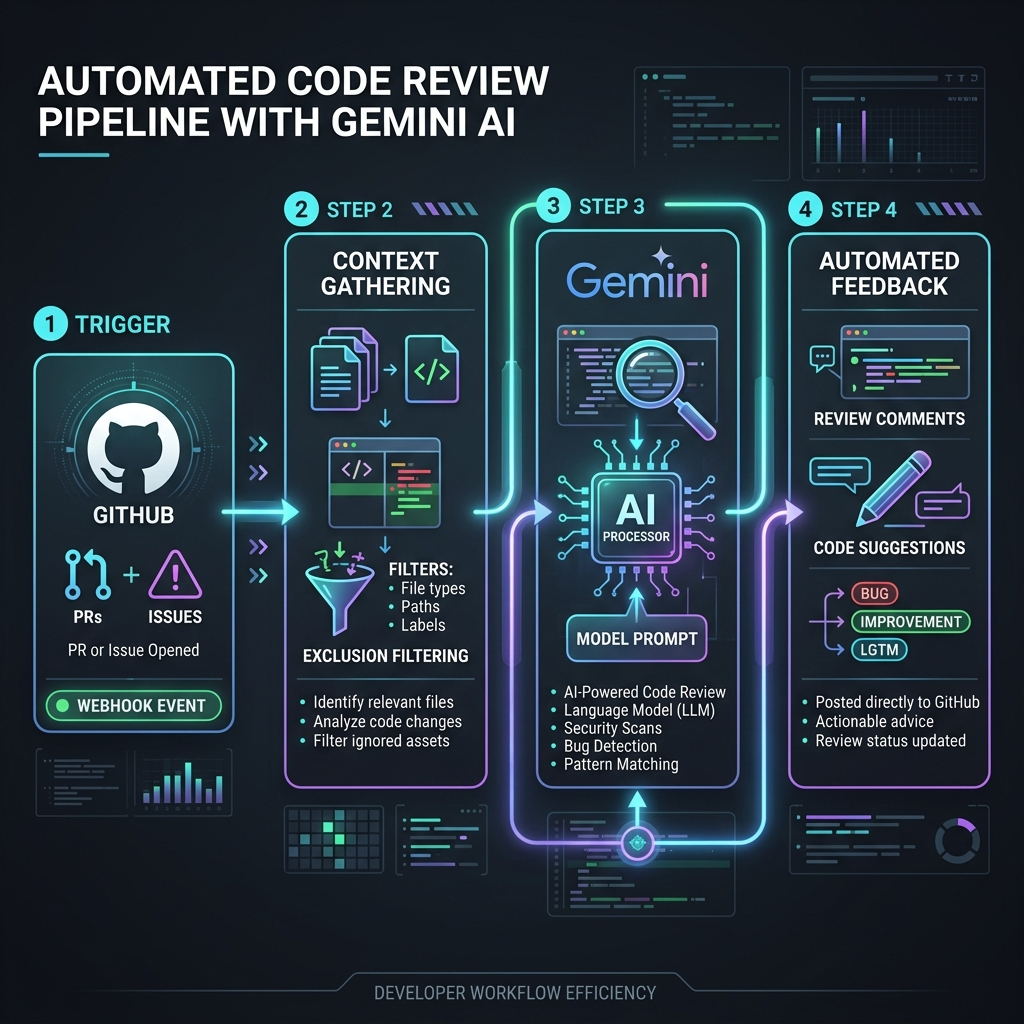
What’s the Big Deal?
If you or your fellow developers aren’t yet using AI to automate code reviews, then you’re missing out on an absolute game-changer in the software development lifecycle.
Legacy approach:
- You commit your code.
- You submit your pull request (PR).
- You wait for another developer to perform a code review and approve the PR.
This is the way it’s been for years. It’s fine. But the review process — and the reviewer — becomes a bottleneck. And furthermore, it’s a human process that is subject to significant variability.
Enter automated code reviews.
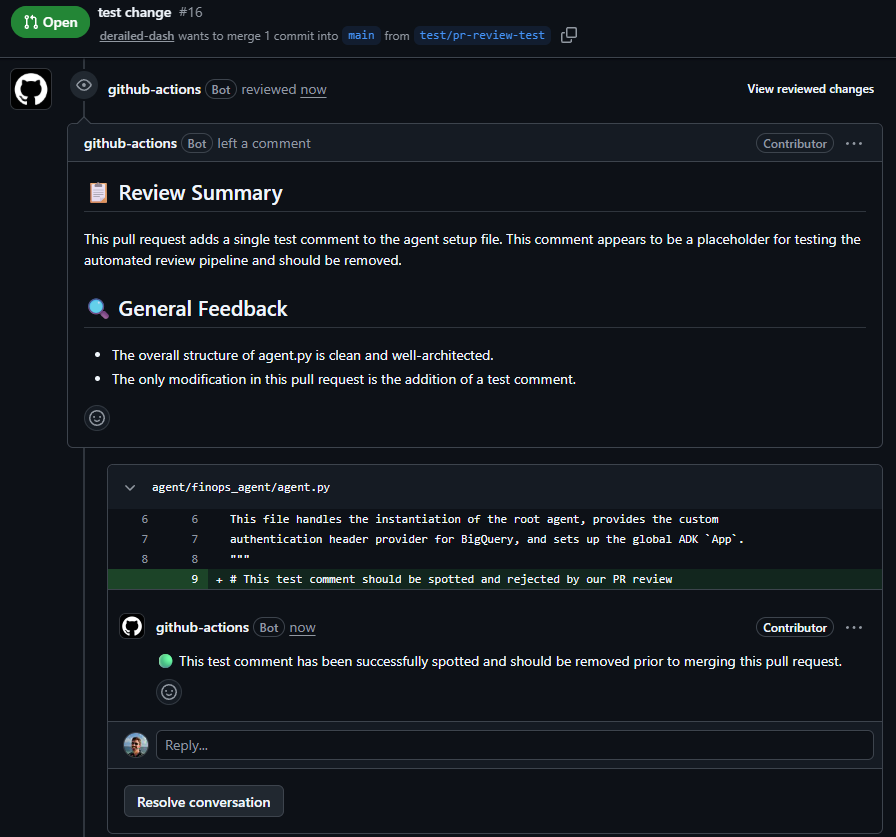
Now, after you submit the PR, a code review is automatically triggered and performed by your favourite model, using whatever instructions and grounding you and your team require. The review happens pretty much immediately. And the quality of the review is often higher than that of your fellow developers.
For the many colleagues I work with who have switched to this approach, the main benefits are:
- No waiting for a human review.
- High quality code reviews that not only catch issues, but also provide easy-to-follow recommendations and explanations that help the developer to learn and improve.
- Massive increase in overall development velocity.
I love it. They love it. You’ll love it too!

RIP Gemini CLI Actions
For a while, Google gave us this review capability out-of-the-box. We had tools that could read our pull requests, analyse our code diffs, and write constructive, line-specific feedback comments directly on GitHub.
But then, the music stopped. If you used to rely on Google’s Gemini-based PR review integrations in GitHub, then you’re probably now sobbing into your strawberry daiquiri. (I know I was.)

Specifically, two Google mechanisms that developers loved have been decommissioned:
- Gemini CLI GitHub Actions (
run-gemini-cli) This was a GitHub Action that you could easily integrate into your GitHub repos by running a/setup-githubcommand from within Google Gemini CLI. Once installed, this action would spin up a container running Gemini CLI, and use it to perform automated reviews of your code in response to a pull request. Alas, this mechanism stopped serving requests on June 18, 2026. - Gemini Code Assist on GitHub This direct GitHub App integration relied on Google Gemini Code Assist. Whenever a pull request was opened, GitHub sent a webhook to Google’s backend. This has also been shut down as of July 17, 2026.
But why have they gone? It’s because Google has terminated both Gemini Code Assist and Gemini CLI in favour of the newer Google Antigravity suite. This is true even for users on a paid Google AI subscription.
What can you do if you relied on these tools? What can you migrate to?

The Answer: My Super-Fast Drop-In Replacement
I didn’t want to lose my automated PR reviews. So, I built a drop-in replacement: the Gemini PR Review & Triage Action (derailed-dash/gemini-review-action).

I’ve officially published this to the GitHub Marketplace too, so you can find it indexed there and enjoy nice IDE autocompletion when configuring your workflows!
Features Overview
Here’s a quick summary of what it does…
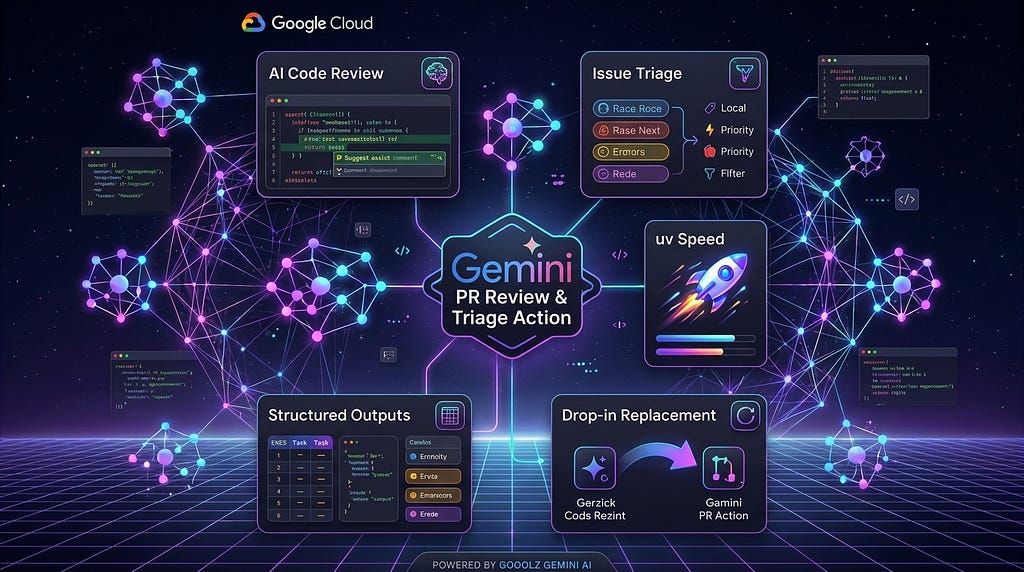
- AI-Powered Code Reviews : Automated, constructive line-specific feedback on Pull Requests using Google Gemini models (Gemini 3.5 Flash by default).
- Automated Issue Triage : Dynamically labels, prioritises, and triages incoming issues.
- Drop-in Replacement : Fully compatible as a direct, drop-in replacement for the deprecated
run-gemini-cliaction. - Structured Outputs : Error-free JSON response formatting using Pydantic schema validation.
- Codebase Context: Automatically includes codebase context based on the overall size of the codebase. If the codebase isn't huge, the entire repo is loaded into context; but if it is huge, the agent reads the overall directory tree and judiciously includes a subset of the repo. (Note that it always reads markdown files, dependency files, packaging files, etc.)
- Interactive Suggestions : Formats code recommendations inside native GitHub
```suggestion```blocks for one-click merge applications. - Triggers : The action triggers automatically in response to PR events. It can also be triggered by posting a comment in the PR starting with
/gemini-review. - Fast-Execution Composite Action : Avoids containerisation build/pull latency (no slow docker build on every execution) by running as a native composite action.
- Cross-Platform Support : Runs natively on Linux, macOS, and Windows runners (both GitHub-hosted and self-hosted).
- Enterprise-Grade Security : Authentication via either Google Gemini API Keys or Google Cloud Workload Identity Federation (WIF).
- Customisable Prompts : Supports repository-specific overrides for both reviews and triaging via simple TOML config files.
Rationale and Design Decisions
Before I built my own, I started by looking at the open source community and found a couple of replacements in the ecosystem. But they didn’t quite tick all my boxes.
Here are some reasons why I built it, and some of the design decisions I made along the way…
Performance — Native Composite Actions with uv
The community versions I found installed their Python dependencies using pip. This is fine, but it’s very slow compared to Astral’s awesome uv. So I wanted to build a solution that’s much faster. If you ever found yourself making changes and then re-running your code review, you’ll appreciate the frustration!
Instead of packaging the action inside a slow Docker container (like run-gemini-cli did), I designed it as a native composite action leveraging uv.
Because uv handles virtual environments and package installations with blazing speed, the scripts start running almost instantly. No Docker pulls, no container builds, and no slow pip resolution phases. The reviews execute in seconds, saving you valuable runner minutes.
Binary Fragility and Codebase Context
The community integrations I tried were a little fragile when processing binary files or encrypted assets, and they completely lacked project-wide context. They could only see the raw diff. I needed a solution that was resilient and understood the broader codebase.
My action parses the diff and automatically filters out binary, compressed, or encrypted assets. For the remaining text files, it implements a smart hybrid codebase context engine:
- Full Context Mode: For smaller codebases (less than 1.5MB, excluding the stuff we filtered out), the action automatically attaches the full contents of all other files in the repository. Gemini gains complete project-wide awareness.
- Sparse Context Mode: For larger codebases, it switches to a sparse mode. It attaches a visual file directory structure of the repository, plus the full contents of core manifest/configuration files and markdown documentation.
This ensures Gemini understands exactly how your PR changes fit into the overall project structure, resulting in significantly higher quality feedback.
JSON Schema Enforcement
Asking a model to return JSON in a text prompt is always a gamble. Without using Gemini’s native response_schema API (which forces structure via Pydantic model validation), the model can return markdown-wrapped JSON or invalid formats, breaking the comment parser. Again, another source of fragility.
My solution addresses this using structured outputs with strict Pydantic schemas.
SDK & Model Defaults
Alternatives I found were using older deprecated SDKs like google-generativeai, and legacy AI models like gemini-2.5-pro. I wanted to use the more up-to-date google-genai SDK, and default to the latest and greatest gemini-3.5-flash right out of the box. It’s so much better at code reviews than the older models, and so much faster too!
Configurable Language
The community actions I found didn’t offer a way to configure the preferred review language and sometimes the response was being returned to me in a language I couldn’t read! So I wanted the ability to configure (amongst other things) the review language.
Clean Slate Reviews (No Session Bias)
When you're pair-programming or debugging with a local AI assistant, it builds up a massive conversational history. While that context is brilliant for generating code, it also introduces a subtle problem: session bias. The local agent knows the evolutionary journey of your code, what compromises you discussed, and what you intended to do. It understands your intent so well that it can become overly forgiving, overlooking gaps or regressions in the final implementation.
This GitHub Action, by contrast, starts with a completely clean slate. It has no idea how you arrived at your solution, what you struggled with, or what you discussed with your local IDE assistant. It is a stateless, objective reviewer checking the actual diff against the codebase. This means it often catches bugs, edge cases, or security issues that your local assistant completely glossed over!
A Quick Primer: What are GitHub Actions?
Before we start throwing a YAML configuration at your repository, let’s make sure we’re on the same page. If you already know your way around CI/CD in GitHub, feel free to skip this bit.
GitHub Actions are GitHub’s native automation platform. Instead of running and maintaining external build servers — I’m looking at you, Jenkins (shudder) — it allows us to run automated pipelines directly inside your repository in response to events like a code push, a new Pull Request, or even someone leaving a comment.
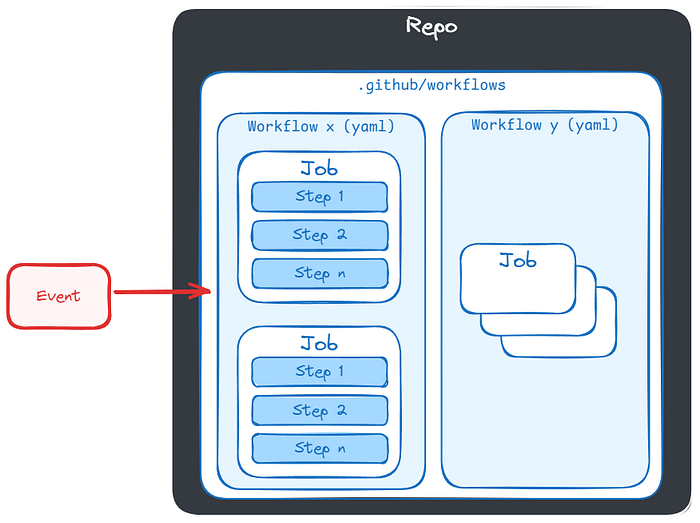
Here’s the basic vocabulary:
- Workflows : The overall automated process, defined in a YAML file inside your
.github/workflows/directory. - Events/Triggers : The GitHub occurrences that kick off the workflow (e.g.
pull_request). - Runners : The virtual machines (hosted by GitHub or self-hosted) that execute the jobs.
- Jobs : A collection of steps that run sequentially on the same runner.
- Steps : Individual tasks that either run commands or use GitHub Actions.
- Actions : Reusable plugins (like ours!) that do the heavy lifting, saving you from writing your own scripts.
It all hangs together like this:
Setting It Up in 3 Minutes
Now you know what a GitHub Action is. Let me walk you through how to bring my GitHub Action into your own repository.
Step 1: Authentication (Required for Both Methods)
Before you install any workflows, you need a one-time authentication setup for your repository so the action can authenticate with the Google Gemini API. You have two choices:
- The Easy Route: Generate a Gemini API Key in Google AI Studio. In GitHub, navigate to Settings > Secrets and variables > Actions, click New repository secret, and add your key named
GEMINI_API_KEY. - The Enterprise Way: If you are running in a corporate Google Cloud environment, you can use Workload Identity Federation (WIF) and Application Default Credentials (ADC) to authenticate securely without storing static secrets. See the repository for WIF setup instructions.
Step 2: Install the Workflows
Once authentication is configured, choose one of the two options below to add the workflow files to your repository.
Option A: The Ultra-Lazy Route (Install via Agent Skill)
If you are already using an agentic coding environment like Google Antigravity, you don't even need to copy and paste the YAML configuration files manually. You can use my skill repository to automate the setup!
Simply run the following command in your terminal to install the skill locally:
npx skills add https://github.com/derailed-dash/dazbo-agent-skills -y -g --skill install-gemini-code-review-action
Once installed, you can just tell your AI coding assistant:
"Install the Gemini code review action in this repo."
The skill will run an interactive setup checklist:
- Detects and removes legacy actions (like
run-gemini-cli) that might conflict. - Prompts you for your preferences (e.g. if you want both PR Review and Issue Triage, your preferred review language, and model).
- Writes the workflow
.ymlfiles and custom prompt.tomltemplates. - Offers to commit and push the changes directly to your repository!
Option B: The Manual Route
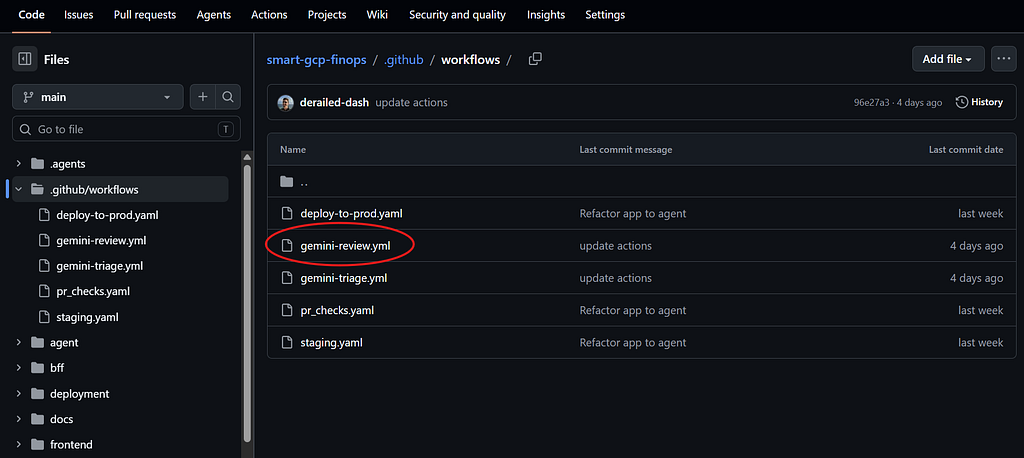
If you prefer to set it up manually, it’s still very easy! Create a file in your repository called .github/workflows/gemini-review.yml and paste the following sample configuration:
name: "🔎 Dazbo's Gemini Code Review"

on:
  pull_request:
    branches:
      - main
    # Optional: restrict trigger paths (supports inclusions & exclusions)
    # paths:
    # - 'src/**'
    # - '!src/generated/**' # Exclude generated files
    # - 'pyproject.toml'
  issue_comment:
    types: [created]

jobs:
  review:
    # Run on PR updates, OR on issue comment starting with /gemini-review by repo owners/members
    if: |
      github.event_name == 'pull_request' ||
      (
        github.event_name == 'issue_comment' &&
        github.event.issue.pull_request &&
        startsWith(github.event.comment.body, '/gemini-review') &&
        contains(fromJSON('["OWNER", "MEMBER", "COLLABORATOR"]'), github.event.comment.author_association)
      )
    runs-on: ubuntu-latest
    permissions:
      contents: read
      pull-requests: write
      issues: write

    steps:
      - name: Checkout repository
        uses: actions/checkout@v6
        with:
          # Automatically checks out the head ref for PR events,
          # and pulls the PR head branch for comment-based triggers
          ref: ${{ github.event.pull_request.head.sha || format('refs/pull/{0}/head', github.event.issue.number) }}

      - name: Run Gemini Review Action
        uses: derailed-dash/gemini-review-action@v1
        with:
          gemini_api_key: ${{ secrets.GEMINI_API_KEY }}
          github_token: ${{ secrets.GITHUB_TOKEN }}
          gemini_model: 'gemini-3.5-flash'
          language: 'English (UK)'
You don’t need to change this config at all, but you can if you want to. The part you’re most likely to want to modify is the inclusions and exclusions. There are other configurations you can tweak here, and the repo provides more details.
After you add the workflow to your own repo, it will look something like this:
Step 3: [Optional] Customise the AI’s Personality
You don’t have to stick to the default prompt. But I suggest you do — there’s a lot of smarts built into the default.
If you do want to override the default behaviour, e.g. to use a specific style guide (or maybe you just want it to sound like a grumpy senior developer), you can create a gemini-review.toml configuration file in the root of your repository:
# Customise the system instruction prompt
prompt = """
You are a grumpy, sarcastic senior code reviewer.
You prefer clean, readable, Pythonic code.
Always look for security vulnerabilities, resource leaks, and performance issues.
"""

# Customise the codebase context threshold (optional)
max_context_bytes = 512000
core_file_patterns = ["*.md", "pyproject.toml", "package.json"]
But I recommend you always start by copying the defaults located in the starter-examples/ directory of the project.
Let’s See It Run!
Let’s do a quick demo. For this demo, the action has already been installed our repo.
Then we create a PR:
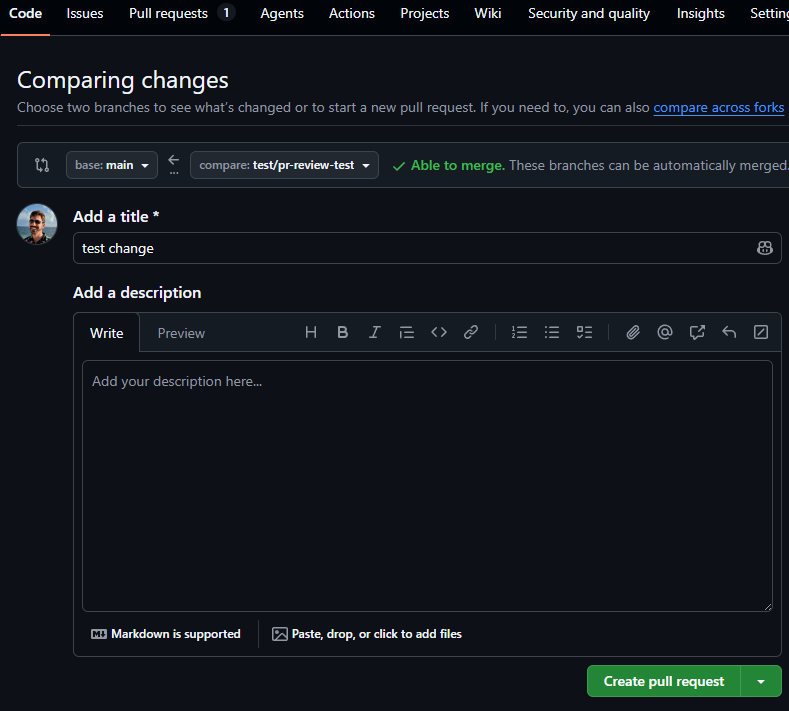
In a couple of seconds we’ll see the workflow begin to run:
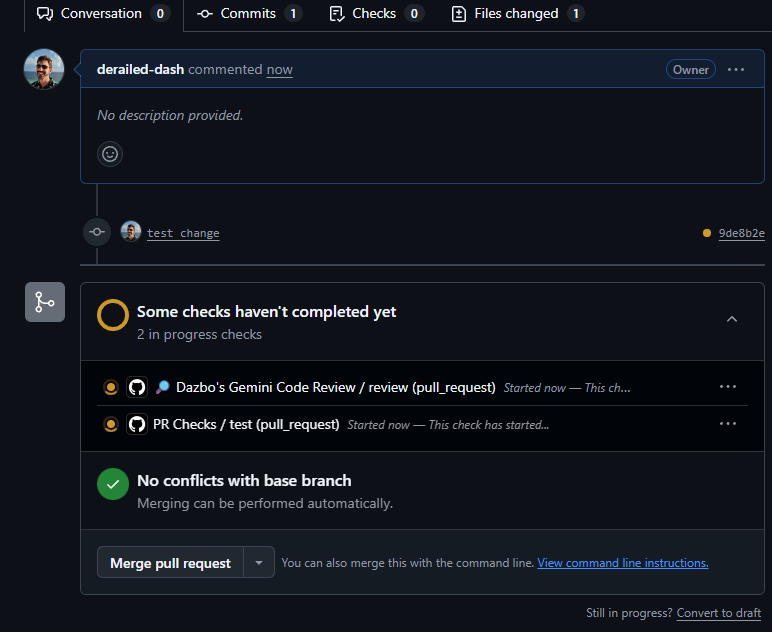
A few seconds later, the review completes and we see the recommendations:
Triggering a Review with a Comment
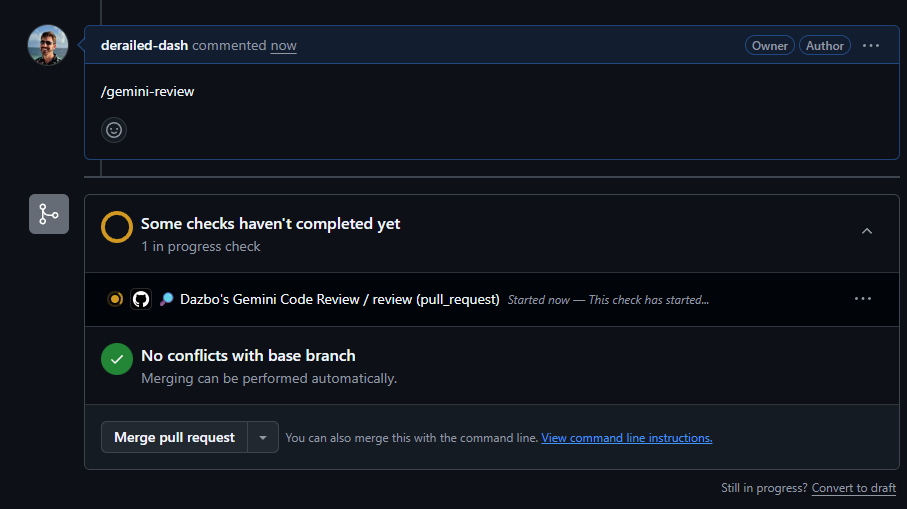
We’ve seen the review trigger in response to creating a PR. But we can also trigger a PR by adding a GitHub comment: /gemini-review. This is really useful for re-running a review on-demand. (Again, this is a feature that existed in the original Google tools, and I wanted to keep it.)
Under-the-hood, my workflow achieves this using the issue_comment trigger.
Notice the if conditional for issue_comment. This is incredibly important. On public repositories, anyone can leave a comment on a Pull Request. Without that author_association check, a random internet stranger could comment /gemini-review on your PR and drain your Gemini API quota — not to mention your GitHub Action runner minutes. By restricting the trigger to OWNER, MEMBER, or COLLABORATOR, we ensure only trusted team members can summon the AI.
So, when you need a quick review: just leave the comment, and watch the magic happen!
Wait, What About Issues Triage?
I nearly forgot! My action can also be used to triage any issues that are raised against your repo.
As your open-source projects grow, the issue tracker can quickly turn into a chaotic mess of bug reports, feature requests, spam, and questions. Keeping the backlog clean and correctly tagged is a chore that most developers dread.
To help solve this, you can run my action in triage mode. When a new issue is opened, Gemini reviews the title and description, compares it against your existing repository labels, and automatically applies the most appropriate tags.
What you get is an immediately organised issue backlog, complete with a brief reasoning comment explaining why the labels were selected. It takes the manual effort out of issue classification entirely.
If you want to set this up in your repository, visit the repository for the full setup instructions.
Wrapping-Up
Sunsets are always frustrating, especially when they disrupt a workflow you’ve grown to rely on. But they also present a fantastic opportunity. An opportunity to learn and an opportunity to do things in a slightly different way. The main benefit for me is having a reviewer that’s now much faster than my old one. It consumes fewer runner minutes, it supports custom TOML prompts, and it leverages the latest from Gemini.
PLEASE give the repository a star , try the action out on your open-source projects, and let’s keep our CI/CD pipelines smart, secure, and fast!
Let know how you get on!
If you run into any issues or want to contribute a custom workflow, drop a comment, open an issue, or add your own contribution to derailed-dash/gemini-review-action.
Before You Go
- Please share this with anyone that you think will be interested. It might help them, and it really helps me!
- Please give me loads of claps! (Just hold down the clap button.)
- Please leave a comment 💬. Interaction is good!
- Add a star on the repo!
- Follow and subscribe, so you don’t miss my content.
Useful Links and References
Comments
More Blog
View allgemmaFive Gemma-4 models, one accelerator: what porting E2B 31B to AWS Inferentia2 taught me
I ported the whole Gemma-4 family — E2B, E4B, 12B, 31B, and the 26B-A4B MoE — to run on...
X
xbillcommunityHey DEV, I'm Tobore. Let's actually connect.
Hey DEV, I'm Tobore. Let's actually connect. I've been on here for a while now, mostly writing and...
L
Laurina AyarahaiI burned through thousands of AI tokens. Then a friend did it for free
(yep, kinda clickbait, just for the funsies 😊) At the beginning of the year, I relaunched my...
P
Paulo HenriqueaiClaude might be saturating your machine
My laptop was sitting idle with the fan at full tilt. Nothing was running that I knew of. The culprit...
S
Sidhant PandaaiWhat is an "agentic harness," actually?
I've been hearing the word "harness" thrown around a lot lately. I assumed it just meant "the IDE" or...
T
Tilde A. ThuriumdevchallengeSmash Story: The Demo Script That Out-Debugged My Test Suite
A green 10-test suite, a broken production default, and the 10-minute smash — how a live demo caught an API-contract bug that mocks never could.
X
xbillReady-made automations for this
Workflows from the Neura Market marketplace related to this CoPilot resource
- Automated Reservation System with Telegram, Google Gemini AI, and Google Sheetsn8n · $9.99 · Related topic
- Automated Email Assistant for Suppliers Using OpenAI and Google Sheetsn8n · $9.99 · Related topic
- Automated FAQ Generator from WhatsApp Groups Using GPT-4 and Google Docsn8n · $9.99 · Related topic
- Automated WhatsApp Group Weekly Team Reports with Gemini AI Summarizationn8n · $24.99 · Related topic