
Back to Blog googleworkspace
 gemma
gemma community
 ai
ai ai
ai githubactions
 ai
ai
Google Workspace Studio Tutorial: The New 'Notify by Email' Action
Aryan Irani June 16, 2026
0 views
If you run a product or manage technical operations, you likely have a Google Sheet somewhere that...
If you run a product or manage technical operations, you likely have a Google Sheet somewhere that acts as a dumping ground for unstructured data. Whether it's customer feedback, bug reports, or feature requests, that spreadsheet grows every single day.
Manually reading through hundreds of rows every Friday just to summarize the "vibe" and identify blockers for the executive team is tedious, repetitive work.
In this tutorial, we are going to completely automate that process using Google Workspace Studio.
We are going to build an event-driven pipeline that wakes up on a strict schedule, extracts the raw data from your Google Sheet, natively parses the tone and urgency, and uses Gemini to output a highly-structured executive summary directly into your inbox.
Here is the exact step-by-step architecture.
Step 1: The Scheduled Trigger
Instead of relying on a manual event—like a form submission or a file upload—we want this pipeline to run autonomously. In Workspace Studio, create a new flow and set the Starter to On a schedule. You can configure this to act exactly like a cron job.
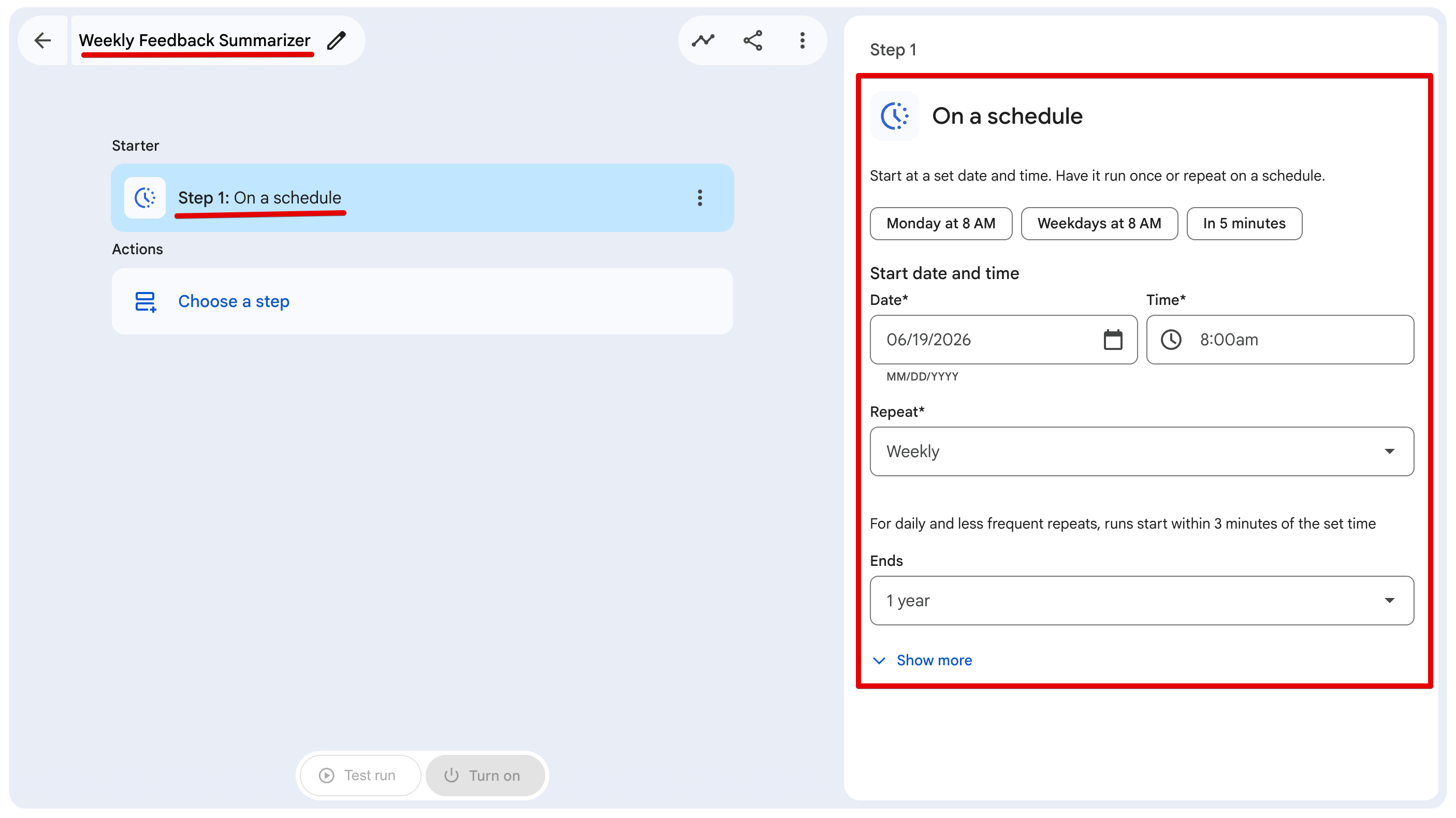
Configure the following fields:
- Start date and time: Set this to your desired starting Friday at 4:00 PM (or 8:00 AM, depending on when you want the report).
- Repeat: Select Weekly.
- Ends: Set to 1 year (or your preferred duration).
- Time zone: Ensure this matches your local working hours (e.g., (GMT+05:30) India Time).
Step 2: Data Extraction & Structuring
Next, we need to pull the raw data into the pipeline runtime. Instead of just dumping a massive, unstructured spreadsheet directly into an LLM, we can use Workspace Studio's native Extract node to structure it first.
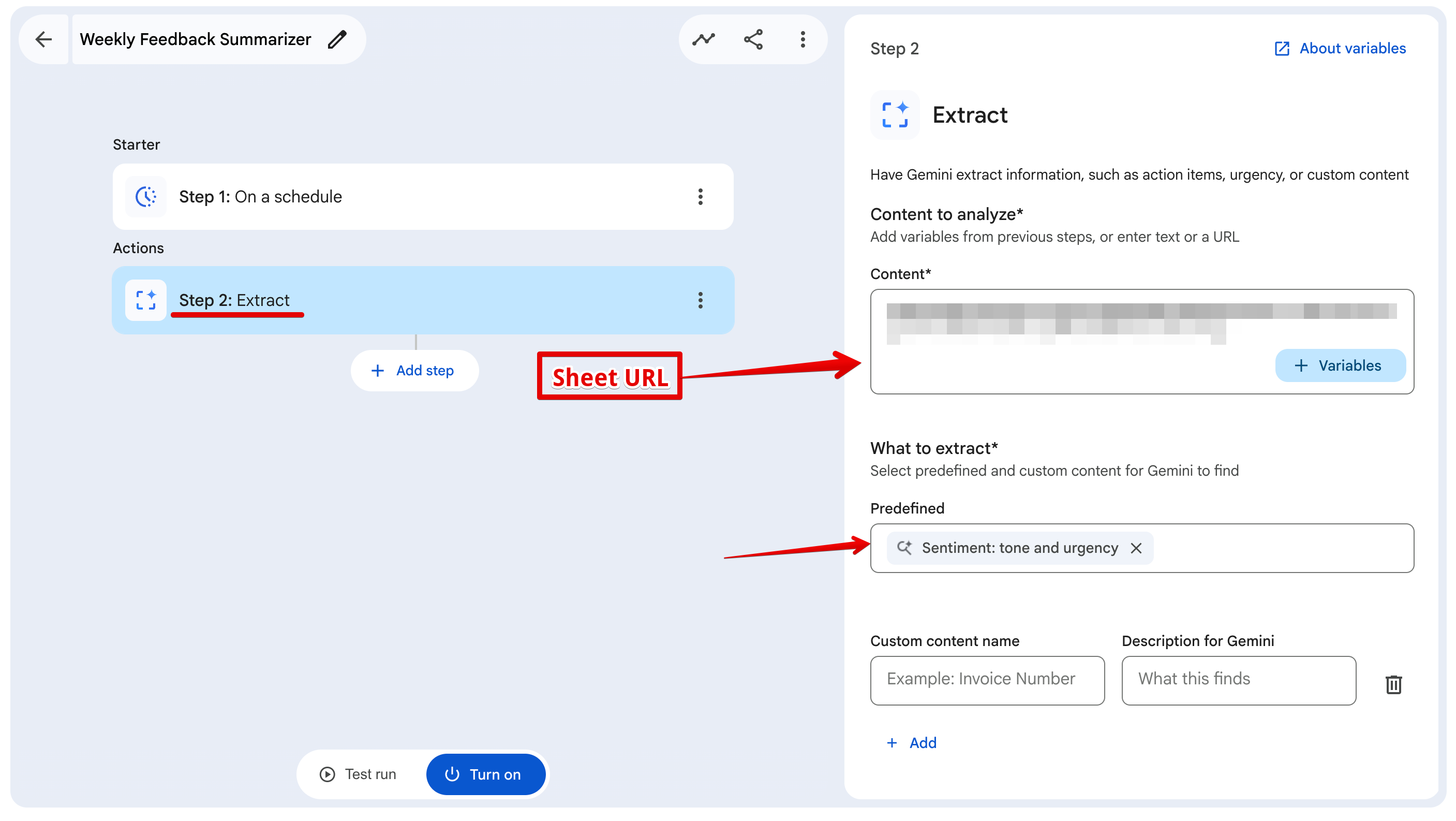
- Add an Extract node.
- In the "Content to analyze" field, paste the direct link to your target Google Sheet.
- Under "What to extract", select the predefined option: Sentiment: tone and urgency.
By doing this, Workspace Studio automatically parses the massive spreadsheet behind the scenes and generates two distinct, structured variables for our next step: {{Tone}} and {{Urgency}}. This significantly reduces AI hallucinations.
Step 3: Data Analysis (Ask Gemini)
This is the core logic node where we take those extracted variables and format them into a readable report.
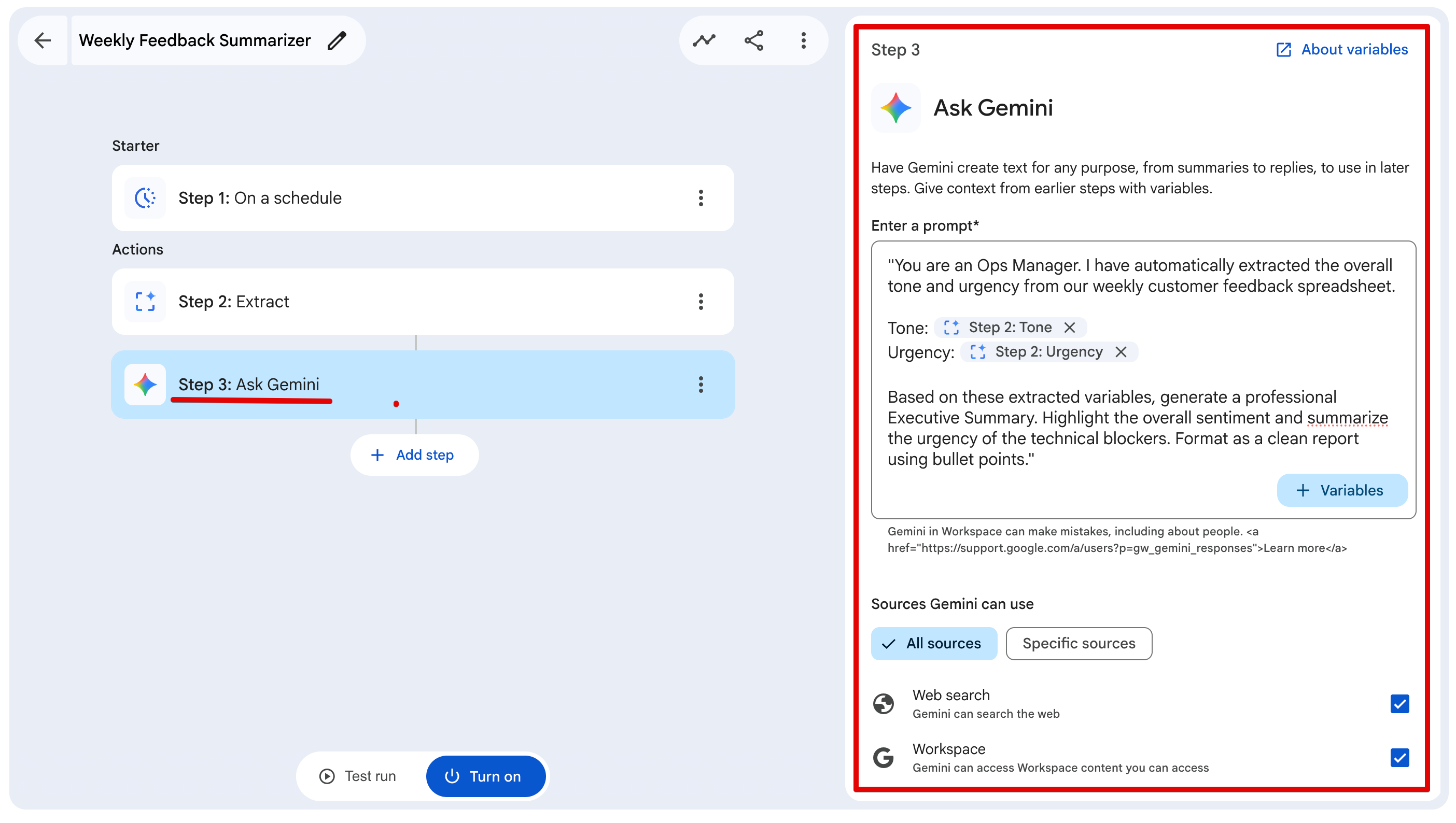
- Add an Ask Gemini node.
- Click the + Variables dropdown and insert the
{{Tone}}and{{Urgency}}variables generated from Step 2. - Append strict system instructions to force a structured output.
Because the Extract node already did the heavy lifting of determining the sentiment, our runtime prompt can be incredibly simple and targeted:
You are an Ops Manager. I have automatically extracted the overall tone and urgency from our weekly customer feedback spreadsheet. Tone: {{Tone}}. Urgency: {{Urgency}}. Based on these extracted variables, generate a professional Executive Summary. Highlight the overall sentiment and summarize the urgency of the technical blockers. Format as a clean report using bullet points.
Step 4: Generating the Report (Google Docs)
Now we need to get the output out of the pipeline and into a readable document.
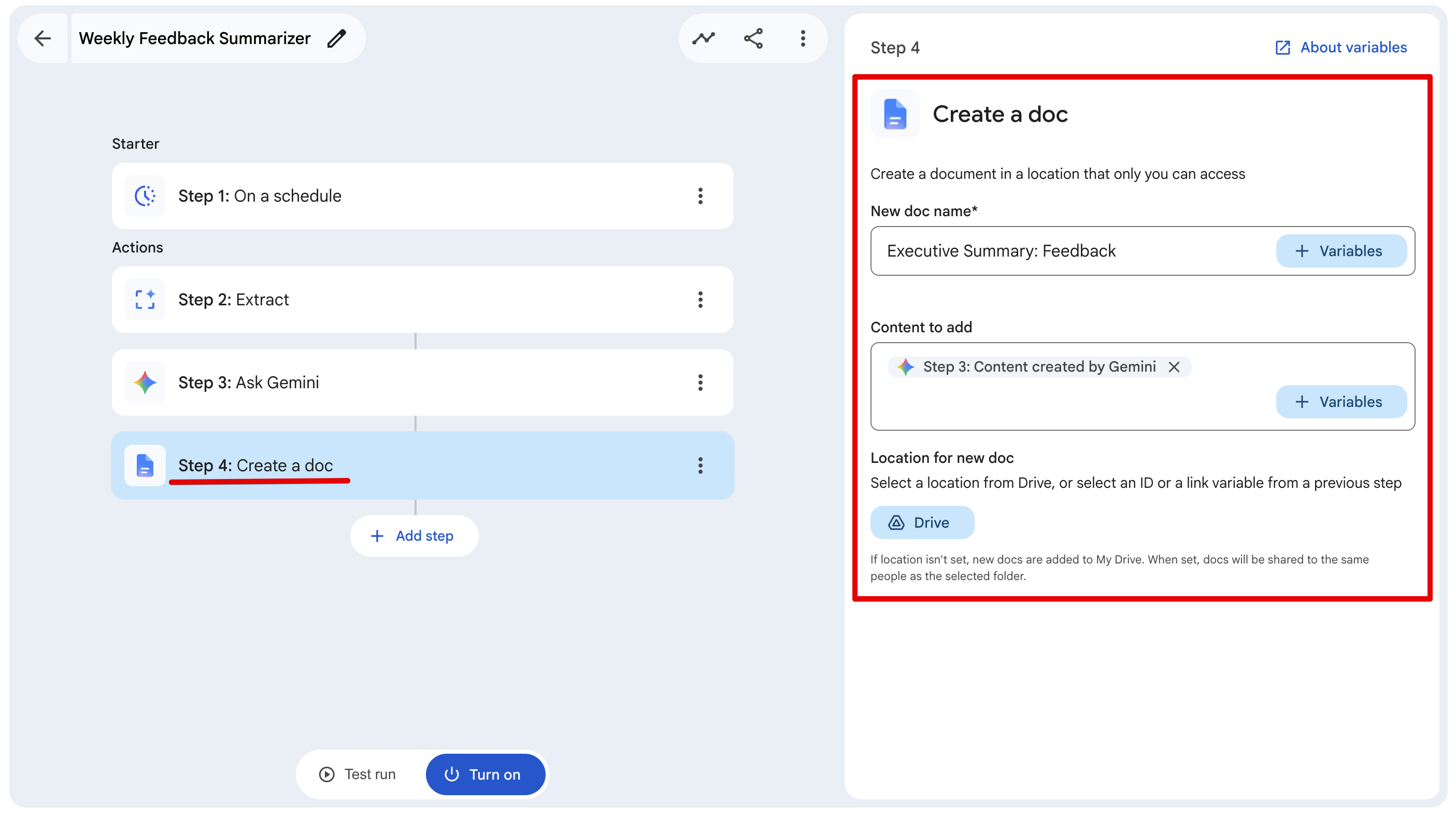
- Add a Create a doc node.
- Set the Title: Executive Summary: Feedback.
- Set the Body to the output variable from the Gemini node in Step3.
Step 5: Distribution (Gmail)
Finally, we need to distribute the report so you don't have to go digging through your Drive to find it.
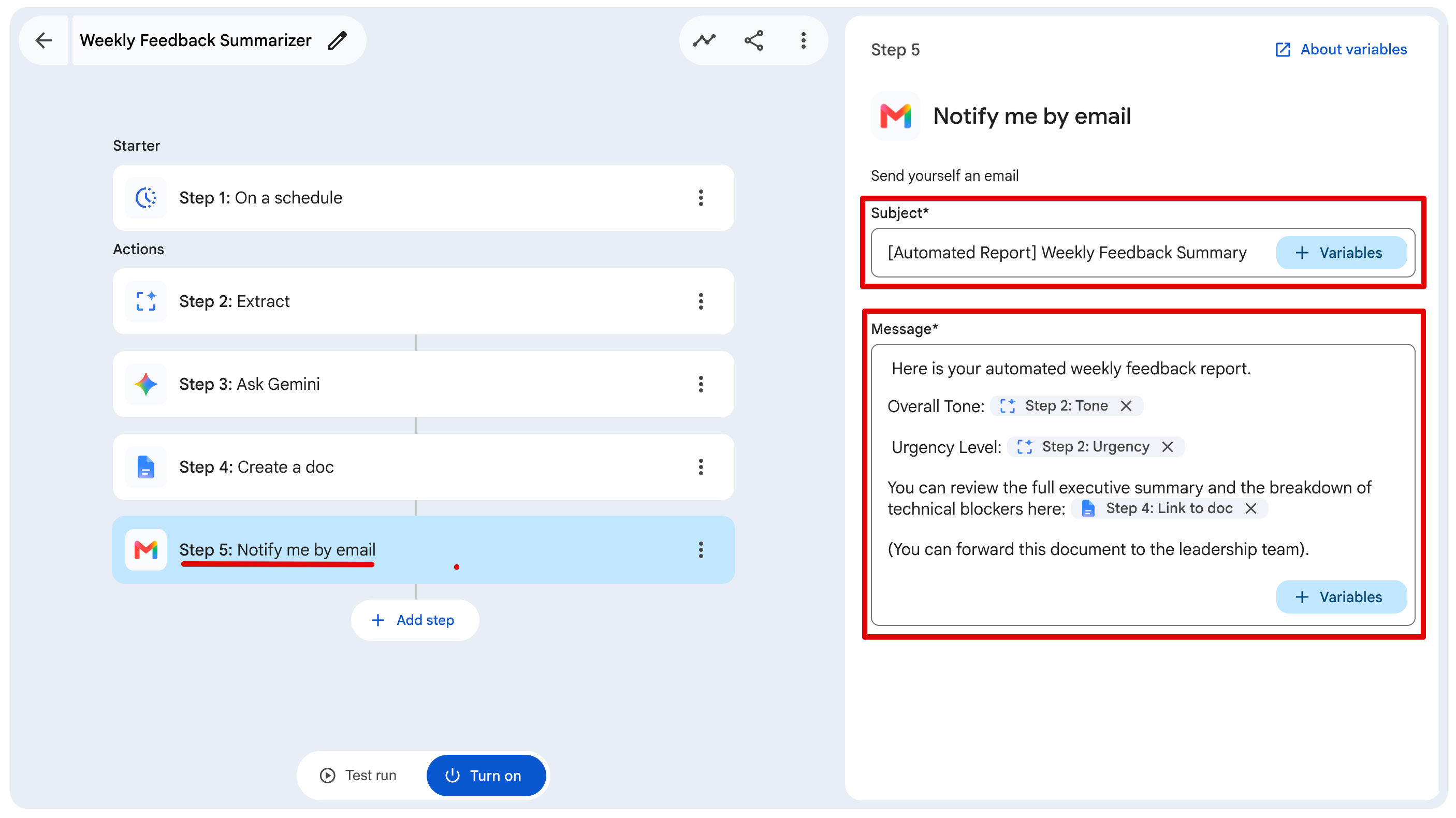
- Add a Notify me by email node.
- Set the Subject to: [Automated Report] Weekly Feedback Summary.
- In the Message field, copy and paste the following template. Use the + Variables dropdown to insert the dynamic variables where indicated:
Here is your automated weekly feedback report. Overall Tone: {{Tone}} Urgency Level: {{Urgency}} You can review the full executive summary and the breakdown of technical blockers here: {{Document_Link}} (You can forward this document to the leadership team).
(Note: The 'Notify me by email' node automatically sends the email directly to the account running the workflow, making it perfect for a personal executive summary.)
Step 6: The Test Run & Output
Before blindly turning this on, you always want to run a test to ensure your variables are mapping correctly. Click the Test run button at the bottom of the Workspace Studio editor.
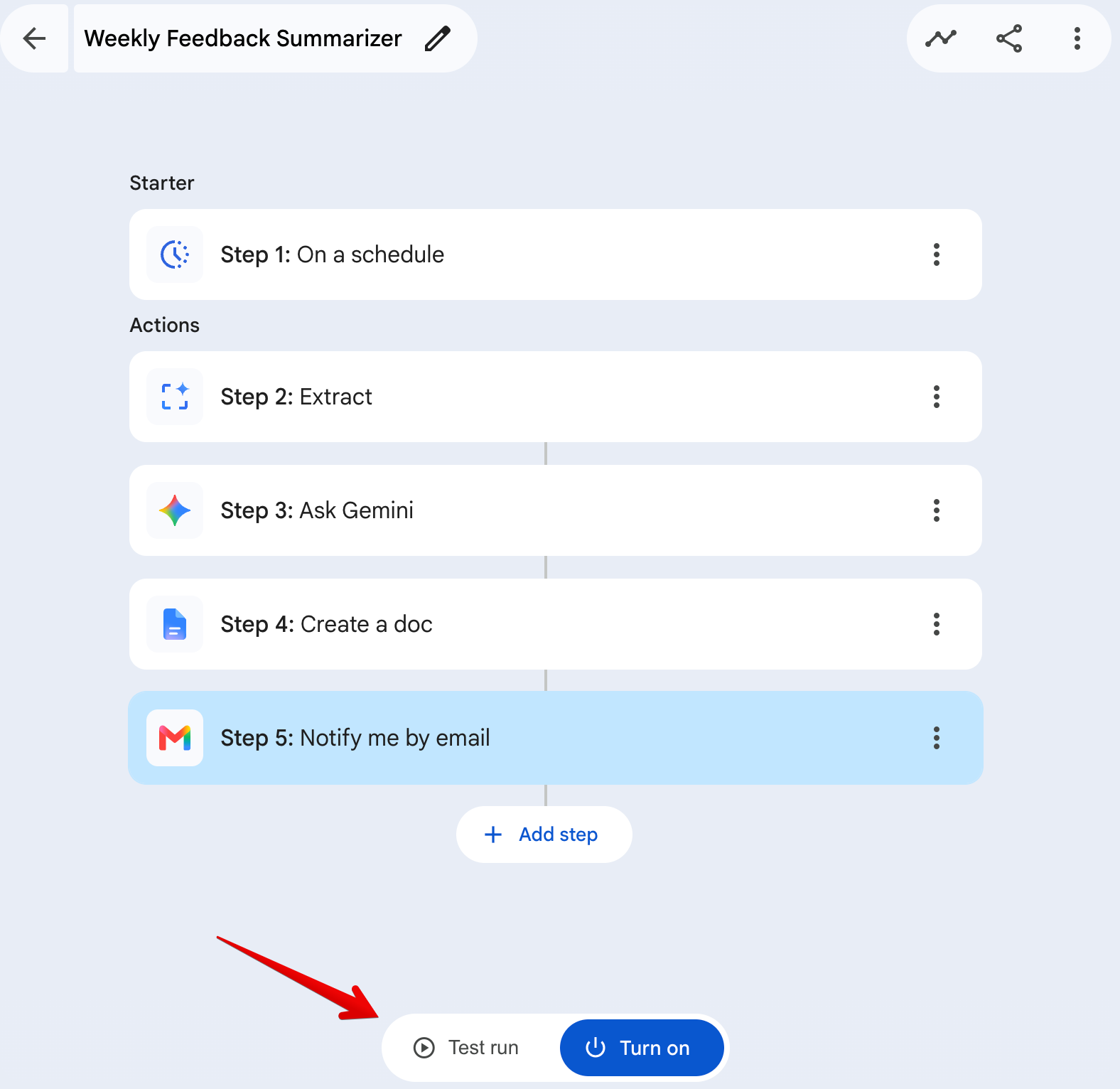
If everything is wired up correctly, you will see a beautiful wall of green checkmarks confirming that the pipeline successfully extracted the data, generated the document, and sent the email.
Check your inbox. You should have an email waiting for you that looks like this:
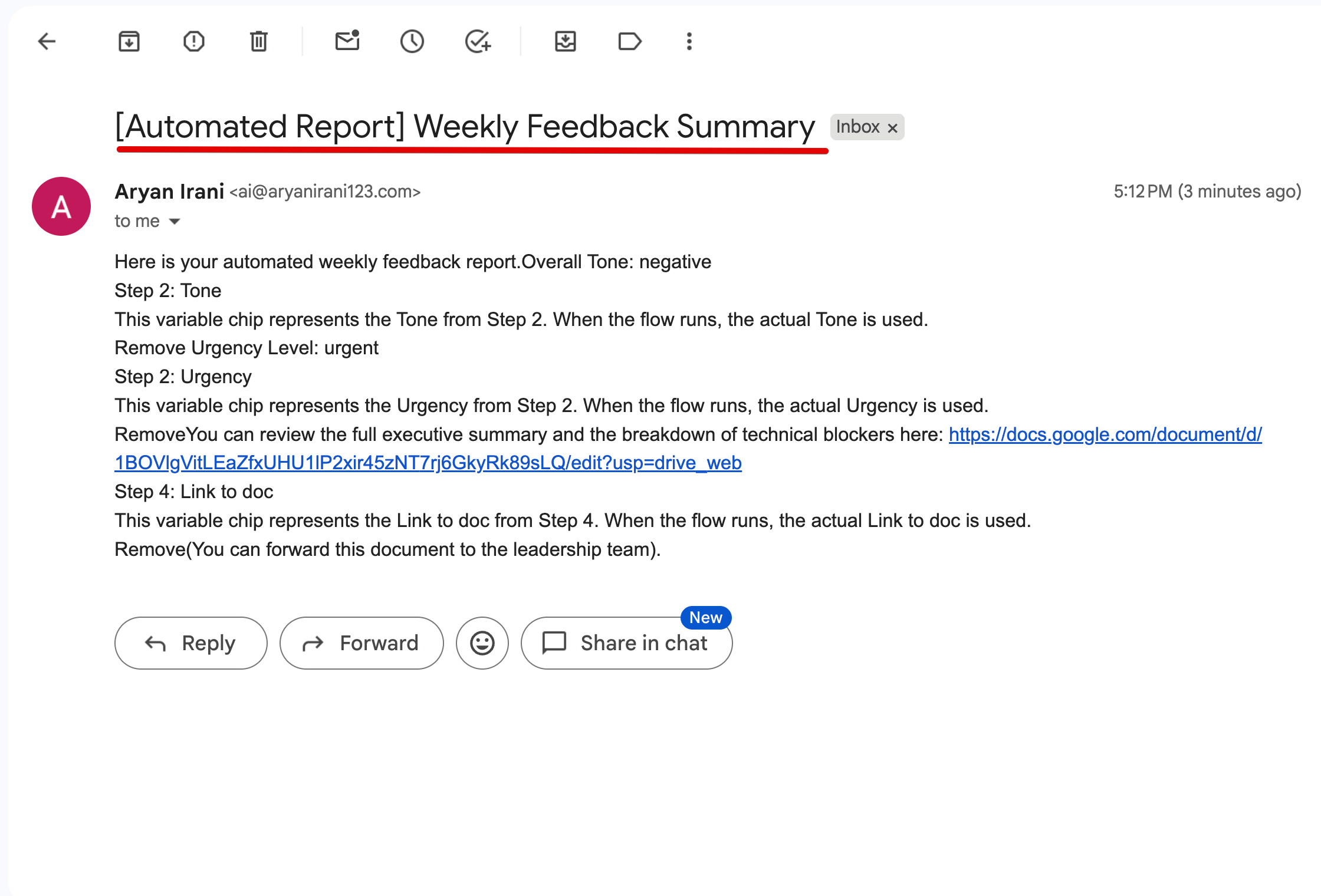
Because we used the Extract node, the pipeline correctly identified the tone of our mock data as negative and the urgency as urgent.
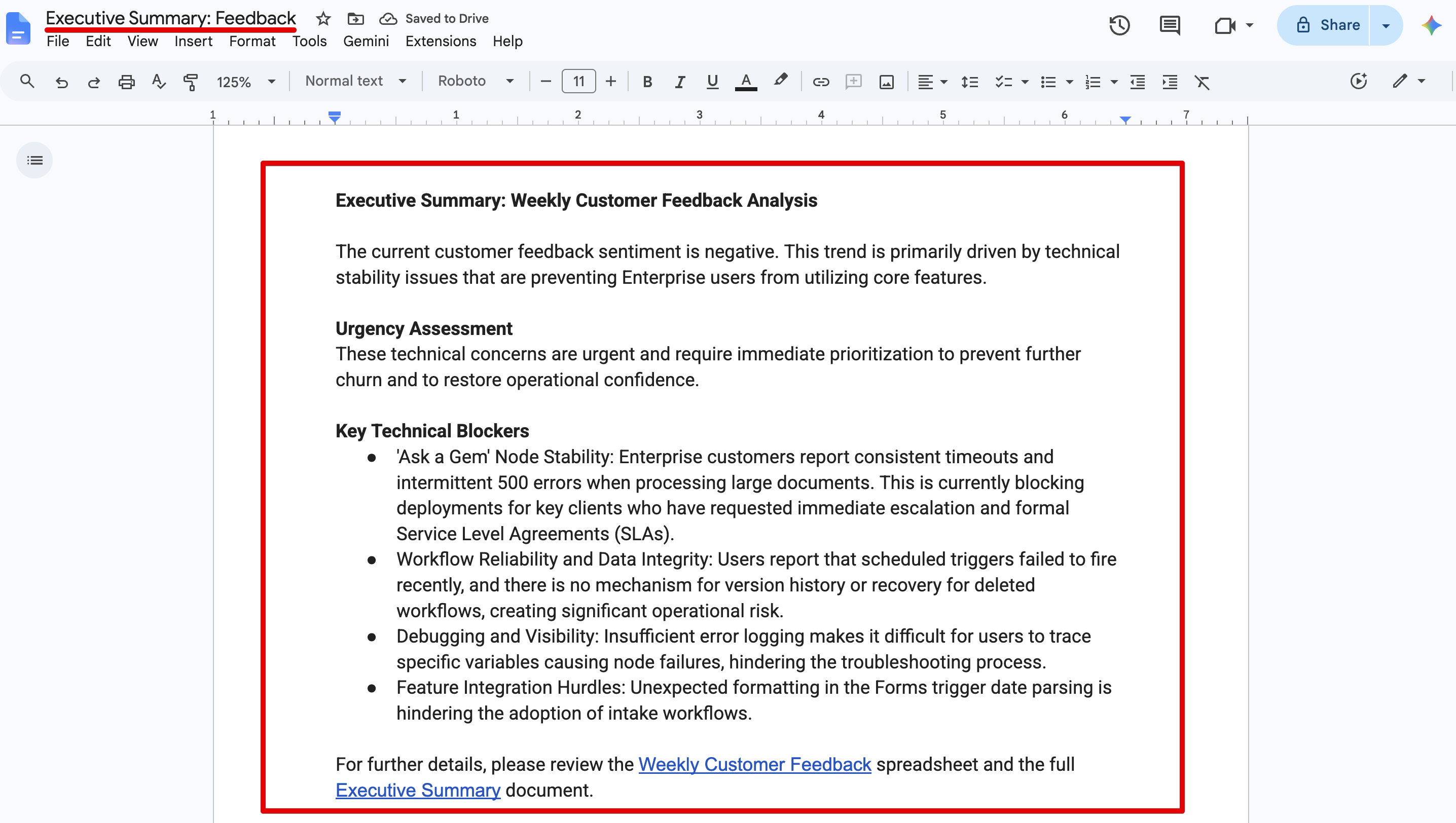
When you click the generated document link in the email, you'll see the real magic. Gemini successfully parsed the unstructured customer feedback, bypassed the generic complaints, and accurately identified the critical technical blockers (like the timeout errors and scheduled trigger failures).
The Verdict: Moving from Manual to Event-Driven
If you are still manually reading spreadsheets, parsing user feedback, and writing Friday summary emails from scratch, you are wasting valuable engineering and operational hours.
By combining a Scheduled Trigger with the new Extract and Notify me by email nodes, we just built a highly-resilient, event-driven reporting pipeline in under 10 minutes.
The beauty of this architecture is the clean separation of concerns:
- Google Sheets acts as your raw data lake.
- Workspace Studio's Extract Node acts as your data parser (which severely reduces LLM hallucination).
- Gemini acts as your dedicated logic and reasoning engine.
- Google Docs & Gmail act as your automated distribution layer.
You set it up once, and every single Friday at 4:00 PM, a perfectly formatted executive summary lands in your inbox. No manual prompting required.
Work With Me
I run a specialized software consultancy focused on building custom tools, AI integrations, and automation pipelines that help engineering and ops teams move significantly faster.
We just launched our brand new website, and we are currently taking on new clients. My core services include:
- AI & Workspace Automation: Building custom Gemini architectures (like the pipeline above) directly into your business infrastructure.
- Custom Software Development: Architecting scalable web applications and internal tools from the ground up.
- Cloud Architecture: Secure GCP and Firebase infrastructure design.
- Developer Relations & Content: Partnering with tech brands to create high-quality developer tutorials and video series.
If your team is dealing with manual bottlenecks, or if you need an expert to help architect a complex solution, check out my new site and let's get on a call.
Comments
More Blog
View allgemmaFive Gemma-4 models, one accelerator: what porting E2B 31B to AWS Inferentia2 taught me
I ported the whole Gemma-4 family — E2B, E4B, 12B, 31B, and the 26B-A4B MoE — to run on...
X
xbillcommunityHey DEV, I'm Tobore. Let's actually connect.
Hey DEV, I'm Tobore. Let's actually connect. I've been on here for a while now, mostly writing and...
L
Laurina AyarahaiI burned through thousands of AI tokens. Then a friend did it for free
(yep, kinda clickbait, just for the funsies 😊) At the beginning of the year, I relaunched my...
P
Paulo HenriqueaiClaude might be saturating your machine
My laptop was sitting idle with the fan at full tilt. Nothing was running that I knew of. The culprit...
S
Sidhant PandagithubactionsAutomated GitHub Code Reviews Using Google Gemini
I Built a Thing! TL;DR — Google Gemini-based Pull Request reviews and Issue Triaging for...
D
Darren "Dazbo" LesteraiWhat is an "agentic harness," actually?
I've been hearing the word "harness" thrown around a lot lately. I assumed it just meant "the IDE" or...
T
Tilde A. ThuriumReady-made automations for this
Workflows from the Neura Market marketplace related to this CoPilot resource
- Automate Employee Onboarding with Slack, Jira, and Google Workspace Integrationn8n · $24.99 · Related topic
- AI Resume Screening & Evaluation for HR with GPT-4 & Google Workspacen8n · $14.99 · Related topic
- Google Asks Cool MCP Server to Halt All 5 Operationsn8n · $4.99 · Related topic
- Automated AI-Powered Workflow Maintenance with Google Workspace Integrationn8n · $24.99 · Related topic