
Back to Blog githubcopilot
 gemma
gemma community
 ai
ai ai
ai githubactions
 ai
ai
Get started with GitHub Copilot SDK, part 1
Chris Noring March 4, 2026
0 views
This article explains what GitHub Copilot SDK is and why use it
title: Get started with GitHub Copilot SDK, part 1 published: true description: This article explains what GitHub Copilot SDK is and why use it tags: copilot, python, ai, programming cover_image: https://dev-to-uploads.s3.amazonaws.com/uploads/articles/cty891qm0yhp71exdmoe.png
Use a ratio of 100:42 for best results.
published_at: 2026-03-04 20:48 +0000
Did you know GitHub Copilot now has an SDK and that you can leverage your existing license to build AI integrations into your app? No, well I hope I have you attention now.
{% youtube hvwGZqS4qF0 %}
Series on Copilot SDK
This series is about Copilot SDK and how you can leverage your existing GitHub Copilot license to integrate AI into your apps
- Part 1 - install and your first app, you're here
- Part 2 - streamable responses
Install
You need two pieces here to get started:
- GitHub Copilot CLI
- A supported runtime, which at present means either Node.js, .NET, Python or Go
Then you need to install the SDK for your chosen runtime like so:
pip install github-copilot-sdk
The parts
So what do you need to know to get started? There are three concepts:
- Client, you need to create and instance of it. Additionally you need to start and stop it when you're done with it.
- Session. The session takes an object where you can set things like model, system prompt and more. Also, the session is what you talk when you want to carry out a request.
- Response. The response contains your LLM response.
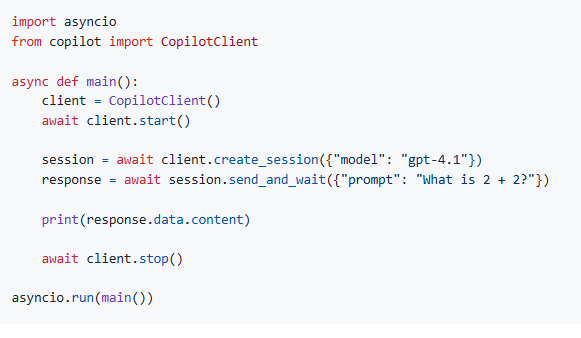
Below is an example program using these three concepts. As you can see we choose "gpt-4.1" as model but this can be changed. See also how we pass the prompt to the function send_and_wait.
import asyncio
from copilot import CopilotClient

async def main():
    client = CopilotClient()
    await client.start()

    session = await client.create_session({"model": "gpt-4.1"})
    response = await session.send_and_wait({"prompt": "What is 2 + 2?"})

    print(response.data.content)

    await client.stop()

asyncio.run(main())
Ok, now that we know what a simple program looks like, let's make something interesting, an FAQ responder.
Your first app
An FAQ for a web page, is often a pretty boring read. A way to make that more interesting for the end user is if they can instead chat with the FAQ, let's make that happen.
Here's the plan:
- Define a static FAQ
- Add the FAQ as part of the prompt.
- Make a request to to the LLM and print out the response.
Let's build out the code little by little. First, let's define the FAQ information.
-1- FAQ information
# faq.py

faq = {
  "warranty": "Our products come with a 1-year warranty covering manufacturing defects. Please contact our support team for assistance.",
  "return_policy": "We offer a 30-day return policy for unused products in their original packaging. To initiate a return, please visit our returns page and follow the instructions.",
  "shipping": "We offer free standard shipping on all orders over $50. Expedited shipping options are available at checkout for an additional fee.",
}
Next, let's add the call to the Copilot SDK
-2 Adding the LLM call
import asyncio
from copilot import CopilotClient

def faq_to_string(faq: dict) -> str:
    return "\n".join([f"{key}: {value}" for key, value in faq.items()])

async def main(user_prompt: str = "Tell me about shipping"):
    client = CopilotClient()
    await client.start()

    prompt = f"Here's the FAQ, {faq_to_string(faq)}\n\nUser question: {user_prompt}\nAnswer:"

    session = await client.create_session({"model": "gpt-4.1"})
    response = await session.send_and_wait({"prompt": prompt})

    print(response.data.content)

    await client.stop()

if __name__ == "__main__":
    print("My first app using the GitHub Copilot SDK!")
    print(f"[LOG] Asking the model about shipping information...")
    asyncio.run(main("Tell me about shipping"))
Note how we concatenate the FAQ data with the user's prompt:
prompt = f"Here's the FAQ, {faq_to_string(faq)}\n\nUser question: {user_prompt}\nAnswer:"
-3- Let's run it
Now run it:
uv run faq.py
You should see output like so:
My first app using the GitHub Copilot SDK!
[LOG] Asking the model about shipping information...
We offer free standard shipping on all orders over $50. Expedited shipping options are available at checkout for an additional fee.
What's next
Check out the official docs
Comments
More Blog
View allgemmaFive Gemma-4 models, one accelerator: what porting E2B 31B to AWS Inferentia2 taught me
I ported the whole Gemma-4 family — E2B, E4B, 12B, 31B, and the 26B-A4B MoE — to run on...
X
xbillcommunityHey DEV, I'm Tobore. Let's actually connect.
Hey DEV, I'm Tobore. Let's actually connect. I've been on here for a while now, mostly writing and...
L
Laurina AyarahaiI burned through thousands of AI tokens. Then a friend did it for free
(yep, kinda clickbait, just for the funsies 😊) At the beginning of the year, I relaunched my...
P
Paulo HenriqueaiClaude might be saturating your machine
My laptop was sitting idle with the fan at full tilt. Nothing was running that I knew of. The culprit...
S
Sidhant PandagithubactionsAutomated GitHub Code Reviews Using Google Gemini
I Built a Thing! TL;DR — Google Gemini-based Pull Request reviews and Issue Triaging for...
D
Darren "Dazbo" LesteraiWhat is an "agentic harness," actually?
I've been hearing the word "harness" thrown around a lot lately. I assumed it just meant "the IDE" or...
T
Tilde A. ThuriumReady-made automations for this
Workflows from the Neura Market marketplace related to this CoPilot resource
- WordPress Content Assistant: Article Recommendations & Q&A with Mistral AIn8n · $24.99 · Related topic
- TechCrunch AI Article Scraper & Classifier with GPT-4.1-nano to Sheets & Telegramn8n · $14.99 · Related topic
- Auto-translate Blog Articles with Google Translate and Airtable Storagen8n · $9.99 · Related topic
- Command-based Telegram Bot for Article Summarization & Image Prompts with OpenAIn8n · $9.99 · Related topic