
Back to Blog githubchallenge
1. Wrestling with the
 gemma
gemma community
 ai
ai ai
ai githubactions
 ai
ai
I Built a TUI That Makes Rust Code Inspection Feel Like Magic ✨
Yash Kumar Saini February 15, 2026
0 views
This is a submission for the GitHub Copilot CLI Challenge The "Why Did I Build This?"...
This is a submission for the GitHub Copilot CLI Challenge
The "Why Did I Build This?" Moment
Okay so here's the thing. I was working on this Rust project at 2 AM (as you do), trying to figure out where the hell DeserializeOwned was actually implemented. The codebase had like 50,000 lines, and there were these 17 different impl blocks just... everywhere. Scattered across 8 files like someone playing hide and seek with code.
And I'm sitting there thinking about my options:
- Fire up VSCode? My SSH connection was lagging harder than my reaction time on Monday mornings
- Use
grep? Sure, if I wanted to scroll through 400 lines of garbage output - Try
ripgrepwith regex? I'd rather debug segfaults than write another regex at 2 AM - Make coffee and pretend the problem doesn't exist? Tempting...
But you know what? I got frustrated enough to actually do something about it.
So I built Oracle — basically a code inspector that lives in your terminal and actually doesn't suck to use. And to flex it more, Github Copilot helped me build, review, clean, optimize and vibe code all of this in just under 3 days.
<img width="100%" style="width:100%" src="https://dev-to-uploads.s3.amazonaws.com/uploads/articles/d2qfilxnaz467yhot78w.gif">What I Built
So 🔮 Oracle is basically a terminal-based code inspector for Rust projects. Think of it like... if grep and VSCode had a baby, and that baby grew up to be really good at understanding Rust code. No GUI bloat, no browser tabs eating your RAM, just your terminal doing cool stuff.
Here's what it does:
📦 Deep Code Analysis
Look, it parses everything. And I mean everything:
- Functions (with those fancy async/const/unsafe badges, plus all the parameters and return types)
- Structs (every field, every derive, all the generics — no more squinting at code trying to figure out field types)
- Enums (it shows you ALL the variants with their field types spelled out)
- Traits (methods, associated types, supertraits, the works)
- Impl blocks (both the regular ones and trait implementations)
- Modules, type aliases, constants, statics... basically if Rust can define it, Oracle can show it
🔍 Intelligent Search
The search is actually pretty smart (if I do say so myself):
- Fuzzy matching that updates as you type (using
fuzzy-matcherunder the hood) - Context-aware, so when you're in the Functions tab, it only searches functions (no more wading through noise)
- You can search for functions like and will get fully qualified paths like
serde::de::Deserializeand it just works - Filter stuff by visibility (public/private/crate-level)
📋 Dependency Inspector
This part's kinda cool — it reads your Cargo.toml and shows you:
- Your entire dependency tree visualized nicely
- Live info from crates.io (descriptions, GitHub stars, license info)
- All the crates installed in your
~/.cargo/registryfolder - Press
oto open docs.rs, presscto open crates.io — boom, instant browser tabs
🎨 Beautiful Themes
Because apparently I care about aesthetics even in my terminal:
- Default Dark (clean and professional-ish)
- Nord (if you like cool blues)
- Catppuccin Mocha (cozy vibes)
- Dracula (for the dramatic folks)
- Just press
tto cycle through them
⚡ Smooth Animations
Yeah I added animations to a CLI tool. Fight me.
- Selection highlights that fade in smoothly
- Tab transitions that don't feel jarring
- Scrolling with momentum (it feels buttery smooth)
- Real-time syntax highlighting
Honestly, I spent way too much time on the animations, but they make it feel really nice to use.
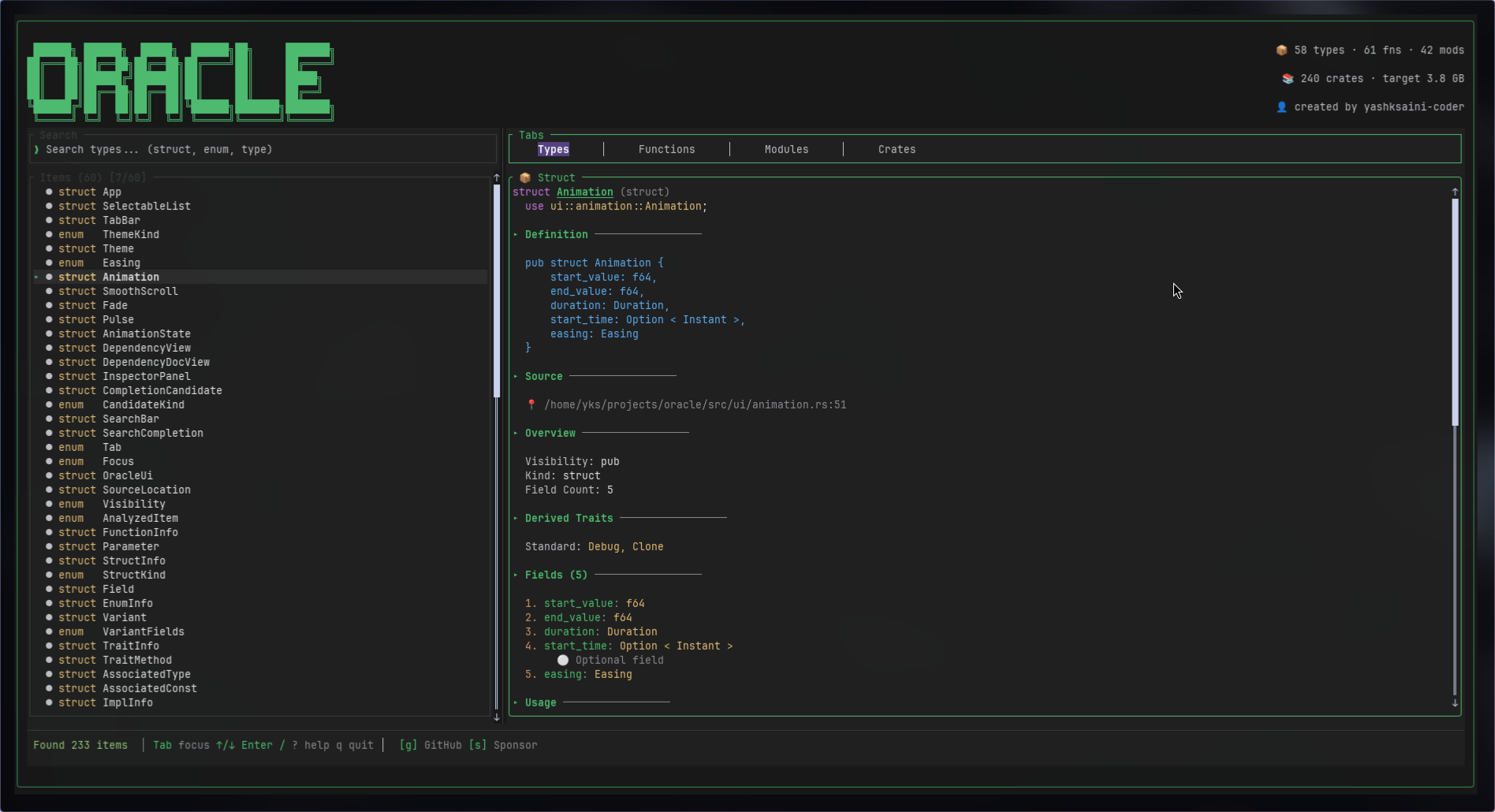
Demo
GitHub Repository: github.com/yashksaini-coder/oracle
Quick Start
# Install from source
git clone https://github.com/yashksaini-coder/oracle.git
cd oracle
cargo install --path .

# Run on any Rust project
oracle /path/to/rust/project

# Or analyze current directory
oracle
Sample Usage
# Inspect a famous crate
cargo new test_project
cd test_project
cargo add tokio

# Launch Oracle
oracle

# Now press:
# - Tab 4 times to get to Crates tab
# - Navigate to "tokio"
# - Press Enter
# - Search for "copy" with /
# - Browse copy methods and implementations

My Experience with GitHub Copilot CLI
Alright, confession time: This was my first serious Rust project that involved terminal UI stuff. I'd never touched Ratatui before, barely understood how syn worked, and was basically figuring everything out as I went.
GitHub Copilot CLI basically became my rubber duck, my Stack Overflow, and my patient senior developer all rolled into one. And the best part? I never had to leave my terminal.
🎯 How Copilot Saved My Sanity
1. Wrestling with the syn Crate
So Rust's syn crate is amazing for parsing Rust code, but holy hell the learning curve is steep. I needed to extract function signatures, struct fields, enum variants, all the trait bounds... basically everything.
I was staring at the docs feeling like I was reading ancient Greek, so I just asked Copilot:
gh copilot suggest "parse rust struct with syn crate extract all fields and visibility"
And it straight up gave me this:
use syn::{ItemStruct, Fields};

fn analyze_struct(st: &ItemStruct) -> Vec<Field> {
    match &st.fields {
        Fields::Named(named) => {
            named.named.iter().map(|f| Field {
                name: f.ident.as_ref().unwrap().to_string(),
                ty: quote!(#ty).to_string(),
                visibility: parse_visibility(&f.vis),
            }).collect()
        }
        // ... Tuple and Unit variants
    }
}
Like, it just worked. This became the foundation for parsing everything else — enums, traits, impl blocks, you name it. I just extended this pattern to handle all the other Rust item types.
Honestly? Saved me probably 8-10 hours of banging my head against the syn docs. Worth it.
2. Making the TUI Not Look Like Garbage
I wanted something that looked good. Not just functional, but actually pleasant to use. Panels, borders, smooth scrolling, the whole nine yards.
Problem: Ratatui's layout system made my brain hurt. How do you even compose these things?
Asked Copilot: gh copilot explain "ratatui layout constraints horizontal vertical split"
It explained that layouts are basically Lego blocks — you can compose them with Constraint::Percentage and Constraint::Length, and nest them for complex UIs. That made it click.
Then I was like: gh copilot suggest "ratatui scrollable panel with borders and title"
Got this back:
let block = Block::default()
    .borders(Borders::ALL)
    .title(" Inspector ");

let paragraph = Paragraph::new(lines)
    .block(block)
    .scroll((scroll_offset as u16, 0));
Beautiful. That became the core of my inspector panel. Later on I added the animations by interpolating the scroll_offset with some easing functions (because I'm extra like that).
3. Making Search Feel Snappy
I wanted the search to feel like VSCode's Ctrl+P — you know, where you just start typing and boom, instant results. No lag, no BS.
Asked Copilot: gh copilot suggest "rust fuzzy search crate with scoring"
It recommended fuzzy-matcher with SkimMatcherV2. Here's what I ended up with:
use fuzzy_matcher::skim::SkimMatcherV2;

let matcher = SkimMatcherV2::default();
let scored: Vec<_> = items
    .iter()
    .filter_map(|item| {
        matcher.fuzzy_match(&item.name, query)
            .map(|score| (item, score))
    })
    .collect();

scored.sort_by(|a, b| b.1.cmp(&a.1)); // Highest score first
And guess what? It worked perfectly on the first try. No debugging, no tweaking, just... worked. Those moments are rare in programming and should be celebrated.
4. Parsing Cargo.toml Without Crying
Dependencies and Cargo.toml can get complex real fast, especially with workspaces and transitive deps. I needed to parse all of that and build a proper dependency tree.
I was dreading this part until I asked: gh copilot explain "cargo metadata crate rust get all dependencies"
Turns out there's a crate called cargo_metadata (who knew?) that gives you structured JSON output. Copilot showed me:
- How to get the root package
- How to traverse the dependency tree
- How to detect direct vs transitive dependencies
- How to handle workspace crates
Here's what came out of it:
use cargo_metadata::MetadataCommand;

let metadata = MetadataCommand::new()
    .manifest_path(&manifest_path)
    .exec()?;

let root = metadata.root_package();
let dependencies = root.dependencies.iter()
    .filter(|d| d.kind == DependencyKind::Normal)
    .collect();
Simple, clean, and it actually works. Love it when code is like that.
5. Fetching Live Crate Info
I wanted to show real crate info when someone's browsing dependencies — descriptions, GitHub stars, license info, all that good stuff. Which meant hitting the crates.io API.
Me, having zero experience with async HTTP in Rust: gh copilot suggest "rust async http request to crates.io api"
Copilot pointed me to reqwest and showed me the blocking client pattern for background threads:
use reqwest::blocking::Client;

fn fetch_crate_docs(name: &str) -> Option<CrateDoc> {
    let client = Client::new();
    let url = format!("https://crates.io/api/v1/crates/{}", name);

    let response = client.get(&url).send().ok()?;
    let json: serde_json::Value = response.json().ok()?;

    Some(CrateDoc {
        name: json["crate"]["name"].as_str()?.to_string(),
        description: json["crate"]["description"].as_str().map(String::from),
        // ...
    })
}
Then I needed GitHub repo stats too, so I asked how to parse GitHub URLs and hit their API. Got that working too.
The whole crates.io + GitHub integration took one evening instead of... I don't know, a week of reading API docs?
6. Cross-Platform Path Hell
You know what's annoying? File paths. Windows uses backslashes, Unix uses forward slashes, and I needed to convert file paths to module paths (src/analyzer/parser.rs → ["analyzer", "parser"]).
Asked: gh copilot suggest "rust strip src directory from pathbuf get module path"
Got this beauty:
fn derive_module_path(path: &Path) -> Vec<String> {
    path.iter()
        .skip_while(|c| c != &"src")
        .skip(1) // Skip "src" itself
        .map(|c| c.to_string_lossy().to_string())
        .collect()
}
Works on Windows, macOS, Linux. No #[cfg] needed. Just works everywhere.
7. Making Animations Not Suck
Okay so this is where I got a bit carried away. I wanted smooth scrolling with momentum, not that janky jump-scroll thing most TUIs have.
Asked Copilot: gh copilot suggest "rust easing functions ease in out cubic"
It gave me the classic easing formulas:
pub fn ease_out(t: f64) -> f64 {
    1.0 - (1.0 - t).powi(3)
}

pub fn ease_in_out(t: f64) -> f64 {
    if t < 0.5 {
        4.0 * t * t * t
    } else {
        1.0 - (-2.0 * t + 2.0).powi(3) / 2.0
    }
}
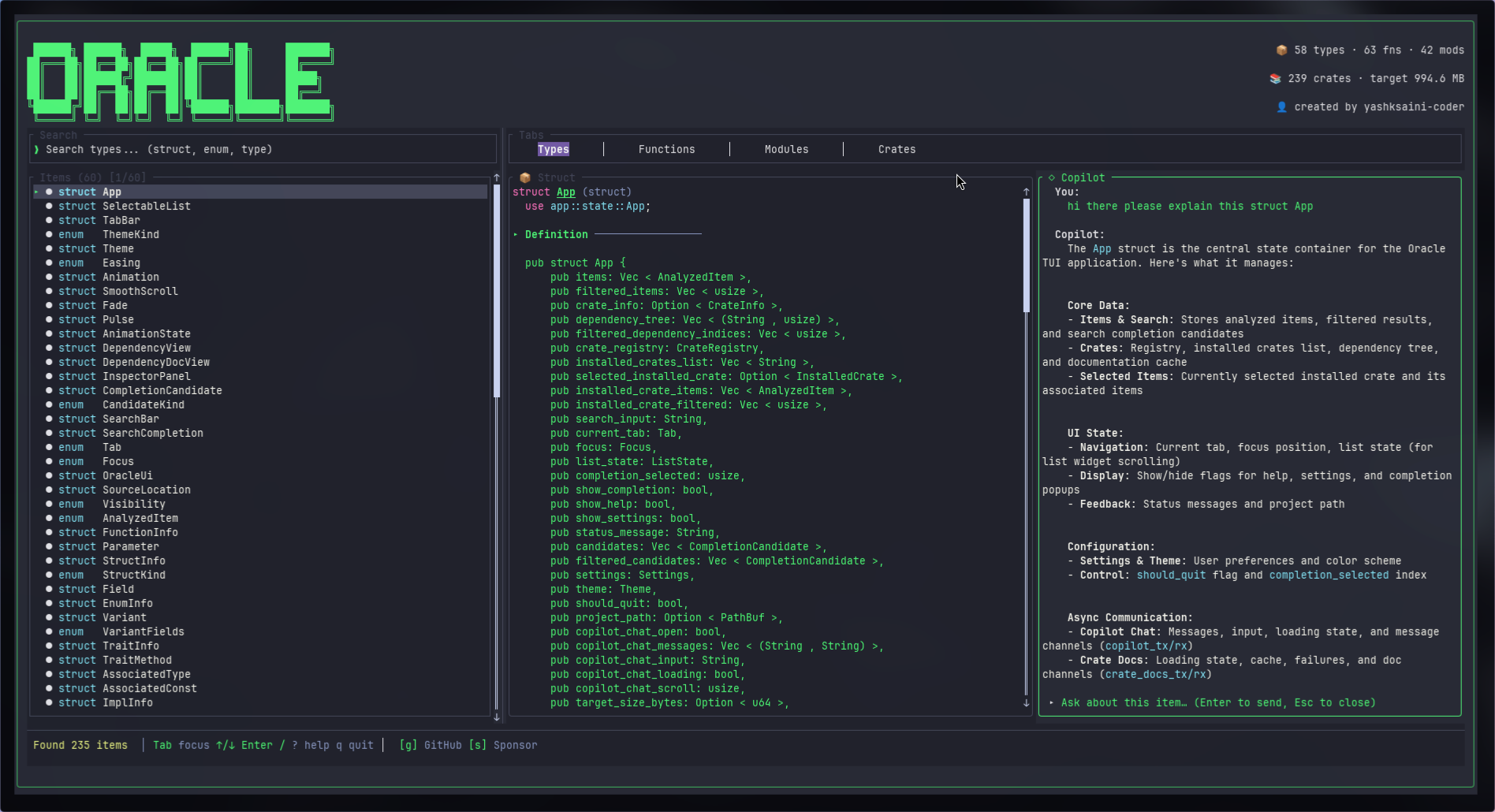
8. Integrating Copilot within itself
At this point I was just too deep into the rabbit hole and wanted to see how far I can reach, and so decided to give it a AI chat interface area, completely powered by Copilot and guess what ....
It Actually Works, it was mind blowing telling copilot to build and integrate yourself within my tool.
Applied these to scroll offset interpolation and boom — butter-smooth 60fps scrolling. Completely unnecessary for a CLI tool? Yes. Did I do it anyway? Also yes.
The Stuff That Almost Broke Me

Challenge 1: Not Freezing the Terminal When Parsing Big Projects
The Problem: So I tried running Oracle on the tokio codebase (which has like 200+ files), and my terminal just... froze. For a solid 10 seconds. Completely unresponsive. Not great.
The Solution: I moved all the parsing to background threads so the UI could stay responsive. Added a splash screen with this little wave animation (because if users have to wait, at least make it pretty). Also pre-computed search indices so that wouldn't lag either.
Copilot helped me figure out the threading patterns and how to show progress without blocking the UI. Game changer.
Challenge 2: Making Search Feel Instant (Even When It's Not)
The Problem: When you have 10,000+ items to search through, every keystroke was taking like 100ms. That's noticeable lag, and it felt janky.
The Solution:
- Only search within the active tab (if you're in Functions, only search functions)
- Limit results to top 50 (nobody scrolls past that anyway)
- Used
fuzzy-matcher's batch scoring (it's faster than one-by-one) - Cached search results for repeated queries
- Only rendered visible items on screen
Result? Search now takes < 16ms per keystroke. That's 60fps territory. Smooth.
Challenge 3: GitHub Rate Limits Are Real
The Problem: The GitHub API rate-limits unauthenticated requests to 60 per hour. I was hitting that limit basically immediately when testing the crates.io features.
The Solution:
- Added support for
GITHUB_TOKENenvironment variable (gives you 5000/hour when authenticated) - Cached responses per crate so we don't re-fetch
- Graceful fallback when rate-limited (just show "rate limited" instead of crashing)
- Added a hint to users: "Set GITHUB_TOKEN for more requests"
Copilot helped explain the GitHub API auth flow and how to parse rate limit headers. Much better now.
Challenge 4: Scrollable Content That Doesn't Suck
The Problem: When you select an item, the inspector panel shows all its details. But what if the docs are really long? It just got cut off. Not ideal.
The Solution:
Had to track scroll offset per selected item, bind j/k and arrow keys to scroll up/down, show a scrollbar indicator when content overflows, and reset scroll position when switching items.
Copilot showed me Ratatui's Scrollbar widget and how to manage scroll state properly. Works great now.
Why You Might Actually Want to Use This
🚀 It's Fast (Like, Really Fast)
- Parses 200+ files in under 2 seconds
- Search responds instantly (< 16ms per keystroke)
- 60fps animations (yes, in a terminal)
- Zero network calls for local analysis (your code never leaves your machine)
🎨 It Doesn't Look Like Hot Garbage
- 4 hand-crafted themes (Nord is chef's kiss)
- Smooth scrolling with easing (because I have standards)
- Context-aware UI (functions show parameter hints, structs show field types)
- Professional documentation formatting
🔧 Actually Designed for Terminal Use
- Works perfectly over SSH (no GUI needed, no X forwarding BS)
- Vim-style keybindings (
j/kfor life) - One command:
oracle— that's it - Installable via
cargo install(once I publish it to crates.io)
📚 It Actually Understands Rust
Most code search tools are just fancy grep. Oracle:
- Analyzes ALL Rust item types (functions, structs, enums, traits, impls, modules)
- Shows qualified paths (
serde::de::Deserializeworks perfectly) - Handles visibility modifiers properly
- Understands generics, lifetimes, trait bounds, async, const, unsafe — all of it
Basically, it doesn't just search your code, it understands it.
How I Actually Use This Thing
Before Oracle:
# Trying to find all trait implementations
rg "impl.*for" | less  # Scroll through 200 lines of noise

# Trying to understand a struct
rg "struct Config" -A 20 | grep "pub"  # Miss half the fields

# Finding function signatures
rg "pub fn connect"  # Get incomplete matches without parameters
With Oracle:
oracle
# Tab to Functions, type "connect", press Enter
# See:
#   - Full signature with all parameters and types
#   - Complete documentation
#   - Return type with error handling
#   - Source location (file + line number)
# Press 'o' to open in your editor
It's just... so much faster. And less annoying.
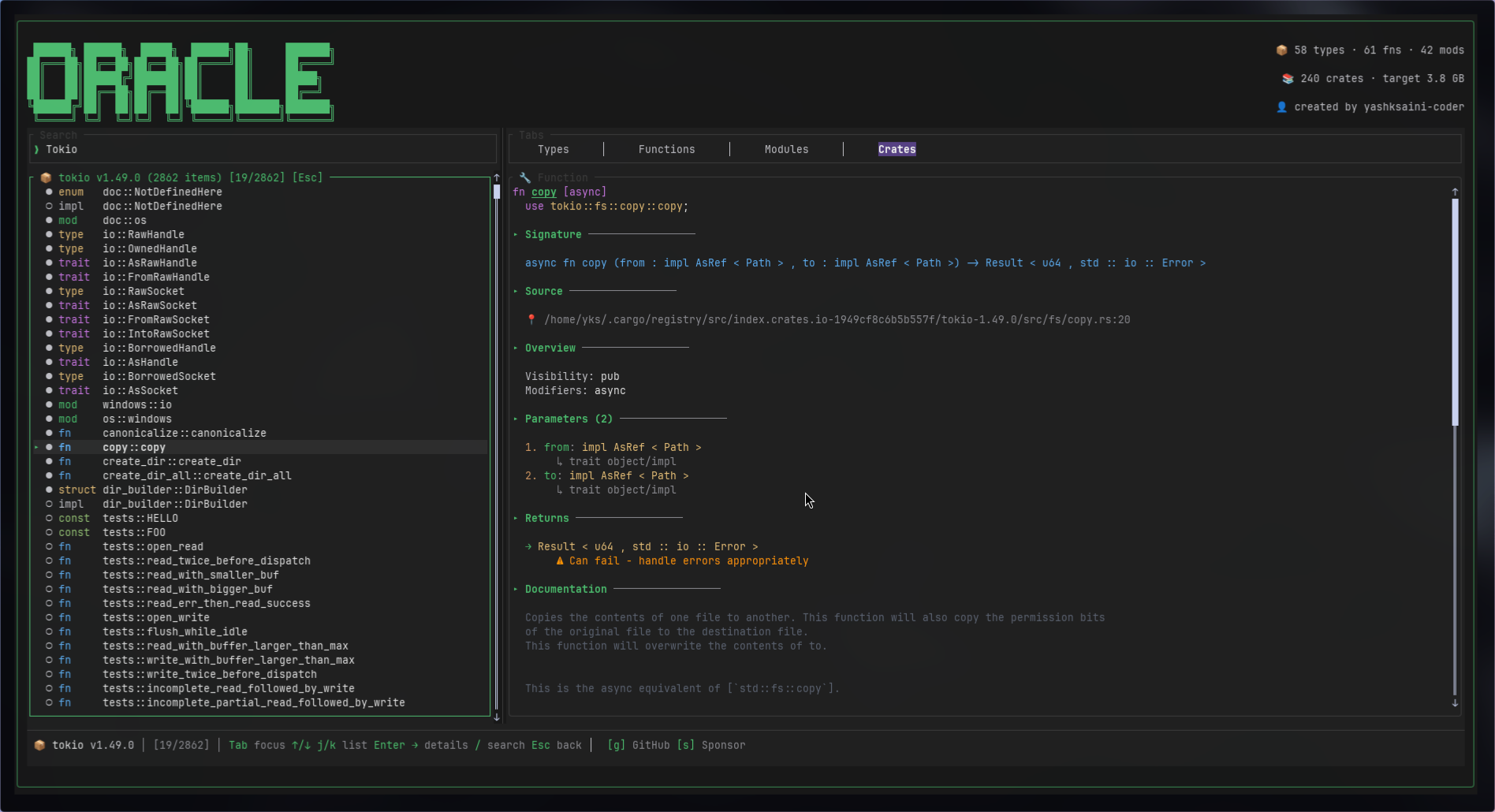
Another example: You add tokio to your project and want to understand how spawn works.
Old way:
- Clone the tokio repo
- grep for "pub fn spawn"
- Get 47 matches
- Try to figure out which one is the right one
- Give up and read the docs instead
With Oracle:
oracle ~/.cargo/registry/src/*/tokio-*
# Press 4 for Crates tab
# Navigate to "tokio", press Enter
# Type "spawn" in search
# See signature, docs, parameters, trait bounds
# Press 'o' for docs.rs if you want more details
Time saved: Like 5 minutes every single time.
Installation & Usage
Install
# From source (recommended for now)
git clone https://github.com/yashksaini-coder/oracle.git
cd oracle
cargo install --path .

# Or use cargo directly (once published)
cargo install oracle-tui
Usage
# Analyze current directory
oracle

# Analyze specific project
oracle ~/code/my-rust-project

# Set GitHub token for better crate.io API limits
export GITHUB_TOKEN=ghp_yourtoken
oracle
What's Next (If People Actually Use This)
Got some ideas for future versions:
- Symbol references: Show where a function/type is actually being used (would be super helpful)
- Jump to definition: Press a key, open the source file at the exact line
- Macro expansion viewer: See what those cryptic macros expand to
- Call graph visualization: Show which functions call which (could get messy but cool)
- Git integration: Show recent changes per item, like "this function was modified 3 days ago"
- Export to JSON/HTML: Generate static docs from your codebase
- LSP integration: Hook into rust-analyzer for even deeper analysis
No promises on timeline though. This is still a side project I hacked together because I was annoyed.
Why Rust?
Performance: Parsing is CPU-bound. Rust's zero-cost abstractions mean fast parsing without GC pauses.
Safety: No segfaults when traversing complex ASTs. The borrow checker caught 20+ bugs during development.
Ecosystem: syn is the gold standard for Rust parsing. ratatui makes TUIs actually fun to build.
Cross-platform: One binary works on Linux, macOS, Windows — no Python/Node runtime needed.
Lessons Learned
1. TUI State Management is Hard
Managing focus, scroll positions, search state, animations — all simultaneously — is trickier than React state. Had to build a small state machine.
2. Parsing is Expensive
Even with syn's fast parser, analyzing 200+ files takes time. Had to optimize with:
- Lazy loading (only parse visible items)
- Caching parsed results
- Background threads for heavy work
3. Terminal Rendering is Delicate
Drawing too frequently causes flicker. Drawing too infrequently feels laggy. Found the sweet spot: 60fps when animating, 10fps when idle.
4. Copilot CLI is a Force Multiplier
Seriously. Having an AI explain syn patterns, Ratatui layouts, async patterns, easing formulas — all without leaving the terminal — was incredible.
Wrapping Up
So yeah, that's Oracle. Built it because I was frustrated with existing tools, learned a ton about Rust, TUIs, and parsing along the way.
GitHub Copilot CLI was honestly a lifesaver. Having an AI that could explain syn patterns, show me Ratatui layouts, help with async patterns, and even provide easing formulas — all without leaving my terminal — was incredible. Saved me probably 30+ hours of reading docs and Stack Overflow.
The result is a tool I actually use every day now. Every time I clone a new Rust project, I run oracle first to get the lay of the land. It's just become part of my workflow.
If you work with Rust, give it a shot. Worst case, you wasted 2 minutes installing it. Best case, it changes how you explore code.
Links:
- Yash Saini - @yashksaini-coder
- X: 0xcrackedDev
- GitHub: github.com/yashksaini-coder/oracle
- Crates: oracle-tui
- Latest Release: Latest releases
Got feedback? Found a bug? Want a feature? Open an issue or drop a comment. I actually read them.
Built with way too much coffee, Rust, Ratatui, and GitHub Copilot CLI being an absolute legend.
{% cta link https://github.com/yashksaini-coder/vizier %} Star Oracle {% endcta %}
If you liked this, consider giving the repo a star. It makes me feel good about my life choices. ⭐
#devchallenge #githubchallenge #cli #rust #tui #opensource
Comments
More Blog
View allgemmaFive Gemma-4 models, one accelerator: what porting E2B 31B to AWS Inferentia2 taught me
I ported the whole Gemma-4 family — E2B, E4B, 12B, 31B, and the 26B-A4B MoE — to run on...
X
xbillcommunityHey DEV, I'm Tobore. Let's actually connect.
Hey DEV, I'm Tobore. Let's actually connect. I've been on here for a while now, mostly writing and...
L
Laurina AyarahaiI burned through thousands of AI tokens. Then a friend did it for free
(yep, kinda clickbait, just for the funsies 😊) At the beginning of the year, I relaunched my...
P
Paulo HenriqueaiClaude might be saturating your machine
My laptop was sitting idle with the fan at full tilt. Nothing was running that I knew of. The culprit...
S
Sidhant PandagithubactionsAutomated GitHub Code Reviews Using Google Gemini
I Built a Thing! TL;DR — Google Gemini-based Pull Request reviews and Issue Triaging for...
D
Darren "Dazbo" LesteraiWhat is an "agentic harness," actually?
I've been hearing the word "harness" thrown around a lot lately. I assumed it just meant "the IDE" or...
T
Tilde A. ThuriumReady-made automations for this
Workflows from the Neura Market marketplace related to this CoPilot resource
- Create a Stripe customer from a Gravity Forms form submissionmake · $3.99 · Uses make
- Send submission data from JotForm to a specified URLmake · $2.99 · Uses make
- Add a tag to a Mailchimp subscriber with a Gravity Forms form submissionmake · $3.99 · Uses make
- Send a Gmail email from a new Interact quiz submissionmake · $2.99 · Uses make