Generate AI Viral Videos with NanoBanana & VEO3, Shared on Socials via Blotato
# Generate AI viral videos with NanoBanana & VEO3, shared on socials via Blotato
## Who is this for?
This workflow is designed for **content creators, marketers, and entrepreneurs** who want to automate their video production and social media publishing process. If you regularly post promotional or viral-style content on platforms like TikTok, YouTube Shorts, Instagram Reels, LinkedIn, and more, this template will save you hours of manual work.
---
## What problem is this workflow solving? / Use case
Creating **viral short-form videos** is often time-consuming:
- You need to generate visuals, write scripts, edit videos, and then manually upload them to multiple platforms.
- Staying consistent across **TikTok, YouTube Shorts, Instagram Reels, LinkedIn, Twitter/X, and others** requires constant effort.
This workflow solves the problem by **automating the entire pipeline** from idea → video creation → multi-platform publishing.
---
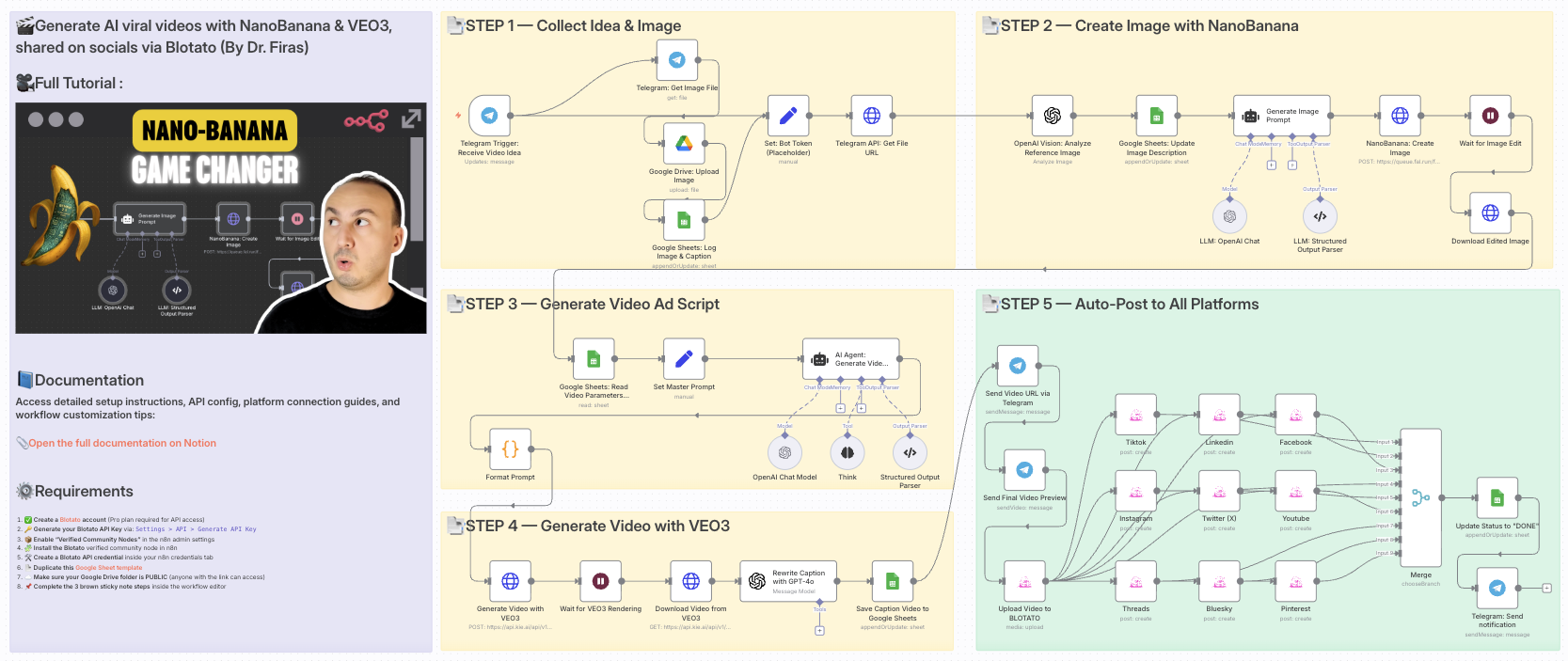
## What this workflow does
1. **Collects an idea and image** from Telegram.
2. **Enhances visuals with NanoBanana** for user-generated content style.
3. **Generates a complete video script with AI** (OpenAI + structured prompts).
4. **Creates the final video with VEO3** using your custom prompt and visuals.
5. **Rewrites captions with GPT** to be short, catchy, and optimized for social platforms.
6. **Saves metadata in Google Sheets** for tracking and management.
7. **Auto-uploads the video to all major platforms via Blotato** (TikTok, YouTube, Instagram, LinkedIn, Threads, Pinterest, X/Twitter, Bluesky, Facebook).
8. **Notifies you on Telegram** with a preview link once publishing is complete.
---
## Setup
1. **Connect your accounts**:
- Google Sheets (for video tracking)
- Telegram (to receive and send media)
- Blotato (for multi-platform publishing)
- OpenAI API (for captions, prompts, and image analysis)
- VEO3 API (for video rendering)
- Flixel.ai (for NanoBanana image editing)
- Google Drive (to store processed images)
2. **Set your credentials** in the respective nodes.
3. **Adjust the Google Sheet IDs** to match your own sheet structure.
4. **Insert your Telegram bot token** in the `Set: Bot Token (Placeholder)` node.
---
## How to customize this workflow to your needs
- **Platforms**: Disable or enable only the Blotato social accounts you want to post to.
- **Video style**: Adjust the master prompt schema in the `Set Master Prompt` node to fine-tune tone, camera style, or video format.
- **Captions**: Modify the GPT prompt in the `Rewrite Caption with GPT-4` node to control length and tone.
- **Notifications**: Customize the Telegram nodes to notify team members, not just yourself.
- **Scheduling**: Add a Cron trigger if you want automatic posting at specific times.
---
“With this workflow, you go from **idea → AI-enhanced video → instant multi-platform publishing** in just minutes, with almost no manual work. ➡️ **Documentation**: [Notion Guide](https://automatisation.notion.site/NanoBanana-2643d6550fd98041aef5dcbe8ab0f7a1?source=copy_link)
---
### Need help customizing?
Contact me for consulting and support: [LinkedIn](https://www.linkedin.com/in/dr-firas/) / [YouTube](https://www.youtube.com/@DRFIRASS)
Platform
n8n
Category
Media & Entertainment
Price
$24.99
Creator
Dr. Firas
set
code
wait
merge
telegram
stickyNote
googleDrive
httpRequest
googleSheets
agent
How to import this workflow into n8n
1Purchase or download the workflow to get the n8n workflow JSON file.
2In your n8n instance, open Workflows and choose "Import from File" (or paste the JSON with Ctrl+V on the canvas).
3Open each node marked with a credential warning and connect your own accounts and API keys.
4Run the workflow once manually to verify the data flow, then toggle it to Active.