
Back to Blog ai
ai gemma
gemma community
 ai
ai ai
ai githubactions
 ai
ai
Loop Engineering Explained for Developers!
Pavan Belagatti July 6, 2026
0 views
With a Real CI Automation Example Loop Engineering is suddenly everywhere, and honestly, I wanted to...
With a Real CI Automation Example
Loop Engineering is suddenly everywhere, and honestly, I wanted to understand it properly instead of just repeating the buzzword. The simplest way I can explain Loop Engineering is this: it replaces me as the person constantly prompting the agent.
Instead of me manually noticing a problem, deciding what it means, writing the next prompt, and pushing the process forward, I design a system that keeps moving on its own until it reaches the outcome I want. That is the whole point of Loop Engineering. I stop acting like the operator and start acting like the system designer.
To make that idea concrete, I built a practical software engineering workflow around CI failures. Whenever a GitHub Actions CI run fails, the system automatically classifies the failure, creates a Jira bug for real issues, sends a Slack notification, and records the outcome so it does not process the same failure twice.
{% embed https://youtu.be/RvG7R0Ue1k4?si=kd0vnzcNYScM8dr6 %}
What Loop Engineering actually means
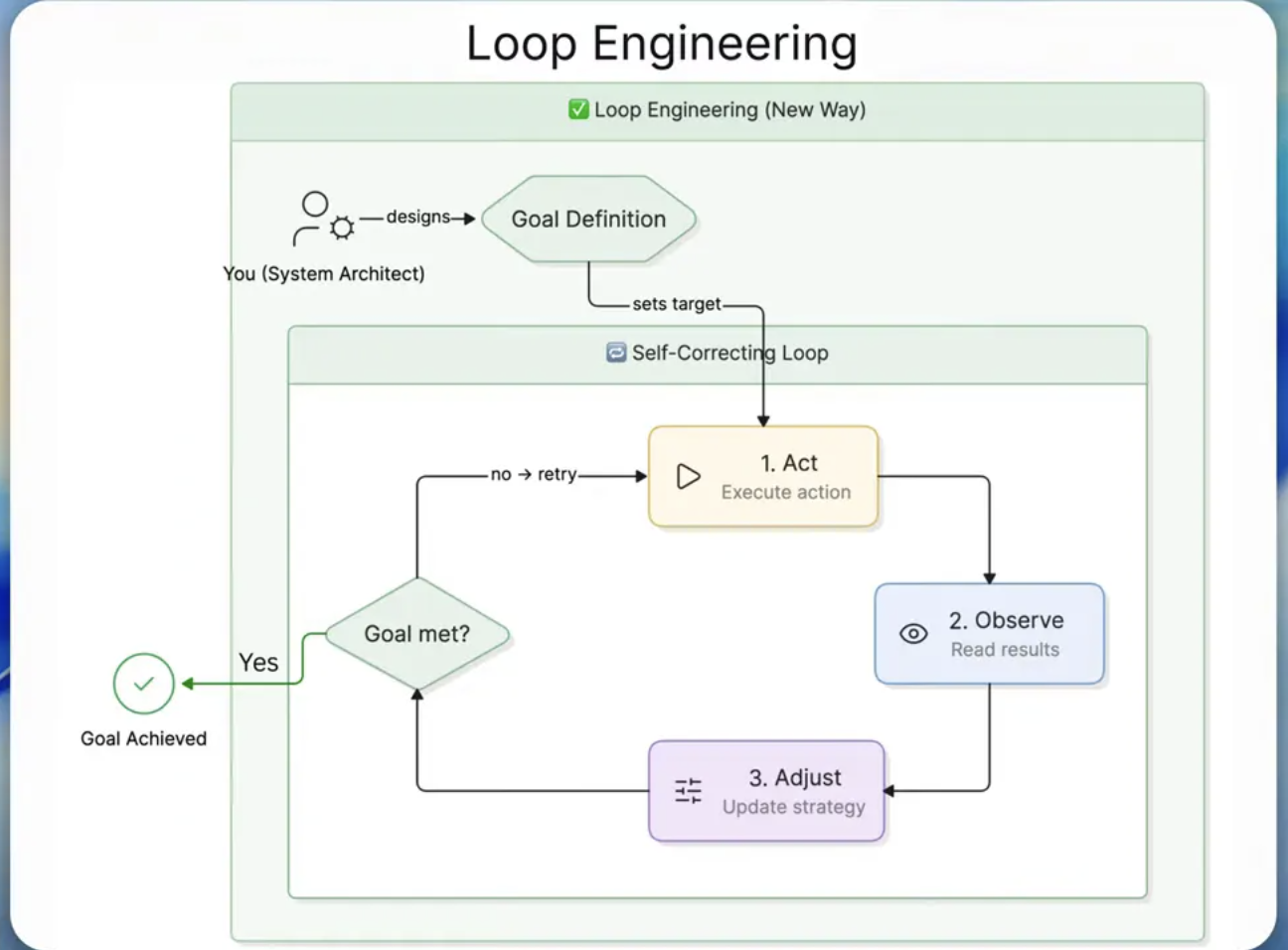
Early AI workflows were mostly linear. I would give a prompt, the model would return an answer, and if the answer was incomplete or wrong, I would jump back in and prompt again. That worked, but it kept me trapped inside the process.
Loop Engineering changes that dynamic. I am no longer the person babysitting each step. I build an autonomous loop that can observe, decide, act, and persist state. The system keeps iterating until the task is done, without needing me to micromanage it.
That distinction matters. In a normal prompt based workflow, the human is still the glue. In Loop Engineering, the human creates the machine, and the machine runs the loop.
The five building blocks of Loop Engineering
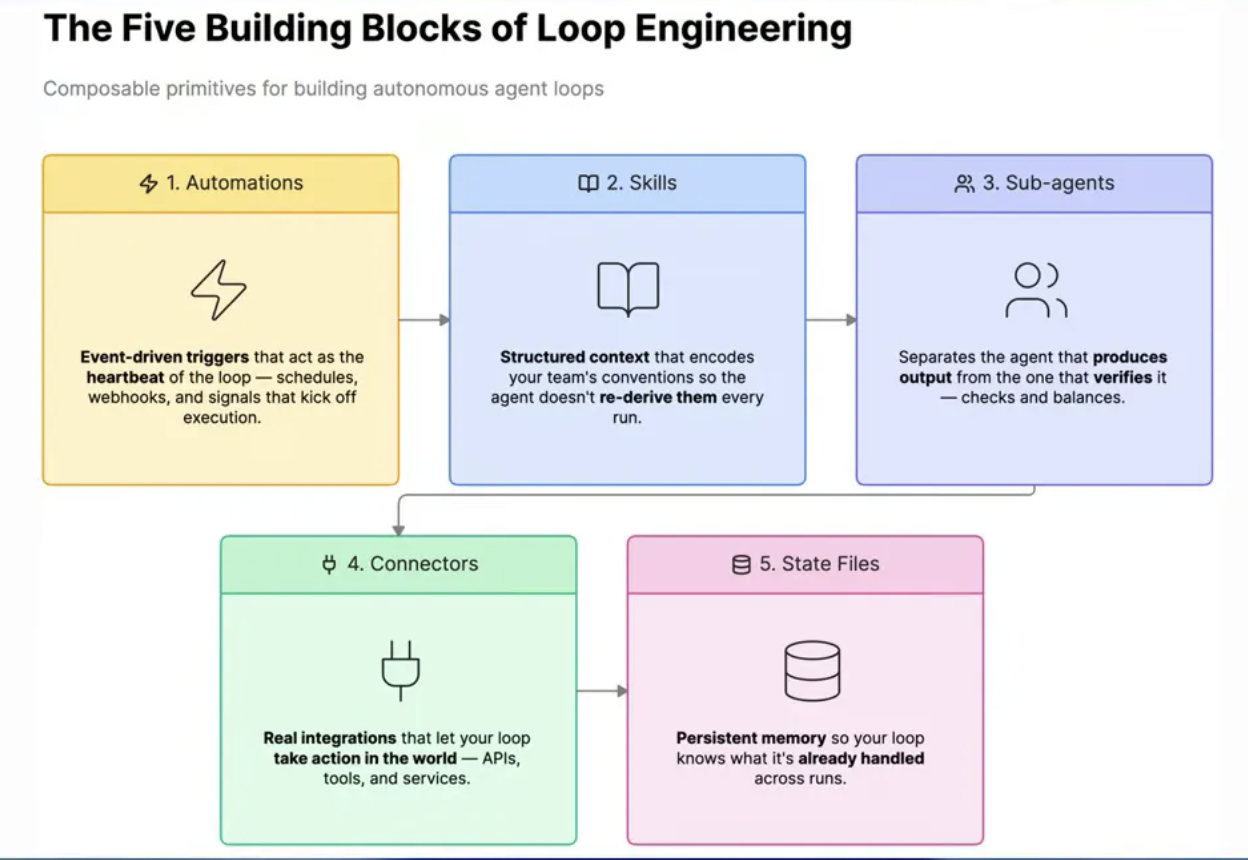
When I break down Loop Engineering, I think of it as five core building blocks working together.
1. Automations These are the event driven triggers that start the whole system. They are the heartbeat of the loop. Something happens, and the automation fires. Without this, nothing starts.
2. Skills Skills give the agent structured context. Instead of forcing the agent to rediscover team conventions every single time, I encode that context once so it can operate with the same assumptions repeatedly.
3. Sub-agents This is where things get more robust. One agent can produce an output, and another can verify or classify it. That separation is useful because generation and validation are not always the same job.
4. Connectors Connectors are what let the loop act in the real world. A decision inside the system is only valuable if it can trigger something external like Jira, Slack, GitHub, or another platform.
5. State files State is memory. It helps the loop remember what it has already handled. This is how I avoid duplicate processing and repeated actions. Without persistent state, the system can become noisy and unreliable.
Why I used a CI failure use case
I wanted to apply Loop Engineering to something real, not just a toy demo. Continuous integration is a perfect example because teams deal with CI failures all the time, and a lot of the follow-up work is repetitive.
Here is what usually happens when a CI run fails in GitHub Actions:
- Someone notices the failure
- Someone checks whether it is a flaky test, an environment problem, or a real bug
- Someone creates a Jira issue
- Someone sends a Slack message
- Someone tracks whether the issue was already handled
That is manual toil.
The Google SRE way of thinking about toil is useful here. Toil is repetitive manual work that grows linearly with the size of the team. As the engineering organization grows, CI failures grow too. If handling them still depends on humans doing the same boring steps every day, the cost scales badly.
So my goal was simple: eliminate as much of that toil as possible with Loop Engineering.
The loop I built
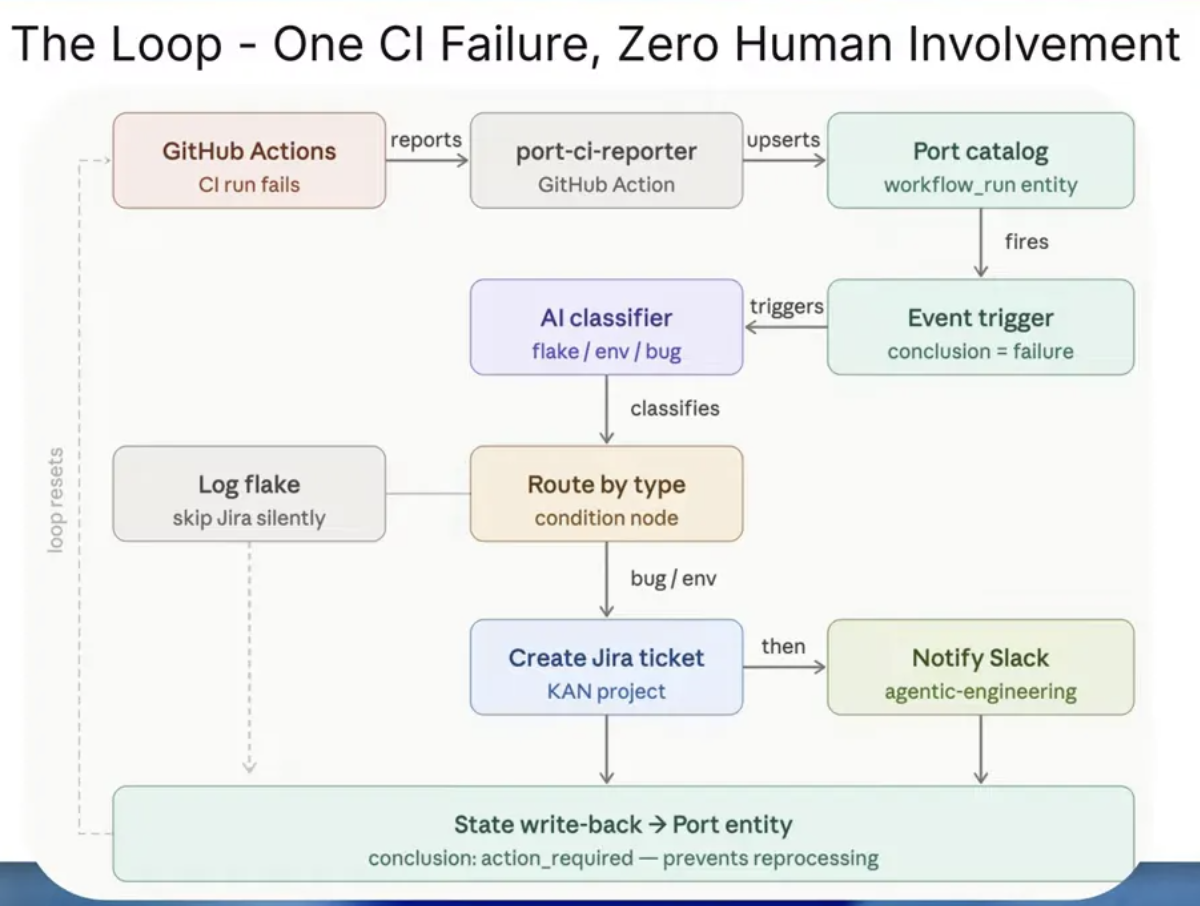
The loop works like this.
- A CI run fails in GitHub Actions.
- An automation triggers automatically.
- AI classifies the failure.
- If it is a flake, the system logs it and skips Jira.
- If it is a real bug, the system creates a Jira ticket.
- The system sends a Slack notification with the details.
- The result is written back as persistent state so the same failure is not processed twice.
That is a very practical example of Loop Engineering. No manual prompting in the middle. No waiting for a human to notice the failure. No repeated handoffs.
How the workflow behaves in practice
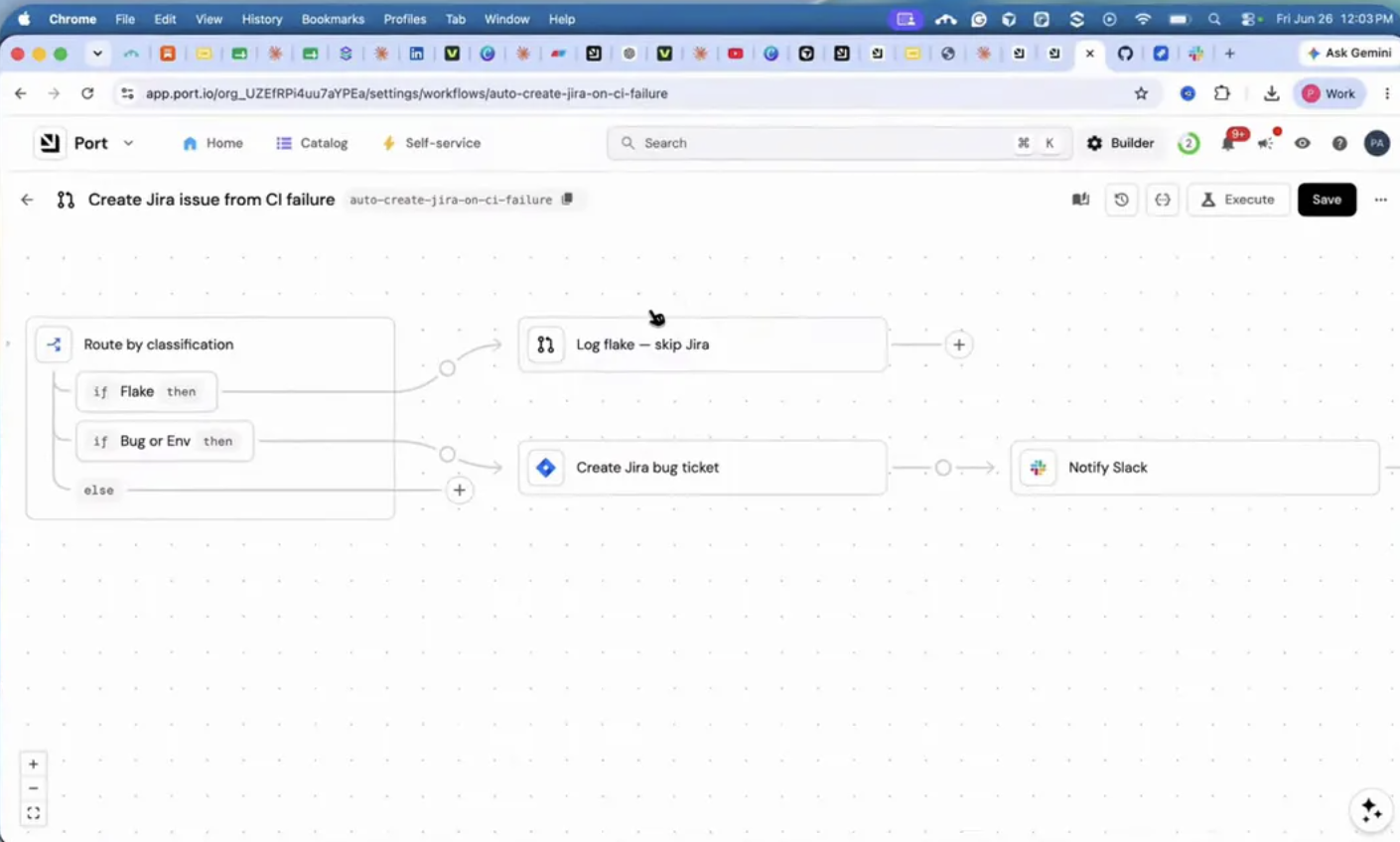
I built this workflow in Port.io, which is an agentic SDLC platform. The interesting part is not the product pitch. The interesting part is that it gave me a clean way to connect automations, workflows, AI classification, and external systems.
The workflow I created is essentially a seven node process for CI failure handling. When a workflow run changes, the system classifies the CI failure. From there, it branches based on the classification.
If the failure is treated as a flake, it gets logged and Jira is skipped. If the classification is bug, it creates a Jira bug, notifies Slack, and updates the run status back in Port.
This is where Loop Engineering becomes more than theory. The loop is not just deciding things. It is taking action across tools and writing the outcome back into the system.
The live example that proves the point
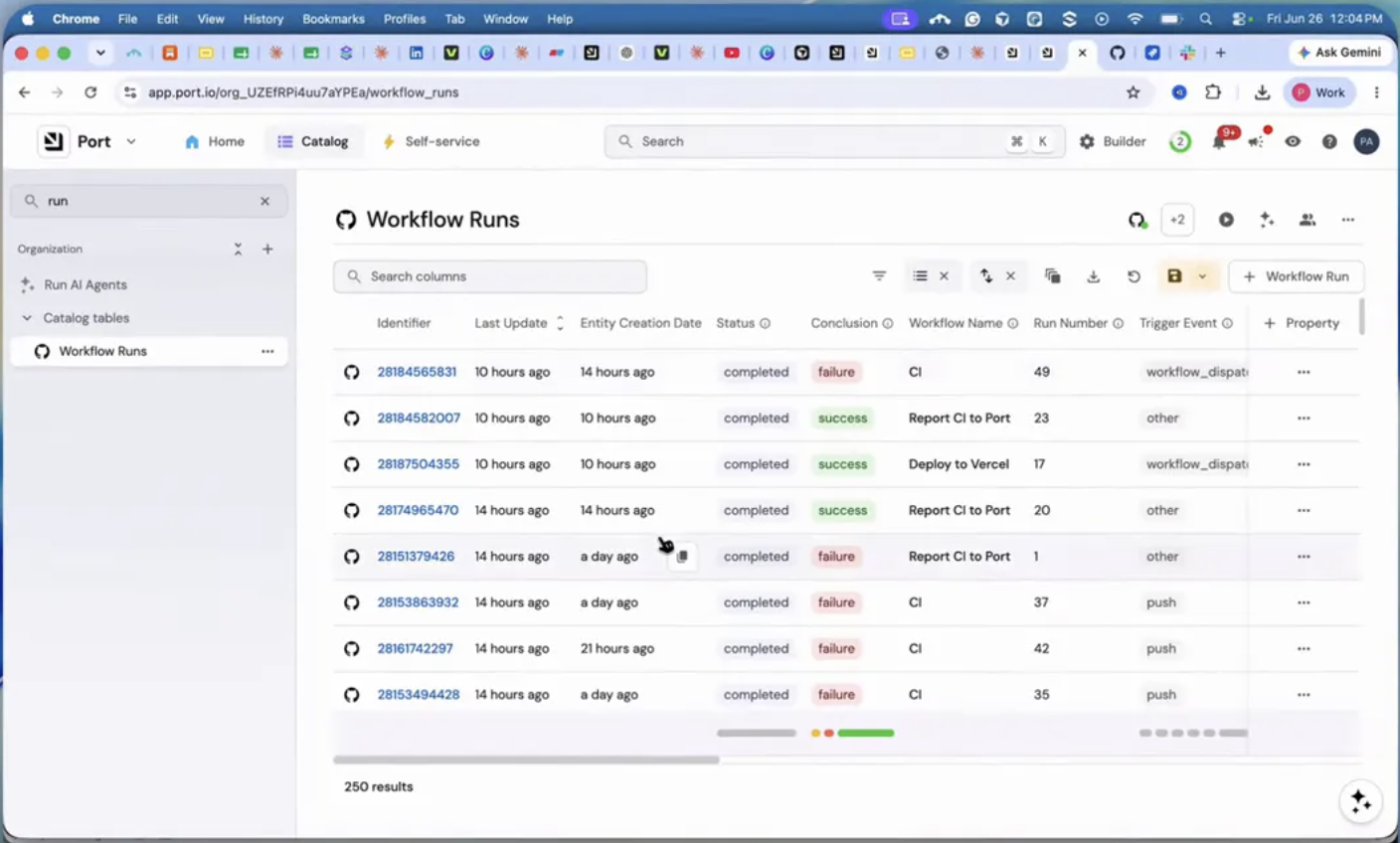
To test the setup, I triggered a CI failure by editing a README file in a GitHub repository and committing directly to the main branch. In my setup, that change was enough to kick off a CI workflow that intentionally simulates a failure.
Once the CI run failed, the chain reacted automatically.
Inside Port, a new workflow run appeared. The system picked up the failure, classified it, and continued through the automation path.
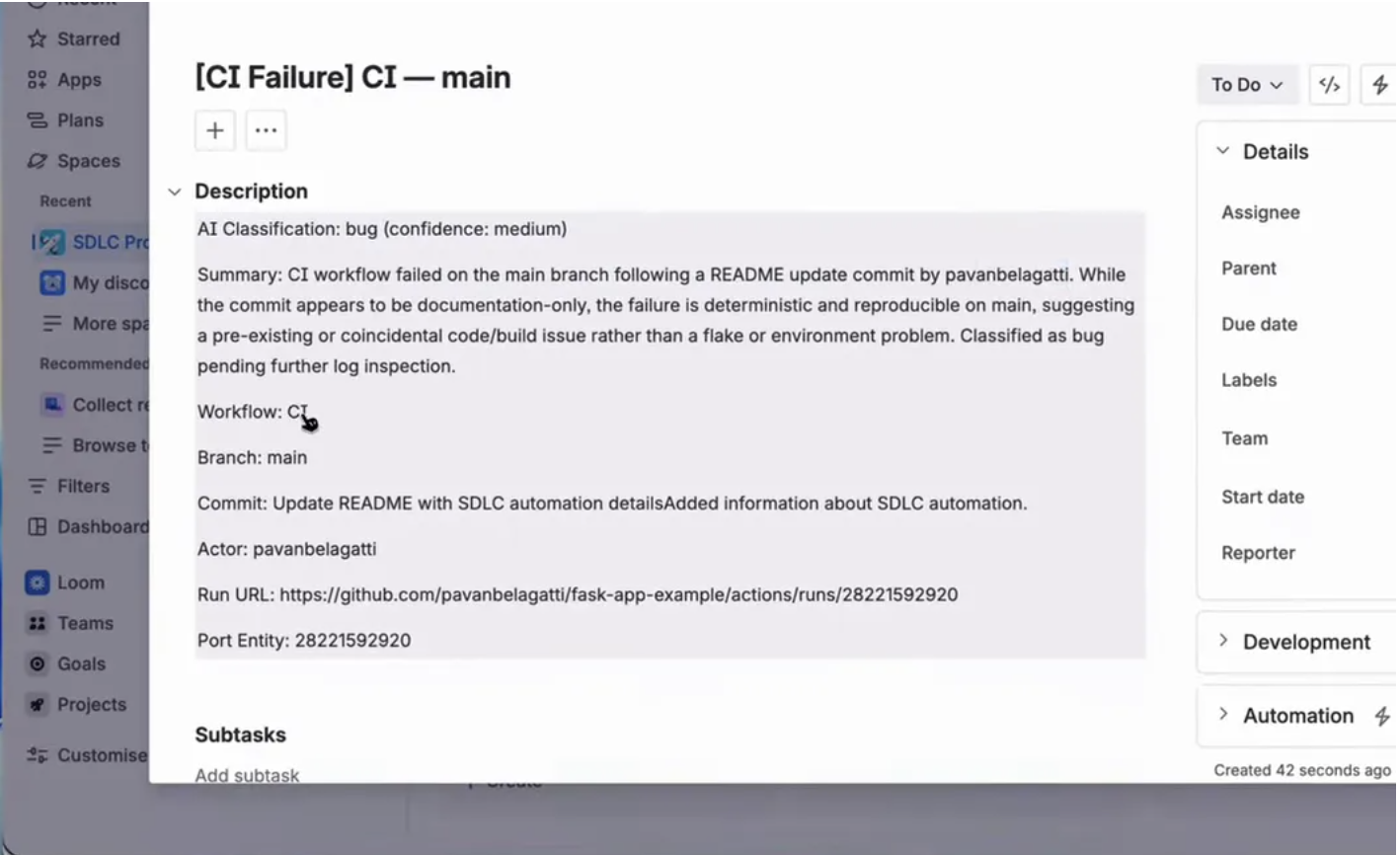
Then in Jira, a bug was created automatically. The issue included useful details like:
- AI classification
- Confidence level
- Summary of the CI failure
- Workflow name
- Branch
- Commit
- Actor
- Run URL
- Port entity reference
And on Slack, a notification landed with the same core details and links back to GitHub, Jira, and Port.
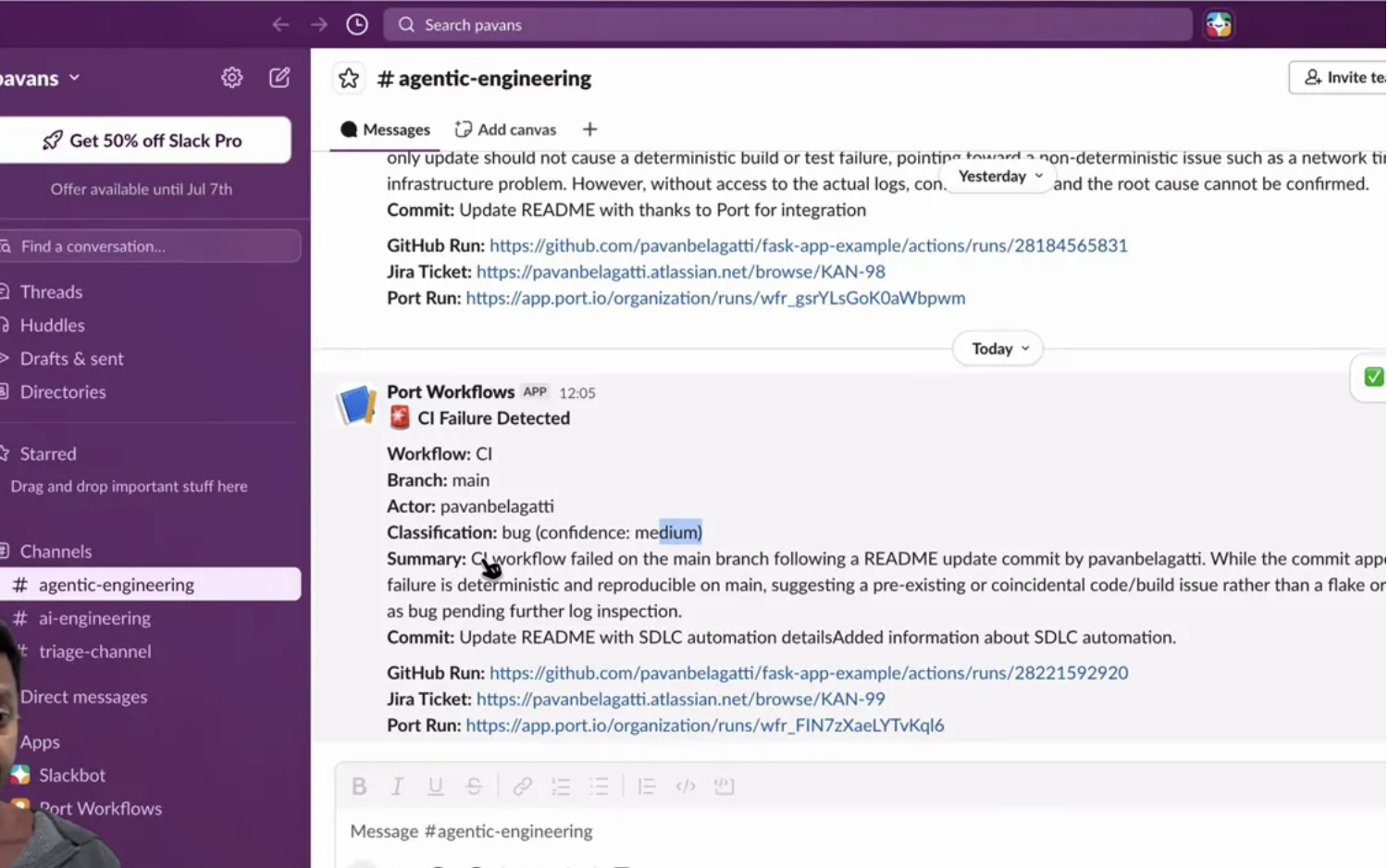
That is the moment where Loop Engineering really clicks. The failure happened, the system reasoned about it, took action, and recorded the result, all without me stepping in between.
Why this matters more than it first appears
A lot of people hear “autonomous workflow” and think it just means convenience. I think it is more than that.
Imagine a CI failure happening at 3 a.m. Normally, somebody has to notice it later, inspect it, and decide what to do. That delay can slow teams down, especially when failures stack up. But with a Loop Engineering approach, the first response happens immediately.
Even if the loop does not fully fix the issue yet, it still removes the boring operational overhead:
- Detection is automatic
- Triage is automatic
- Routing is automatic
- Notification is automatic
- State tracking is automatic
That is already a huge gain. And once the loop is mature enough, it can potentially expand beyond reporting into remediation.
What I needed to build it
The prerequisites were pretty straightforward.
- A Port.io account
- A GitHub account and repository
- A CI workflow in GitHub
- A workflow that reports CI run metadata to Port
- A Jira project and credentials
- A Slack app and bot token
- The two GitHub workflow files
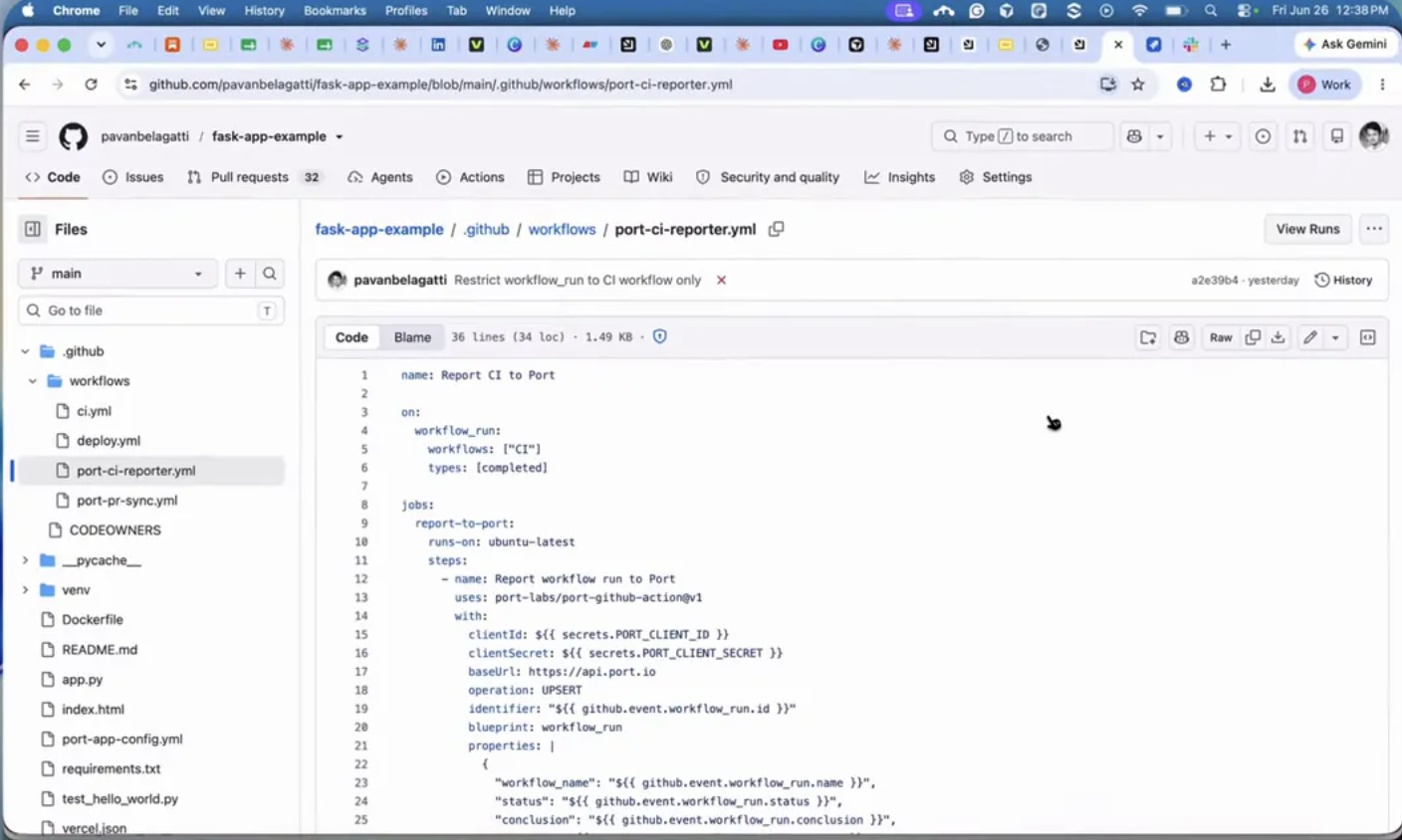
I used two YAML files in the repository. The first was the main CI pipeline. That one simulates a test failure when I make the kind of change I used for the demo.
The second was a Port CI reporter workflow. Its job is to fire after the CI run completes and send the run metadata to Port in a single upsert. That metadata includes things like the workflow name, branch, commit message, actor, and run URL.
That second file is important because it is what bridges GitHub into the Loop Engineering system.
How the pieces connect inside Port
Inside Port, I had a few major setup pieces.
1. Data sources
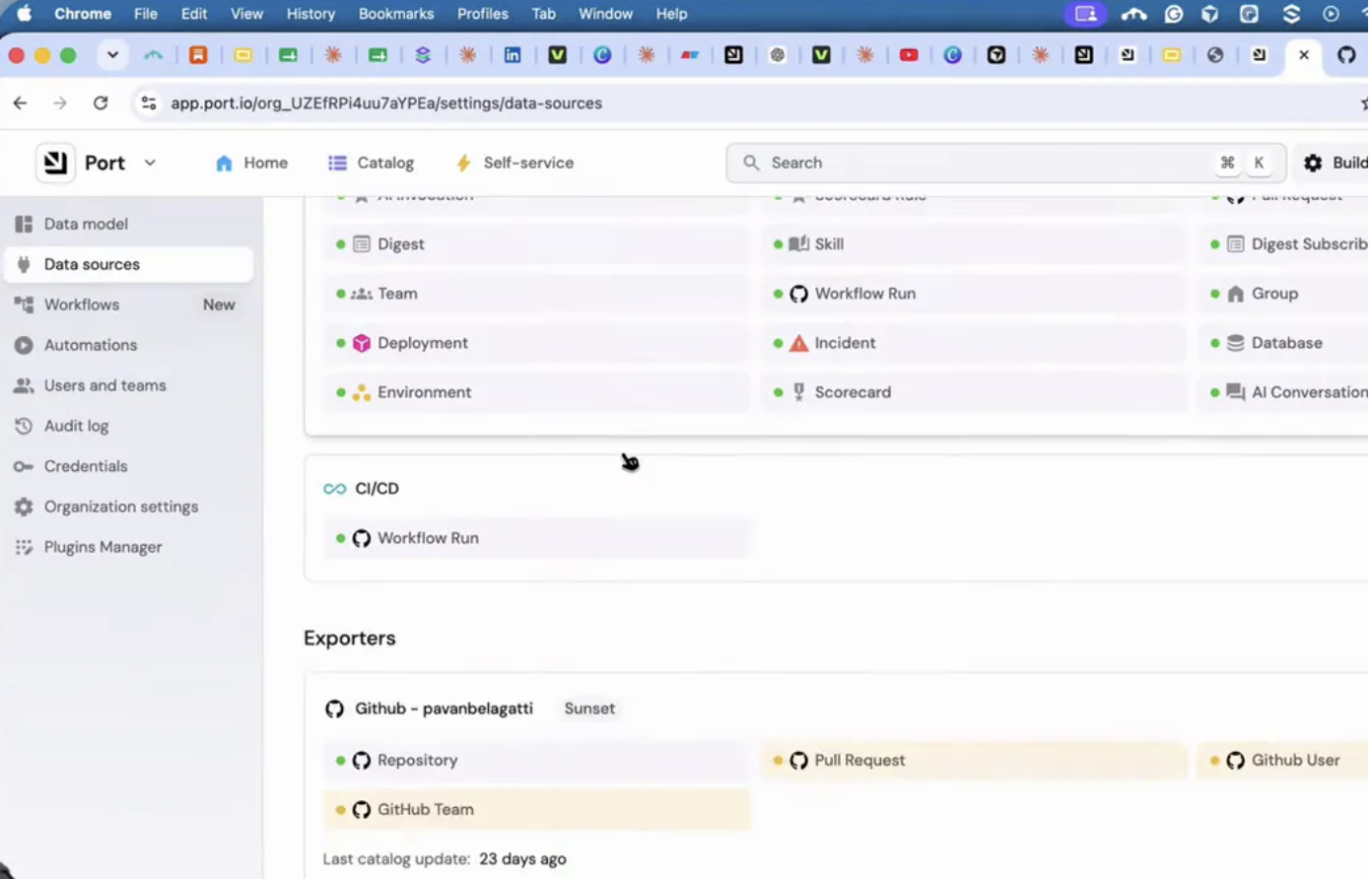
I connected GitHub and the CI CD workflow run data source so Port could sync workflow run information.
2. Self-service action
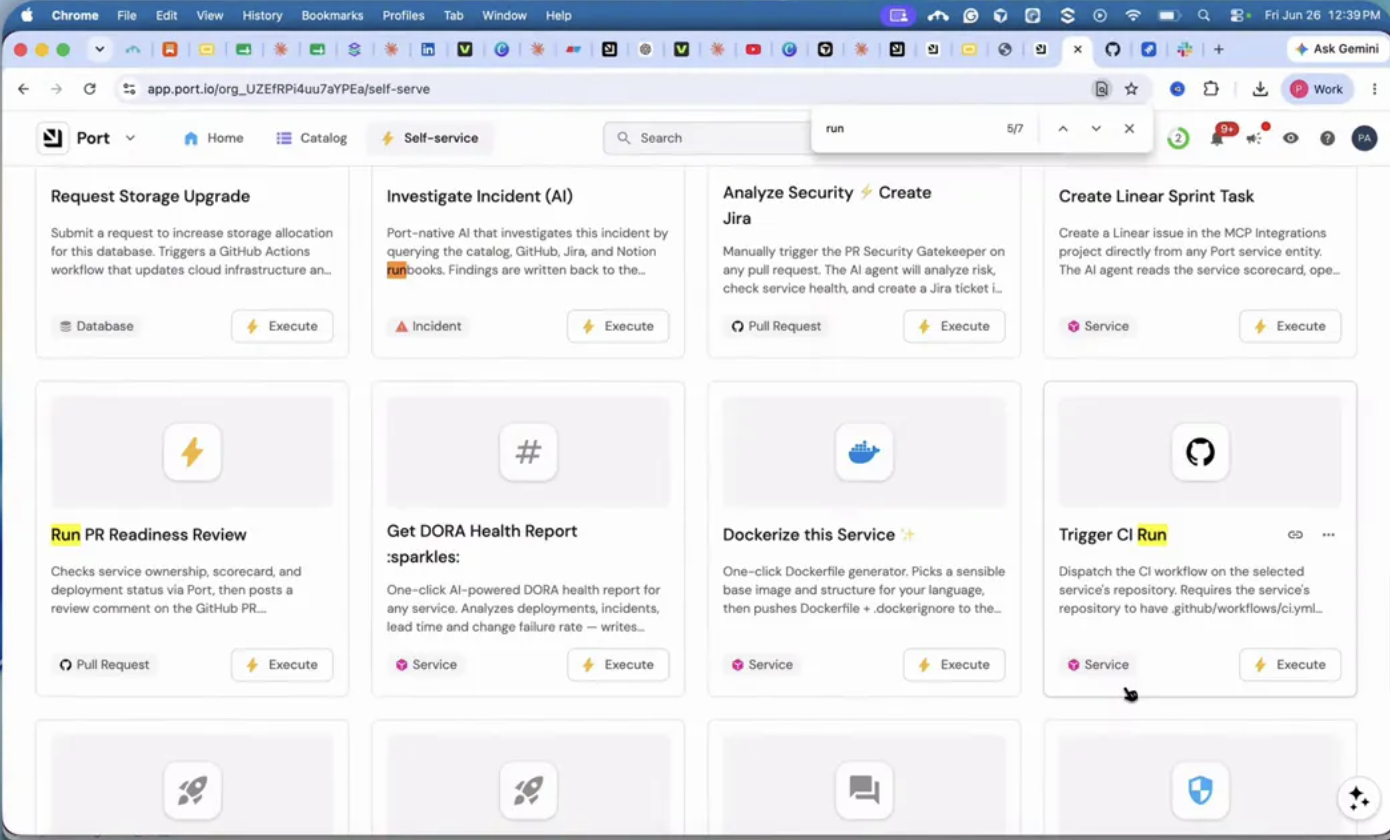
I created a self-service action that gets triggered once the report from GitHub lands in Port. That is one of the event entry points in the system.
3. Workflow builder
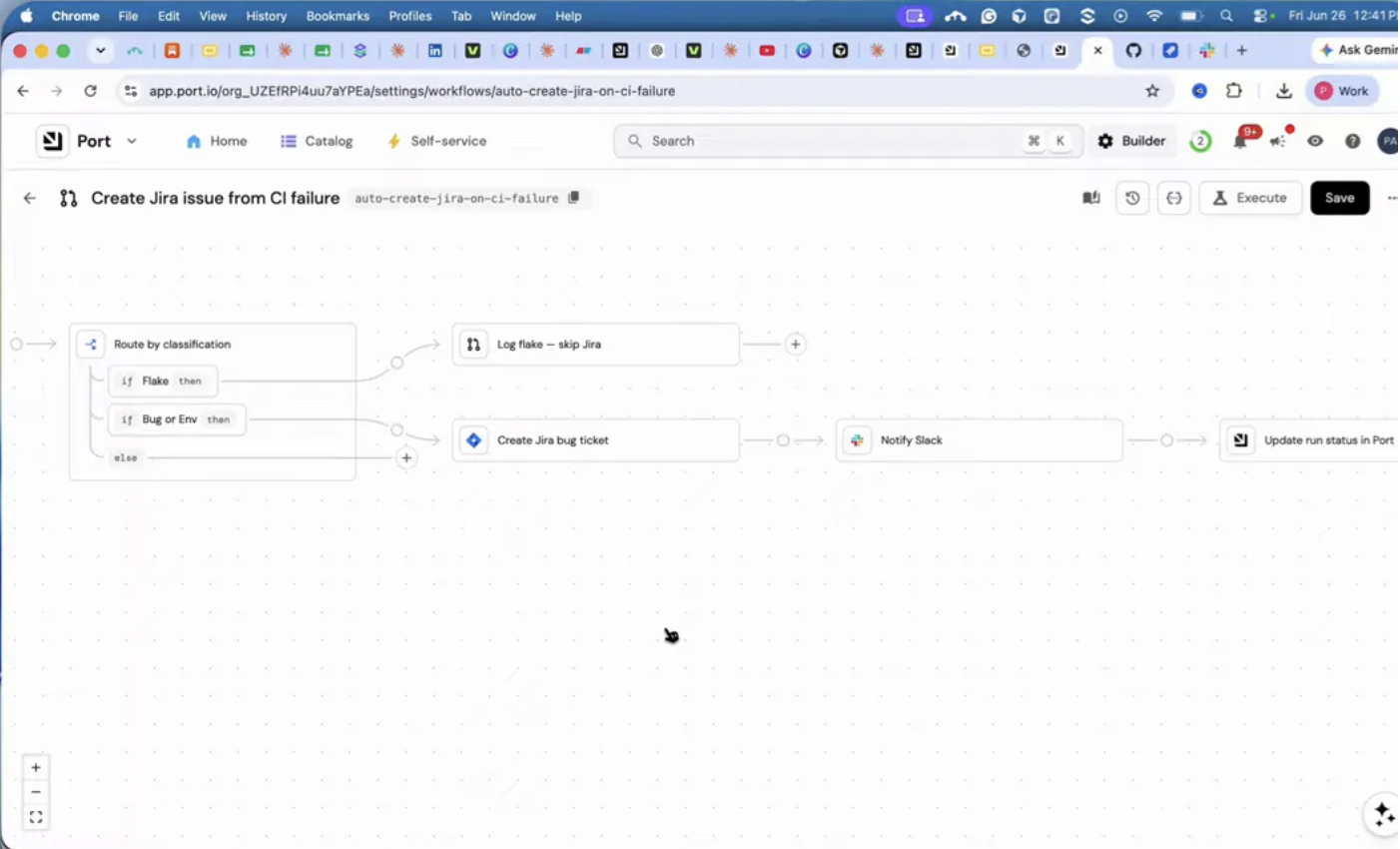
I created the actual workflow named something like “Create Jira Issue from CI Failure.” This is the central Loop Engineering canvas where classification, branching, Jira creation, Slack notification, and status updates all live.
4. Secrets and credentials
I stored the Jira auth token and Slack bot token in secrets so Port could talk securely to both systems.
This part is easy to underestimate, but it is what turns the loop from a passive classifier into an active system with connectors.
The branching logic is the whole game
The most important idea in this setup is not just that AI is present. It is that AI sits inside a controlled loop with branching logic.
The classification step decides whether the CI failure is:
- A flake
- An environment issue
- A real bug
That decision changes the path of the workflow. This is where Loop Engineering feels engineering driven rather than prompt driven. I am not asking a model a one off question and hoping for magic. I am using a model as one decision making component inside a deterministic system.
That means the surrounding workflow still matters:
- What event triggers the loop
- What context the classifier receives
- What actions are available after classification
- How state is updated
- How duplicate processing is avoided
That is the mindset shift I find most useful.
What makes this Loop Engineering and not just automation
This is an important question.
If all I did was trigger a webhook after failure and create a static Jira ticket every time, that would be automation. Useful, yes, but still basic.
What pushes this toward Loop Engineering is the combination of:
- Autonomous triggering
- AI based classification
- Conditional routing
- External action through connectors
- Persistent state to avoid reprocessing
In other words, the system is not just reacting. It is making decisions inside a loop and carrying those decisions forward until the workflow reaches a stable outcome.
Where I think developers should start
If you want to experiment with Loop Engineering, do not start with an overly ambitious “build me a fully autonomous engineering org” idea. Start with a narrow, annoying, repeatable piece of toil.
Good candidates look like this:
- CI failure triage
- Incident labeling and routing
- Support ticket classification
- PR summarization and assignment
- Infrastructure drift detection with notifications
The key is to pick something with a clear trigger, a small number of decisions, and obvious actions that can be taken through connectors.
That is exactly why I picked CI failures. The signal is clear, the need is real, and the workflow can be tested easily.
My biggest takeaway from building this
My biggest takeaway is that Loop Engineering is less about “cool AI agents” and more about system design.
The interesting part is not writing clever prompts over and over. The interesting part is designing a loop where:
- events are captured reliably
- decisions are made with context
- actions happen automatically
- state is persisted for future runs
Once I think of it that way, the concept becomes much less vague.
Loop Engineering is basically me removing myself from the middle of repetitive decision cycles and replacing that role with a structured autonomous system. That system does not just answer a prompt. It keeps working until the job is done.
And for developers, that is where things start getting really interesting.
Comments
More Blog
View allgemmaFive Gemma-4 models, one accelerator: what porting E2B 31B to AWS Inferentia2 taught me
I ported the whole Gemma-4 family — E2B, E4B, 12B, 31B, and the 26B-A4B MoE — to run on...
X
xbillcommunityHey DEV, I'm Tobore. Let's actually connect.
Hey DEV, I'm Tobore. Let's actually connect. I've been on here for a while now, mostly writing and...
L
Laurina AyarahaiI burned through thousands of AI tokens. Then a friend did it for free
(yep, kinda clickbait, just for the funsies 😊) At the beginning of the year, I relaunched my...
P
Paulo HenriqueaiClaude might be saturating your machine
My laptop was sitting idle with the fan at full tilt. Nothing was running that I knew of. The culprit...
S
Sidhant PandagithubactionsAutomated GitHub Code Reviews Using Google Gemini
I Built a Thing! TL;DR — Google Gemini-based Pull Request reviews and Issue Triaging for...
D
Darren "Dazbo" LesteraiWhat is an "agentic harness," actually?
I've been hearing the word "harness" thrown around a lot lately. I assumed it just meant "the IDE" or...
T
Tilde A. ThuriumReady-made automations for this
Workflows from the Neura Market marketplace related to this Perplexity resource
- Automate SEO-Optimized Blog Creation with GPT-4, Perplexity AI & Multi-Language Supportn8n · $24.99 · Related topic
- Automate SEO Blog Content Creation with GPT-4, Perplexity AI, and WordPressn8n · $24.99 · Related topic
- Automate SEO Blog Creation + Social Media with GPT-4, Perplexity, and WordPressn8n · $24.99 · Related topic
- Auto-Generate SEO Blog Posts with Perplexity, GPT, Leonardo & WordPressn8n · $14.99 · Related topic