
Back to Blog javascript
 gemma
gemma community
 ai
ai ai
ai githubactions
 ai
ai
I stopped generating color scales and started shaping them
Gil Barbara June 23, 2026
0 views
Generating a color scale is a solved problem. Hand most tools a color and you get back eleven valid,...
Generating a color scale is a solved problem. Hand most tools a color and you get back eleven valid, perceptually even steps. The trouble is they tend to come out a little lifeless: chalky tints, every step interchangeable, technically correct and slightly generic.
The scale you actually want has intent: clean highlights, shadows with depth, contrast spent where your UI needs it. The gap between the two isn't more math — it's a few controls, and a way to see what they're doing.
I maintain a small color library, colorizr, and its scale() does the generating part: one color in, a full scale out:
import { scale } from 'colorizr';

scale('#ff38af');
// { 50: '#ffeff7', 100: '#ffe2f1', …, 500: '#ff3fb4', …, 950: '#31001c' }
Even, valid, fine. The interesting part is everything after the default — the controls that let you shape it.
The catch: you'd be shaping blind
Here's why this takes more than an API. Most of these controls are gamut-relative: they work against the maximum chroma a color can physically exhibit, and that ceiling shifts with hue and lightness at every step. There's no fixed range to picture the way there is in HSL — set chromaCurve: { low: 0.6, high: 0.4 } and you'd have no real idea what you just did.
So the app isn't a product wrapped around the library, it's a visualizer for it. The scale on screen, every control on a slider, and a chart for the parts you can't see.
Chroma curve — shaped against the ceiling
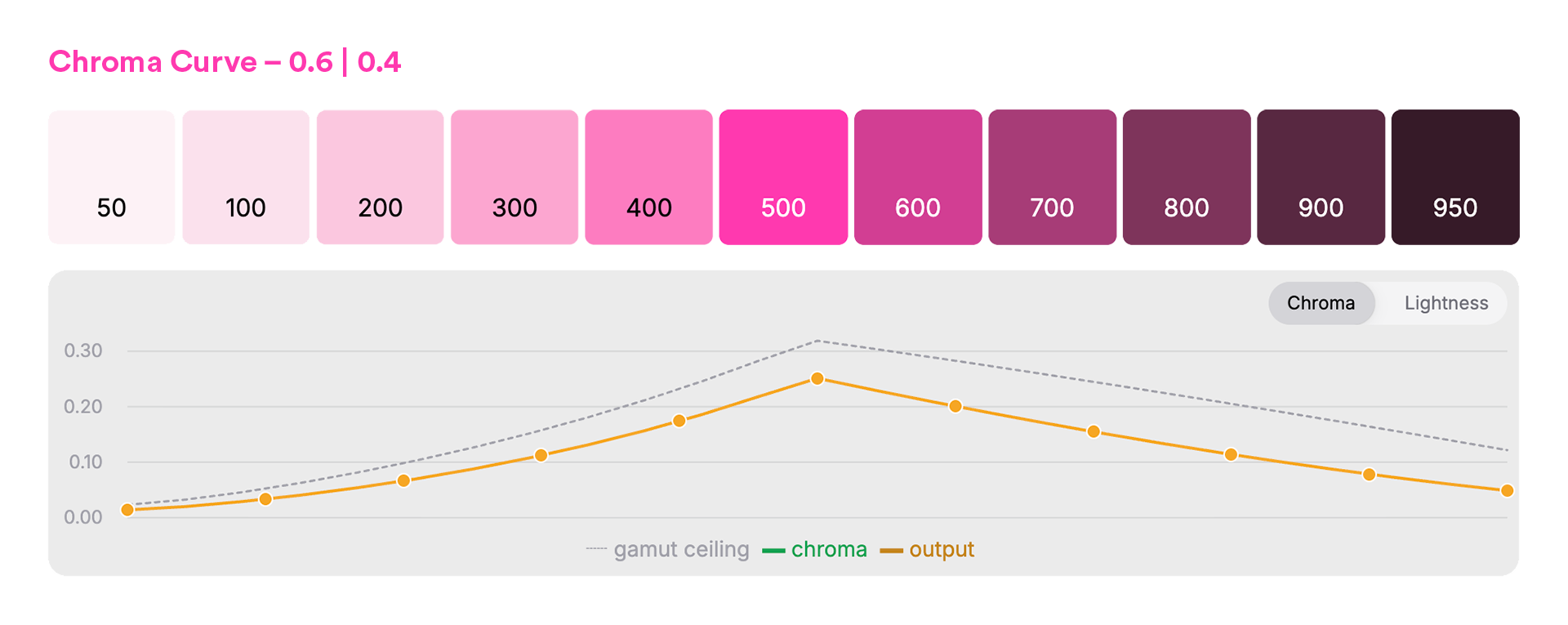
scale('#ff38af', { chromaCurve: { low: 0.6, high: 0.4 } });
The dotted line is the gamut ceiling; the solid line is what the scale uses. You shape chroma as a fraction of the ceiling, so the tints stay clean and nothing clips — per step, per hue. Hold chroma flat instead, and those pale steps go chalky. That's the whole difference between a washed-out light end and a clean one, and it's not a number you'd ever land on by eye.
Hue shift — depth across the range
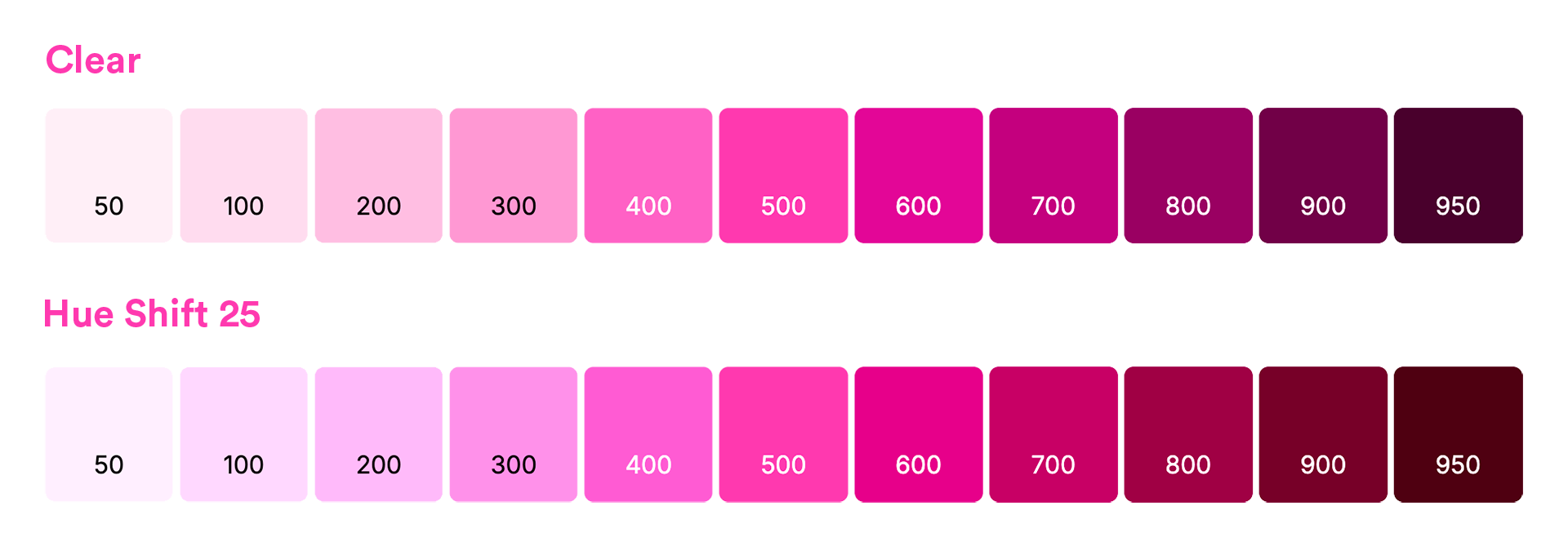
scale('#ff38af', { hueShift: 25 });
Pinning one hue across the whole scale is part of what reads synthetic. Rotate it a few degrees toward the ends — warm the shadows, cool the tints — and the scale gains the sense of light moving through it that hand-mixed palettes have. The middle stays locked to your base; the visualizer shows you how far is too far before your pink drifts into orange.
There's more in the same spirit: a lightness curve to decide where the contrast lives, a min/max lightness range to set the endpoints, and they all work the same way: a slider and a chart, so the choice is something you see, not something you guess.
The payoff
That's the whole loop: shape the scale against the charts until it has the character you want, then take it to code. The visualizer hands you the result, export-ready — CSS variables, Tailwind, SCSS — and if you'd rather skip the UI, the same controls are available in colorizr for your build.
Same base color across all images above. The numbers won't tell you which scale you want; shaping it where you can see it will.
- colorizr - the engine.
npm i colorizr, generate and shape scales in code, export-ready. - the visualizer - shape against the gamut ceiling, watch the curves, copy the result out.
Comments
More Blog
View allgemmaFive Gemma-4 models, one accelerator: what porting E2B 31B to AWS Inferentia2 taught me
I ported the whole Gemma-4 family — E2B, E4B, 12B, 31B, and the 26B-A4B MoE — to run on...
X
xbillcommunityHey DEV, I'm Tobore. Let's actually connect.
Hey DEV, I'm Tobore. Let's actually connect. I've been on here for a while now, mostly writing and...
L
Laurina AyarahaiI burned through thousands of AI tokens. Then a friend did it for free
(yep, kinda clickbait, just for the funsies 😊) At the beginning of the year, I relaunched my...
P
Paulo HenriqueaiClaude might be saturating your machine
My laptop was sitting idle with the fan at full tilt. Nothing was running that I knew of. The culprit...
S
Sidhant PandagithubactionsAutomated GitHub Code Reviews Using Google Gemini
I Built a Thing! TL;DR — Google Gemini-based Pull Request reviews and Issue Triaging for...
D
Darren "Dazbo" LesteraiWhat is an "agentic harness," actually?
I've been hearing the word "harness" thrown around a lot lately. I assumed it just meant "the IDE" or...
T
Tilde A. ThuriumReady-made automations for this
Workflows from the Neura Market marketplace related to this DeepSeek resource
- Automate Blog Content Creation with Notion MCP, DeepSeek AI, and WordPressn8n · $9.99 · Related topic
- Generate AI Videos from Scripts with DeepSeek, Synthesia, and Together.ain8n · $24.99 · Related topic
- Compare Multi-Period Financial Data from Google Sheets with DeepSeek AI Analysisn8n · $14.99 · Related topic
- Generating AI Videos with VEO3 and Distributing with Blotato Across Multiple Platformsn8n · $14.99 · Related topic