
Back to Blog webdev
 gemma
gemma community
 ai
ai ai
ai githubactions
 ai
ai
I Built a Web App That Finds the Fairest Meeting Spot for Any Group (and It's Free)
Karthigayan Devan June 14, 2026
0 views
The Problem Nobody Talks About Picture this: You're trying to find a place to meet up with...
The Problem Nobody Talks About
Picture this: You're trying to find a place to meet up with friends. Someone suggests a coffee shop. It's 8 minutes from their house. It's 45 minutes from yours.
You say yes anyway, because suggesting a different place feels awkward.
This happens all the time — with friends, with remote teams, with family scattered across a city. And the worst part? Most "meet in the middle" suggestions aren't actually in the middle. They're just the geographic midpoint, which completely ignores traffic, transit options, and the fact that roads don't go in straight lines.
I got frustrated enough to build something about it.
Meet Meetle
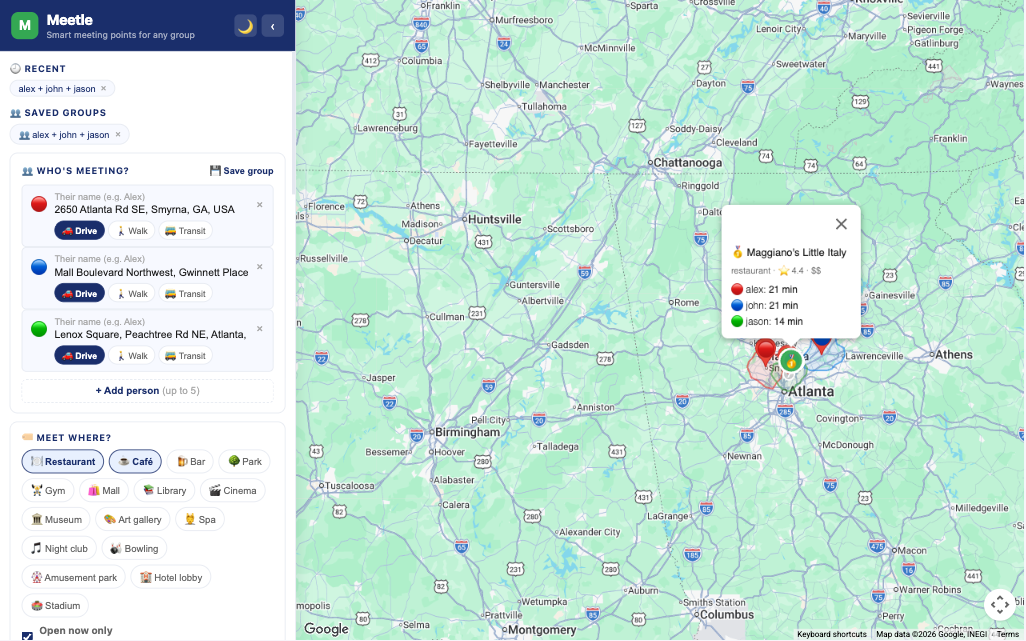
Meetle is a free web app/google chrome extension that finds the fairest meeting spot for any group of people — based on real travel times, not just distance. A Chrome Extension is coming soon, so you'll have it one click away in your toolbar.
You add everyone's starting location, choose how each person is traveling (driving, walking, or transit), then hit Find Meeting Point, and Meetle does the math for everyone simultaneously. It then surfaces the best nearby cafés, restaurants, parks, gyms, or whatever venue type you're looking for — ranked by actual fairness.
No more "it's fine, I don't mind the drive." Now you have data.
How It Actually Works
{% embed https://www.youtube.com/watch?v=8hwQfdN_M4w %}
Under the hood, Meetle uses three Google Maps APIs working together:
Distance Matrix API calculates travel time from every person's location to every candidate venue simultaneously. This is the core of the fairness scoring — you can't rank venues fairly without knowing everyone's actual travel time to each one.
Places API finds candidate venues near the calculated center point. You can filter by type (coffee, food, parks, gyms, etc.), price level, minimum rating, and whether they're open right now.
Maps JavaScript API renders everything visually — the map, the travel zones (isochrones), and the markers for each suggested venue.
The scoring works two ways, and you can toggle between them:
- Fairness mode — minimizes the maximum travel time across the group. Nobody gets stuck with an unreasonable commute.
- Efficiency mode — minimizes the total travel time. Best if you're trying to save the group's collective time, even if it's not perfectly equal.
Features That Actually Matter
A few things that make Meetle more useful than a quick Google Maps search:
Mixed travel modes. One person is driving, another is walking, a third is taking the subway. Meetle handles this — each person picks their own mode and gets their own routing.
Travel zones (isochrones). You can see a visual zone on the map showing what's reachable for everyone within your chosen time limit. If a venue falls outside someone's zone, it is automatically filtered out.
Arrive Together mode. You pick a meeting time, and Meetle tells each person exactly when they need to leave to arrive simultaneously. No more "I've been here for 20 minutes" texts.
Real traffic. You can set a departure time, and Meetle uses Google's live traffic data. A 10 a.m. meeting on a Tuesday has very different travel times than a 6 pm Friday meeting.
Save groups. Regular team meeting? Save the group once and load it with one click next time.
Share link. After finding a spot, generate a shareable link so everyone in the group can see the results and the map.
The Chrome Extension Story
Here's where it gets technically interesting, and also a little humbling.
I originally built Meetle as a standard web app. When I decided to package it as a Chrome Extension, I hit Chrome's Manifest V3 Content Security Policy wall hard.
MV3 extension pages cannot load remote JavaScript. Google Maps JavaScript API is a remote script. Meaning: if you try to build a Chrome Extension that loads Maps the normal way — <script src="https://maps.googleapis.com/maps/api/js?..."> — it simply won't work inside an extension page.
The workaround I landed on: the extension is a launcher. It lives in your Chrome toolbar and opens the Meetle web app (hosted on GitHub Pages) in a new tab. Since GitHub Pages is a regular web page, not an extension page, it loads Maps just fine.
This also elegantly solved the API key problem. Because the app runs as a regular website, each user can enter their own Google Maps API key directly in the app. It's stored in their browser's localStorage. Google gives every account $200 free credit per month, which comfortably covers thousands of searches. So Meetle is genuinely free to use — the developer (me) doesn't pay anything, and neither does the user unless they're doing unusually high volume.
Getting Started
Use the web app right now: Go to karthidec.github.io/meetle — no install needed, works in any browser.
Chrome Extension Go to [https://chromewebstore.google.com/detail/meetle-%E2%80%94-smart-meeting-po/ihkfpheildekeaoohfpnpmdpelcbkgkc] (https://chromewebstore.google.com/detail/meetle-%E2%80%94-smart-meeting-po/ihkfpheildekeaoohfpnpmdpelcbkgkc)
The first time you open it, you'll see a setup screen asking for your Google Maps API key. Here's how to get one in about 2 minutes: (free of cost)
- Go to console.cloud.google.com
- Create a new project (name it anything — "Meetle" works)
- Enable these three APIs: Maps JavaScript API, Distance Matrix API, Places API
- Go to Credentials → Create → API Key
- Copy it and paste it into Meetle's setup screen
That's it. You won't be asked again.
What's Next
- Google Maps integration — ideally as a sidebar panel that lives inside Google Maps itself, so you don't have to leave the app you're already using
- Calendar integration — let people add the meeting spot to their calendar directly
- More venue categories — coworking spaces, gyms, grocery stores for after-work pickups
If you have ideas or feedback, I'd genuinely love to hear them in the comments. This started as a learning project for Google Maps APIs and turned into something I actually use every week.
The Code
Stack: vanilla JavaScript, Google Maps APIs (Distance Matrix, Places, JS SDK), Turf.js for isochrone polygon math.
No framework, no build step, no backend. Just a folder of files and three Google Maps API calls that do something genuinely useful together.
If you've ever been the person who always ends up driving the farthest — this one's for you. 🗺️
References:
Comments
More Blog
View allgemmaFive Gemma-4 models, one accelerator: what porting E2B 31B to AWS Inferentia2 taught me
I ported the whole Gemma-4 family — E2B, E4B, 12B, 31B, and the 26B-A4B MoE — to run on...
X
xbillcommunityHey DEV, I'm Tobore. Let's actually connect.
Hey DEV, I'm Tobore. Let's actually connect. I've been on here for a while now, mostly writing and...
L
Laurina AyarahaiI burned through thousands of AI tokens. Then a friend did it for free
(yep, kinda clickbait, just for the funsies 😊) At the beginning of the year, I relaunched my...
P
Paulo HenriqueaiClaude might be saturating your machine
My laptop was sitting idle with the fan at full tilt. Nothing was running that I knew of. The culprit...
S
Sidhant PandagithubactionsAutomated GitHub Code Reviews Using Google Gemini
I Built a Thing! TL;DR — Google Gemini-based Pull Request reviews and Issue Triaging for...
D
Darren "Dazbo" LesteraiWhat is an "agentic harness," actually?
I've been hearing the word "harness" thrown around a lot lately. I assumed it just meant "the IDE" or...
T
Tilde A. ThuriumReady-made automations for this
Workflows from the Neura Market marketplace related to this DeepSeek resource
- Auto-Generate Problem-Focused Blog Posts for Shopify Products with AIn8n · $14.99 · Related topic
- Automate Blog Content Creation with Notion MCP, DeepSeek AI, and WordPressn8n · $9.99 · Related topic
- Automated Meeting Summaries: Google Meet to Slack with Vexa.ai and GPT-4n8n · $9.99 · Related topic
- Generate AI Videos from Scripts with DeepSeek, Synthesia, and Together.ain8n · $24.99 · Related topic