
Back to Blog workspacestudio
 gemma
gemma community
 ai
ai ai
ai githubactions
 ai
ai
Building an AI Sales RFP Assistant with Google Workspace Studio & NotebookLM
Aryan Irani June 8, 2026
0 views
If you are a Sales Engineer or Account Executive, you know that responding to a Request for Proposal...
If you are a Sales Engineer or Account Executive, you know that responding to a Request for Proposal (RFP) is a massive time sink. When a potential client asks, "Can you prove you've done this before?", you have to dig through Google Drive, read half a dozen old case studies, and manually copy-paste metrics to draft a response.
In this tutorial, we are going to automate the hardest part of RFP writing: the research.
Using Google Workspace Studio and NotebookLM, we are going to build an AI Research Assistant. When a salesperson drops an RFP into a Google Form, the workflow will instantly search your company's past case studies, map the client's requirements to your proven metrics, and generate a customized Google Doc draft for the sales team to review.
Prefer to watch instead of read? Check out the video version of the guide here.
{% embed https://youtu.be/0fA2OgAXLlQ?si=1BgJGf1vQPb7See2 %}
The Traditional Workflow:
- Receive an RFP.
- Search Google Drive for "Cloud Migration Case Study".
- Read through three old PDFs to find the one that mentions "cost savings."
- Copy the metrics into a new Google Doc.
- Spend an hour drafting the executive summary.
The New AI Workflow:
- Submit the RFP requirements via a Google Form.
- Workspace Studio asks NotebookLM to cross-reference the client's needs against your uploaded case studies.
- Workspace Studio instantly creates a new Google Doc with a customized, metric-driven draft and pings the sales team in Google Chat.
The Step-by-Step Build Guide
Prerequisites: Setting up NotebookLM
Before building the automation, we need to build the brain.
- Go to NotebookLM.
- Create a new Notebook named "Past Proposals & Case Studies".
- Upload your company's best marketing materials, case studies, and winning RFPs.
Step 1: Configure the Starter (Google Forms)
Open Google Workspace Studio. We want to trigger this flow whenever the sales team has a new lead.
- Choose a starter.
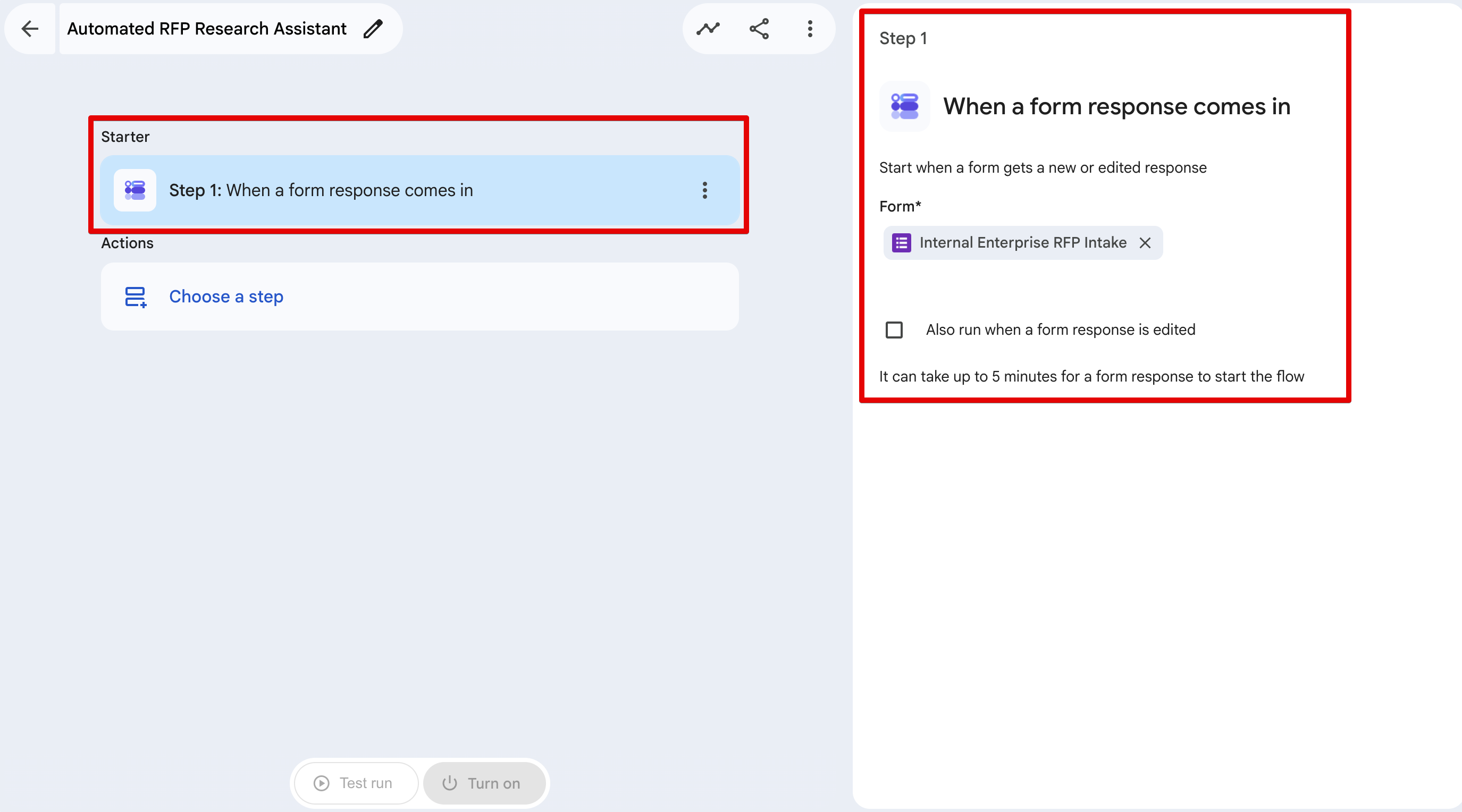
- Select When a form response comes in
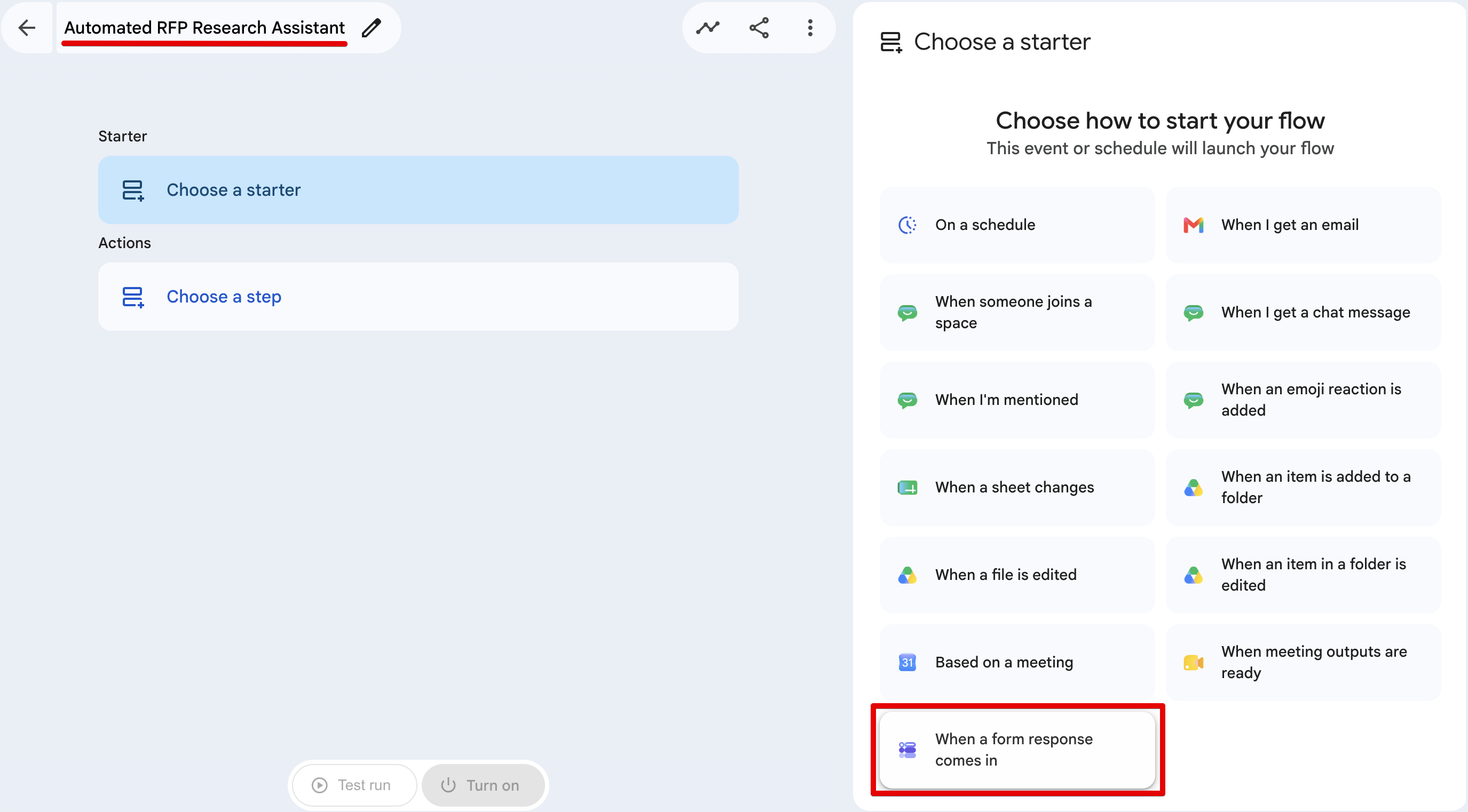
3.Select the specific Google Form your team uses for RFP Intake. (Your form should ask for things like Client Name, Industry, and Core Requirements).
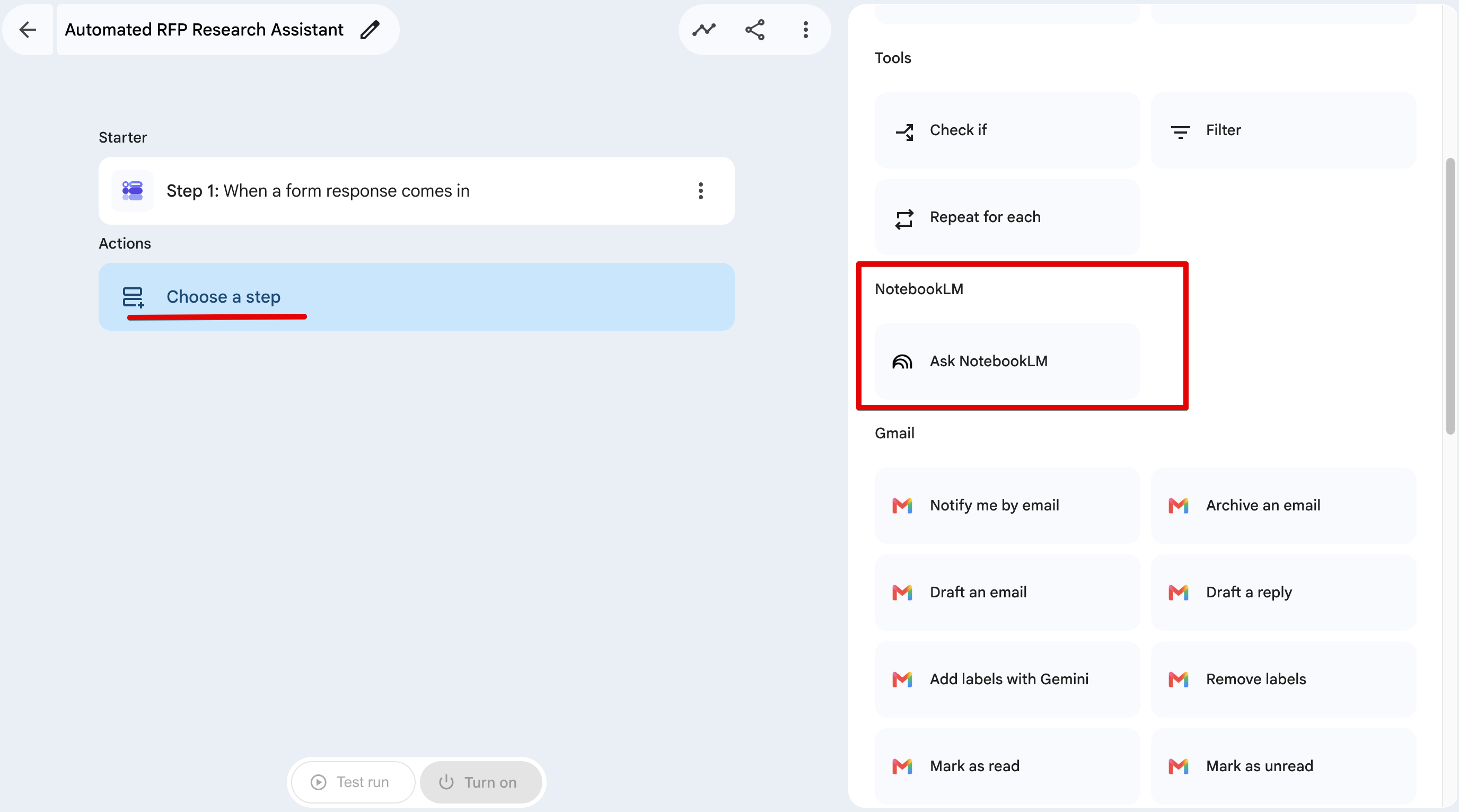
Step 2: The Reasoning Engine (NotebookLM)
This is where we map the incoming form data to our internal docs.
- Click on Choose a step: NotebookLM -> Ask NotebookLM.
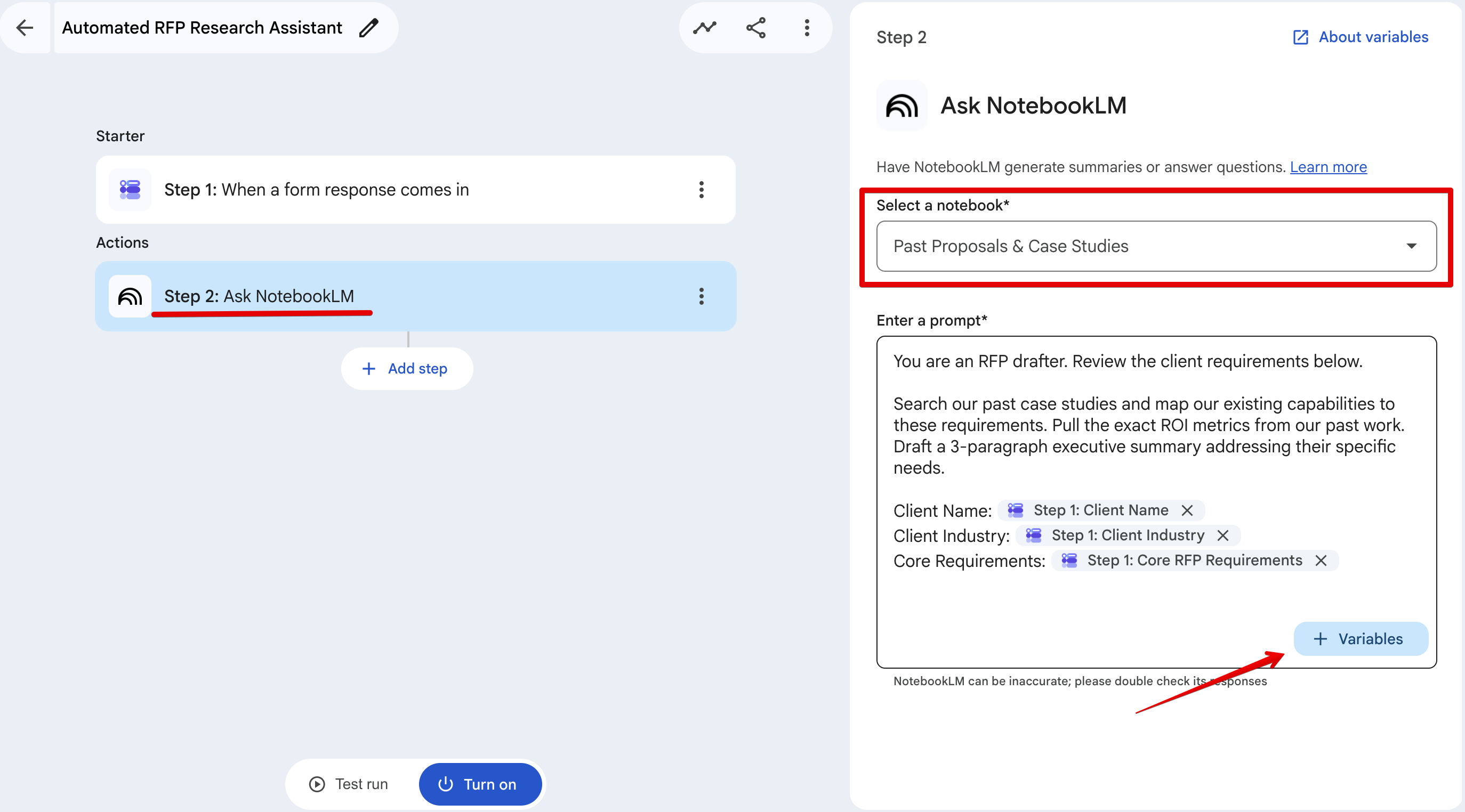
2.Point it to the notebook you created in Step 0. 3.Click the + Variables button to inject the form responses into your prompt.
Here is the exact prompt I used:
You are an RFP drafter. Review the client requirements below. Search our past case studies and map our existing capabilities to these requirements. Pull the exact ROI metrics from our past work. Draft a 3-paragraph executive summary addressing their specific needs. Client Name: {{Step1: Client Name}} Client Industry: {{Step1: Client Industry}} Core Requirements: {{Step1: Core RFP Requirements}}
Step 3: Generating the Output (Google Docs)
We want a collaborative document, not just a block of text in an email.
- Click on Add a step: Google Docs -> Create Document.
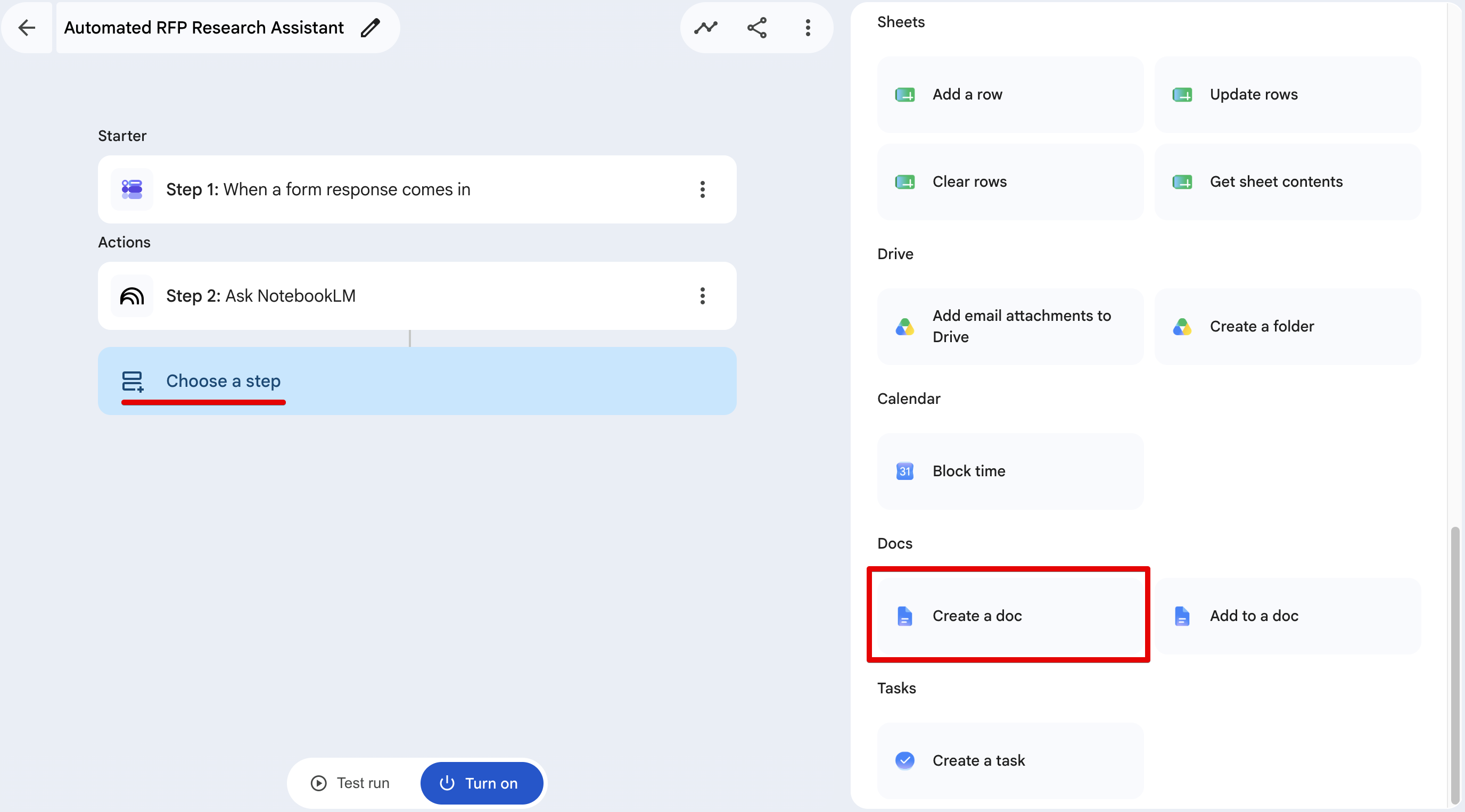
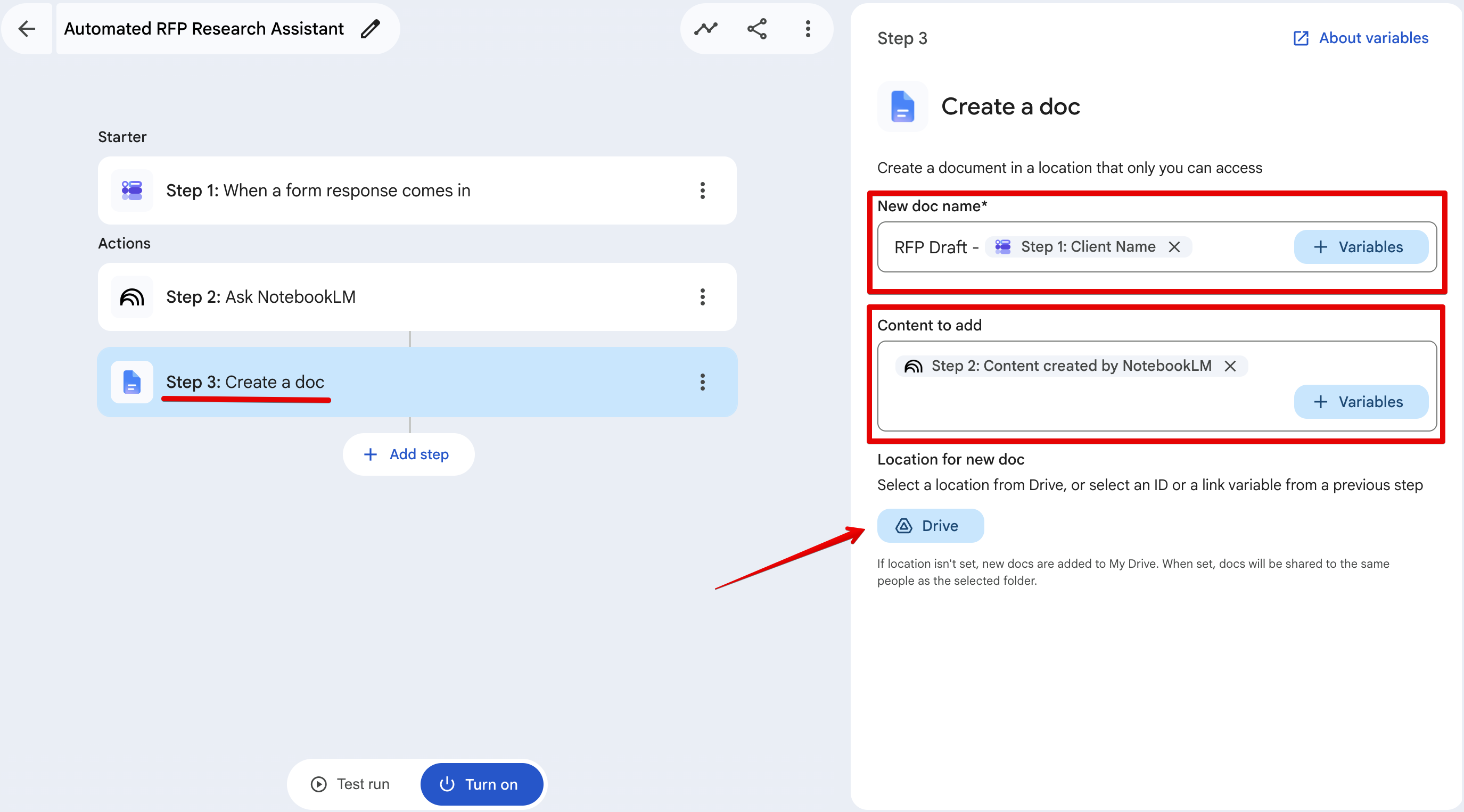
2.New doc name: RFP Draft - {{Step1: Client Name}} 3.Content to add: Map the {{NotebookLM Output}} variable here. 4.Location for new doc: Select a specific Drive folder.
Step 4: The Alert (Google Chat)
Finally, let’s send a chat message when the draft is ready.
- Click on Add step: Google Chat -> Notify me in Chat.
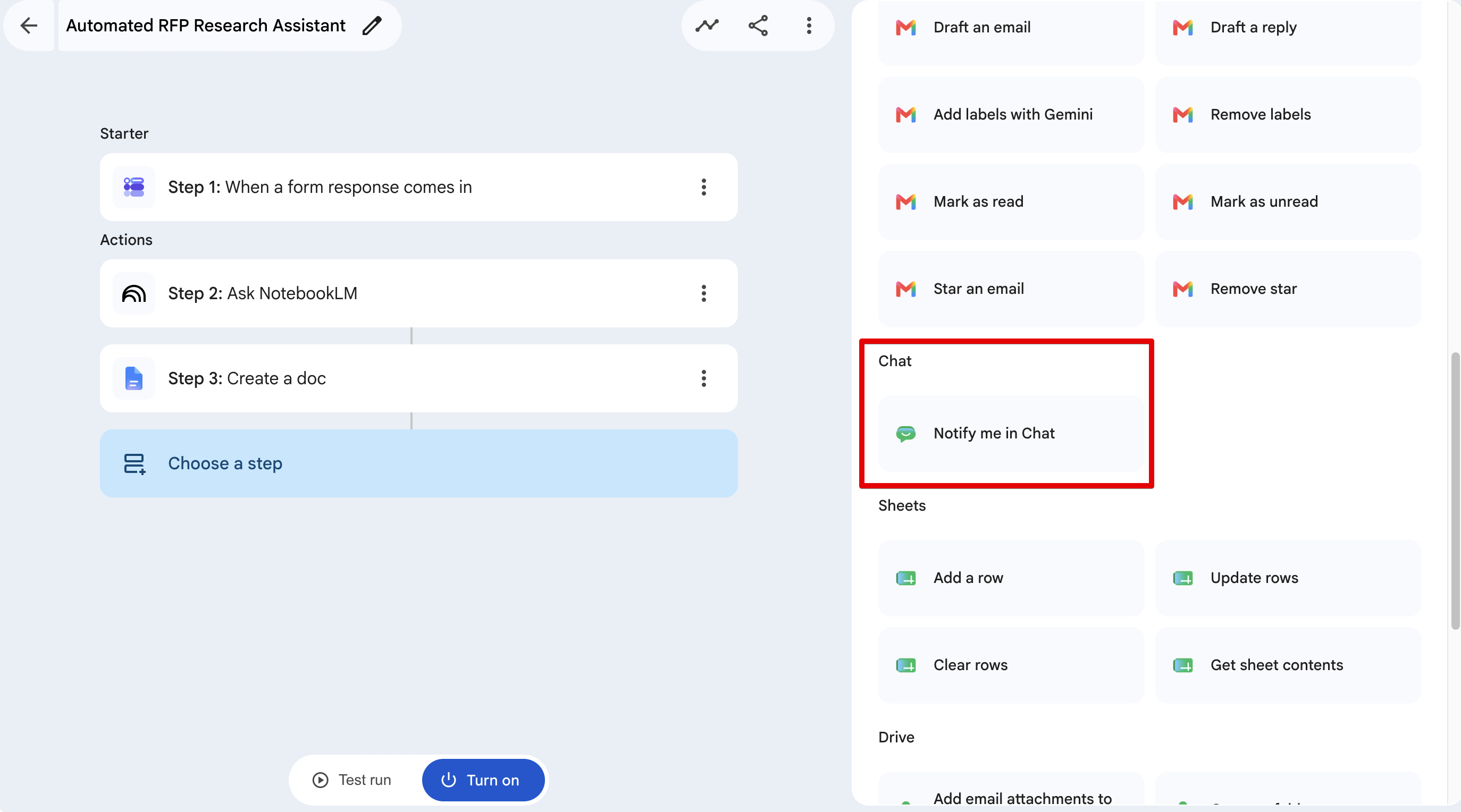
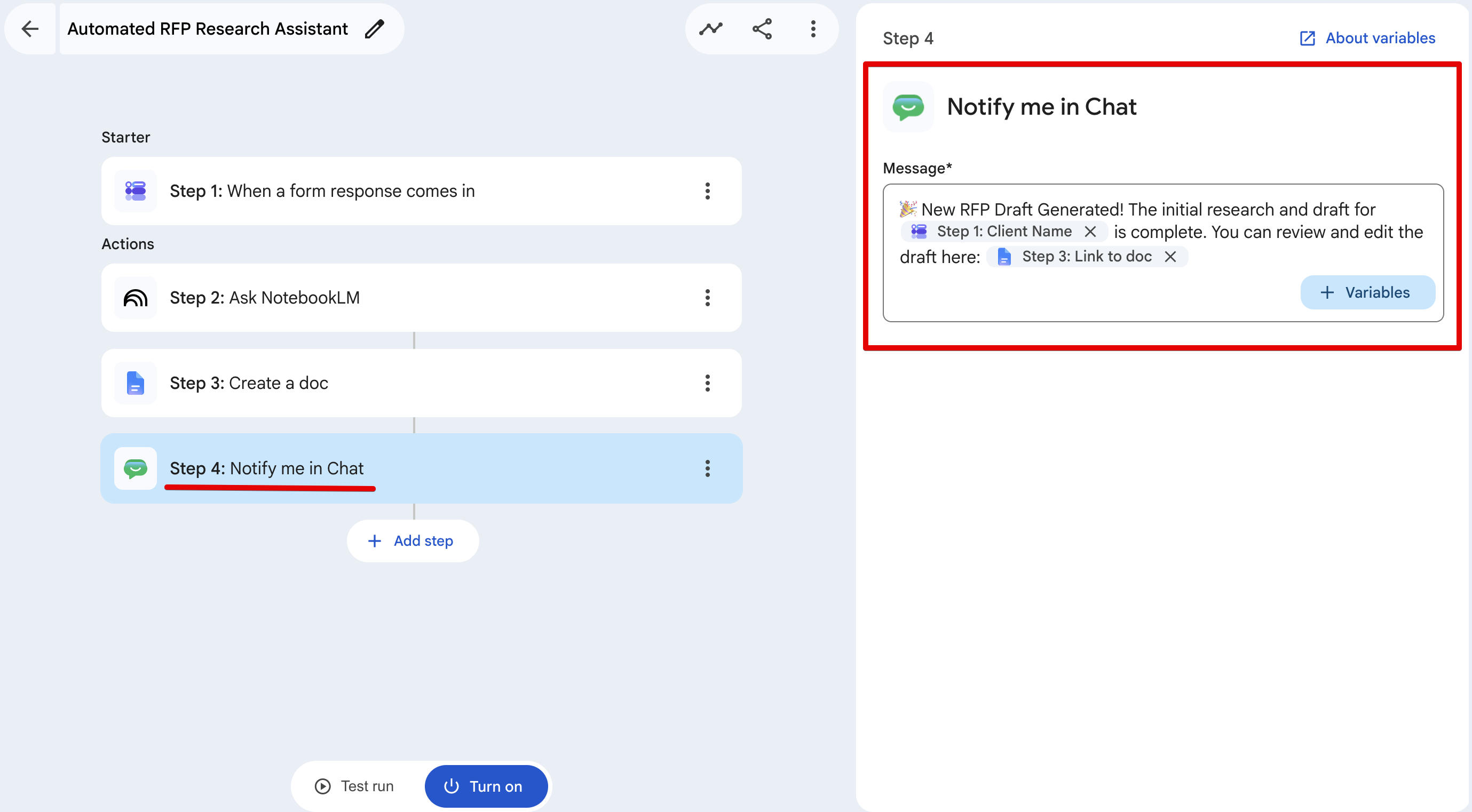
2.Map it to your channel and use this payload:
🎉 New RFP Draft Generated! The initial research for {{Step1: Client Name}} is done. Review and edit the draft here: {{Step3: Link to doc}}
The Test Run
Workspace Studio has a built-in test runner at the bottom of the canvas. To test it, I submitted a mock RFP for a fictional bank asking for a cloud migration with a strict 99.99% SLA and a 25% cost reduction.
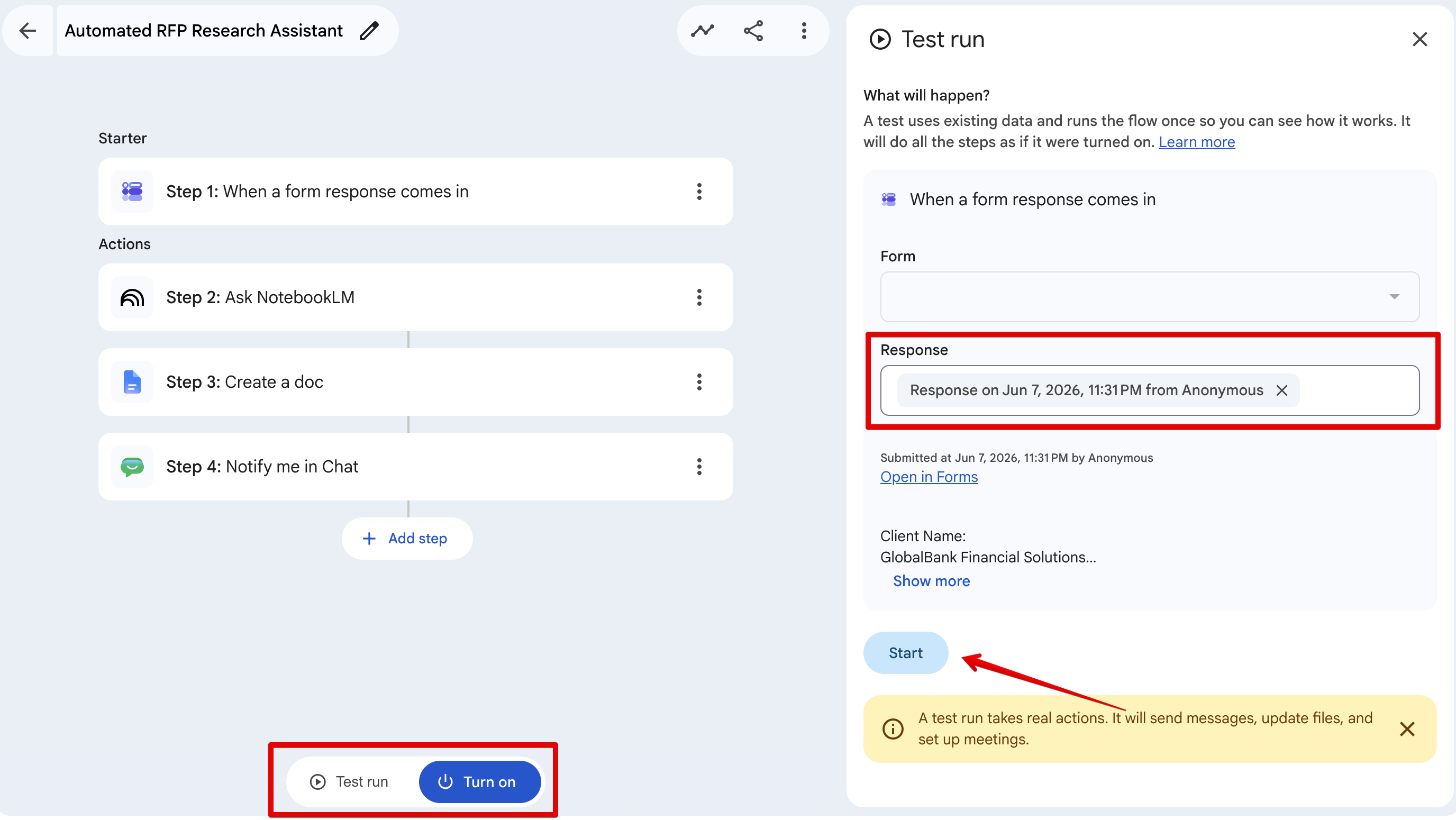
I hit Test run. 15 seconds later, my Google Chat pinged with a link to a newly generated Google Doc.
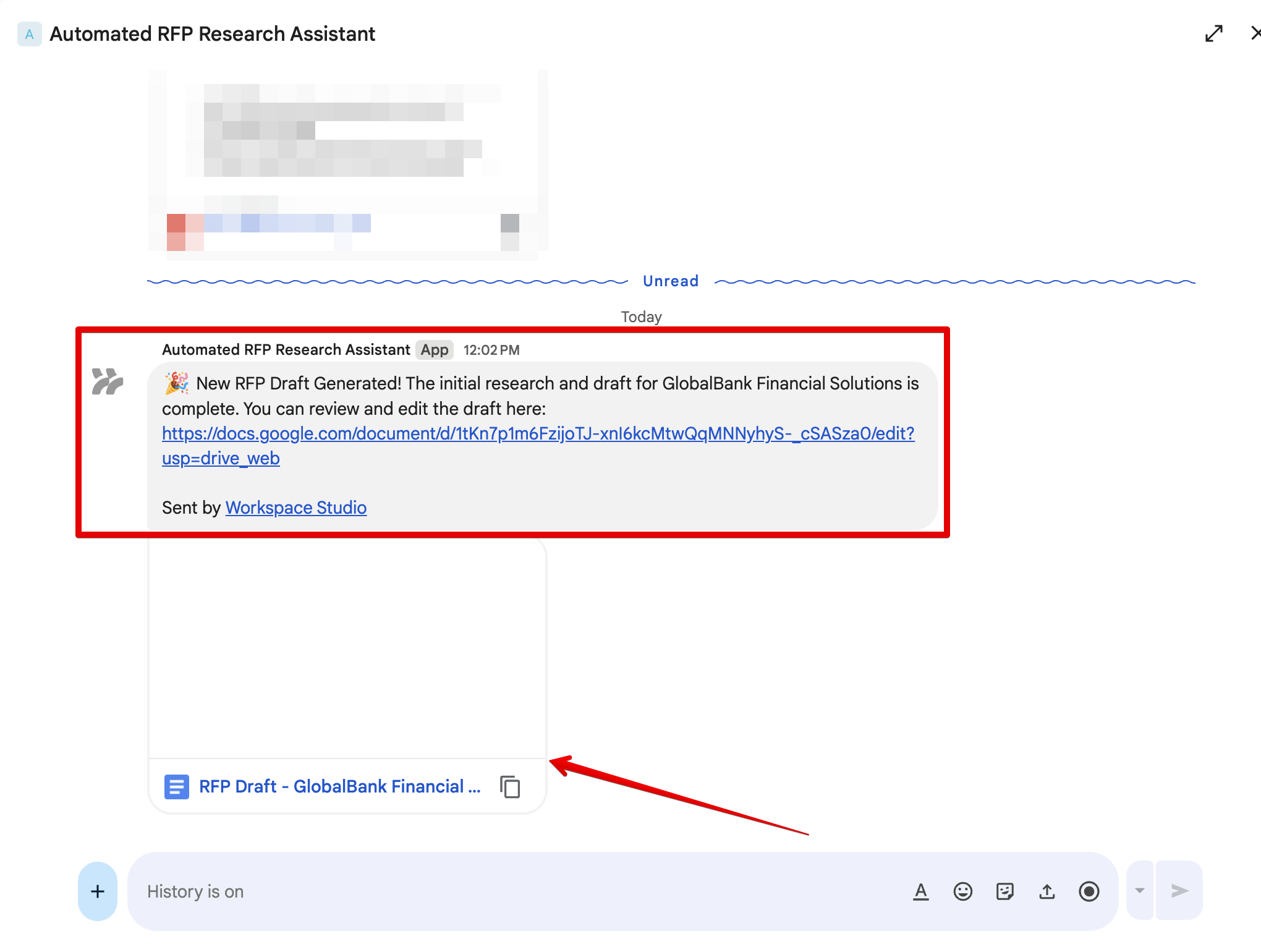
Here is the exact output NotebookLM generated and dumped into the Doc:
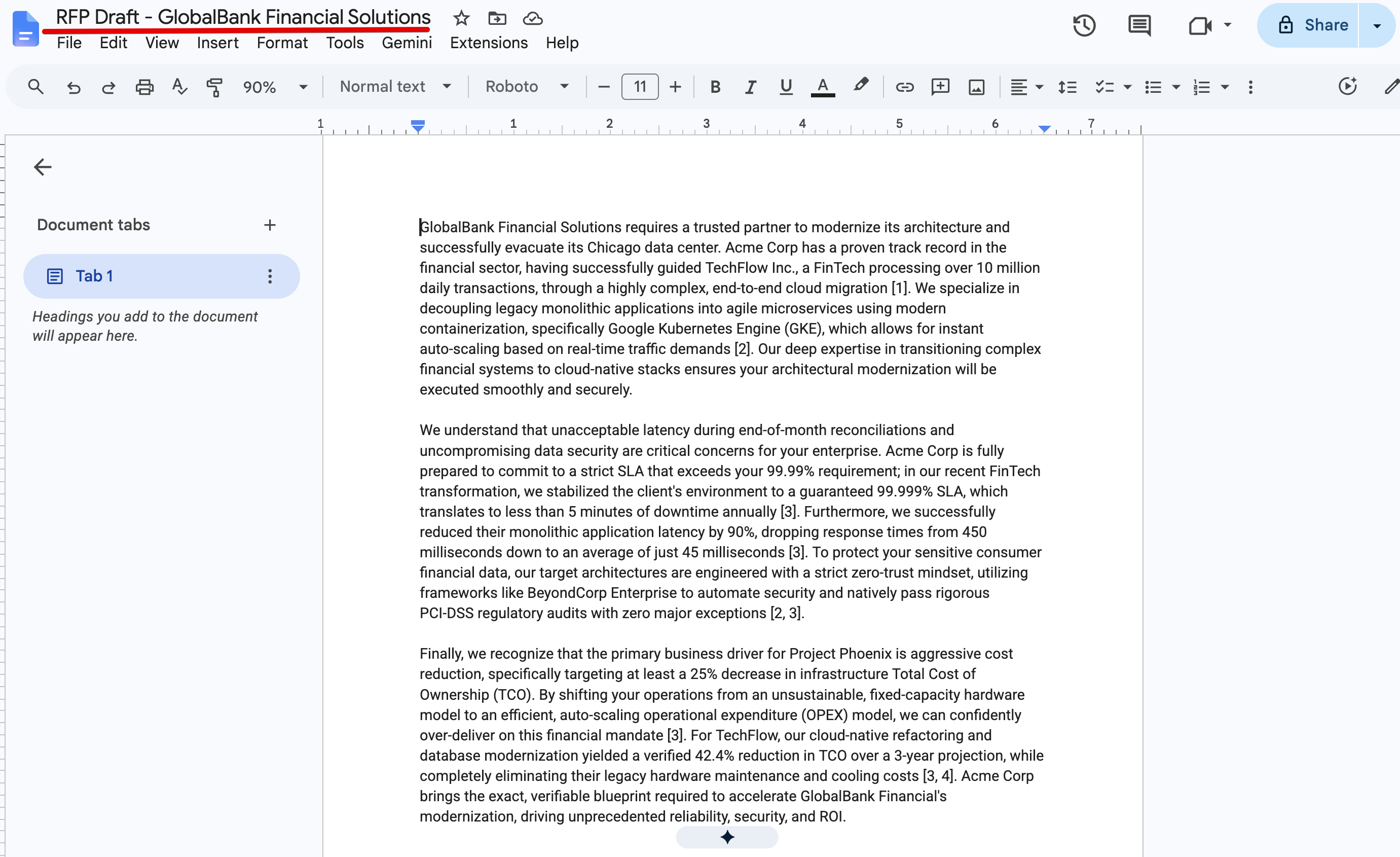
Look closely at how NotebookLM structured that response. It didn't just summarize a document; it actively reasoned against the prompt. The mock RFP asked for a 25% cost reduction and a 99.99% SLA. NotebookLM searched the knowledge base, ignored the irrelevant cybersecurity and data analytics case studies, and extracted the exact metrics from our cloud migration case study.
It confidently stated: "we stabilized the client's environment to a guaranteed 99.999% SLA" and "yielded a verified 42.4% reduction in TCO." It even included citation markers (e.g., [1], [3]) so you can trace exactly which source document it pulled the data from.
By using Workspace Studio as the orchestration layer and NotebookLM as the grounded reasoning engine, we bypassed the biggest issue with LLMs in enterprise environments: hallucination.
Beyond RFPs: Scaling This Pattern
The architecture we just built is essentially a "Form-Triggered Research Agent," and you can apply this exact same template to dozens of other use cases across your organization:
-
HR Onboarding: Trigger a flow when a new hire submits their role and department via a form. NotebookLM reads your massive employee handbook and auto-generates a customized 30-day onboarding checklist in a Google Doc.
-
Customer Support: When a complex technical ticket is logged, Workspace Studio asks NotebookLM to search your internal troubleshooting wikis and drafts a technical response directly in Chat for the support engineer to review.
-
Legal Contract Drafting: Intake a vendor's basic details via a form, and have NotebookLM query your standard legal templates to generate an initial MSA draft.
The days of writing boilerplate Python scripts to string together basic RAG (Retrieval-Augmented Generation) pipelines are fading. With native integration inside Workspace Studio, you can build, test, and deploy grounded enterprise workflows in minutes.
(Standard disclaimer: As impressive as this is, NotebookLM explicitly warns in the UI that it can be inaccurate. Always have a human review the metrics before sending a proposal to a client!)
Comments
More Blog
View allgemmaFive Gemma-4 models, one accelerator: what porting E2B 31B to AWS Inferentia2 taught me
I ported the whole Gemma-4 family — E2B, E4B, 12B, 31B, and the 26B-A4B MoE — to run on...
X
xbillcommunityHey DEV, I'm Tobore. Let's actually connect.
Hey DEV, I'm Tobore. Let's actually connect. I've been on here for a while now, mostly writing and...
L
Laurina AyarahaiI burned through thousands of AI tokens. Then a friend did it for free
(yep, kinda clickbait, just for the funsies 😊) At the beginning of the year, I relaunched my...
P
Paulo HenriqueaiClaude might be saturating your machine
My laptop was sitting idle with the fan at full tilt. Nothing was running that I knew of. The culprit...
S
Sidhant PandagithubactionsAutomated GitHub Code Reviews Using Google Gemini
I Built a Thing! TL;DR — Google Gemini-based Pull Request reviews and Issue Triaging for...
D
Darren "Dazbo" LesteraiWhat is an "agentic harness," actually?
I've been hearing the word "harness" thrown around a lot lately. I assumed it just meant "the IDE" or...
T
Tilde A. ThuriumReady-made automations for this
Workflows from the Neura Market marketplace related to this DeepSeek resource
- Automate Employee Onboarding with Slack, Jira, and Google Workspace Integrationn8n · $24.99 · Related topic
- Build a WhatsApp Assistant with Memory, Google Suite, Multi-AI, Research, and Imagingn8n · $24.99 · Related topic
- Manage Google Calendar & Gmail with a Gemini/GP-Powered AI Assistantn8n · $14.99 · Related topic
- Create a Context-Aware Slack Assistant with Google Sheets, Pinecone & GPT-4n8n · $14.99 · Related topic