
Back to Blog kiro
kiro
 gemma
gemma community
 ai
ai ai
ai githubactions
 ai
ai
Mix and Match: Running Kiro on Google Cloud Shell
xbill May 31, 2026
0 views
This article provides a step by step deployment guide for using Amazon Kiro CLI on the Google Cloud...
Series: AI tags: kiro,aws,googlecloudplatform,gcp
This article provides a step by step deployment guide for using Amazon Kiro CLI on the Google Cloud Shell.
What is this project trying to Do?
This project aims to configure the Kiro CLI for seamless cross cloud operations across AWS and Google Cloud.
Aren’t You Running on the Wrong Cloud?
Mix and Match — Baby! The Antigravity CLI runs on AWS Cloud Shell:
AWS Cloud Shell with Antigravity CLI
So let’s give Kiro a shot on Google Cloud Shell!
What is the Google Cloud Shell Terminal and Editor?
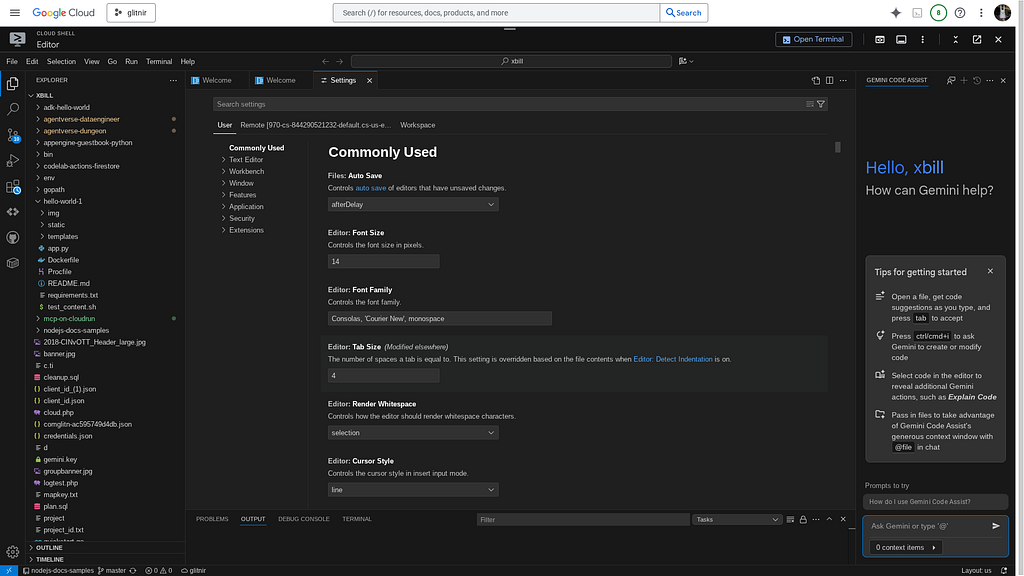
The Google Cloud Shell- available on every Google Cloud project — comes with a built-in code editor that allows you to browse file directories, view and edit files, with continued access to the Cloud Shell. The Cloud Shell Editor is available by default with every Cloud Shell instance, and is based on Code OSS.
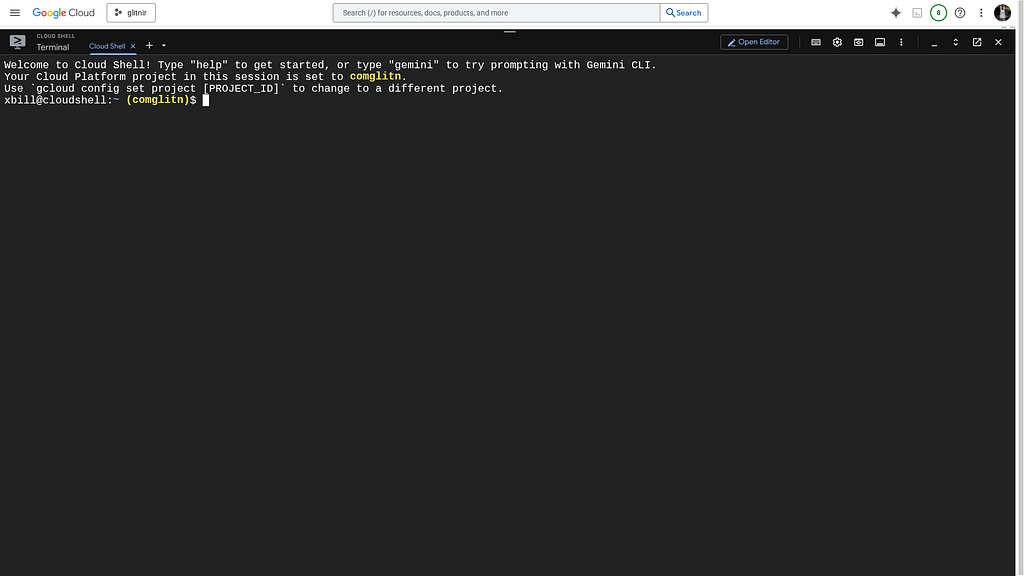
Where Can I find the Cloud Shell?
The Cloud Shell is provided on the Google Cloud Console for all Google Cloud Projects. It is available from the small icon on the upper right next to the Gemini Icon:
The Cloud Shell Editor is a basic hosted VSCode environment for rapid prototyping. It offers a minimal IDE environment to get started. For more in depth development-other options are available like Firebase Studio or developing from a GCE Cloud VM.
AWS Setup
The AWS CLI provides the basic tools for working with the AWS services:
Check the AWS installation:
xbill9@cloudshell:~ (aisprint-491218)$ /usr/local/bin/aws --version
aws-cli/2.34.57 Python/3.14.5 Linux/6.6.137+ exe/x86_64.ubuntu.24
xbill9@cloudshell:~ (aisprint-491218)$
Once the tools are installed — login to the AWS console:
aws login --remote
What is Kiro
Kiro is an agentic, AI-powered Integrated Development Environment (IDE) built by Amazon Web Services (AWS) designed to help developers move from initial concepts to production-ready software. Based on a fork of VS Code (Code OSS), Kiro feels familiar while acting like an autonomous co-developer. [1, 2, 3]
Installing Kiro
The main download site for Kiro is:
https://kiro.dev/
Kiro: Bring engineering rigor to agentic development
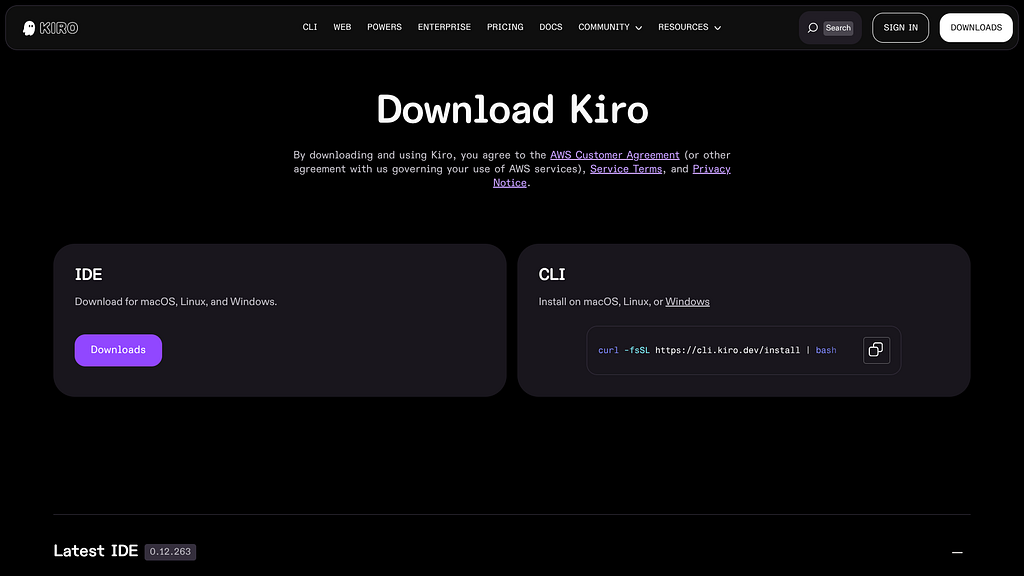
for the CLI download — click CLI:
curl -fsSL https://cli.kiro.dev/install | bash
This will download Kiro to Google Cloud Shell:
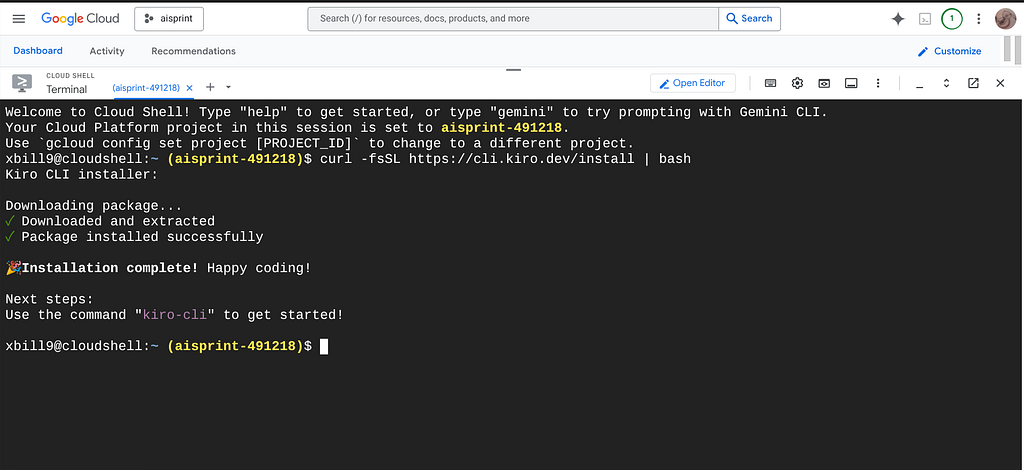
Running Kiro
First — authenticate to Kiro:
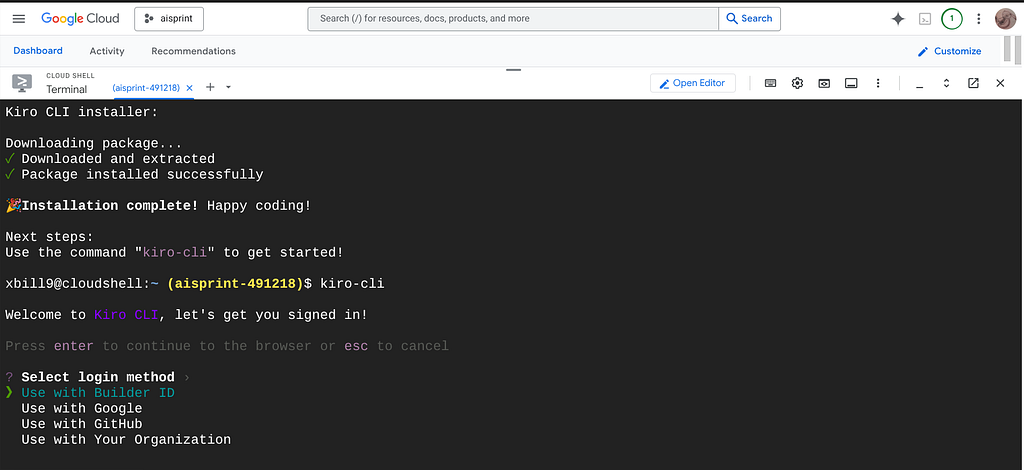
Then confirm:
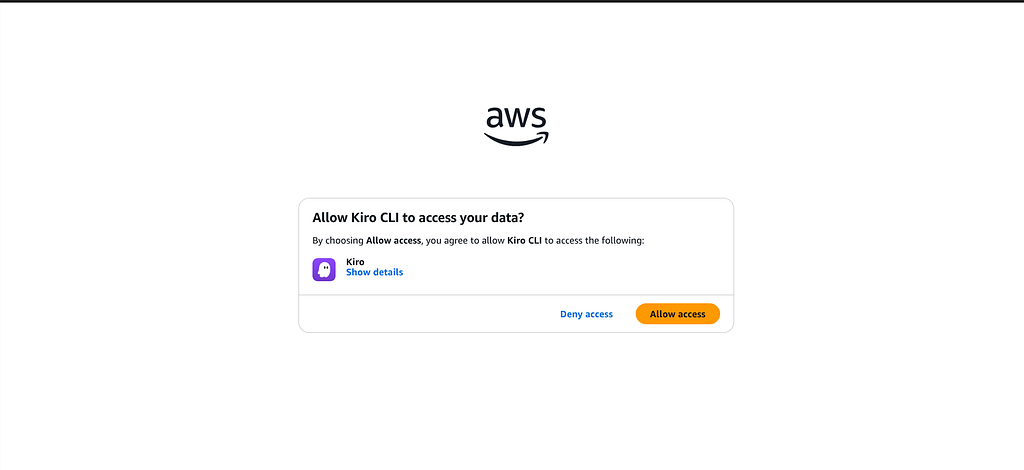
Verify The Installation
Kiro has full access to the local Google Cloud Shell Environment:
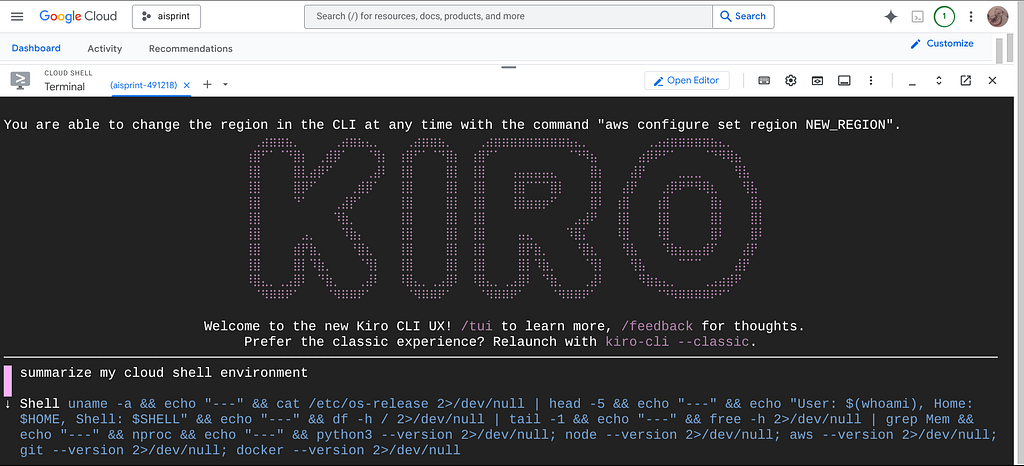
 summarize my google cloud project

● Shell gcloud config list 2>/dev/null && echo "---" && gcloud projects describe $(gcloud config get-value project
  2>/dev/null) 2>/dev/null
● Shell echo "=== Enabled APIs ===" && gcloud services list --enabled --format="value(name)" 2>/dev/null | sed
  's/.googleapis.com//' && echo "=== Compute Instances ===" && gcloud compute instances list 2>/dev/null && echo "=== Cloud
  Run Services ===" && gcloud run services list 2>/dev/null && echo "=== GCS Buckets ===" && gsutil ls 2>/dev/null && echo
  "=== Cloud Functions ===" && gcloud functions list 2>/dev/null && echo "=== Billing ===" && gcloud billing projects
  describe aisprint-491218 2>/dev/null
    === Enabled APIs ===
    projects/289270257791/services/addressvalidation
    projects/289270257791/services/aerialview
    projects/289270257791/services/agentregistry
    projects/289270257791/services/aiplatform
    ...+167 lines (ctrl+o to toggle)

  Here's a summary of your Google Cloud project:

  Project

  - Name: aisprint (ID: aisprint-491218)
  - Account: xbill9@gmail.com
  - Created: March 24, 2026 — Active

  Cloud Run Services (6 total, all deployed today/yesterday)

  ┌───────────────────────────┬─────────────┬─────────────┐
  │ Service │ Region │ Status │
  ├───────────────────────────┼─────────────┼─────────────┤
  │ gpu-4b-6000-devops-agent │ us-central1 │ ✅ │
  ├───────────────────────────┼─────────────┼─────────────┤
  │ gpu-4b-l4-devops-agent │ us-east4 │ ✅ │
  ├───────────────────────────┼─────────────┼─────────────┤
  │ gpu-26b-6000-devops-agent │ us-central1 │ ✅ │
  ├───────────────────────────┼─────────────┼─────────────┤
  │ gpu-26b-l4-devops-agent │ us-east4 │ ✅ │
  ├───────────────────────────┼─────────────┼─────────────┤
  │ gpu-31b-6000-devops-agent │ us-central1 │ ✅ │
  ├───────────────────────────┼─────────────┼─────────────┤
  │ gpu-31b-l4-devops-agent │ us-east4 │ ❌ (failed) │
  └───────────────────────────┴─────────────┴─────────────┘

  The naming pattern suggests GPU-accelerated devops agents in two GPU tiers (NVIDIA L4 and RTX 6000) across three model
  sizes (4B, 26B, 31B parameters).

  Storage

  - aisprint-491218-bucket
  - aisprint-491218-source-bucket
  - aisprint-491218_cloudbuild

  No active Compute instances or Cloud Functions.

  Enabled APIs — heavily focused on AI/ML:

  - AI Platform, Vertex AI (aiplatform), Generative Language, Gemini, ML
  - Maps Platform (full suite), BigQuery, Cloud Run, Cloud Build
  - Secret Manager, Pub/Sub, Dataflow, GKE, Artifact Registry
  - Google Workspace APIs (Gmail, Drive, Calendar, Chat) + MCP variants

  The project is clearly an AI agent platform, running GPU-backed LLM inference services on Cloud Run with GPU support.
Test The AWS Integration
This step tests the Kiro interactions with the remote AWS environment:
 Compute

  - 1 EC2 instance: i-03456018d00d13504 (t3.small, stopped)
  - No active ECS clusters or EKS clusters running (stacks exist, clusters likely deleted)

  Lambda

  - AgentCore-mcpBedrockRustA-ApplicationAgentMcpServe-rWGgAcNdRUnH

  S3 Buckets (5)

  - bedrock-agentcore-runtime-... (us-west-2)
  - cdk-hnb659fds-assets-... (CDK bootstrap)
  - elasticbeanstalk-us-east-1-...
  - my-adk-comic-artifacts
  - xbill-test

  CloudFormation Stacks (13 active)

  - Multiple AgentCore-* stacks (Bedrock, ADK, MCP variants)
  - eksctl-* stacks for 3 EKS clusters (mcp-eks, adkui-eks, biometric-scout) — infrastructure stacks remain even if clusters
  are torn down
  - CDKToolkit bootstrap

  ECR Repositories (33)

  - Heavy focus on AI agent workloads: course creator pipelines (orchestrator, researcher, content-builder, judge), MCP
  servers, ADK agents, biometric-scout
  - Both Python and Rust MCP server variants

  No active: RDS, EKS clusters, ECS, Elastic Beanstalk environments

  ──────────────────────────────────────────────────────────────────────────────────────────────────────────────────────────

  The environment is clearly an AI agent development platform — experimenting with Bedrock AgentCore, ADK (Agent Development
  Kit), and MCP (Model Context Protocol) server patterns, with both Python and Rust implementations.
So Why? Just Why? Why Mix and Match Cloud Setups?
Kiro was used to summarize the advantages of the approach:
  summarize the benefits of using Kiro from the Google Cloud Shell

  Based on your specific environment — an AI agent developer working across GCP and AWS from Cloud Shell — here's where Kiro
  adds real value:

  Cross-Cloud Visibility in One Place

  You just saw this: Kiro can summarize your GCP project and AWS environment in a single conversation, correlating context
  across both clouds without switching tools or consoles.

  Codebase Intelligence

  Cloud Shell gives you a terminal; Kiro gives you a coding partner. For your agent repos (ADK, MCP servers, Bedrock
  AgentCore), Kiro can read, understand, and modify code across files — not just run commands.

  Infrastructure as Code Assistance

  With 13 CloudFormation stacks and CDK in use, Kiro can help write, debug, and refactor IaC — understanding the intent
  behind stacks like eksctl-adkui-eks-cluster rather than just listing them.

  Agentic Workflows Without Context Switching

  You're building AI agents. Kiro can help you design, implement, and deploy them — writing the Cloud Run service configs,
  Dockerfiles, Lambda handlers, and Bedrock agent definitions — all from the same shell session where you're already
  working.

  Persistent Task Execution

  Unlike a plain terminal, Kiro tracks multi-step tasks, catches errors, and adapts — useful when deploying across regions
  (your us-central1 / us-east4 Cloud Run pattern) or debugging failed services like gpu-31b-l4-devops-agent.

  No Extra Tooling

  Cloud Shell already has gcloud, aws, docker, git, and python — everything Kiro needs. There's nothing to install; you get
  AI-assisted development on top of the environment you already have.
Summary
The Google Cloud Shell and Cloud Shell Terminal provides an environment for rapid prototyping Agentic development. With some configuration and customization- it provides core functionality cross cloud using the Kiro CLI.
Comments
More Blog
View allgemmaFive Gemma-4 models, one accelerator: what porting E2B 31B to AWS Inferentia2 taught me
I ported the whole Gemma-4 family — E2B, E4B, 12B, 31B, and the 26B-A4B MoE — to run on...
X
xbillcommunityHey DEV, I'm Tobore. Let's actually connect.
Hey DEV, I'm Tobore. Let's actually connect. I've been on here for a while now, mostly writing and...
L
Laurina AyarahaiI burned through thousands of AI tokens. Then a friend did it for free
(yep, kinda clickbait, just for the funsies 😊) At the beginning of the year, I relaunched my...
P
Paulo HenriqueaiClaude might be saturating your machine
My laptop was sitting idle with the fan at full tilt. Nothing was running that I knew of. The culprit...
S
Sidhant PandagithubactionsAutomated GitHub Code Reviews Using Google Gemini
I Built a Thing! TL;DR — Google Gemini-based Pull Request reviews and Issue Triaging for...
D
Darren "Dazbo" LesteraiWhat is an "agentic harness," actually?
I've been hearing the word "harness" thrown around a lot lately. I assumed it just meant "the IDE" or...
T
Tilde A. ThuriumReady-made automations for this
Workflows from the Neura Market marketplace related to this DeepSeek resource
- Compare Multi-Period Financial Data from Google Sheets with DeepSeek AI Analysisn8n · $14.99 · Related topic
- Automate Blog Content Creation with Notion MCP, DeepSeek AI, and WordPressn8n · $9.99 · Related topic
- Auto-Start Tagged Workflows Using n8n API after Deploymentn8n · $4.99 · Related topic
- Automate Altcoin News to LinkedIn Posts with DeepSeek AI and Google Sheetsn8n · $14.99 · Related topic