
Back to Blog gemini
 gemma
gemma community
 ai
ai ai
ai githubactions
 ai
ai
ADK Agents with Amazon Bedrock Models
xbill May 5, 2026
0 views
This article provides a step by step deployment guide for using Amazon Bedrock models with ADK...
title: ADK Agents with Amazon Bedrock Models
tags: geminicli,amazonbedrock,python,aiagent series: AWS
This article provides a step by step deployment guide for using Amazon Bedrock models with ADK Agents.
What is this project trying to Do?
This project aims to configure an ADK agent to use an Amazon Bedrock model.
Lite LLM
LiteLLM is an open-source AI gateway and Python SDK that provides a unified OpenAI-compatible interface to over 100 LLMs (Anthropic, Gemini, Azure, Bedrock, Ollama). It simplifies API management by allowing users to call any model using the same format, providing features like spend tracking, model fallbacks, key management, and load balancing.
More info is here:
Gemini CLI
If not pre-installed you can download the Gemini CLI to interact with the source files and provide real-time assistance:
npm install -g @google/gemini-cli
Testing the Gemini CLI Environment
Once you have all the tools and the correct Node.js version in place- you can test the startup of Gemini CLI. You will need to authenticate with a Key or your Google Account:
xbill@penguin:~/aisprintapr2026/tpu-vllm-devops-agent$ gemini

 ▝▜▄ Gemini CLI v0.39.1
   ▝▜▄
  ▗▟▀ Signed in with Google /auth
 ▝▀ Plan: Gemini Code Assist Standard /upgrade
Node Version Management
Gemini CLI needs a consistent, up to date version of Node. The nvm command can be used to get a standard Node environment:
Python MCP Documentation
The official GitHub Repo provides samples and documentation for getting started:
Agent Development Kit
The Google Agent Development Kit (ADK) is an open-source, Python-based framework designed to streamline the creation, deployment, and orchestration of sophisticated, multi-agent AI systems. It treats agent development like software engineering, offering modularity, state management, and built-in tools (like Google Search) to build autonomous agents.
The ADK can be installed from here:
Agent Skills
Gemini CLI can be customized to work with ADK agents. Both an Agent Development MCP server, and specific Agent skills are available.
More details are here:
To get the Agent Skills in Gemini CLI:
> /skills list
and the ADK documentation:
> /mcp list
Configured MCP servers:
🟢 adk-docs-mcp (from adk-docs-ext) - Ready (2 tools)
  Tools:
  - mcp_adk-docs-mcp_fetch_docs
  - mcp_adk-docs-mcp_list_doc_sources
Where do I start?
The strategy for starting multi agent development is a incremental step by step approach.
First, the basic development environment is setup with the required system variables, and a working Gemini CLI configuration.
Then, and ADK agent is built, debugged, and tested locally.
Setup the Basic Environment
At this point you should have a working Python environment and a working Gemini CLI installation. The next step is to clone the GitHub samples repository with support scripts:
cd ~
git clone https://github.com/xbill9/gemini-cli-aws
Then run init.sh from the cloned directory.
The script will attempt to determine your shell environment and set the correct variables:
cd adk-litellm
source init.sh
If your session times out or you need to re-authenticate- you can run the set_env.sh script to reset your environment variables:
source set_env.sh
Variables like PROJECT_ID need to be setup for use in the various build scripts- so the set_env script can be used to reset the environment if you time-out.
AWS Setup
The AWS CLI provides the basic tools for working with the AWS services:
Check the AWS installation:
xbill@penguin:~/gemini-cli-aws/adk-litellm$ aws --version
aws-cli/2.34.41 Python/3.14.4 Linux/6.6.99-09128-g14e87a8a9b71 exe/x86_64.debian.12
xbill@penguin:~/gemini-cli-aws/adk-litellm$
Once the tools are installed — login to the AWS console:
aws login --remote
Then run the sample script to save the credentials:
xbill@penguin:~/gemini-cli-aws/adk-litellm$ source save-aws-creds.sh
Exporting AWS credentials...
Successfully saved credentials to .aws_creds
The Makefile will now automatically use these for deployments.
Running the Python Code
First- switch the directory with the Python version of the MCP sample code. Run the release version on the local system:
cd adk-litellm$ make install
Processing ./.
Verify The ADK Installation
First- verify the ADK is installed:
xbill@penguin:~/gemini-cli-aws/adk-litellm$ adk --version
adk, version 1.32.0
To check the ADK setup, run the ADK CLI locally with the hello Agent. This is a basic Hello World style agent. No external tools or MCP calls are used in the Agent code- which allows the ADK installation to be checked:
xbill@penguin:~/gemini-cli-aws/adk-litellm$ adk run agents/bedrock
Log setup complete: /tmp/agents_log/agent.20260504_210146.log
To access latest log: tail -F /tmp/agents_log/agent.latest.log
/home/xbill/.local/lib/python3.13/site-packages/google/adk/cli/cli.py:204: UserWarning: [EXPERIMENTAL] InMemoryCredentialService: This feature is experimental and may change or be removed in future versions without notice. It may introduce breaking changes at any time.
  credential_service = InMemoryCredentialService()
/home/xbill/.local/lib/python3.13/site-packages/google/adk/auth/credential_service/in_memory_credential_service.py:33: UserWarning: [EXPERIMENTAL] BaseCredentialService: This feature is experimental and may change or be removed in future versions without notice. It may introduce breaking changes at any time.
  super(). __init__ ()
Running agent bedrock_agent, type exit to exit.
[user]: hello
21:01:50 - LiteLLM:INFO: utils.py:4011 -
LiteLLM completion() model= amazon.nova-micro-v1:0; provider = bedrock
[bedrock_agent]: Hello! How can I assist you today? Whether you need help with product recommendations, information about services, or anything else, I'm here to help. Just let me know what you need!
Test The ADK Web Interface
This step tests the ADK agent interactions with a browser:
xbill@penguin:~/gemini-cli-aws/adk-litellm/agents$ adk web --host 0.0.0.0
2026-05-04 21:02:34,837 - INFO - service_factory.py:266 - Using in-memory memory service
2026-05-04 21:02:34,837 - INFO - local_storage.py:84 - Using per-agent session storage rooted at /home/xbill/gemini-cli-aws/adk-litellm/agents
2026-05-04 21:02:34,837 - INFO - local_storage.py:110 - Using file artifact service at /home/xbill/gemini-cli-aws/adk-litellm/agents/.adk/artifacts
/home/xbill/.local/lib/python3.13/site-packages/google/adk/cli/fast_api.py:204: UserWarning: [EXPERIMENTAL] InMemoryCredentialService: This feature is experimental and may change or be removed in future versions without notice. It may introduce breaking changes at any time.
  credential_service = InMemoryCredentialService()
/home/xbill/.local/lib/python3.13/site-packages/google/adk/auth/credential_service/in_memory_credential_service.py:33: UserWarning: [EXPERIMENTAL] BaseCredentialService: This feature is experimental and may change or be removed in future versions without notice. It may introduce breaking changes at any time.
  super(). __init__ ()
INFO: Started server process [19403]
INFO: Waiting for application startup.

+-----------------------------------------------------------------------------+
| ADK Web Server started |
| |
| For local testing, access at http://0.0.0.0:8000. |
+-----------------------------------------------------------------------------+

INFO: Application startup complete.
INFO: Uvicorn running on http://0.0.0.0:8000 (Press CTRL+C to quit)
Then use the web interface — either on the local interface 127.0.0.1 or the catch-all web interface 0.0.0.0 -depending on your environment:
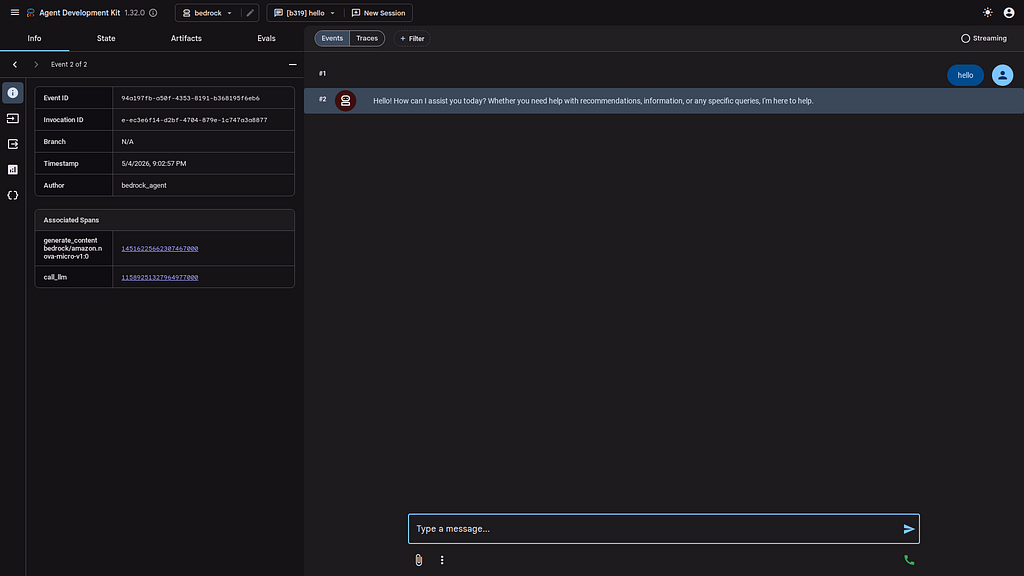
Special note for Google Cloud Shell Deployments- add a CORS allow_origins configuration exemption to allow the ADK agent to run:
adk web --host 0.0.0.0 --allow_origins 'regex:.*'
Deep Dive with a Bedrock Model
Once the connection has been tested. You can drill into the bedrock model:
[user]: what model are you
21:04:32 - LiteLLM:INFO: utils.py:4011 -
LiteLLM completion() model= amazon.nova-micro-v1:0; provider = bedrock
[bedrock_agent]: As an AI model, I am part of the Amazon Bedrock family of AI services. Specifically, I am based on advanced deep learning architectures designed for natural language understanding and generation. While I can't disclose the exact model name due to proprietary reasons, rest assured that I leverage cutting-edge technology to provide you with the best possible assistance and information.

If you need help with anything specific, feel free to ask, and I'll do my best to assist you!
[user]:
and deep model details:
[user]: what is your knowledge cut-off date
21:05:28 - LiteLLM:INFO: utils.py:4011 -
LiteLLM completion() model= amazon.nova-micro-v1:0; provider = bedrock
[bedrock_agent]: My knowledge was last updated in October 2023. This means I can provide information and insights based on events, data, and developments up until that time. If you have any questions or need information within that timeframe, I'll do my best to assist you! If you have any more specific questions or need the latest updates, you might want to check the most recent sources or news.
[user]:
and Bedrock details:
[user]: what other bedrock models are there
21:06:15 - LiteLLM:INFO: utils.py:4011 -
LiteLLM completion() model= amazon.nova-micro-v1:0; provider = bedrock
[bedrock_agent]: Amazon Bedrock is a platform that offers access to various foundation models from different vendors. These models can be used for a wide range of applications, including natural language processing, computer vision, and more. As of my last update in October 2023, specific details about all the models available through Amazon Bedrock could vary because the platform is continually evolving with new model integrations.

However, some common types of foundation models you might find on Amazon Bedrock include:

1. **Natural Language Processing (NLP) Models**: These are used for tasks like text generation, translation, summarization, and question-answering.
2. **Computer Vision Models** : These are used for image and video analysis, including object detection, image classification, and optical character recognition (OCR).
3. **General Purpose Foundation Models** : These are versatile models that can be fine-tuned for specific tasks across different domains.

For the most current and detailed information about the specific models available on Amazon Bedrock, I recommend visiting the [official Amazon Bedrock website](https://aws.amazon.com/bedrock/) or checking the AWS documentation and services catalog. These resources will provide the latest updates on available models, their capabilities, and how to integrate them into your applications.
[user]:
One Last Code Review with Gemini CLI
Gemini CLI was used to summarize the project:
✦ I have completed the code review for agent.py. My analysis is based on the latest ADK 1.32.0 standards and LiteLLM best practices.

  Code Review: agent.py

  Summary
  The current implementation is a clean and syntactically correct minimal scaffold for an ADK agent using Amazon Bedrock. It correctly leverages
  the LiteLlm connector and defines a root_agent as required by the ADK runtime.

  ---

  Detailed Feedback

  1. Model Configuration & Fallbacks
   * Positive: Using os.getenv for BEDROCK_MODEL is excellent for 12-factor app compliance.
   * Positive: The fallback bedrock/amazon.nova-micro-v1:0 is a modern and efficient choice.
   * Tip: Ensure AWS_REGION and credentials are set in the execution environment, as LiteLLM relies on these for Bedrock connectivity.

  2. Agent Identity (name and description)
   * Observation: The agent lacks a description field.
   * Recommendation: While optional, a description is highly recommended for multi-agent systems. It allows the ADK runtime and other agents to
     "discover" this agent's purpose.
   * Action: Add description="A general-purpose assistant powered by Amazon Bedrock via LiteLLM.".

  3. Instructions (instruction)
   * Observation: The instruction "You are a helpful assistant powered by Amazon Bedrock." is very generic.
   * Recommendation: A strong ADK instruction should define a persona, goals, and constraints.
   * Risk: Hardcoding "Amazon Bedrock" in the instruction might lead to confusing output if the model is later changed via environment variables to
     another provider (e.g., openai/gpt-4o).
   * Action: Use a more descriptive or provider-agnostic instruction.

  4. Tooling & Extensibility
   * Observation: The agent currently has no tools and a placeholder comment # ... other agent parameters.
   * Recommendation: To make the agent functional beyond simple chat, you should define and register tools (functions). Even if not immediately
     needed, adding an empty tools=[] list makes the intended extension point clear.

  5. Library Versions & Security
   * Note: I verified your environment is running google-adk==1.32.0 and litellm==1.83.14. This is safe and avoids the recent LiteLLM security
     advisory (v1.82.7/8).
Summary
The strategy for using the ADK with Amazon Bedrock LLMs was validated with a incremental step by step approach.
First- the basic environment tools were configured. Then the required Python libraries were installed. LiteLLM was used to proxy the Google ADK to a Model hosted on Amazon Bedrock. Finally, some tests were run from the CLI and the Web interface. Gemini CLI was used to validate the approach.
Comments
More Blog
View allgemmaFive Gemma-4 models, one accelerator: what porting E2B 31B to AWS Inferentia2 taught me
I ported the whole Gemma-4 family — E2B, E4B, 12B, 31B, and the 26B-A4B MoE — to run on...
X
xbillcommunityHey DEV, I'm Tobore. Let's actually connect.
Hey DEV, I'm Tobore. Let's actually connect. I've been on here for a while now, mostly writing and...
L
Laurina AyarahaiI burned through thousands of AI tokens. Then a friend did it for free
(yep, kinda clickbait, just for the funsies 😊) At the beginning of the year, I relaunched my...
P
Paulo HenriqueaiClaude might be saturating your machine
My laptop was sitting idle with the fan at full tilt. Nothing was running that I knew of. The culprit...
S
Sidhant PandagithubactionsAutomated GitHub Code Reviews Using Google Gemini
I Built a Thing! TL;DR — Google Gemini-based Pull Request reviews and Issue Triaging for...
D
Darren "Dazbo" LesteraiWhat is an "agentic harness," actually?
I've been hearing the word "harness" thrown around a lot lately. I assumed it just meant "the IDE" or...
T
Tilde A. ThuriumReady-made automations for this
Workflows from the Neura Market marketplace related to this DeepSeek resource
- Automate CRM Data Analysis with Dual-AI Verification Using DeepSeek Modelsn8n · $9.99 · Related topic
- Automate Blog Content Creation with Notion MCP, DeepSeek AI, and WordPressn8n · $9.99 · Related topic
- Integrate DeepSeek AI Models with n8n for Advanced Chat and Reasoningn8n · $9.99 · Related topic
- Generate AI Videos from Scripts with DeepSeek, Synthesia, and Together.ain8n · $24.99 · Related topic