
Back to Blog claude
 gemma
gemma community
 ai
ai ai
ai githubactions
 ai
ai
Letting Claude Code's Routines continuously tune my CLI's performance
yamadashy April 30, 2026
0 views
I set up Claude Code's Routines to autonomously tune the performance of my open-source CLI every couple of hours. Sharing the prompt and the benchmark setup that makes it work — Repomix ended up around 2.4x faster.
title: "Letting Claude Code's Routines continuously tune my CLI's performance" published: true description: "I set up Claude Code's Routines to autonomously tune the performance of my open-source CLI every couple of hours. Sharing the prompt and the benchmark setup that makes it work — Repomix ended up around 2.4x faster." tags: claude, ai, githubactions, performance
I had been thinking about what to actually do with Claude Code's Routines feature for a while. It runs prompts in the cloud on a schedule, which sounds useful, but what's actually worth firing every couple of hours?
What I landed on is performance tuning. "Did it get faster?" is a question you can answer with numbers, so as long as you have a benchmark in place, the rest can be handed off to an AI. If you have tests, regressions get caught for you. The work happens on a branch, so nothing leaks into main. And a lot of perf wins are "patterned" changes — swapping a dependency, lazy-loading something, cutting an I/O — that don't really need much creative design.
I tried this on Repomix, the CLI I maintain, and the runtime ended up roughly 2.4x faster.
It's reproducible enough now that I think it's worth sharing. Below is the prompt I'm using and the benchmark setup that makes it tick.
What Routines are
Claude Code has a feature called Routines that runs prompts in the cloud on a schedule. Point it at a GitHub repository and it pushes results to a branch automatically. Unlike /loop, which runs locally, this keeps going even when you close your laptop.
The setup
You configure Routines from the web UI at claude.ai/code/routines. Mine runs on a 2-hour cron.
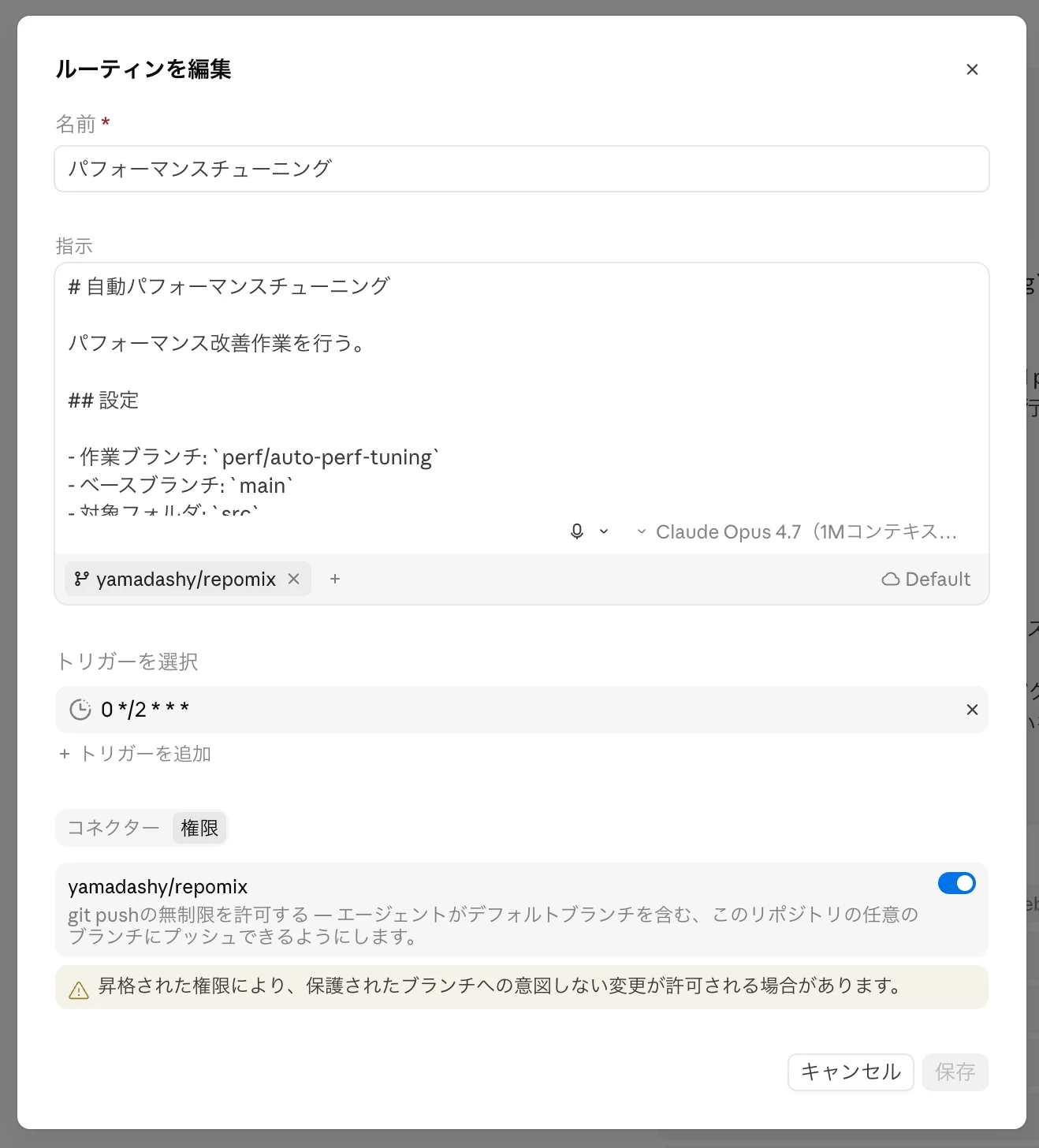
Here's the prompt I have registered:
# Automated Performance Tuning

Perform performance improvement work.

## Settings

- Working branch: `perf/auto-perf-tuning`
- Base branch: `main`
- Target folder: `src`
- PR title: `perf(core): Automated performance tuning by Claude`
- Improvement threshold: `For a CLI run that takes 1–2 seconds, ignore changes of a few ms; require at least a 2% reduction in total execution time`
- Number of investigation sub-agents: `5`
- Sub-agent model: `sonnet`

## Policy

Improve the performance, or reduce memory usage, of <Target folder> and related code (tests, config, dependencies).
Aim for measurable, impactful changes based on <Improvement threshold>.
Do not make functional changes. Improve performance only, keeping existing behavior intact.

## Progress checklist

- [ ] 1. Branch preparation
- [ ] 2. Check existing PR
- [ ] 3. Investigation & planning
- [ ] 4. Implementation
- [ ] 5. Benchmark & verification
- [ ] 6. Commit
- [ ] 7. Local review
- [ ] 8. Create / update PR

## Steps

### 1. Branch preparation

- If <Working branch> does not exist, create it from the latest <Base branch>. If it exists, check it out.
- Then, if <Base branch> is ahead of <Working branch>, merge <Base branch> in and push. If conflicts occur, resolve them keeping in mind that the corresponding change may have already been picked up elsewhere.

### 2. Check existing PR

- Check whether a PR for <Working branch> already exists.
- If it does, read the PR description and review comments to grasp the context.

### 3. Investigation & planning

First, understand the repository structure and processing flow. Then define <Number of investigation sub-agents> non-overlapping investigation scopes yourself, and launch sub-agents (model: <Sub-agent model>) for each scope in parallel. Aggregate all reports and form an improvement plan.

Choose scopes freely based on the repository's characteristics. Examples:
- Critical path identification (locating bottlenecks)
- I/O & external communication (redundant reads, sync I/O, buffer sizes)
- Data structures & algorithms (complexity, string operations, collection choice)
- Parallelization & async (serialized work that could parallelize, redundant sequential awaits)
- Dependency libraries & init cost (lighter alternatives, lazy loading)

Even if multiple improvements are found, pick only one. Focus on the single highest-impact change for this run.

If no improvement meeting <Improvement threshold> is found, report findings and end the run.

### 4. Implementation

Implement the plan.

### 5. Benchmark & verification

- Run the benchmark and confirm the change meets <Improvement threshold>.
- Then run lint and test, confirming no regressions.
- If <Improvement threshold> is not met, revert the changes and report findings.

### 6. Commit

- Commit with the `perf` prefix.
- Include the change description and benchmark results in the commit body.

### 7. Local review

- Have multiple sub-agents review locally. If issues are raised, fix them and review again. Use amend so the work stays as a single commit.
- Once no more fixes remain, push.

### 8. Create / update PR

- Update the PR if it already exists, otherwise create a new one.
- Create as Draft.
- Title: <PR title>
- Add the change description and benchmark results to the PR body.
A few things I care about in this prompt:
- The settings section is at the top with placeholders, so I can drop the prompt into another repo and just edit the variables.
- One run = one improvement. This is the rule I'm strictest about. Multiple changes in one run and you can't tell which one actually moved the needle.
- The investigation runs 5 sub-agents in parallel, each with a different scope (I/O, memory, dependency weight, etc.). One agent looking at everything tends to be too narrow. I use Sonnet for sub-agents to keep cost in check.
- If nothing meets the improvement threshold, the run reverts and exits. No filler commits.
- Sub-agents review locally before push, so I don't burn CI on obvious issues.
- Everything stacks into one PR (
perf/auto-perf-tuning). Having a fresh PR every time would be annoying.
How the measurement works
Inside the routine, Claude Code writes the benchmark on the fly and only commits if the result clears the threshold.
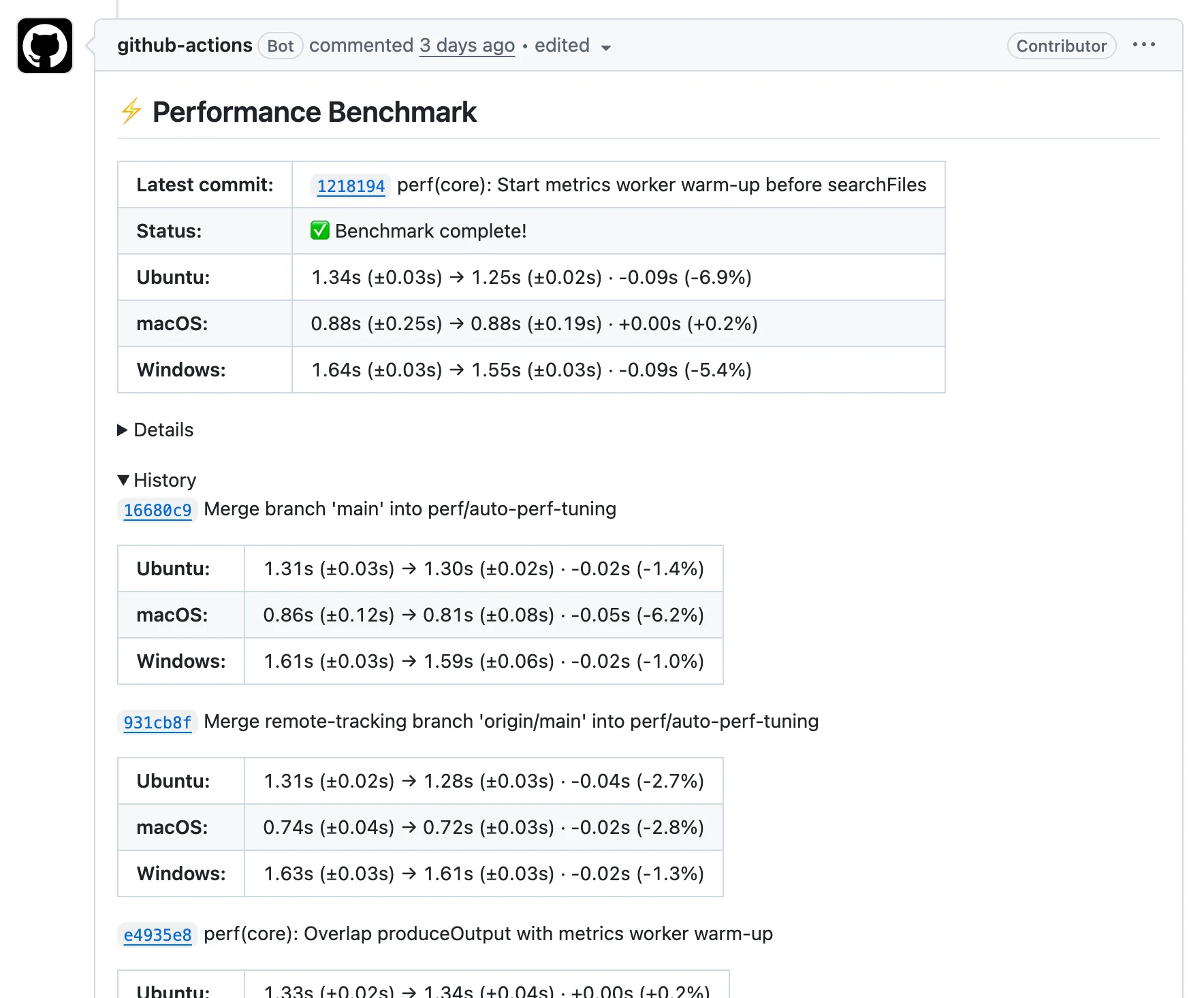
I also have a separate benchmark that runs on every PR, mostly for my own eyes:
Roughly what it does:
- Checks out the PR branch and main into separate directories and builds both
- Measures pack time on Ubuntu / macOS / Windows (run counts tuned per OS)
- Posts the diff back to the PR as a comment
The multi-OS bit is to avoid being fooled by environment-specific wins.
Since the routine stacks all its commits onto a single perf/auto-perf-tuning PR, the benchmark history naturally accumulates in that PR's comments:
I also wanted a longer-running view of main, so on every push to main the same benchmark runs and the result is saved to gh-pages via github-action-benchmark.
The graph is public:
https://yamadashy.github.io/repomix/dev/bench/
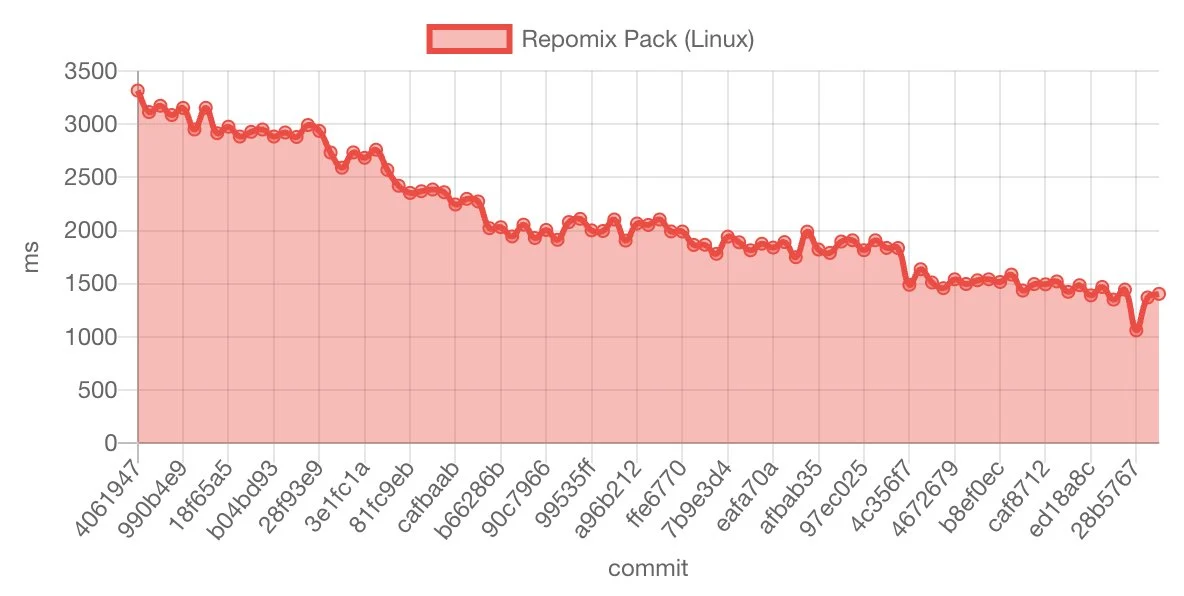
You can read off the staircase-shaped drops, the occasional plateau, and a few sudden cliffs. I find it surprisingly fun to look at. It also makes it pretty obvious that this kind of work is something that pays off as accumulation, not as one big PR.
How changes actually land in main
The routine drops commits onto perf/auto-perf-tuning, which has a Draft PR sitting against it.
https://github.com/yamadashy/repomix/pull/1514
I look at the per-commit benchmark in the PR's comments, find the commits that look promising, and ask Claude Code (in a separate, local session) to "re-implement this from main and open a PR." That goes back through the normal review path.
I don't merge the routine's PR directly. Sometimes a regression sneaks in. Sometimes the change is way bigger than it needs to be for a 2% win. Reviewing commit-by-commit and re-implementing them lets me actually own what goes in.
What I noticed
Ideas keep coming, including counter-intuitive ones
Even when you keep the routine running, it doesn't run out of things to suggest. The most interesting ones are the ones that go against my own gut feel — "this used to be faster with X, but with the current shape it's faster to revert that." The codebase changes around old optimizations, but I rarely revisit them. An AI that only looks at numbers catches that drift more easily than I do.
It pairs well with changes I'd never bother with on my own
20+ PRs ended up in v1.14.0, and individually a lot of them are -2% or -3% kind of things. The kind of change where, if you wrote it by hand, you'd think "...is this really worth typing out?"
But when the implementation and the measurement arrive together, "okay, I'll take it" feels totally reasonable. The cost of accepting small wins drops because the work isn't on me.
What I want to improve
The prompt is fairly minimal right now. Things like "what exactly to measure," "how much regression to tolerate," "what behavior must not change" — I haven't really nailed those down. Tightening them would probably make the AI's calls more accurate.
I also don't have a benchmark scaffold checked into the repo. Right now Claude Code writes one on the fly each run, which works, but having something stable in the repo would mean more reliable measurements and lower token usage. Something to clean up.
Closing thoughts
Setting the benchmark up takes effort, the room for wins shrinks over time, and not everything the AI suggests is good. Reviews still flip a few decisions.
That said, "your PR has grown overnight" is a new kind of experience. You wake up, the PR has a few new optimization commits with benchmark results attached, and your job is just to review.
If this sounds interesting, the easiest place to start is to get a benchmark running on your CI. With that in place, Claude Code's Routines will quietly grow the rest.
Comments
More Blog
View allgemmaFive Gemma-4 models, one accelerator: what porting E2B 31B to AWS Inferentia2 taught me
I ported the whole Gemma-4 family — E2B, E4B, 12B, 31B, and the 26B-A4B MoE — to run on...
X
xbillcommunityHey DEV, I'm Tobore. Let's actually connect.
Hey DEV, I'm Tobore. Let's actually connect. I've been on here for a while now, mostly writing and...
L
Laurina AyarahaiI burned through thousands of AI tokens. Then a friend did it for free
(yep, kinda clickbait, just for the funsies 😊) At the beginning of the year, I relaunched my...
P
Paulo HenriqueaiClaude might be saturating your machine
My laptop was sitting idle with the fan at full tilt. Nothing was running that I knew of. The culprit...
S
Sidhant PandagithubactionsAutomated GitHub Code Reviews Using Google Gemini
I Built a Thing! TL;DR — Google Gemini-based Pull Request reviews and Issue Triaging for...
D
Darren "Dazbo" LesteraiWhat is an "agentic harness," actually?
I've been hearing the word "harness" thrown around a lot lately. I assumed it just meant "the IDE" or...
T
Tilde A. ThuriumReady-made automations for this
Workflows from the Neura Market marketplace related to this DeepSeek resource
- Send search term performance stats from Google Ads in an emailmake · $4.99 · Uses make
- Performance Management - Team Performance Generation 3/3make · $4.99 · Uses make
- Create new records in Airtable from users in When I Workmake · $3.99 · Uses make
- Create new users in When I Work from new rows in a Google Sheets spreadsheetmake · $2.99 · Uses make