
Back to Blog playwright
 gemma
gemma community
 ai
ai ai
ai githubactions
 ai
ai
You don't need to deal with code to understand Playwright
Abhijeet Vaikar April 4, 2026
0 views
Trywright is a local control panel that gives you a live Playwright session in your browser — no code, no IDE, no project setup.
title: You don't need to deal with code to understand Playwright published: true description: Trywright is a local control panel that gives you a live Playwright session in your browser — no code, no IDE, no project setup. tags: playwright, testing, webdev, devtools cover_image: https://trywright.dev/screenshots/hero.png
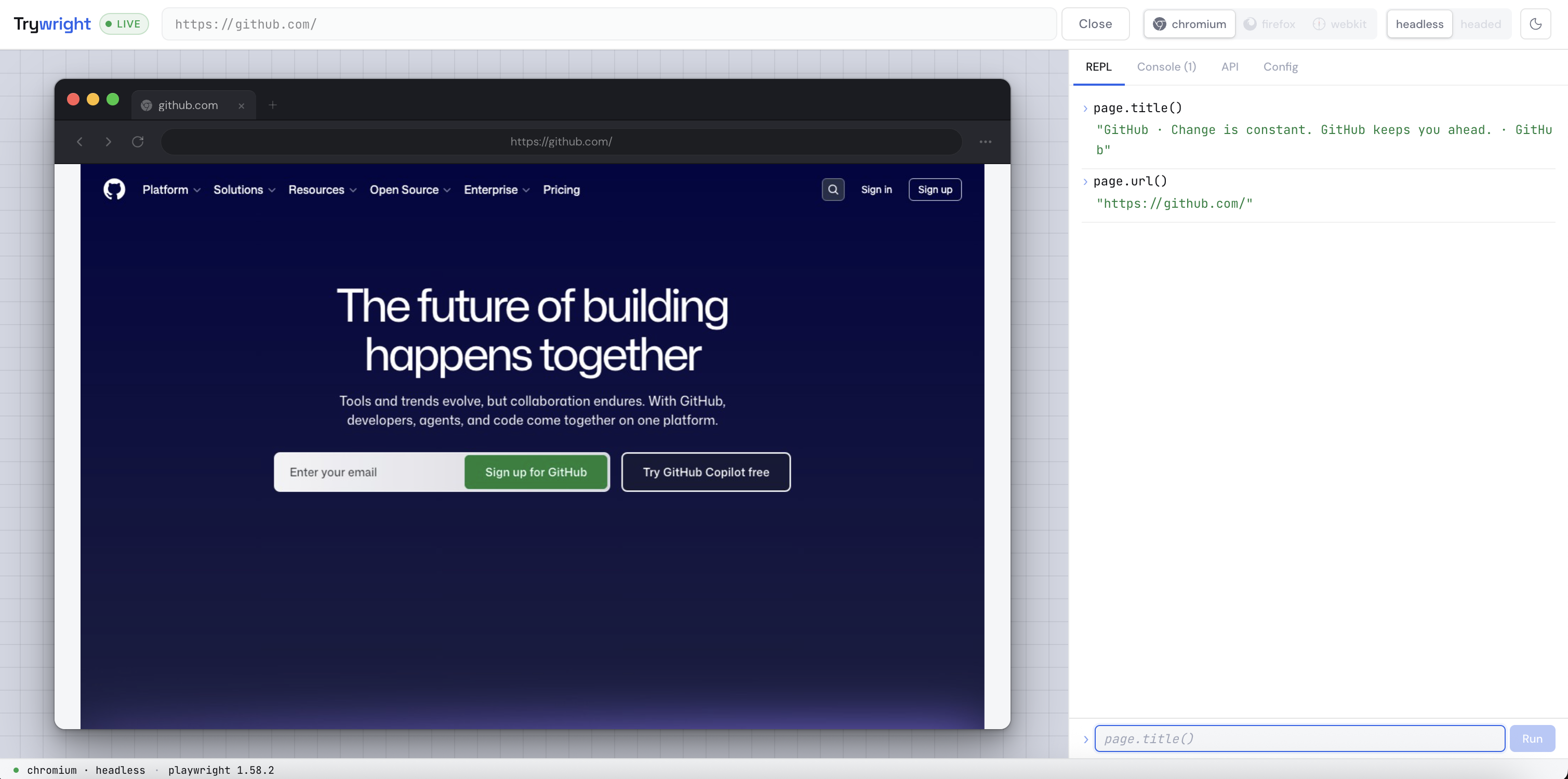
You know the feeling. Someone on your team mentions Playwright. You've heard of it, maybe used it briefly, but you've never really got it. So you decide to finally sit down and learn it properly.
Twenty minutes later you're still setting up the project.
You've created a directory, run npm init, installed @playwright/test, answered the init wizard questions, opened VS Code, created a spec file, and now you're staring at a boilerplate test that navigates to https://example.com and checks for the word "Example" in the title.
You haven't learned anything about Playwright yet. You've learned how to scaffold a project.
I kept running into three kinds of people who had this exact problem in different flavours.
The first is someone like a backend developer who keeps getting pulled into frontend meetings where Playwright comes up. They want to understand what it actually does — not write tests, not set anything up, just see it work. Every tutorial assumes they want to build a full test suite. They just want to poke at it.
The second is a QA engineer who understands testing deeply but is new to Playwright specifically. They know what a locator is supposed to do. They want to build intuition for how getByRole behaves on a real page, how waitForSelector differs from waitForLoadState, what page.evaluate() actually returns. The only way to build that intuition is to try things. But every time they want to try something they have to run a whole test file to do it.
The third is a developer who has written Playwright tests before. They're debugging something — a selector that works in Chromium but not WebKit, or a timing issue on a specific page. They need to interrogate a live page quickly without spinning up their whole test suite or adding temporary console.log statements to a spec file.
All three of these people have the same underlying problem. The feedback loop between "I want to try something with Playwright" and "I am trying something with Playwright" is too long.
That gap is what I tried to close.
I built Trywright — a local control panel that gives you a live Playwright session directly in your browser at localhost:3333. You give it a URL, pick a browser (Chromium, Firefox, or WebKit), choose headed or headless, and within a couple of seconds you have a real Playwright-controlled browser session running.
The main thing you get is a REPL wired directly to the active page object. await is implicit. You just type:
page.title()
// → 'GitHub: Let's build from here · GitHub'

page.locator('nav a').count()
// → 7

page.getByRole('button', { name: 'Sign in' }).isVisible()
// → true
Results come back immediately. You're talking to a real page, in a real browser, through the actual Playwright API. There's no simulation, no mocking, no synthetic environment.
There's also a built-in API reference panel — every page method grouped by category with short examples. You can click any method and it inserts into the REPL input. The goal is that you should never need to leave the tool to figure out what to try next.
A few things I deliberately left out.
Trywright doesn't record your actions and generate test code. Playwright already has codegen for that and it does it well. Trywright isn't trying to compete with it.
It doesn't have a selector inspector or element highlighting. Again, Playwright's own tooling handles this. Maybe I might think of adding an intelligent selector suggestion feature in future versions.
What it does is sit one level before those tools. It's for the moment before you know what you're doing — the exploration phase, the learning phase, the "I just want to see what Playwright thinks about this page" phase.
Installing it is one command:
npm install -g trywright
Then:
trywright start
That's it. Chromium, Firefox, and WebKit install automatically on first run. The daemon registers as a startup item so it's always available at localhost:3333 whenever you need it — you never run the install command again.
It works on macOS and Linux. Node.js 20 or higher required.
If you've been meaning to properly learn Playwright but keep putting it off because the setup feels like a commitment — this is the zero-commitment version. Open it, point it at a website you're planning to automate, spend twenty minutes in the REPL, and close it.
You'll understand more about Playwright in those twenty minutes than you would in an hour of reading the docs cold.
Trywright is a closed-source tool that's free to use. The npm package is live. Bug reports and feature requests go to the public issue tracker at github.com/abhivaikar/trywright-issues. Would genuinely love to hear what breaks.
Comments
More Blog
View allgemmaFive Gemma-4 models, one accelerator: what porting E2B 31B to AWS Inferentia2 taught me
I ported the whole Gemma-4 family — E2B, E4B, 12B, 31B, and the 26B-A4B MoE — to run on...
X
xbillcommunityHey DEV, I'm Tobore. Let's actually connect.
Hey DEV, I'm Tobore. Let's actually connect. I've been on here for a while now, mostly writing and...
L
Laurina AyarahaiI burned through thousands of AI tokens. Then a friend did it for free
(yep, kinda clickbait, just for the funsies 😊) At the beginning of the year, I relaunched my...
P
Paulo HenriqueaiClaude might be saturating your machine
My laptop was sitting idle with the fan at full tilt. Nothing was running that I knew of. The culprit...
S
Sidhant PandagithubactionsAutomated GitHub Code Reviews Using Google Gemini
I Built a Thing! TL;DR — Google Gemini-based Pull Request reviews and Issue Triaging for...
D
Darren "Dazbo" LesteraiWhat is an "agentic harness," actually?
I've been hearing the word "harness" thrown around a lot lately. I assumed it just meant "the IDE" or...
T
Tilde A. ThuriumReady-made automations for this
Workflows from the Neura Market marketplace related to this DeepSeek resource
- Automate Blog Content Creation with Notion MCP, DeepSeek AI, and WordPressn8n · $9.99 · Related topic
- Deploy a Customizable AI Chatbot with DeepSeek Integration on Your Websiten8n · $4.99 · Related topic
- Generate AI Videos from Scripts with DeepSeek, Synthesia, and Together.ain8n · $24.99 · Related topic
- Compare Multi-Period Financial Data from Google Sheets with DeepSeek AI Analysisn8n · $14.99 · Related topic