
Back to Blog serverless
 gemma
gemma community
 ai
ai ai
ai githubactions
 ai
ai
Building a Production-Ready Serverless App on Google Cloud (Part 1: Architecture)
Patricio Navarro March 31, 2026
0 views
The Problem In my previous post, I shared how I used an AI agent framework during a train...
The Problem
In my previous post, I shared how I used an AI agent framework during a train ride to build a Proof of Concept (POC) for a project called the Dog Finder App. The response was great, but the experiment raised a technical question: How do you build a POC quickly without creating a messy monolith that you'll have to rewrite later?
When building a data-intensive application, engineers usually face a harsh trade-off. You can either build it fast to prove the concept (and inherit massive technical debt), or you can build it "right" (and spend weeks provisioning infrastructure and writing boilerplate).
By leveraging serverless services on Google Cloud Platform (GCP), we can break that trade-off.
This is the first in a three-part series where I will show you how to architect, automate, and deploy a complete, decoupled data application. We will look at how combining serverless tools with strict Data Engineering practices allows you to spin up a solution that is both incredibly fast to build and ready for production traffic.
The Architecture: Decoupling by Default
In traditional POCs, it is common to see a tightly coupled monolith: a single backend service receiving HTTP requests, saving images to a local disk, writing state to a database, and running heavy analytical queries. If one component bottlenecks, the entire application crashes.
For the Dog Finder app—a system designed to ingest real-time sightings of lost dogs and route them for geographical analysis—we needed a system that scales instantly under load but costs absolutely nothing when there is no traffic.
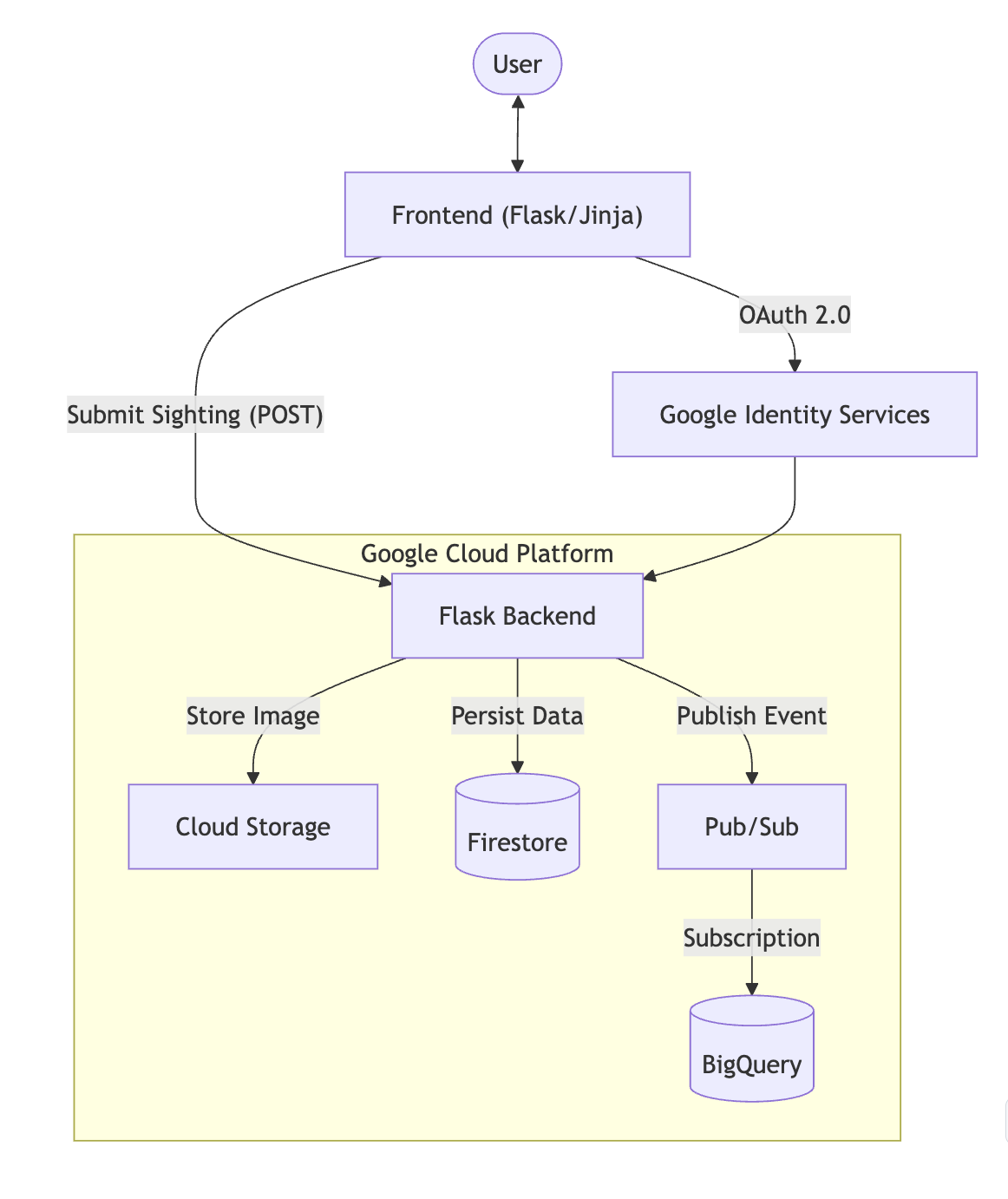
To achieve this, we default to a decoupled architecture. We split the ingestion, state, and analytics across specialized, managed serverless components:
-
Google Cloud Run (Compute): Hosts our stateless Flask web application and API. It handles incoming user traffic, scales up automatically on demand, and drops to zero when idle.
-
Google Cloud Storage (Blob Storage): Handles the heavy payloads. User-uploaded images of dogs go straight here, keeping our databases lean and performant.
-
Firestore (Operational Database): Our OLTP layer. This NoSQL database stores the real-time state of the application, allowing the frontend to read and display current sightings with millisecond latency.
-
Cloud Pub/Sub (Ingestion Buffer): The shock absorber of our system. When a sighting occurs, the backend publishes an event here and immediately responds to the user, completely decoupling the web app from the analytics pipeline.
-
BigQuery (Data Warehouse): Our OLAP layer. The final destination where all structured sightings land for historical storage, regional partitioning, and complex analytical querying.
The Compute Layer: Scaling to Zero with Cloud Run
At the core of the Dog Finder app is a Python Flask backend. In a traditional setup, you would provision a Virtual Machine (Compute Engine) to run this application. You’d pay for that VM 24/7, even at 3:00 AM when no one is reporting lost dogs.
Instead, we containerized the application using a standard Dockerfile and deployed it to Google Cloud Run.
Cloud Run is a fully managed compute platform that automatically scales stateless containers. As an architect, enforcing statelessness is critical here. The Flask app does not store any session data or images on its local filesystem. Its only job is to act as a highly efficient traffic cop:
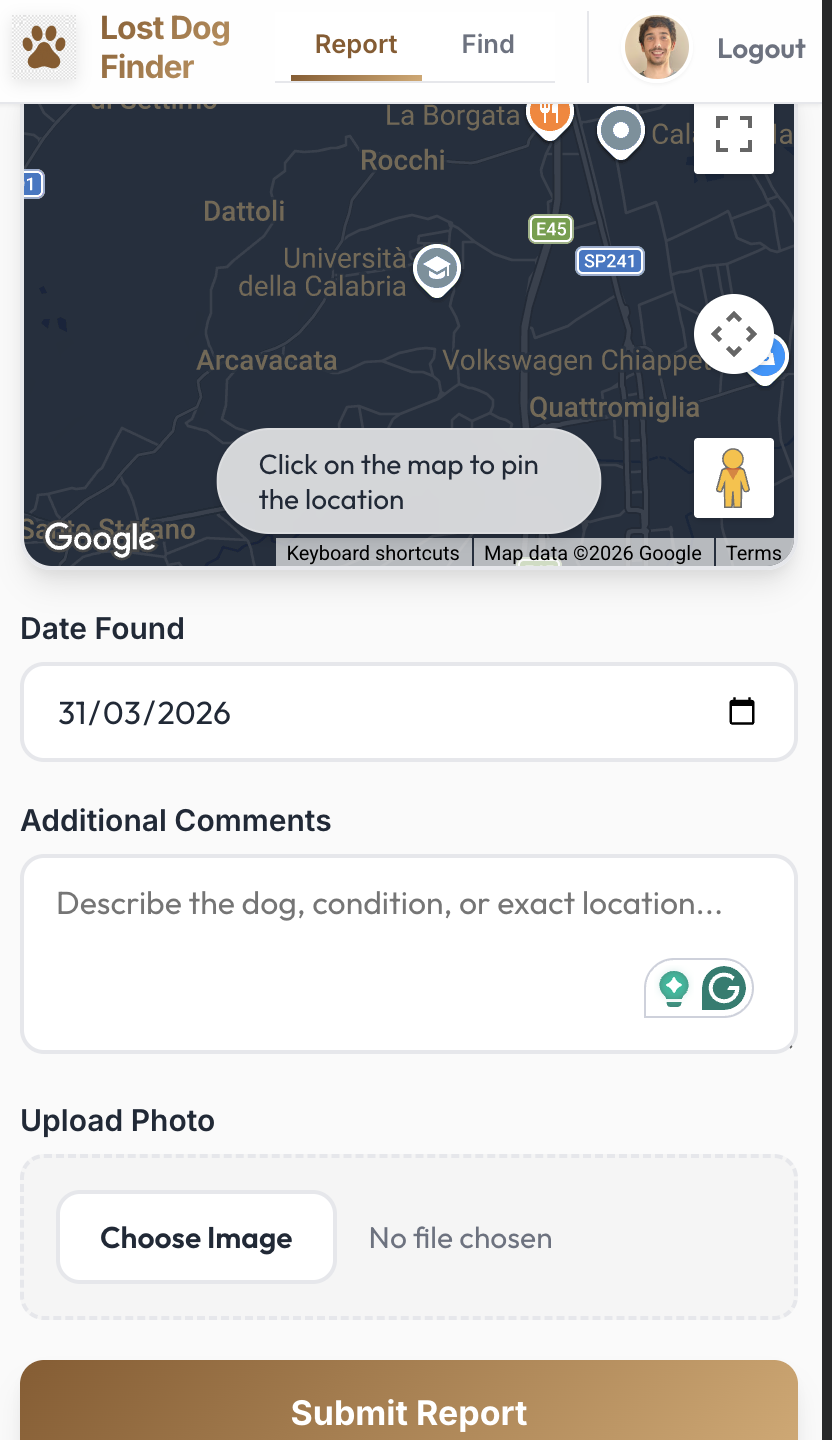
- Receive the HTTP POST request (the sighting payload and image).
- Validate the data payload.
- Offload the heavy lifting to our specialized data services.
- Return a success response to the user.
If there is a massive spike in lost dog reports, Cloud Run spins up multiple container instances instantly. When traffic drops, it scales down to zero. We only pay for the exact number of milliseconds the CPU spends processing a request.
The Data Split: OLTP vs. OLAP in a Serverless World
This is where many rapid POCs turn into unmaintainable monoliths. A common mistake is throwing all your data—images, real-time app state, and analytical history—into a single relational database like PostgreSQL. As the application grows, database locks increase, queries slow down, and storage costs skyrocket.
To prevent this, we split the data path into three specialized lanes:
1. Cloud Storage (The Payload)
Databases are expensive places to store binary files. When a user uploads a photo of a dog, our Cloud Run app sends that file directly to a Google Cloud Storage bucket. The app then grabs the resulting image_url and uses that string for the rest of the data pipeline. This keeps our databases incredibly lean and fast.
2. Firestore (Operational / OLTP)
Users expect a snappy UI. When they open the app, they want to see the latest dog sightings immediately. We use Firestore (a NoSQL document database) as our operational layer. After saving the image, Cloud Run writes the sighting record to Firestore. This provides low-latency reads and writes, ensuring the web frontend feels instantaneous without running complex SQL joins.
3. BigQuery (Analytical / OLAP)
While Firestore is great for the UI, it is not designed for heavy aggregations (e.g., "How many Golden Retrievers were lost in the northern region last month compared to last year?").
For this, we route the data to BigQuery. We explicitly partitioned the BigQuery table by sighting_date. This is a crucial Data Engineering standard: when analysts query the table for recent trends, BigQuery only scans the relevant partitions, drastically reducing query costs and execution time.
The Payoff: Visualizing the Data (Looker Studio)
An architecture is only as good as the insights it delivers. The real payoff of this decoupled, partitioned setup became obvious when I wanted to add a visualization layer.
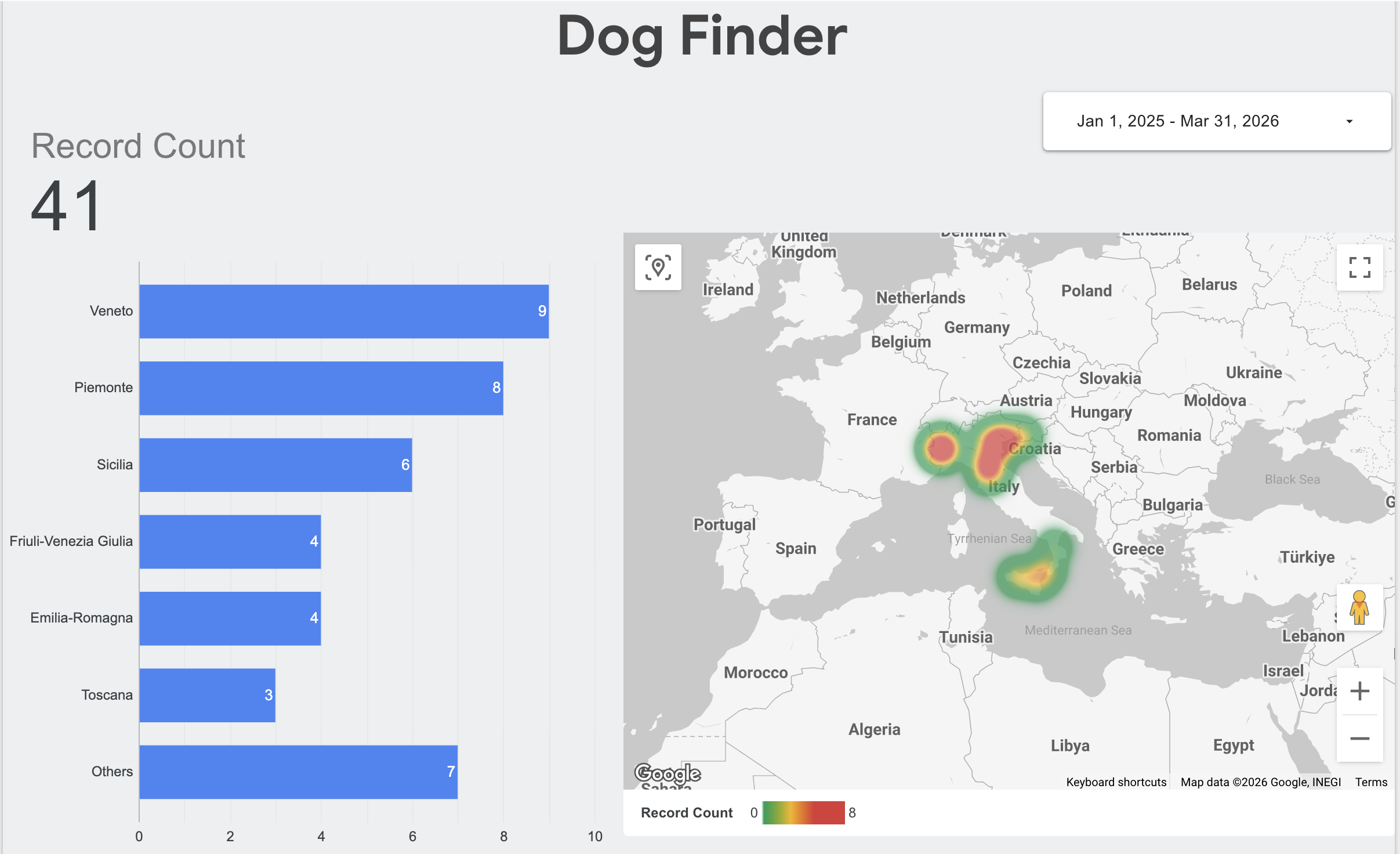
Because we cleanly separated our operational state (Firestore) from our analytical history (BigQuery), I was able to connect Looker Studio directly to the BigQuery table in minutes. I didn't have to worry about complex API integrations or degrading the performance of the live web app.
I created a real-time dashboard that plots the sightings by region. As new records flow through the serverless pipeline, the dashboard updates automatically, providing a live heat map of lost dog hotspots. This transforms the POC from a simple "data entry" app into a complete, end-to-end data product.
Conclusion & What’s Next
In this first part, we laid out the "boxes" of our architecture. By leveraging Cloud Run, Cloud Storage, Firestore, and BigQuery, we designed a system that scales instantly, costs nothing when idle, and handles both operational and analytical workloads perfectly.
But having the right boxes is only half the battle. How do we connect them reliably?
In Part 2, we will dive into the lines connecting the boxes. I will show you how to use Pub/Sub to fully decouple ingestion, how to set up a direct serverless subscription from Pub/Sub to BigQuery (no code required), and how to enforce strict Data Contracts so your beautiful data warehouse doesn’t turn into a data swamp.
Comments
More Blog
View allgemmaFive Gemma-4 models, one accelerator: what porting E2B 31B to AWS Inferentia2 taught me
I ported the whole Gemma-4 family — E2B, E4B, 12B, 31B, and the 26B-A4B MoE — to run on...
X
xbillcommunityHey DEV, I'm Tobore. Let's actually connect.
Hey DEV, I'm Tobore. Let's actually connect. I've been on here for a while now, mostly writing and...
L
Laurina AyarahaiI burned through thousands of AI tokens. Then a friend did it for free
(yep, kinda clickbait, just for the funsies 😊) At the beginning of the year, I relaunched my...
P
Paulo HenriqueaiClaude might be saturating your machine
My laptop was sitting idle with the fan at full tilt. Nothing was running that I knew of. The culprit...
S
Sidhant PandagithubactionsAutomated GitHub Code Reviews Using Google Gemini
I Built a Thing! TL;DR — Google Gemini-based Pull Request reviews and Issue Triaging for...
D
Darren "Dazbo" LesteraiWhat is an "agentic harness," actually?
I've been hearing the word "harness" thrown around a lot lately. I assumed it just meant "the IDE" or...
T
Tilde A. ThuriumReady-made automations for this
Workflows from the Neura Market marketplace related to this DeepSeek resource
- AI Chatbot Call Center: Taxi Booking Worker (Production-Ready, Part 5)n8n · $24.99 · Related topic
- Build Production-Ready User Authentication with Airtable and JWTn8n · $14.99 · Related topic
- Generate High-Conversion Sales Copy Using Hormozi Framework and Google Docsn8n · $24.99 · Related topic
- Automate Video Production from Google Sheets with AI-Driven Promptsn8n · $14.99 · Related topic