
Back to Blog rag
rag gemma
gemma community
 ai
ai ai
ai githubactions
 ai
ai
Implementing a RAG system: Walk
Glen Yu March 30, 2026
0 views
Now that we've established the basics in our "Crawl" phase, it's time to pick up the pace. In this...
Now that we've established the basics in our "Crawl" phase, it's time to pick up the pace. In this guid, we'll move beyond the initial setup to focus on optimizing core architectural components for better performance and accuracy.
Walk
We ended the previous "Crawl" design with a functioning AI HR agent with a RAG system. The responses, however, could be better. I've introduced some new elements to the architecture to perform better document processing and chunking, as well as re-ranker model to sort the semantic retrieval results by relevance:
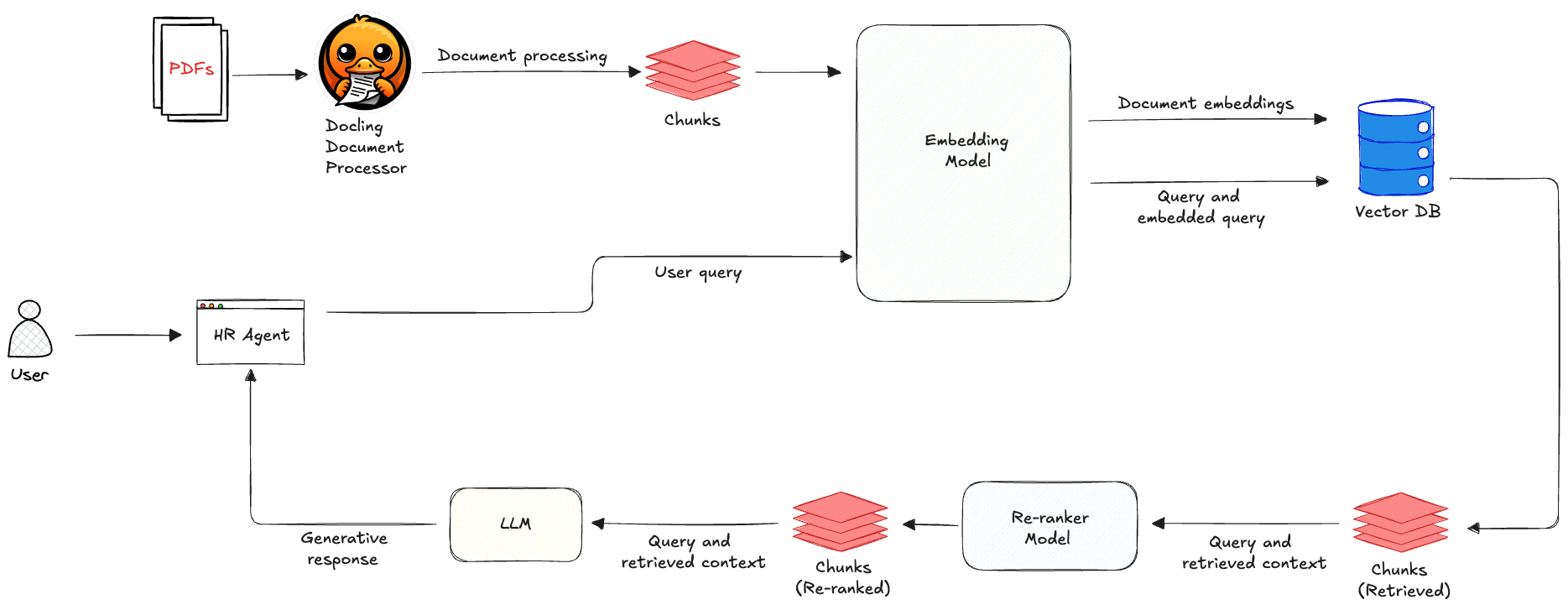
The ugly Docling
IBM's Docling is an open-source document processing tool and easily one of the most effective ones I've tested. It can convert various file formats (e.g., PDF, docx, HTML) into clean, structured formats like Markdown and JSON. By integrating AI models and OCR, it doesn't just extract text, but also preserve the original layout's integrity. Through its hierarchical and hybrid chunking methods, Docling intelligently groups content by heading, merges smaller fragments for better context, and attaches rich metadata to streamline downstream searching and citations. Here's a Python function I use for chunking a PDF file:
def docling_chunk_pdf(file: str) -> tuple[list, list]:
    converter = DocumentConverter(
        format_options={
            InputFormat.PDF: PdfFormatOption(
                pipeline_options=pipeline_options,
            )
        }
    )

    result = converter.convert(file)
    doc = result.document
    chunker = HybridChunker()
    chunks = list(chunker.chunk(doc))
    chunk_texts = [c.text for c in chunks]

    return chunks, chunk_texts
I plan to take a deeper dive into Docling in a future article, so give me a follow so you won't miss it! 😄
Dot product vs cosine similarity
In the "Crawl" post, I talked briefly about cosine similarity and how it ignore magnitude and only focuses on the angle between two vectors. This is because normalization is baked into the cosine similarity formula. Dot product is effectively cosine similarity but without the final normalization step, which is why its result is affected by the magnitude of the vectors. Since many modern embedding models output pre-normalized unit vectors, the extra normalization step in cosine similarity becomes a redundant calculation. By using dot product on these pre-normalized vectors, you can achieve identical results with higher computational efficiency.
NOTE #1: While switching to dot product can increase your raw retrieval throughput, the latency gains may feel negligible when considering the entire end-to-end RAG pipeline depending on your particular use case and scale.
NOTE #2: A friendly reminder that choosing dot product over cosine similarity has the hard requirement that your vectors be normalized beforehand, or the magnitude will skew your search results. It's also quite easy to update your search configuration to use one or the other. If you're ever in doubt, just run a quick test with both settings to verify that both methods return the exact same nearest neighbours (top semantic matches).
Re-ranking
Standard search is built for speed and not deep understanding, so it can sometimes miss nuances. Re-ranking takes a crucial "second look" at the standard retrieval results to see which one(s) actually address the user's query. While the Cosine distance represents how similar the query and document align in the vector space, a "close" match doesn't guarantee an answer. The re-ranker's job to is to bridge this gap by scrutinizing the top results to assign a true relevance_score and ensure the most helpful contexts rise to the top. Here's what that snippet of code looks like:
co = cohere.ClientV2()

response = co.rerank(
    model=RERANKING_MODEL,
    query=user_query,
    documents=documents_to_rerank,
    top_n=len(candidate_responses),
)

reranked_results = []
for res in response.results:
    original_data = candidate_responses[res.index]

    reranked_results.append({
        "content": original_data["content"],
        "source": original_data["source"],
        "heading": original_data["heading"],
        "page": original_data["page"],
        "search_distance": original_data["search_distance"],
        "relevance_score": res.relevance_score
    })
As part of the full code that performs the re-ranking, I assign a threshold for the relevance score. Scores lower than this threshold is deemed irrelevant.
Updated example
I'm shaking up the stack for the "Walk" phase! In addition to using a different document processor, I will also be using a different embedding model and vector database.
Since I wanted to try out Cohere's re-ranking model, I opted to lean into their full suite and use their embedding model as well. I made a deliberate choice here to set the embedding dimension to 384, which is a lower than the 768 I previous used in the "Crawl" example. I wanted to handicap the initial semantic search, and by doing so, we can more clearly see the re-ranker work its magic to fix the order or the results.
I switched out ChromaDB with LanceDB to showcase just how many robust, easy-to-use open-source local vector databases are available for use.
Querying the HR agent
While I kept the core agent configuration from the "Crawl" phase the same, the addition of the re-ranking step made a significant impact. I asked the same two benchmark questions and this time the results were more refined and accurate:
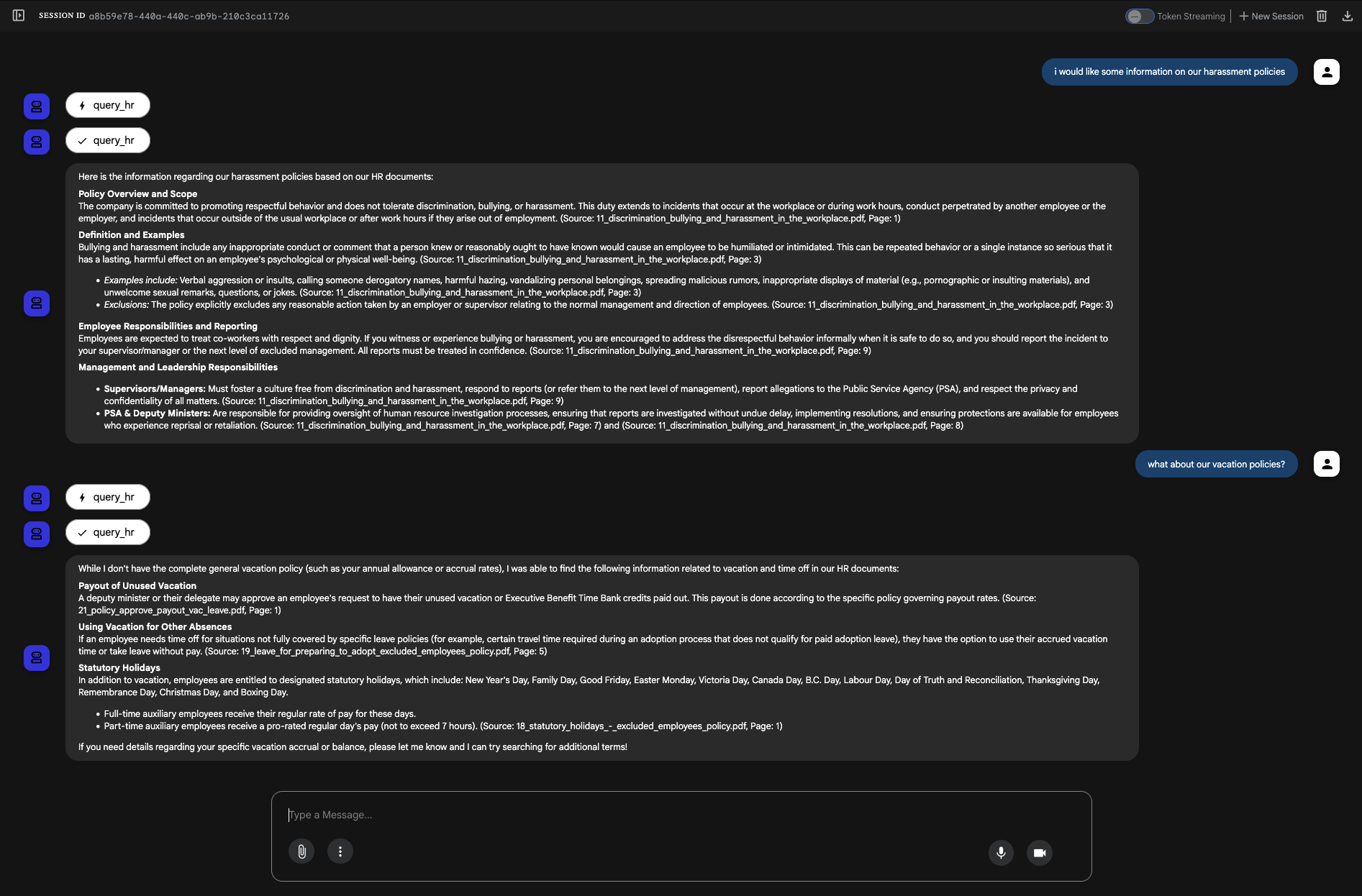
You can find the code for the "Walk" phase → here
Next steps
Now that we've manually optimized our retrieval and re-ranking, the next step is to scale. I will be migrating this architecture to Vertex AI's RAG Engine for a fully managed, high-performance RAG pipeline at an enterprise scale.
Additional learning
I used Cohere's embedding and re-ranking models in my example, but if you want to try out Vertex AI's re-ranking capabilities (and more), try out this Advanced RAG Techniques Codelab.
Comments
More Blog
View allgemmaFive Gemma-4 models, one accelerator: what porting E2B 31B to AWS Inferentia2 taught me
I ported the whole Gemma-4 family — E2B, E4B, 12B, 31B, and the 26B-A4B MoE — to run on...
X
xbillcommunityHey DEV, I'm Tobore. Let's actually connect.
Hey DEV, I'm Tobore. Let's actually connect. I've been on here for a while now, mostly writing and...
L
Laurina AyarahaiI burned through thousands of AI tokens. Then a friend did it for free
(yep, kinda clickbait, just for the funsies 😊) At the beginning of the year, I relaunched my...
P
Paulo HenriqueaiClaude might be saturating your machine
My laptop was sitting idle with the fan at full tilt. Nothing was running that I knew of. The culprit...
S
Sidhant PandagithubactionsAutomated GitHub Code Reviews Using Google Gemini
I Built a Thing! TL;DR — Google Gemini-based Pull Request reviews and Issue Triaging for...
D
Darren "Dazbo" LesteraiWhat is an "agentic harness," actually?
I've been hearing the word "harness" thrown around a lot lately. I assumed it just meant "the IDE" or...
T
Tilde A. ThuriumReady-made automations for this
Workflows from the Neura Market marketplace related to this DeepSeek resource
- Automate Blog Content Creation with Notion MCP, DeepSeek AI, and WordPressn8n · $9.99 · Related topic
- "Automated Social Media Content Publishing Factory & System Prompt Composition"n8n · $24.99 · Related topic
- LinkedIn Lead Generation: Auto DM System with Comment Triggers using Unipile & NocoDBn8n · $24.99 · Related topic
- Build a PDF Document RAG System with Mistral OCR, Qdrant, and Gemini AIn8n · $24.99 · Related topic