
Back to Blog googleappsscript
 gemma
gemma community
 ai
ai ai
ai githubactions
 ai
ai
Mastering Google Apps Script CI/CD: Seamless GitHub Actions Integration with gas-fakes
Tanaike March 25, 2026
0 views
Abstract Discover how to seamlessly integrate Google Workspace with GitHub Actions using...

Abstract
Discover how to seamlessly integrate Google Workspace with GitHub Actions using the gas-fakes library. This guide demonstrates running Google Apps Script locally and within CI/CD pipelines without deploying Web Apps. Automate workflows, secure credentials, and effortlessly interact with Google Drive and Sheets directly from your repository.
Introduction
Google Apps Script (GAS) is a powerful low-code platform that enables developers to integrate, automate, and extend Google Workspace with ease. Ref Typically, executing GAS requires the script to be hosted on Google's servers via the Script Editor. While tools like clasp allow for local development and synchronization, running scripts from outside the Google ecosystem—such as from a local environment or a different cloud provider—often involves complex setups relying heavily on the Apps Script API or Web Apps. Ref
A common approach to triggering GAS from GitHub Actions is using Web Apps. However, this method presents several hurdles. Developers must re-deploy the Web App every time the script is updated, and verifying the latest code logic directly within the repository can be cumbersome. This is where gas-fakes becomes a game-changer. Ref Operating as a robust emulation layer, gas-fakes allows GAS projects to run on Node.js as if they were native, enabling seamless execution across various environments.
By leveraging gas-fakes within GitHub Actions, you can manage, test, and update your scripts directly inside your repository without the need for constant re-deployment. Furthermore, by storing sensitive credentials in GitHub's "Secrets and variables," you can ensure a high level of security for your automation workflows. This synergy between GitHub Actions and GAS opens up infinite possibilities for CI/CD application development. In this article, I will introduce a streamlined, professional method for managing Google Workspace using GitHub Actions and gas-fakes.
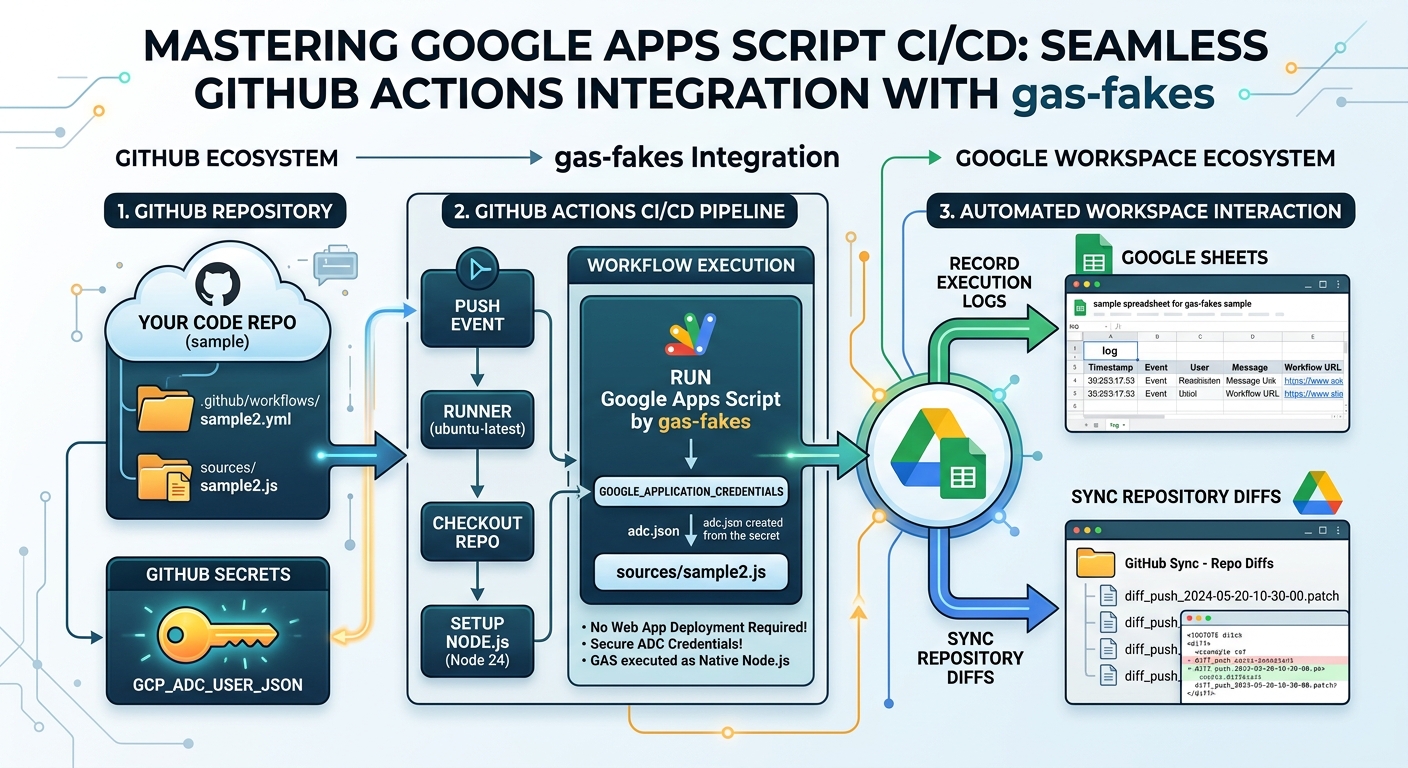
Phase 1: Setup and Authentication
To establish this pipeline, we first need to extract the proper authorization credentials and configure our GitHub repository.
Step 1: Obtain Authorization Data
In order to authorize gas-fakes, you must first generate Application Default Credentials (ADC) on your local machine. The Google Cloud CLI (gcloud) is required for this step. Detailed installation instructions can be found in the gas-fakes official documentation.
If you prefer using npx, execute the following commands in your terminal:
npx @mcpher/gas-fakes init --auth-type adc
npx @mcpher/gas-fakes auth
Alternatively, if you want to install the package globally via npm, run:
npm install -g @mcpher/gas-fakes
gas-fakes init --auth-type adc
gas-fakes auth
Once the authorization is complete, retrieve your credentials file.
For Linux / macOS:
cat ~/.config/gcloud/application_default_credentials.json
For Windows:
type C:\Users\{user name}\AppData\Roaming\gcloud\application_default_credentials.json
Copy the output. Your authorization data will look similar to the following JSON structure:
{
  "account": "",
  "client_id": "{your client ID}",
  "client_secret": "{your client secret}",
  "quota_project_id": "{your project ID}",
  "refresh_token": "{your refresh token}",
  "type": "authorized_user",
  "universe_domain": "googleapis.com"
}
Step 2: Create a New GitHub Repository
To test this integration, create a new repository on GitHub. For this guide, we will assume the repository name is sample.
Step 3: Configure GitHub Secrets
We must securely store the authorization data in GitHub. Navigate to your repository's "Settings" -> "Secrets and variables" -> "Actions". Click on "New repository secret" and configure the following:
Key: GCP_ADC_USER_JSON
Value: (Paste the JSON string you copied in Step 1)
{
  "account": "",
  "client_id": "{your client ID}",
  "client_secret": "{your client secret}",
  "quota_project_id": "{your project ID}",
  "refresh_token": "{your refresh token}",
  "type": "authorized_user",
  "universe_domain": "googleapis.com"
}
When the gh command is used, you can also use the following command.
gh secret set GCP_ADC_USER_JSON < ~/.config/gcloud/application_default_credentials.json
Phase 2: Building Your First Workflow
Step 4: Define the GitHub Actions Workflow
Create a new YAML file named sample1.yml inside the .github/workflows/ directory of your repository.
name: Run GAS via gas-fakes (sample1)

on:
  push:
    branches: ["*"]
  pull_request:
    branches: ["*"]
  issues:
    types: [opened, edited, closed]
  workflow_dispatch:

jobs:
  execute:
    name: sample1
    runs-on: ubuntu-latest
    env:
      FORCE_JAVASCRIPT_ACTIONS_TO_NODE24: true

    steps:
      - name: Checkout repository
        uses: actions/checkout@v4

      - name: Setup Node.js
        uses: actions/setup-node@v4
        with:
          node-version: "24"

      - name: Create ADC file
        run: |
          echo '${{ secrets.GCP_ADC_USER_JSON }}' > /tmp/adc.json

      - name: Extract Project ID from ADC
        run: |
          echo "PROJECT_ID=$(jq -r '.quota_project_id' /tmp/adc.json)" >> $GITHUB_ENV

      - name: Run Google Apps Script by gas-fakes
        run: |
          export GOOGLE_CLOUD_PROJECT=$PROJECT_ID
          export GOOGLE_APPLICATION_CREDENTIALS=/tmp/adc.json
          npx @mcpher/gas-fakes -s "const rootFolder = DriveApp.getRootFolder(); const rootFolderName = rootFolder.getName(); console.log(rootFolderName);"
In this initial test, a simple Google Apps Script snippet (const rootFolder = DriveApp.getRootFolder();...) is passed directly as an inline string within the YAML file.
Step 5: Push to the Remote Repository
Commit and push your local repository to GitHub. This action will automatically trigger the GitHub Actions workflow. You can monitor the execution under the "Actions" tab. If successful, the step "Run Google Apps Script by gas-fakes" will output logs similar to this:
...using env file in /home/runner/work/github-action-for-gas-fakes/github-action-for-gas-fakes/.env
...gas-fakes version 2.2.7[Worker] ...authorized backends: google via ADC (###@gmail.com)[Worker] ...using scriptId: ### (source: random)
マイドライブ
...terminating worker thread
Seeing your Google Drive's root folder name in the logs confirms that gas-fakes successfully authenticated and executed the GAS code natively via GitHub Actions.
Phase 3: Advanced Practical Applications
To demonstrate the full potential of this architecture, let's explore two practical CI/CD use cases: recording execution logs to Google Sheets and uploading repository diffs to Google Drive.
When this phase is finished, the directory structure of this repository becomes as follows.
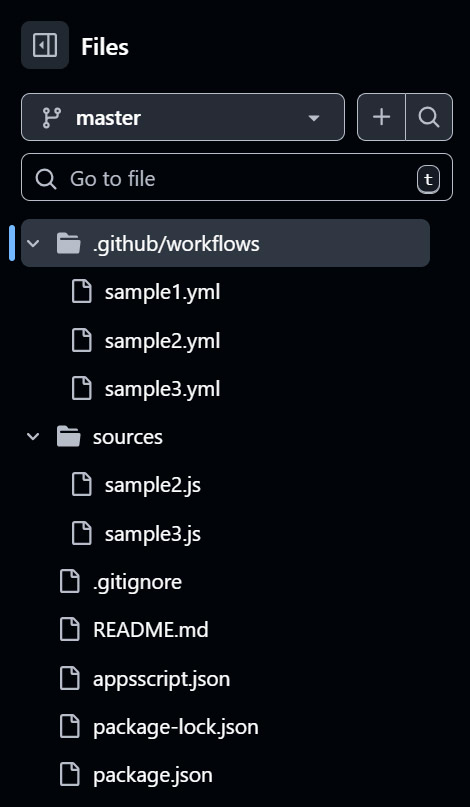
Please create the following package.json and put into the root directory.
{
  "name": "gas-fakes-workflow",
  "version": "1.0.0",
  "description": "Google Apps Script execution on GitHub Actions with gas-fakes",
  "main": "sources/sample2.js",
  "type": "module",
  "scripts": {
    "sample2": "node sources/sample2.js",
    "sample3": "node sources/sample3.js"
  },
  "dependencies": {
    "@mcpher/gas-fakes": "^2.3.0"
  },
  "engines": {
    "node": ">=24"
  }
}
.gitignore is as follows.
node_modules/
.env
Also, in order to create package-lock.json, please run npm install at the local side.
As another file, please create appsscript.json in the root directory as follows.
{
  "timeZone": "Asia/Tokyo",
  "exceptionLogging": "STACKDRIVER",
  "runtimeVersion": "V8",
  "oauthScopes": ["https://www.googleapis.com/auth/drive"]
}
Case 1: Record Execution Logs to Google Sheets
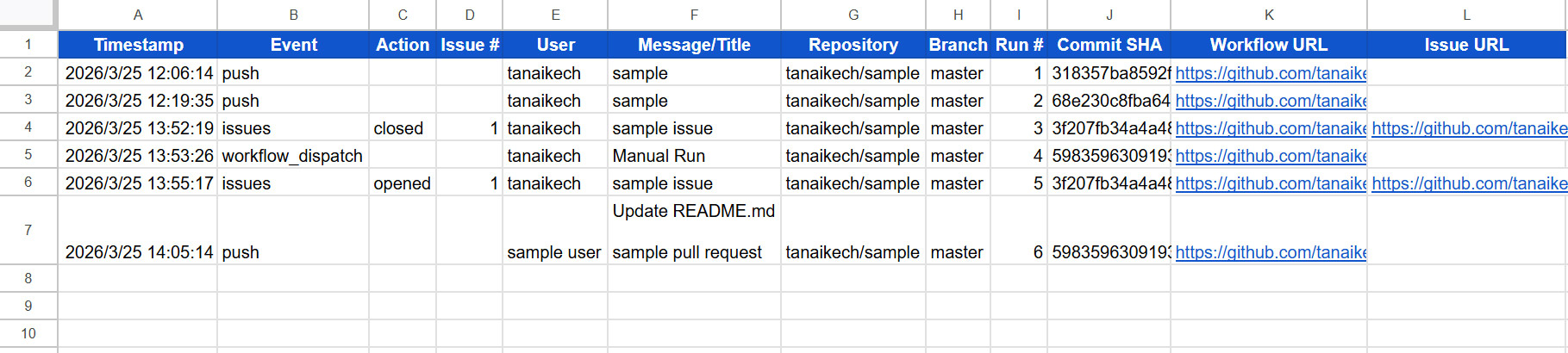
In this scenario, whenever a push, pull request, issue event, or manual trigger occurs, the workflow stores detailed execution logs in a Google Spreadsheet named sample spreadsheet for gas-fakes sample. If the file doesn't exist, it is automatically created in the root folder of your Google Drive.
Add the following YAML file to .github/workflows/sample2.yml:
name: Run GAS via gas-fakes (sample2)

on:
  push:
    branches: ["*"]
  pull_request:
    branches: ["*"]
  issues:
    types: [opened, edited, closed]
  workflow_dispatch:

env:
  FORCE_JAVASCRIPT_ACTIONS_TO_NODE24: "true"

jobs:
  execute:
    name: sample2
    runs-on: ubuntu-latest
    steps:
      - name: Checkout repository
        uses: actions/checkout@v4
        with:
          fetch-depth: 0

      - name: Setup Node.js
        uses: actions/setup-node@v4
        with:
          node-version: "24"
          cache: "npm"

      - name: Install dependencies
        run: npm install

      - name: Create ADC file
        run: |
          echo '${{ secrets.GCP_ADC_USER_JSON }}' > /tmp/adc.json

      - name: Extract Project ID from ADC
        run: |
          echo "PROJECT_ID=$(jq -r '.quota_project_id' /tmp/adc.json)" >> $GITHUB_ENV

      - name: Run Google Apps Script by gas-fakes
        run: |
          export GOOGLE_CLOUD_PROJECT=$PROJECT_ID
          export GOOGLE_APPLICATION_CREDENTIALS=/tmp/adc.json
          npm run sample2
        env:
          GH_EVENT_NAME: "${{ github.event_name }}"
          GH_ACTOR: "${{ github.actor }}"
          GH_SHA: "${{ github.sha }}"
          GH_REF: "${{ github.ref_name }}"
          GH_COMMIT_MSG: "${{ github.event.issue.title || github.event.head_commit.message || github.event.pull_request.title || 'Manual Run' }}"
          GH_RUN_URL: "${{ github.server_url }}/${{ github.repository }}/actions/runs/${{ github.run_id }}"
          GH_REPO: "${{ github.repository }}"
          GH_RUN_NUMBER: "${{ github.run_number }}"
          GH_ISSUE_NUMBER: "${{ github.event.issue.number || '' }}"
          GH_ISSUE_ACTION: "${{ github.event.action || '' }}"
          GH_ISSUE_URL: "${{ github.event.issue.html_url || '' }}"
Next, create a new directory named sources and add the corresponding Google Apps Script file as sources/sample2.js. This script reads the environment variables passed by GitHub Actions and appends them to the spreadsheet.
In order to use gas-fakes in a cache, import "@mcpher/gas-fakes" was used in the script.
import "@mcpher/gas-fakes";

/**
 * Log GitHub Actions execution details to Google Sheets
 * Updated to include Issue details
 */
function logExecution() {
  const data = {
    timestamp: new Date().toLocaleString("ja-JP", { timeZone: "Asia/Tokyo" }),
    event: process.env.GH_EVENT_NAME,
    action: process.env.GH_ISSUE_ACTION,
    issueNumber: process.env.GH_ISSUE_NUMBER,
    actor: process.env.GH_ACTOR,
    repo: process.env.GH_REPO,
    branch: process.env.GH_REF,
    runNumber: process.env.GH_RUN_NUMBER,
    message: process.env.GH_COMMIT_MSG,
    sha: process.env.GH_SHA,
    url: process.env.GH_RUN_URL,
    issueUrl: process.env.GH_ISSUE_URL,
  };

  const values = [
    [
      data.timestamp,
      data.event,
      data.action,
      data.issueNumber,
      data.actor,
      data.message,
      data.repo,
      data.branch,
      data.runNumber,
      data.sha,
      data.url,
      data.issueUrl,
    ],
  ];

  const headers = [
    "Timestamp",
    "Event",
    "Action",
    "Issue #",
    "User",
    "Message/Title",
    "Repository",
    "Branch",
    "Run #",
    "Commit SHA",
    "Workflow URL",
    "Issue URL",
  ];

  const spreadsheet_name = "sample spreadsheet for gas-fakes sample";
  const sheetName = "log";
  const files = DriveApp.getFilesByName(spreadsheet_name);
  const ss = files.hasNext()
    ? SpreadsheetApp.openById(files.next().getId())
    : SpreadsheetApp.create(spreadsheet_name);
  let sheet = ss.getSheetByName(sheetName) || ss.insertSheet(sheetName);

  if (sheet.getDataRange().getValues().length <= 1) {
    sheet.getRange(1, 1, 2, headers.length).setValues([headers, ...values]);
  } else {
    sheet
      .getRange(sheet.getLastRow() + 1, 1, values.length, values[0].length)
      .setValues(values);
  }

  console.log(
    `Log updated for ${data.repo} (Event: ${data.event}, Run #${data.runNumber})`,
  );
}

logExecution();
Case 2: Sync Repository Diffs to Google Drive
This workflow dynamically generates a .patch file containing code differences (or issue content) based on the triggered event, saving the result directly into a Google Drive folder named GitHub Sync - Repo Diffs.
Create .github/workflows/sample3.yml:
name: Run GAS via gas-fakes (sample3)

on:
  push:
    branches: ["*"]
  pull_request:
    branches: ["*"]
  issues:
    types: [opened, edited, closed]
  workflow_dispatch:

env:
  FORCE_JAVASCRIPT_ACTIONS_TO_NODE24: "true"

jobs:
  sync-to-drive:
    name: sample3
    runs-on: ubuntu-latest
    steps:
      - name: Checkout Repository
        uses: actions/checkout@v4
        with:
          fetch-depth: 0

      - name: Setup Node.js Environment
        uses: actions/setup-node@v4
        with:
          node-version: "24"
          cache: "npm"

      - name: Install dependencies
        run: npm install

      - name: Configure Google Cloud Credentials
        run: |
          echo '${{ secrets.GCP_ADC_USER_JSON }}' > /tmp/adc.json

      - name: Extract Project ID from ADC
        run: |
          echo "PROJECT_ID=$(jq -r '.quota_project_id' /tmp/adc.json)" >> $GITHUB_ENV

      - name: Run Google Apps Script by gas-fakes
        run: |
          if [ "${{ github.event_name }}" == "pull_request" ]; then
            REPO_DIFF=$(git diff origin/${{ github.base_ref }}...HEAD | base64 -w 0)
          elif [ "${{ github.event_name }}" == "push" ] && [ "${{ github.event.before }}" != "0000000000000000000000000000000000000000" ]; then
            REPO_DIFF=$(git diff ${{ github.event.before }}..${{ github.sha }} | base64 -w 0)
          elif [ "${{ github.event_name }}" == "issues" ]; then
            ISSUE_CONTENT="Issue Event: ${{ github.event.action }}\nTitle: ${{ github.event.issue.title }}\n\n${{ github.event.issue.body }}"
            REPO_DIFF=$(echo -e "$ISSUE_CONTENT" | base64 -w 0)
          else
            REPO_DIFF=$(echo "Manual trigger: No diff." | base64 -w 0)
          fi

          export REPO_DIFF
          export GOOGLE_CLOUD_PROJECT=$PROJECT_ID
          export GOOGLE_APPLICATION_CREDENTIALS=/tmp/adc.json

          npm run sample3
Create the corresponding script at sources/sample3.js:
import "@mcpher/gas-fakes";

/**
 * Syncs the repository-wide diff to a text file in Google Drive.
 */
function syncRepoDiff() {
  const base64Diff = process.env.REPO_DIFF;

  if (!base64Diff) {
    console.warn("No diff content found in environment variable REPO_DIFF.");
    return;
  }

  const timestamp = new Date().toISOString().replace(/[:.]/g, "-");
  const eventName = process.env.GITHUB_EVENT_NAME || "manual";
  const filename = `diff_${eventName}_${timestamp}.patch`;
  const folderName = "GitHub Sync - Repo Diffs";

  try {
    const decodedBytes = Utilities.base64Decode(base64Diff);
    const blob = Utilities.newBlob(decodedBytes, "text/plain", filename);

    const folders = DriveApp.getFoldersByName(folderName);
    const folder = folders.hasNext()
      ? folders.next()
      : DriveApp.createFolder(folderName);

    const file = folder.createFile(blob);

    console.log(`Successfully synced repository diff.`);
    console.log(`Saved as: ${filename}`);
    console.log(`View File: ${file.getUrl()}`);
  } catch (error) {
    console.error(`Error during Drive sync: ${error.message}`);
    process.exit(1);
  }
}

syncRepoDiff();
Execution and Verification
When a "push" event is triggered on the repository, the configured workflows execute concurrently. The visual output below confirms that GitHub Actions handled the integration flawlessly.
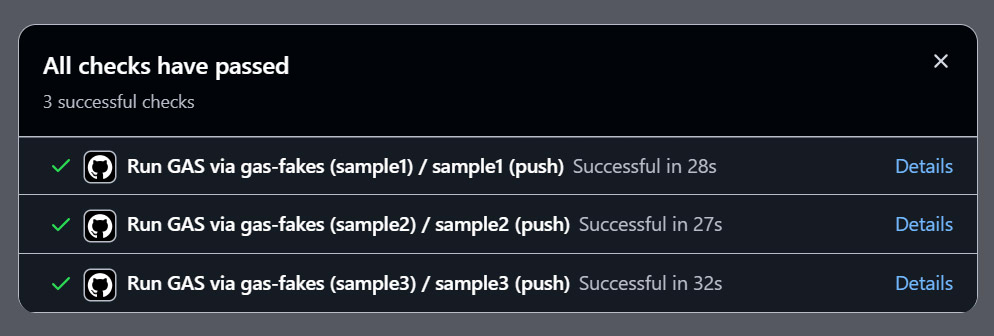
Executing the sample2 workflow processes the event payload and successfully appends a structured log directly into our Google Spreadsheet, functioning perfectly as an automated audit trail.
Executing the sample3 workflow correctly calculates the Git diff and uploads it to the designated Google Drive folder as a standard .patch file. Below is an example of the resulting text file contents generated in Google Drive:
diff --git a/README.md b/README.md
index d63c7d8..19f6f9d 100644
--- a/README.md
+++ b/README.md
@@ -246,3 +246,4 @@ jobs:

sample
sample
+   sample text
These results clearly demonstrate that Google Workspace services can be seamlessly managed and extended utilizing Google Apps Script and gas-fakes within a GitHub Actions CI/CD environment.
Exploring Further Applications
The integration of Google Apps Script and GitHub Actions via gas-fakes is not limited to logging and file syncing. This foundation unlocks numerous advanced automation possibilities for enterprise environments:
Automated Unit Testing
Traditionally, testing Google Apps Script code is a manual and tedious process. By utilizing gas-fakes, you can integrate standard JavaScript testing frameworks like Jest or Mocha. GitHub Actions can automatically run these test suites against your GAS functions on every pull request, ensuring robust code quality and preventing regressions before deployment.
Dynamic Document Generation
You can trigger Google Workspace document creation based on repository events. For instance, when a new GitHub Release is published, a workflow can use Google Docs or Google Slides services via gas-fakes to automatically compile release notes, insert relevant code snippets, and generate presentation slides for stakeholders.
Workspace Infrastructure as Code (IaC) By storing organizational configurations—such as user directory structures, group memberships, or shared drive permissions—as YAML or JSON files in your repository, you can manage Google Workspace like infrastructure. Upon merging changes to the main branch, a workflow can execute a Google Apps Script that interfaces with the Admin Directory API to automatically synchronize the real-world Workspace environment with your repository's state.
Discussion: Evaluating the CI/CD Architecture
Integrating gas-fakes into your deployment pipeline shifts the paradigm of Google Workspace development. However, to maximize its potential, developers must weigh several technical considerations.
gas-fakes vs. Traditional clasp Workflows
Traditionally, developers rely on Google's clasp tool to synchronize local code with the Apps Script server. While effective for deployment, clasp cannot natively execute code locally. Testing requires pushing to Google’s servers and executing manually or via triggers. In contrast, gas-fakes provides a robust Node.js emulation layer. This enables instant execution, seamless integration with standard testing frameworks, and automated triggers directly from GitHub Actions without maintaining intermediate Web Apps.
The Strategic Importance of CI/CD in Workspace Development Implementing CI/CD for Google Workspace is a major leap in enterprise security and maintainability. By shifting execution into GitHub Actions, sensitive credentials are removed from hardcoded scripts and securely managed via GitHub Secrets. Furthermore, every automation execution is firmly tied to a specific Git commit and workflow run, ensuring an immutable, highly auditable trail of operations that is essential for modern development standards.
Note
In this article, we focused on using Application Default Credentials (ADC) for gas-fakes authorization because of its straightforward setup for individual developers.
For more advanced or enterprise-scale implementations, consider the following alternatives and best practices:
- Domain-Wide Delegation (DWD):
For organizational workflows,
gas-fakessupports Service Accounts with Domain-Wide Delegation. This allows automation to perform actions on behalf of specific users (impersonation) within a Google Workspace domain without relying on personal refresh tokens. You can find instructions on using this GitHub Action with a service account in Bruce's repository. - Workflow Optimization:
When using
actions/setup-nodewithcache: "npm", ensure yourpackage-lock.jsonis committed to the repository root. If your project structure is nested, specify thecache-dependency-pathto prevent "lock file not found" errors during CI/CD runs. - Security Best Practices:
While these samples use a temporary file (
/tmp/adc.json) for authentication, always ensure that sensitive credential files are never uploaded as artifacts or printed in workflow logs.
Summary
- Integrates Google Apps Script into modern GitHub CI/CD pipelines using the gas-fakes library.
- Enables local execution of GAS code without the need for constant Web App deployments.
- Securely manages authentication using Google Application Default Credentials (ADC) and GitHub Secrets.
- Demonstrates practical automation cases including automated logging and repository-to-Drive synchronization.
- Provides a foundation for advanced unit testing and Infrastructure as Code (IaC) within Google Workspace.
Comments
More Blog
View allgemmaFive Gemma-4 models, one accelerator: what porting E2B 31B to AWS Inferentia2 taught me
I ported the whole Gemma-4 family — E2B, E4B, 12B, 31B, and the 26B-A4B MoE — to run on...
X
xbillcommunityHey DEV, I'm Tobore. Let's actually connect.
Hey DEV, I'm Tobore. Let's actually connect. I've been on here for a while now, mostly writing and...
L
Laurina AyarahaiI burned through thousands of AI tokens. Then a friend did it for free
(yep, kinda clickbait, just for the funsies 😊) At the beginning of the year, I relaunched my...
P
Paulo HenriqueaiClaude might be saturating your machine
My laptop was sitting idle with the fan at full tilt. Nothing was running that I knew of. The culprit...
S
Sidhant PandagithubactionsAutomated GitHub Code Reviews Using Google Gemini
I Built a Thing! TL;DR — Google Gemini-based Pull Request reviews and Issue Triaging for...
D
Darren "Dazbo" LesteraiWhat is an "agentic harness," actually?
I've been hearing the word "harness" thrown around a lot lately. I assumed it just meant "the IDE" or...
T
Tilde A. ThuriumReady-made automations for this
Workflows from the Neura Market marketplace related to this DeepSeek resource
- Automate Employee Onboarding with Slack, Jira, and Google Workspace Integrationn8n · $24.99 · Related topic
- Automated AI-Powered Workflow Maintenance with Google Workspace Integrationn8n · $24.99 · Related topic
- "ideoGener8r - Complete Ideogram AI Image Generator UI with Google Integration"n8n · $24.99 · Related topic
- Complete Lyft API Integration for AI Agents with 16 Operations Using MCPn8n · $14.99 · Related topic