
Back to Blog a11y
a11y
 gemma
gemma community
 ai
ai ai
ai githubactions
 ai
ai
Embedding Accessibility into AI based software development
Michael Fairchild March 12, 2026
0 views
At CSUN-AT 2026, I spoke with my colleague Mallika Meiyappan on Embedding Accessibility into AI based...
title: Embedding Accessibility into AI based software development published: true description: tags: a11y, llm, AI, benchmark
cover_image: https://dev-to-uploads.s3.amazonaws.com/uploads/articles/zsutenp61jz6w71xadii.jpeg
Use a ratio of 100:42 for best results.
published_at: 2026-03-12 14:43 +0000
At CSUN-AT 2026, I spoke with my colleague Mallika Meiyappan on Embedding Accessibility into AI based software development. Here are some key take aways.
AI is causing rapid transformation across the entire development lifecycle. It's embedded in design tools, developer workflows, content creation, and user experiences. This speed and scale increase both productivity and risk of scaling accessibility issues.
Unless accessibility is intentionally built into AI powered workflows, we risk scaling accessibility barriers as fast as we scale productivity.
TL;DR
- AI is scaling development speed—and accessibility problems if accessibility isn’t intentionally built into AI workflows.
- LLMs generate poorly accessible code by default, largely because they’re trained on web code where most sites already have accessibility issues.
- Explicit accessibility instructions dramatically improve results, with structured guidance pushing some models from near-zero to over 90% pass rates.
- Teams should embed accessibility into AI tooling and pipelines, using custom instructions, CI/CD checks, and continued manual testing.
LLMs don't do a great job of generating accessible code
At Microsoft, I built an evaluation tool to benchmark how well LLMS produce accessible code. That tool is available at github.com/microsoft/a11y-llm-eval. The tool contains a test suite of prompts to generate pages and common components, then evaluates the resulting code against the axe-core automated scanner via playwright. Axe-core is great, but it's a generic testing tool and can't test keyboard behaviors or know to expect certain semantics or other behaviors. Because of this, each prompt has an additional suite of custom tests that go beyond what axe-core can test.
That being said, it's important to note that these tests do not fully evaluate WCAG or guarantee fully accessible results. Manual testing is still essential.
The prompts do not contain anything about accessibility. This is done to establish a baseline/control for how well the LLMs produce accessible code by default, without explicit prompts for accessible code.
The results paint a pretty bleak picture. View the most recent report.
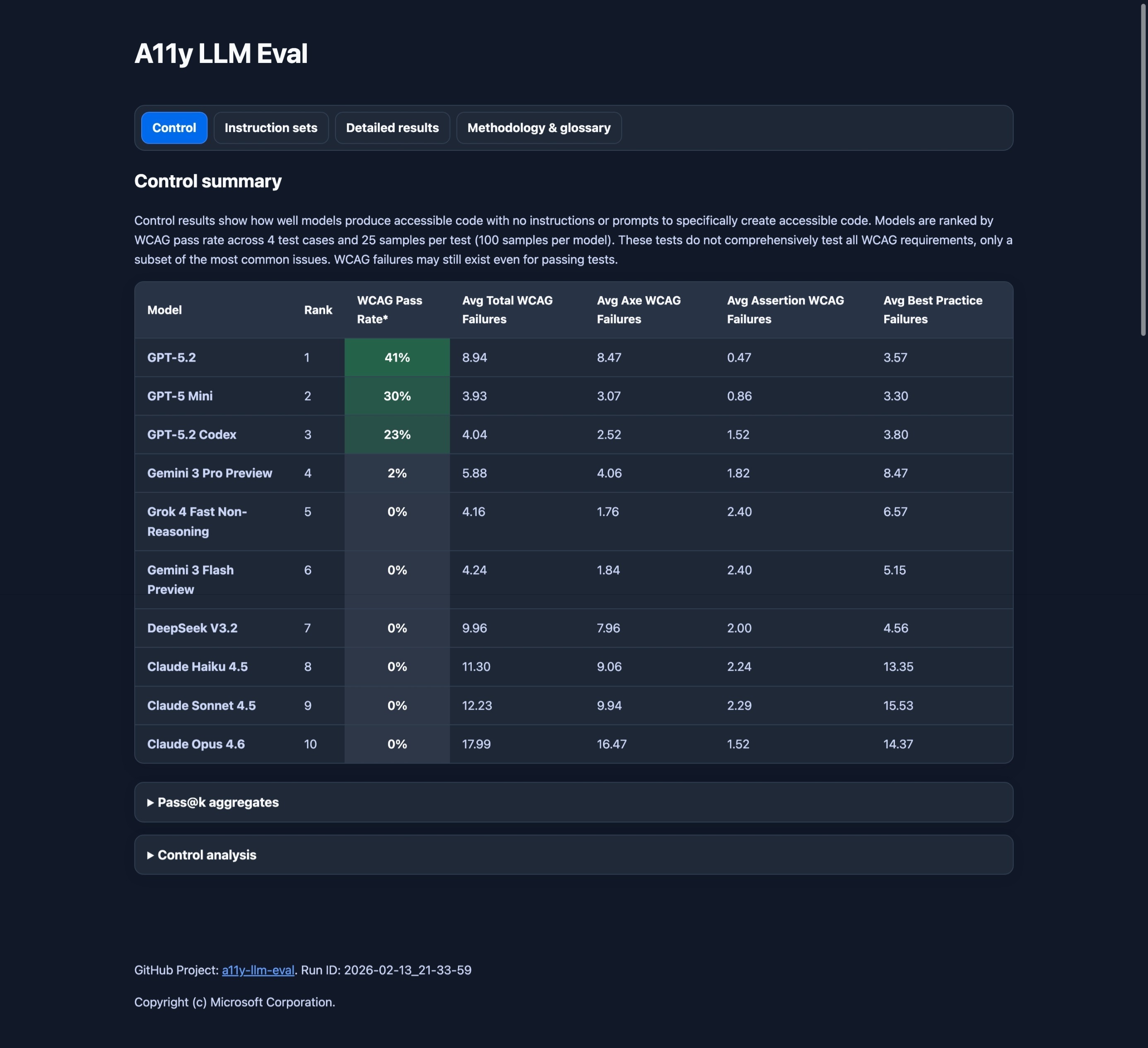
- GPT 5.2 takes the lead with 41% passing.
- The top 3 models are all GPT models.
- The rest of the models score zero or near zero, including Gemini 3 pro, Grok 4 Fast Non-Reasoning, Gemini 3 Flash Preview, DeepSeek V3.2, Claude Haiku 4.5, Claude Sonnet 4.5, and Claude Opus 4.6.
- This results in an average score of about 10% across all models.
Why are results so bad?
It's difficult to know for sure, but what we do know is that about 95% of websites have accessibility issues. So it's safe to assume that these models are being trained on code that is inaccessible, and thus producing results that are inaccessible.
So why is GPT so much better? I'm not sure, but my guess is that they are training on a higher quality data set that has more accessible code than what you would find generally in the wild.
What can devs do to improve results?
This is where custom instructions for accessibility come into play. Custom instructions are files (usually .md files) that enable you to define common guidelines and rules that automatically influence how AI generates code. Visual Studio Code has some great documentation on this. If set up correctly, the agent will automatically use these instructions for all prompts.
As part of the LLM-Eval project, I've benchmarked 3 different custom instruction files for accessibility.
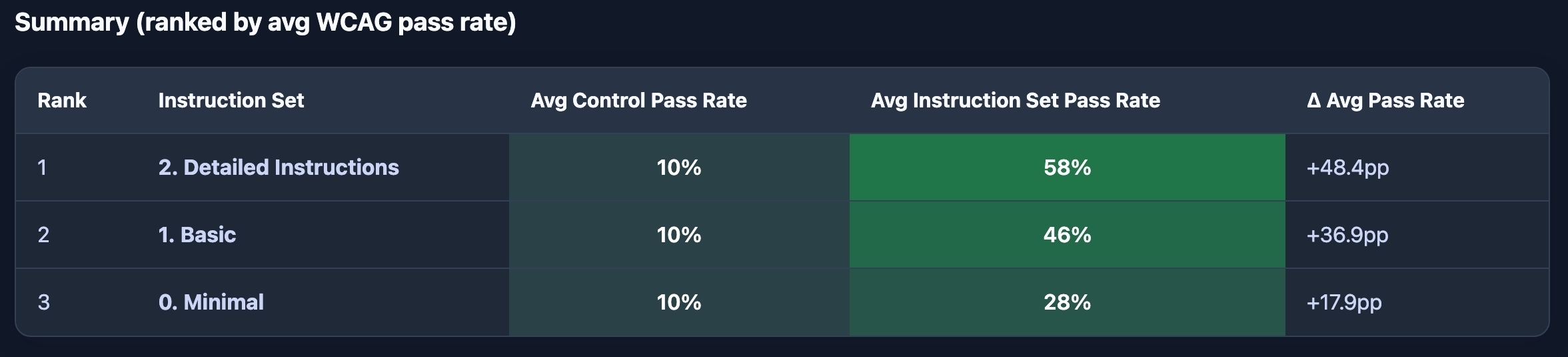
- Minimal: just says "All output MUST be accessible." This alone, resulted in a 18 percentage point jump.
- Basic: says "All output MUST be accessible. Use semantic HTML first; only use ARIA when necessary, and ensure full keyboard support. Conform to WCAG 2.2 Level AA." This resulted in a 37 percentage point jump.
- Detailed: is full-on expert level guidance. This resulted in a 48 percentage point jump.
So just mentioning the word "accessibility" has a huge impact in results.
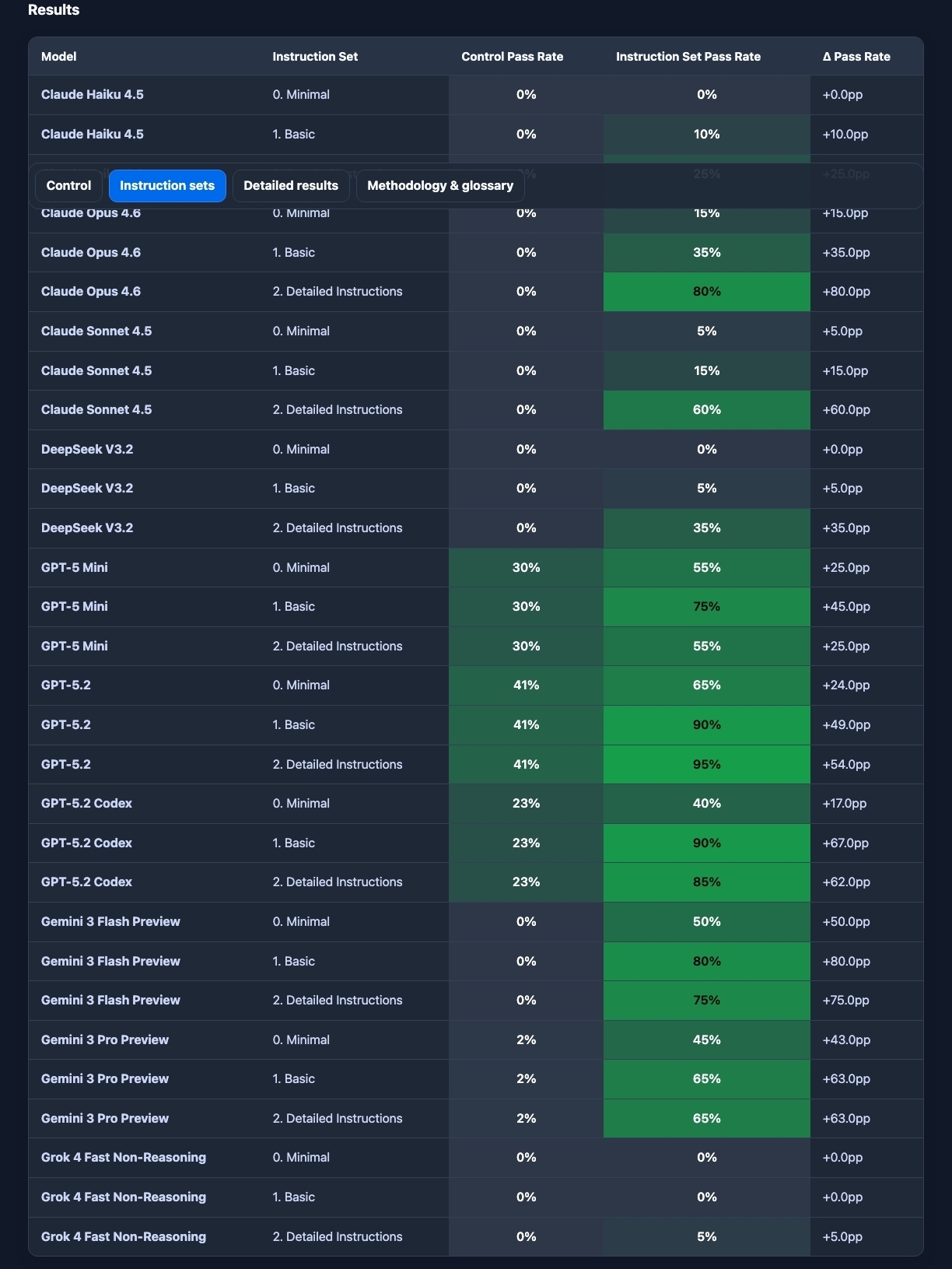
But if you look closer, with the detailed instructions set:
- Some models, like GPT scored over 90%.
- Other models only saw marginal improvements.
- Still other models, kept scoring zero (looking at you Grok).
So what instructions should I use?
I've published the detailed instructions at the Awesome Copilot project. This is a great place to start.
But these instructions are still generic. It's best to customize your instructions to fit your specific project. GitHub has great guidance on this. Here are some tips:
- Define team and project specific workflows, tools, standards, design systems, and component libraries.
- Use precise language, like MUST, MUST NOT, SHOULD, and SHOULD NOT.
- Use lists to format your instructions when possible. LLMs love structure.
- Ask an agent to optimize your instructions. This can be very helpful.
- DO NOT paste entire standards or guidelines like WCAG or ARIA in your instructions. This will often result in worse code.
- DO NOT put critical resources behind links - agents will not follow these links.
What about other aspects of software development?
AI is having a huge impact on all aspects of software development. Here are some insights and opportunities:
Research
Change: AI is being leveraged to speed up product and UX research. "Synthetic users" are AI bots that pretend to be users and give feedback and insights on ideas and designs. Additionally, AI is analyzing more data than ever and identifying trends that result in new features or changes.
Opportunity: "Synthetic users" can be used to help provide quick feedback on accessibility too, but they cannot replace lived experiences and insights from people with disabilities. It may also be possible to leverage AI to help detect accessibility issues from customer feedback and data insights - but we need to be careful and mindful of privacy.
Design
Change: Designers are being asked to use AI now more then ever. AI is being used for rapid prototyping, and some designers are moving away from static designs to vibe coded prototypes. Speed is a huge pressure, and it's common for designers and developers to work in parallel, rather than a classic hand off from design to engineering. We are even seeing a desire for designers to contribute directly to production code, but this has yet to become a reality.
Opportunity: AI can be leveraged to help designers annotate for accessibility quickly and accurately, as well as review their designs and annotations. Additionally, designers can leverage custom instructions for accessibility to improve their vibe coded prototypes.
Testing
Change: Development is happening a much larger scale than ever before, and testing is struggling to keep up.
Opportunity: Leverage AI to facilitate and assist in testing. Clear policy and quality gates are now more important than ever and need to be consistently enforced. Ensuring that accessibility is baked into the CI/CD pipeline and blocks pull requests is essential. Manual testing by humans remains essential.
Comments
More Blog
View allgemmaFive Gemma-4 models, one accelerator: what porting E2B 31B to AWS Inferentia2 taught me
I ported the whole Gemma-4 family — E2B, E4B, 12B, 31B, and the 26B-A4B MoE — to run on...
X
xbillcommunityHey DEV, I'm Tobore. Let's actually connect.
Hey DEV, I'm Tobore. Let's actually connect. I've been on here for a while now, mostly writing and...
L
Laurina AyarahaiI burned through thousands of AI tokens. Then a friend did it for free
(yep, kinda clickbait, just for the funsies 😊) At the beginning of the year, I relaunched my...
P
Paulo HenriqueaiClaude might be saturating your machine
My laptop was sitting idle with the fan at full tilt. Nothing was running that I knew of. The culprit...
S
Sidhant PandagithubactionsAutomated GitHub Code Reviews Using Google Gemini
I Built a Thing! TL;DR — Google Gemini-based Pull Request reviews and Issue Triaging for...
D
Darren "Dazbo" LesteraiWhat is an "agentic harness," actually?
I've been hearing the word "harness" thrown around a lot lately. I assumed it just meant "the IDE" or...
T
Tilde A. ThuriumReady-made automations for this
Workflows from the Neura Market marketplace related to this DeepSeek resource
- Generate a Legal Website Accessibility Statement with AI and WAVEn8n · $9.99 · Related topic
- Automate Document Embedding and Q&A with Voyage-Context-3 and MongoDB Atlasn8n · $24.99 · Related topic
- Automate Product Development with AI-Driven CPO and Specialized Agentsn8n · $14.99 · Related topic
- Transform Gmail Emails into Vector Embeddings with PGVector and Ollaman8n · $14.99 · Related topic