
Back to Blog javascript
 gemma
gemma community
 ai
ai ai
ai githubactions
 ai
ai
Mastering JavaScript Array Methods: A Beginner's Guide
Ritam Saha March 3, 2026
0 views
Introduction Hello, my fellow readers! If you're just starting out with JavaScript array...
Introduction
Hello, my fellow readers! If you're just starting out with JavaScript array or brushing up on your skills, let me telll you that arrays are like the backbone of data handling in programming.
Think of an array as a busy Indian street market, where vendors line up in a row selling everything from vegetables, fishes, spices to sweets. Each vendor (element) has a spot (index), and you can add, remove, or transform what's on offer.
In my previous blog, I have already discussed about the basics of Array in JavaScript. In this blog, we'll dive into some essential array methods: push() and pop(), shift() and unshift(), forEach(), map(), reduce() & filter().
I'll explain each with easy examples and analogies, show how the array changes before and after, and even compare some to traditional for loops. By the end, you'll have a hands-on assignment to try out. Let's get started—grab your console and experiment as we go!
push() and pop(): Adding and Removing from the End
Imagine you're at a family wedding in India, and guests are queuing up for the buffet. push() is like adding a new guest to the end of the line, while pop() is like serving the last person and removing them from the end of queue to reduce the load. These methods are perfect for managing the tail end of an array quickly.
push() can add one or more than one elements at once, but pop() always delete the last element from the array and returns that deleted element.
Example:
Let's say we have an array of Indian sweets:
Before: let sweets = ['jalebi', 'gulab jamun', 'rasgulla'];
Using push() to add 'peda':
sweets.push('peda');
After: ['jalebi', 'gulab jamun', 'rasgulla', 'peda']
Now, pop() to remove the last one:
console.log(sweets.pop()); // 'peda'
After: ['jalebi', 'gulab jamun', 'rasgulla']
Try this in your browser console or you can do it in your IDE also. It's that simple!
shift() and unshift(): Managing the Front
Shifting gears to the front of the array, think of shift() and unshift() as handling the VIP line at a Bollywood movie premiere.
unshift() adds someone to the front (like a celebrity cutting in), and shift() removes the first person (serving them first).
By unshift() we can add one or more than one elements at the beginning but shift() always delete the first element from the beginning of the array and returns that deleted element.
Example:
Starting with our sweets array:
Before: let sweets = ['jalebi', 'gulab jamun', 'rasgulla'];
unshift() to add 'barfi' at the beginning:
sweets.unshift('barfi');
After: ['barfi', 'jalebi', 'gulab jamun', 'rasgulla']
shift() to remove the first:
sweets.shift();
After: ['jalebi', 'gulab jamun', 'rasgulla']
Test it in the browser console or in your IDE and watch the changes!
These can be slower for large arrays since everything shifts, like reorganizing a crowded Indian train compartment.
forEach(): Looping Without Returning
forEach() is like announcing names at a school assembly—it goes through each element and does something (like logging), but doesn't mutate the actual array and doesn't return anything. It's similar to a for loop but more array-focused.
forEach() takes a callback function as the parameter and that callback function itself takes three parameters: the current element, the index of the current element and the array itself.
Example:
Before: let fruits = ['mango', 'banana', 'guava'];
fruits.forEach(fruit => console.log(fruit + ' is tasty!'));
After: No change to fruits array, but console outputs:
mango is tasty!
banana is tasty!
guava is tasty!
It's handy for side effects like updating DOM or logging. Pop this into your console and see the logs appear!
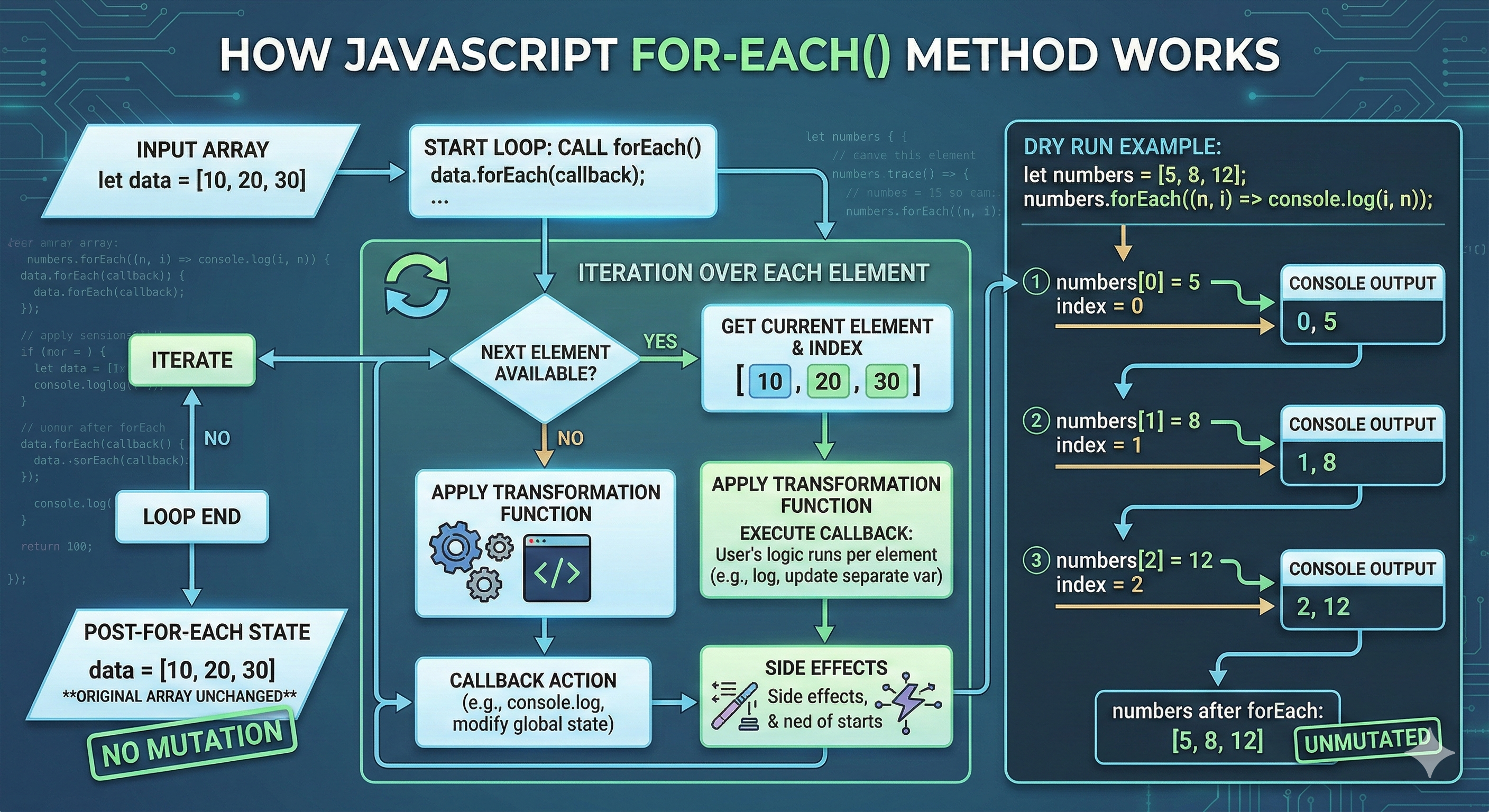
REMEMBER: There is no way to stop or
breaka forEach() loop other than by throwing an exception. If you need such behavior, the forEach() method is the wrong tool. forEach() expects asynchronous function— it does not wait for promises.
map(): Transforming Every Element
map() is like a Diwali makeover for your array—it goes through each item and creates a new array with transformed versions, without changing the original. Picture a group of friends preparing for Holi: map() could "color" each one by doubling their excitement level.
map() takes a callback function as the parameter and that callback function itself takes three parameters: the current element, the index of the current element and the array itself.
Example:
Before: let prices = [10, 20, 30]; (prices of street food items in rupees)
let doubled = prices.map(price => price * 2);
After (new array): [20, 40, 60]
Original remains: [10, 20, 30]
Comparison: Traditional For Loop vs map() A for loop is like manually counting votes in an Indian election—reliable but tedious:
let doubled = [];
for (let i = 0; i < prices.length; i++) {
  doubled.push(prices[i] * 2);
}
map() is cleaner and more modern, like using electronic voting machines—it does the job in one go without mutating the original. Use map() when you want a new array without side effects. Fire up your console and compare both!
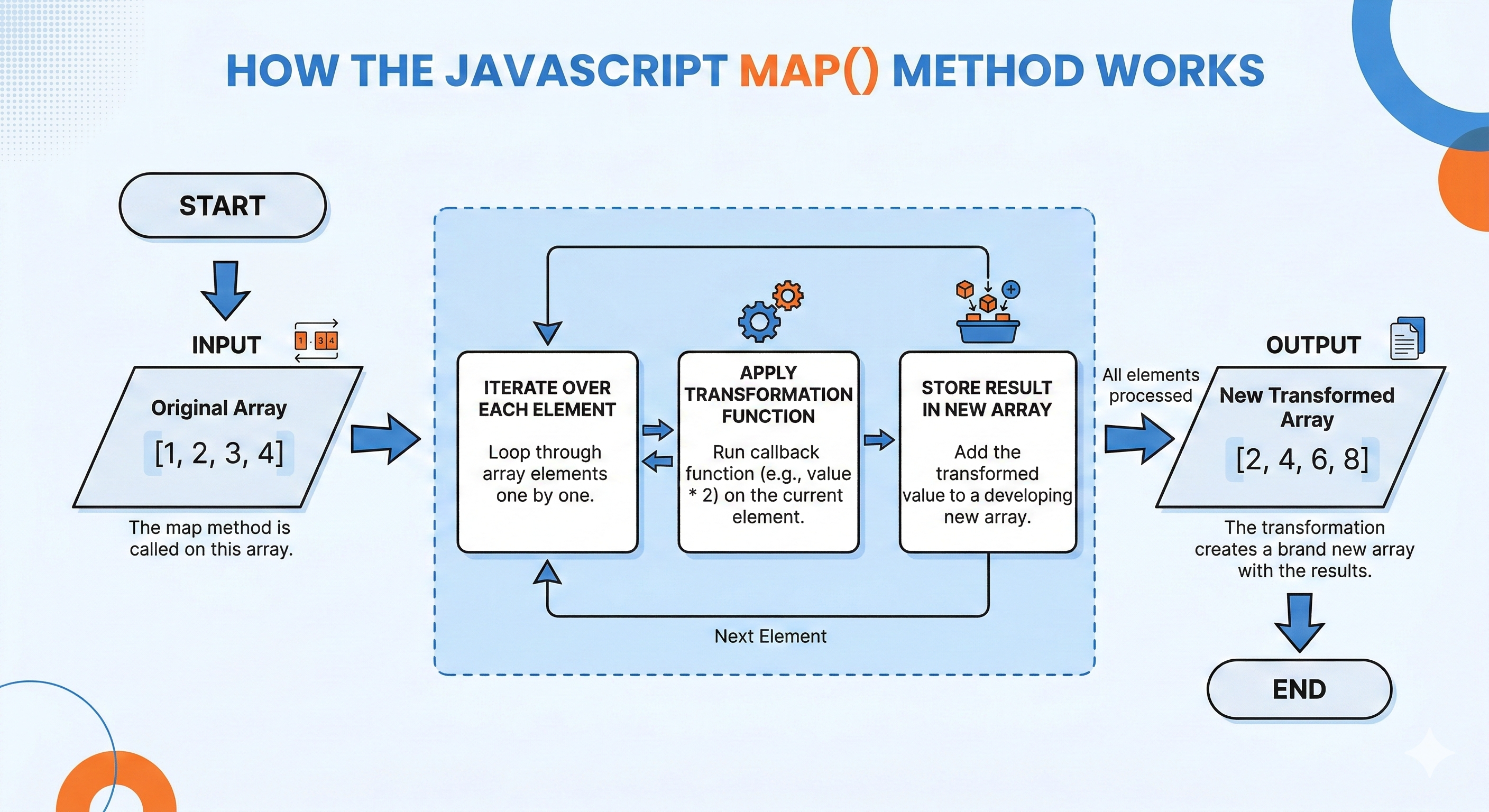
REMEMBER: map() doesn't work as expected in the sparse array. A sparse array remains sparse after map(). The indices of empty slots are still empty in the returned array, as it skips the empty slots.
reduce(): Accumulating Values Simply
reduce() might sound intimidating at the beginning, but think of it as tallying up scores in a cricket match—starting with the base score which is initially zero, it adds (or "reduces") each player's runs into a total. We'll keep it basic: It returns a single value that results from running the "reducer" callback function to completion over the entire array.
reduce() takes a callback function and the accumulator's initial value as the parameter and that callback function itself takes four parameters: the accumulator, the current element, the index of the current element and the array itself.
Example:
Before: let runs = [50, 30, 20]; (runs by batsmen)
let total = runs.reduce((acc, run) => acc + run, 0);
After: 100 (a single value, not an array)
It's beginner-friendly because you just define how to combine items. No need for complex stuff yet—just sum or concatenate!
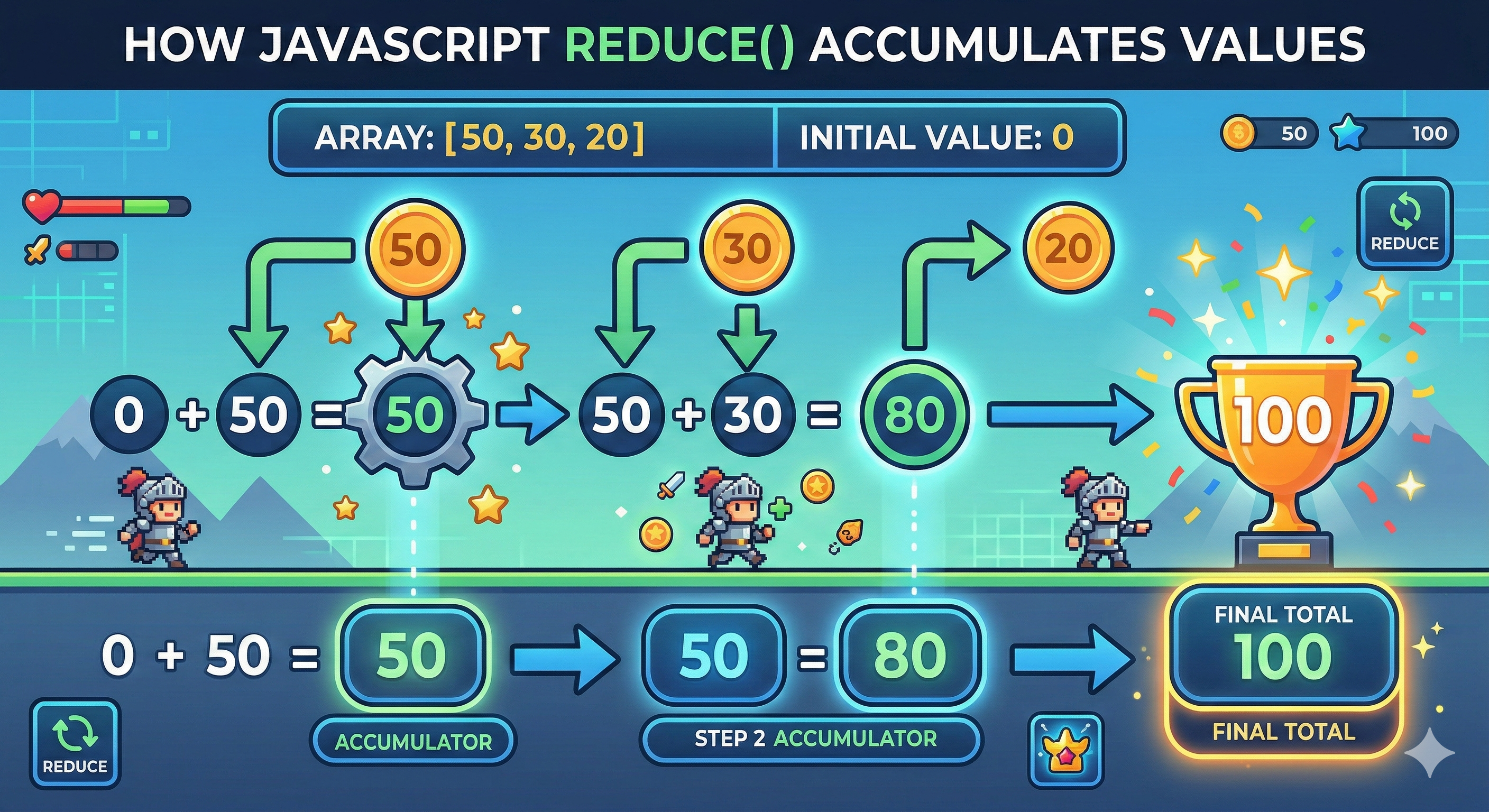
NOTE: it doesn't mean that the value of accumulator will be zero all the time; It will be determined as per needed.
filter(): Selecting What Matters
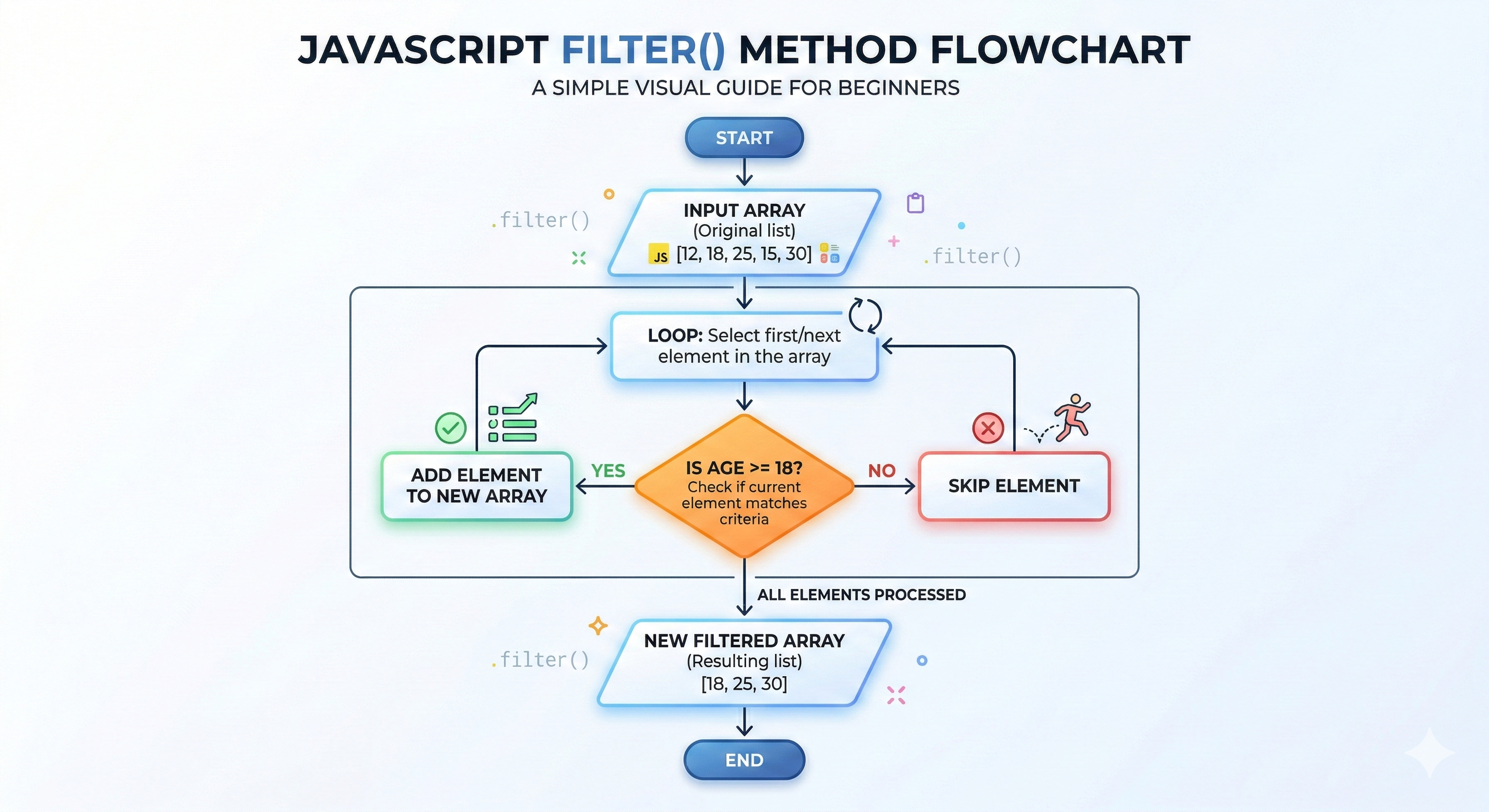
filter() is your array's gatekeeper, like a bouncer at a wedding pandal letting in only invited guests. It creates a shallow copy of the given array containing just the elements that pass the test. If no elements pass the test, an empty array is returned.
It also takes callback function as the parameter and that callback function itself takes 3 parameters: the current element, the index of the current element and the array itself.
Example:
Before: let ages = [15, 22, 18, 30]; (ages at a family gathering)
let adults = ages.filter(age => age >= 18);
After (new array): [22, 18, 30]
Original: [15, 22, 18, 30]
Comparison: Traditional for Loop vs filter()
for loop version is like checking each invitation manually:
let adults = [];
for (let i = 0; i < ages.length; i++) {
  if (ages[i] >= 18) {
    adults.push(ages[i]);
  }
}
filter() streamlines it, focusing on the condition without extra code. It's great for clean, readable filtering. Try both in the console to feel the difference!
Hands-On Assignment: Put It All Together
Ready to practice? Create an array of numbers, say let numbers = [5, 8, 12, 15, 3];
- Use
map()to double each:
let doubled = numbers.map(num => num * 2); (Expected: [10, 16, 24, 30, 6])
- Use filter() to get numbers greater than 10:
let greaterThan10 = doubled.filter(num => num > 10); (Expected: [16, 24, 30])
Note: We're using the doubled array here, but avoid chaining for now—do it step by step.
- Use reduce() to sum them up:
let sum = greaterThan10.reduce((acc, num) => acc + num, 0); (Expected: 70)
Run this in your machine, tweak the array, and experiment. It's the best way to learn! Let me know if you have faced any problem.
Conclusion
We've covered the essentials of JavaScript array methods, from simple additions like push(),unshift() to transformers like map(), reduce() and filter().
Remember, these are tools to make your code cleaner and more efficient—much like how modern apps streamline daily life in India, from ordering food to booking trains. And there are are a lot more in-built functions around, but practice these first, these will help you to understand the others better.
Practice in the console, try the assignment, and soon you'll be wielding arrays like a pro. If you have questions, drop them below. Happy coding!
Comments
More Blog
View allgemmaFive Gemma-4 models, one accelerator: what porting E2B 31B to AWS Inferentia2 taught me
I ported the whole Gemma-4 family — E2B, E4B, 12B, 31B, and the 26B-A4B MoE — to run on...
X
xbillcommunityHey DEV, I'm Tobore. Let's actually connect.
Hey DEV, I'm Tobore. Let's actually connect. I've been on here for a while now, mostly writing and...
L
Laurina AyarahaiI burned through thousands of AI tokens. Then a friend did it for free
(yep, kinda clickbait, just for the funsies 😊) At the beginning of the year, I relaunched my...
P
Paulo HenriqueaiClaude might be saturating your machine
My laptop was sitting idle with the fan at full tilt. Nothing was running that I knew of. The culprit...
S
Sidhant PandagithubactionsAutomated GitHub Code Reviews Using Google Gemini
I Built a Thing! TL;DR — Google Gemini-based Pull Request reviews and Issue Triaging for...
D
Darren "Dazbo" LesteraiWhat is an "agentic harness," actually?
I've been hearing the word "harness" thrown around a lot lately. I assumed it just meant "the IDE" or...
T
Tilde A. ThuriumReady-made automations for this
Workflows from the Neura Market marketplace related to this DeepSeek resource
- Deduplicate Data Records Using JavaScript Array Methodsn8n · $9.99 · Related topic
- Beginner Data Analysis: Merge, Filter & Summarize in Google Sheets with GP-40n8n · $14.99 · Related topic
- Automate Employee Data Tracking & Reminders for HR with JavaScriptn8n · $14.99 · Related topic
- Beginner's Guide to Using SerpAPI for Lead Findingn8n · $14.99 · Related topic