
Back to Blog a11y
a11y
Why not just add
 gemma
gemma community
 ai
ai ai
ai githubactions
 ai
ai
Making Scrollable Code Blocks Accessible
Michaël Vanderheyden February 20, 2026
0 views
When you work on the web long enough, you get used to browsers disagreeing on the small things. But...
canonical_url: https://th3s4mur41.me/blog/scroll-focus-polyfill/
When you work on the web long enough, you get used to browsers disagreeing on the small things. But sometimes those “small things” quietly break accessibility in ways that aren’t obvious until you test with a keyboard.
This is exactly what happened with scrollable elements.
Most browsers like Chrome and Firefox automatically make scrollable regions keyboard‑focusable. That means if the content overflows, a keyboard user can tab into it and scroll through the content using the arrow keys. It’s intuitive, consistent, and aligns with WCAG’s requirement that scrollable regions must be keyboard accessible. Safari, however, doesn't follow this behavior. There's a long‑standing bug report in WebKit Backlog where scrollable elements (like long code blocks or tables) do not receive keyboard focus, as reported by Adrian Roselli, making them inaccessible to keyboard users.
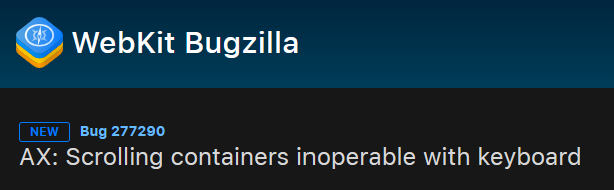
Safari doesn’t make scrollable elements focusable
In Safari, an element that becomes scrollable (e.g., long code snippets) does not receive focus by default. That means:
- You can see the scrollbar.
- You can scroll with a mouse or trackpad.
- But you cannot tab into it.
- And therefore you cannot scroll it using the keyboard.
This is a direct accessibility failure under WCAG 2.2’s Keyboard criterion, which states that all functionality must be operable through a keyboard interface — including scrolling inside overflow regions. For keyboard‑only users, this effectively traps content. They can see the beginning of the content, but not the rest. And because Chrome and Firefox “do the right thing,” most developers never notice the issue.
Why this matters more than it seems
Scrollable code blocks are everywhere:
- Documentation sites
- Developer blogs
- Design system pages
- API references
- Tutorials
- ...
Code blocks are usually implemented using <pre> elements. The <pre> element is one of the most common non-interactive elements that becomes scrollable by default because it's designed to preserve formatting and not wrap content.
If a code block is long enough to require scrolling, it becomes inaccessible to keyboard users in Safari.
If a user can’t scroll them, they can’t read them. And if they can’t read them, the content might as well not exist. This is one of those accessibility issues that isn’t flashy, but has a real impact on real people.
The Solution
There is a simple solution to the problem: make scrollable elements keyboard‑focusable by adding tabindex="0". This allows keyboard users to tab into the element and use arrow keys to scroll through the content.
However, this requires developers to manually add tabindex="0" to every scrollable <pre> element, which is not ideal. It’s easy to forget, and it adds extra maintenance.
Moreover, it’s not ideal to make every <pre> focusable, since not all of them will be scrollable.
The polyfill is only a temporary workaround until Safari implements the expected behavior. It’s not a permanent solution, but it helps bridge the gap in the meantime.
Automatically adding tabindex="0" when needed
To fix this gap, I created a small polyfill: scroll-focus-polyfill that is pretty easy to use by simply including it on your page.
<script src="https://unpkg.com/scroll-focus-polyfill"></script>
The idea is simple:
- Detect when a
<pre>element becomes scrollable. - Automatically add
tabindex="0"so it becomes keyboard-focusable. - Only apply this where the behavior is not already provided by the browser.
This keeps the behavior consistent across browsers without forcing developers to manually annotate every code block. It’s intentionally lightweight, unobtrusive, and standards‑aligned.
Why not just add tabindex="0" everywhere?
You could, but that introduces its own problems:
- Non‑scrollable
<pre>elements don’t need to be in the tab order. - Adding unnecessary focus targets creates noise for keyboard users.
- It also breaks expected semantics — not every
<pre>is interactive.
The polyfill only applies focusability where it's actually needed.
What about other scrollable elements?
While this polyfill focuses on <pre> elements by default for performance reasons, it can be configured to also apply the same logic to other elements like tables, divs with white-space: nowrap, or any other scrollable container.
For example, if you have a class scrollable that prevents an element from wrapping, you can easily extend the polyfill to handle any element with that class.
<script src="https://unpkg.com/scroll-focus-polyfill"
        data-selectors="pre, .scrollable"></script>
A subtle bug with real accessibility impact
This is a great example of how accessibility issues often hide in the details. Safari’s behavior isn’t “wrong” in a spec sense — but it’s inconsistent with user expectations and with other browsers’ accessibility affordances. And because developers don't always test keyboard navigation explicitly in Safari, the issue slips through unnoticed. The polyfill bridges that gap until Safari aligns with the behavior of other engines.
Conclusion
Making scrollable code blocks accessible is a small but important step towards a more inclusive web. By understanding the issue, implementing a simple polyfill, and advocating for better cross‑browser consistency, we can ensure that all users have equal access to content — regardless of their browser or input method. If you maintain a documentation site, developer blog, or any content with scrollable code blocks, consider implementing this polyfill to improve accessibility for your keyboard users. It’s a small change that can make a big difference.
Join the conversation on Bluesky or LinkedIn
Originally published at https://th3s4mur41.me.
Comments
More Blog
View allgemmaFive Gemma-4 models, one accelerator: what porting E2B 31B to AWS Inferentia2 taught me
I ported the whole Gemma-4 family — E2B, E4B, 12B, 31B, and the 26B-A4B MoE — to run on...
X
xbillcommunityHey DEV, I'm Tobore. Let's actually connect.
Hey DEV, I'm Tobore. Let's actually connect. I've been on here for a while now, mostly writing and...
L
Laurina AyarahaiI burned through thousands of AI tokens. Then a friend did it for free
(yep, kinda clickbait, just for the funsies 😊) At the beginning of the year, I relaunched my...
P
Paulo HenriqueaiClaude might be saturating your machine
My laptop was sitting idle with the fan at full tilt. Nothing was running that I knew of. The culprit...
S
Sidhant PandagithubactionsAutomated GitHub Code Reviews Using Google Gemini
I Built a Thing! TL;DR — Google Gemini-based Pull Request reviews and Issue Triaging for...
D
Darren "Dazbo" LesteraiWhat is an "agentic harness," actually?
I've been hearing the word "harness" thrown around a lot lately. I assumed it just meant "the IDE" or...
T
Tilde A. Thurium