
Back to Blog gemini
 gemma
gemma community
 ai
ai ai
ai githubactions
 ai
ai
Building Adaptive Learning Agents with A2UI, Gemini, and Google Apps Script
Tanaike February 7, 2026
0 views
Abstract This article demonstrates how to build an adaptive learning agent using...

Abstract
This article demonstrates how to build an adaptive learning agent using Agent-to-User Interface (A2UI), Gemini, and Google Apps Script. We explore a system that generates personalized quizzes, tracks performance in Google Sheets, and dynamically adjusts difficulty to maximize learning efficiency within the Google Workspace ecosystem.
Introduction
A2UI (Agent-to-User Interface) represents a paradigm shift in how users interact with generative AI. Originally open-sourced by Google and implemented in TypeScript and Python Ref, A2UI becomes even more powerful when integrated with Google Apps Script (GAS). This combination enables seamless access to the Google Workspace ecosystem, transforming static documents into intelligent, agentic applications.
To explore this potential, I have previously published several articles detailing the technical foundations:
- A2UI for Google Apps Script
- Bringing A2UI to Google Workspace with Gemini
- Beyond Chatbots: Building Task-Driven Agentic Interfaces in Google Workspace with A2UI and Gemini
Building upon the foundation laid in those publications, this article takes a step forward by introducing an educational support framework powered by A2UI and Google Apps Script. In this system, the AI does not simply answer questions; it acts as an active tutor.
For example, when a user provides a prompt such as I want to study Google Apps Script, Gemini generates specialized questions on the backend. A2UI then renders these as an interactive quiz on the frontend. Crucially, the system utilizes Google Sheets as a persistent memory store. By analyzing historical performance data, the agent generates increasingly challenging content for subsequent sessions, facilitating a personalized and effective learning progression.
The Adaptive Learning Engine
The core value of this application lies in its ability to improve learning efficiency through a "Feedback-Loop Architecture." Unlike static quiz apps, this agent utilizes Google Sheets as a persistent memory store to track cognitive growth.
Workflow and Architecture
- 1. Goal Definition: The user opens the sidebar and sets a learning target (e.g., "Master Google Apps Script").
- 2. Context Retrieval: The system scans the active Spreadsheet for past performance data. It identifies previously answered questions, success rates, and specific topic weaknesses (e.g., "Batch Operations").
- 3. Generative Logic (Gemini): Using the context, Gemini generates a structured JSON response containing new, targeted questions and the specific UI components (radio buttons, code blocks) required to render them.
- 4. Dynamic Rendering (A2UI): The frontend constructs the interface instantly. No hard-coded HTML is required.
- 5. Immediate Feedback & Persistence: As the user interacts, results are validated in real-time and immediately logged back to the Spreadsheet, refining the dataset for the next session.
The detailed workflow operates as follows:
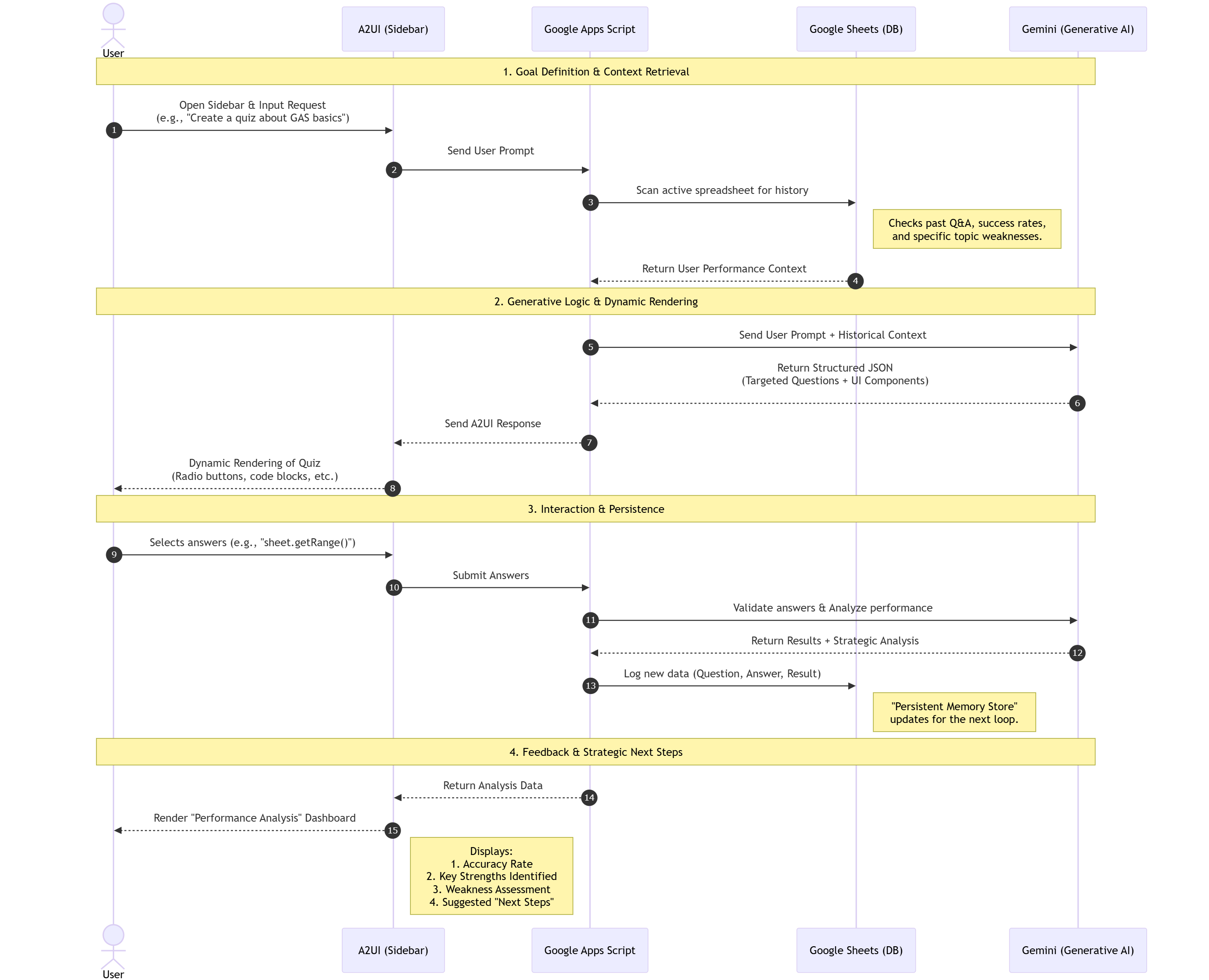
In the official sample script for A2UI (Restaurant finder), the client communicates with the server via A2A (Agent2Agent) protocols. However, in this article, we optimize the architecture for GAS. To reduce the overhead of HTTP requests associated with A2A communication, the client (HTML) communicates directly with the AI agent built on Google Apps Script using google.script.run.
Demonstration: The AI Tutor in Action
{% youtube NzEyI9KWsAk %}
The video demonstration highlights two distinct capabilities: Deep Learning Support and General Versatility. This demonstration utilizes a dialog within Google Sheets to highlight the integration with Google Apps Script. However, this application can easily be deployed as a standalone Web App. By deploying the project as a Web App, the doGet function captures the request, allowing the interface to function independently of the spreadsheet UI.
1. Maximizing Learning Efficiency
In the first segment, the user prompts: Create a quiz about Google Apps Script basics. Especially, I want to manage Google Sheets using Google Apps Script.
- Targeted Question Generation: The AI generates technical questions ranging from basic range selection (
sheet.getRange()) to advanced data handling (sheet.getValues()). - Active Recall: The system presents a challenge question on "Batch Operations" (
SpreadsheetApp.flush()) to test the user's depth of knowledge. - Comprehensive Performance Analysis: The standout feature appears. A2UI renders a "Performance Analysis" dashboard.
- Strengths Identified: It acknowledges mastery in "Range & Data Manipulation."
- Weakness Assessment: It confirms no current weaknesses were detected in this session.
- Strategic Next Steps: It suggests moving on to "Custom Menus" or "Simple Triggers," effectively guiding the user's curriculum path.
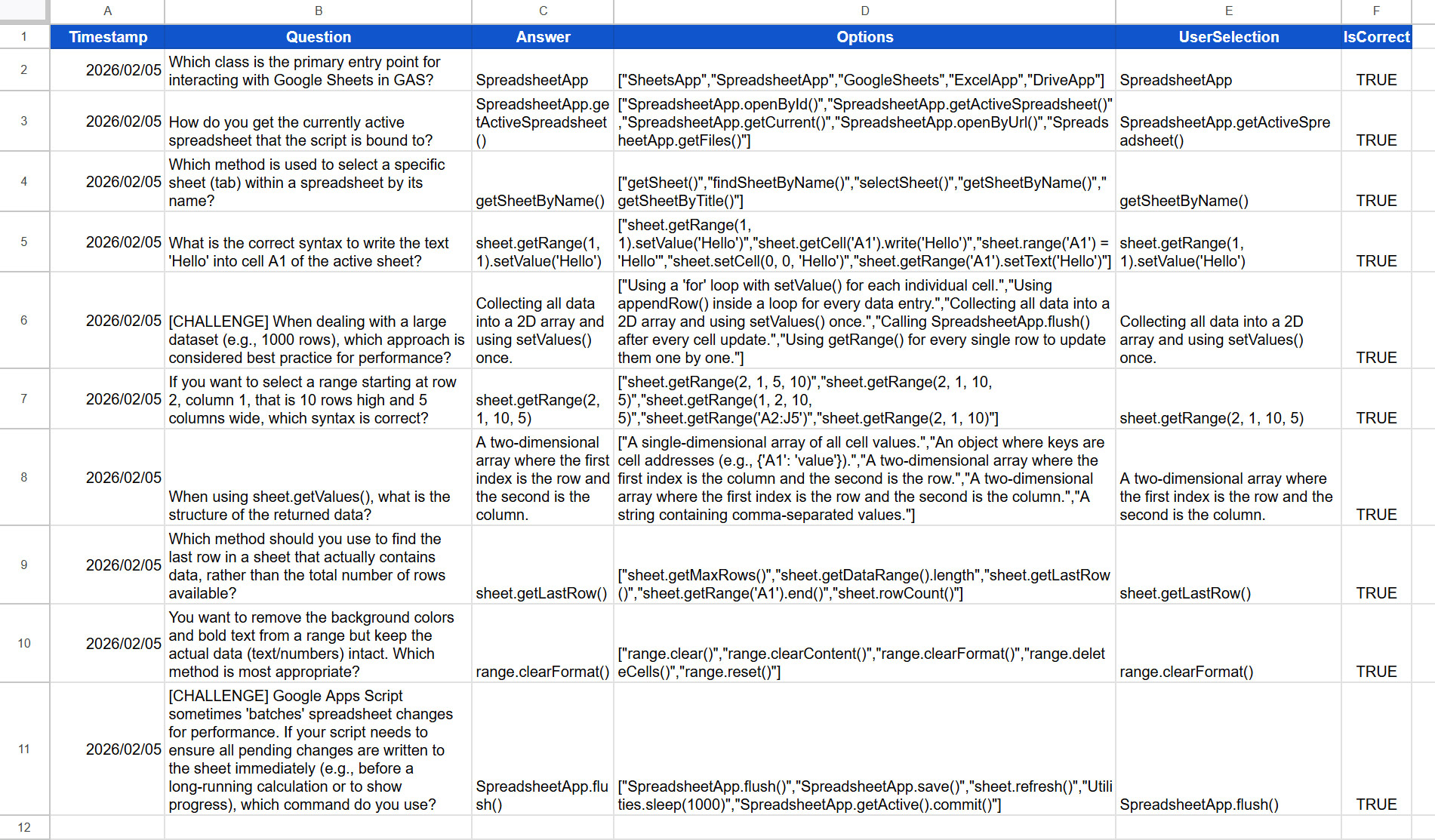
- Note: Upon completion of the initial quiz, using the same prompt triggers a new session where questions are generated based on the refined historical data.
The past data is stored in Google Sheets as follows.
2. Versatility Verification: Restaurant Finder
To prove the system's flexibility, we switch contexts entirely without changing code.
- Prompt:
Find 3 Chinese restaurants in New York. - Multimodal UI: The agent renders rich cards with images for "Han Dynasty" and "RedFarm."
- Complex Action Handling: The user clicks "Book Now," triggering a multi-field form (Party Size, Date, Dietary Requirements).
- Significance: This demonstrates that the A2UI protocol on GAS can handle complex transactional flows just as easily as educational logic.
Repository
The full source code and sample implementation are available here: https://github.com/tanaikech/A2UI-for-Google-Apps-Script/tree/master/samples/A2UI-Lerning-Agent
Application Setup Guide
To deploy this adaptive learning agent in your environment:
1. Obtain an API Key You must have a valid Gemini API Key. Get one here.
2. Copy the Sample Script Copy the pre-configured Spreadsheet containing the A2UI engine: https://docs.google.com/spreadsheets/d/1eckORqs3JtTIJZTB0I5VpqduZw9g3-mM764s4neG7Fo/copy
3. Configure the Script
Open the script editor (Extensions > Apps Script), open main.gs, and paste your API key into the apiKey variable. Finally, save the script and reload the Spreadsheet.
Important Note
This project serves as a foundational methodology for building Agentic UIs. When implementing this in a production environment, ensure the scripts are modified to meet your specific security requirements and workflow constraints.
Users can also study multiple subjects concurrently. When switching topics, Gemini generates new questions by analyzing the historical data trends specific to that context, allowing for simultaneous progress across different fields.
Summary
- Adaptive Learning Loop: The system leverages Google Sheets to store user history, allowing Gemini to tailor future questions based on identified strengths and weaknesses.
- Dynamic UI Generation: A2UI eliminates the need for static HTML templates, allowing the AI to generate quizzes, charts, and booking forms on-the-fly based on context.
- Detailed Performance Analytics: The agent provides qualitative feedback, not just scores, offering specific "Next Steps" to guide the user's learning path efficiently.
- Cross-Domain Versatility: The demonstration proves the architecture is agnostic; it handles educational code quizzes and restaurant booking transactions with equal fluency.
- Seamless Workspace Integration: By combining GAS and Gemini, we transform standard Google Sheets into intelligent, persistent databases that drive agentic behavior.
Comments
More Blog
View allgemmaFive Gemma-4 models, one accelerator: what porting E2B 31B to AWS Inferentia2 taught me
I ported the whole Gemma-4 family — E2B, E4B, 12B, 31B, and the 26B-A4B MoE — to run on...
X
xbillcommunityHey DEV, I'm Tobore. Let's actually connect.
Hey DEV, I'm Tobore. Let's actually connect. I've been on here for a while now, mostly writing and...
L
Laurina AyarahaiI burned through thousands of AI tokens. Then a friend did it for free
(yep, kinda clickbait, just for the funsies 😊) At the beginning of the year, I relaunched my...
P
Paulo HenriqueaiClaude might be saturating your machine
My laptop was sitting idle with the fan at full tilt. Nothing was running that I knew of. The culprit...
S
Sidhant PandagithubactionsAutomated GitHub Code Reviews Using Google Gemini
I Built a Thing! TL;DR — Google Gemini-based Pull Request reviews and Issue Triaging for...
D
Darren "Dazbo" LesteraiWhat is an "agentic harness," actually?
I've been hearing the word "harness" thrown around a lot lately. I assumed it just meant "the IDE" or...
T
Tilde A. ThuriumReady-made automations for this
Workflows from the Neura Market marketplace related to this DeepSeek resource
- Create an Adaptive AI Chat Agent with Google Gemini and Qdrantn8n · $24.99 · Related topic
- Adaptive RAG Strategy with Query Classification & Retrieval (Gemini & Qdrant)n8n · $24.99 · Related topic
- Generate Language Learning Flashcards with GPT-4, Telegram, and Google Sheets for Ankin8n · $9.99 · Related topic
- Generate Personalized Language Learning News Digests with LLaMA-3.1 & DeepSeek AIn8n · $9.99 · Related topic