
Back to Blog cursor
 cursor
 ai
ai amazonbedrock
 ai
ai ai
ai mcp
mcp
Prompt Improvement — One brain for all my AI tools
yann ortodoro July 8, 2026
0 views
I stopped sending lazy prompts to my coding agent — and the fix grew into a self-hosted layer that...
I stopped sending lazy prompts to my coding agent — and the fix grew into a self-hosted layer that routes, remembers, and meters everything. The goad was to be more efficient on the requests I provided to the AI (Cursor mainly) with less efforts.
If you read my post about running Qwen locally inside Cursor, this is the next chapter of the same obsession: getting more from AI tools, with more control and more efficient way.
Here is a prompt I actually sent to my coding agent:
do a deep deepdive anaylsis of the project as IT architect and product owner and prepare a backlog.
One sentence, two typos, three jobs — and the agent would confidently guess everything I didn’t say. So I built a layer that rewrites every message into a proper task specification before any model sees it. What the agent received (trimmed):
# Improved task specification

## Goal
As both IT Architect and Product Owner, perform a deep-dive analysis of the
current project and produce a prioritized backlog ready for sprint planning.

## Deliverables
1. Project Analysis Report — architecture, risks, technical debt, gaps
2. Product Backlog — items with ID, type, acceptance criteria, priority,
   complexity, dependencies
3. Epic Roadmap — phased: MVP → enhancements → scale
4. One ADR per major architectural decision or risk
5. BACKLOG.md and ARCHITECTURE.md committed to the repo root

## Constraints
- Technical debt appears as first-class backlog entries — never hidden
- Priority set from a dual lens: business value AND architectural risk

## Definition of done
- [ ] All layers covered: frontend, backend, data, infra, security
- [ ] Every identified risk maps to a backlog item
- [ ] Sign-off from both Architect and Product Owner perspectives
One sentence in; a work plan out. Deliverables the agent can be held to, constraints I would never think to type, and a definition of done that makes the output checkable — with my original words preserved at the bottom, nothing hidden. A cheap or local model can does the rewrite for fractions of a cent.
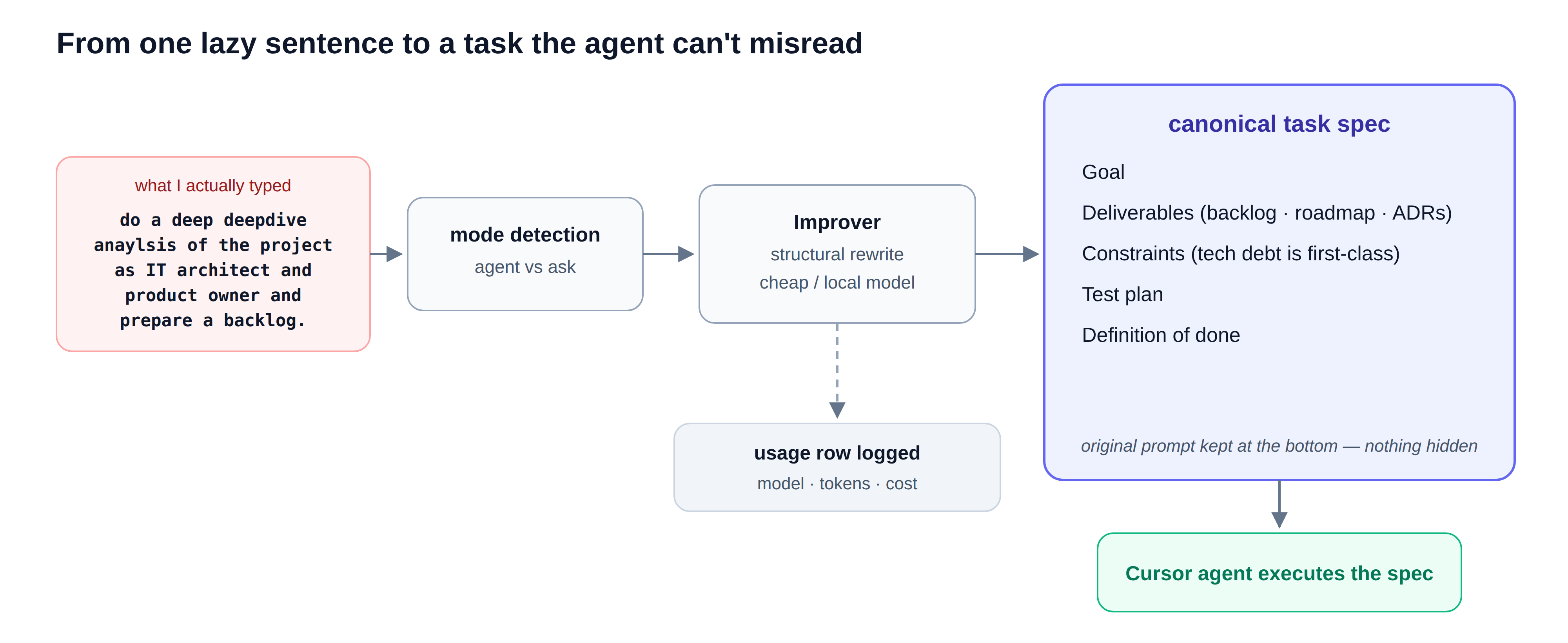 The auto-improve pipeline: from one lazy sentence to a canonical task specification. (Claude AI generated)
One fix became a layer
Once every prompt passed through one place, the rest followed naturally.
Routing. Each task type — code, search, reasoning — has an ordered list of models ranked by quality. The router takes the best available one; cost only breaks ties between models that are effectively interchangeable; and everything falls back to a local Ollama model, free and always on. Cost breaks ties — it never downgrades.
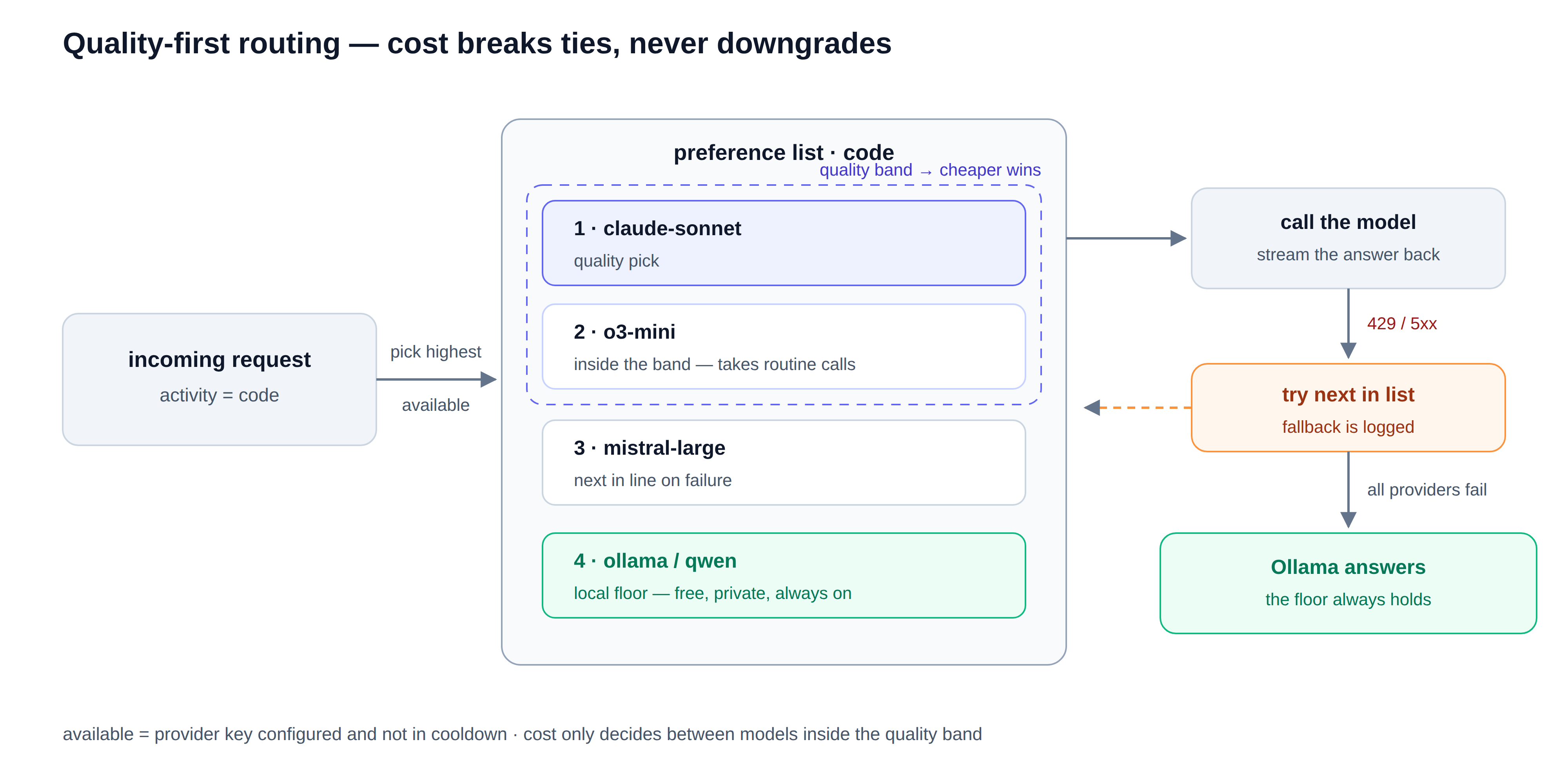 Quality-first routing: cost breaks ties, never downgrades (Claude AI generated)
Templates and memory. Prompts worth keeping become versioned templates with parameters, available in every project on every machine (if centralized on a server ) — and a built-in importer seeds the library from public prompt collections, so it’s useful before you’ve saved a single prompt of your own. Facts I explicitly ask it to remember persist with a scope, private or shareable.
Accounting. Every call writes a row — model, tokens, cost, latency — so “what did AI cost me this week?” finally has a number for an answer.
Two doors into everything. As an MCP server, the tools appear natively inside Cursor, Claude, or any client that speaks the protocol — no UI to build, because the host app is the interface. As an OpenAI-compatible endpoint, it exposes virtual models like route-code, so pointing an editor's model setting at it sends real traffic through my own routing.
How it’s built
One core engine, two thin faces: all the logic lives in one place, and the MCP server and HTTP gateway are adapters over it. The plumbing is deliberately boring and bought, not built :
- Python 3.12, LiteLLM as the one adapter for every provider (the multi-provider gateway is a commodity in 2026; originality belongs above it),
- SQLite in WAL mode as the single shared brain,
- Streamable HTTP with a bearer token that fails closed.
It runs on my home Linux dev server, firewalled to the LAN. Local-first is not an aesthetic: a layer that sees every prompt is only acceptable if you own it. And no — it cannot pool your flat subscriptions; those expose no API. It works on API keys plus a local model, full stop.
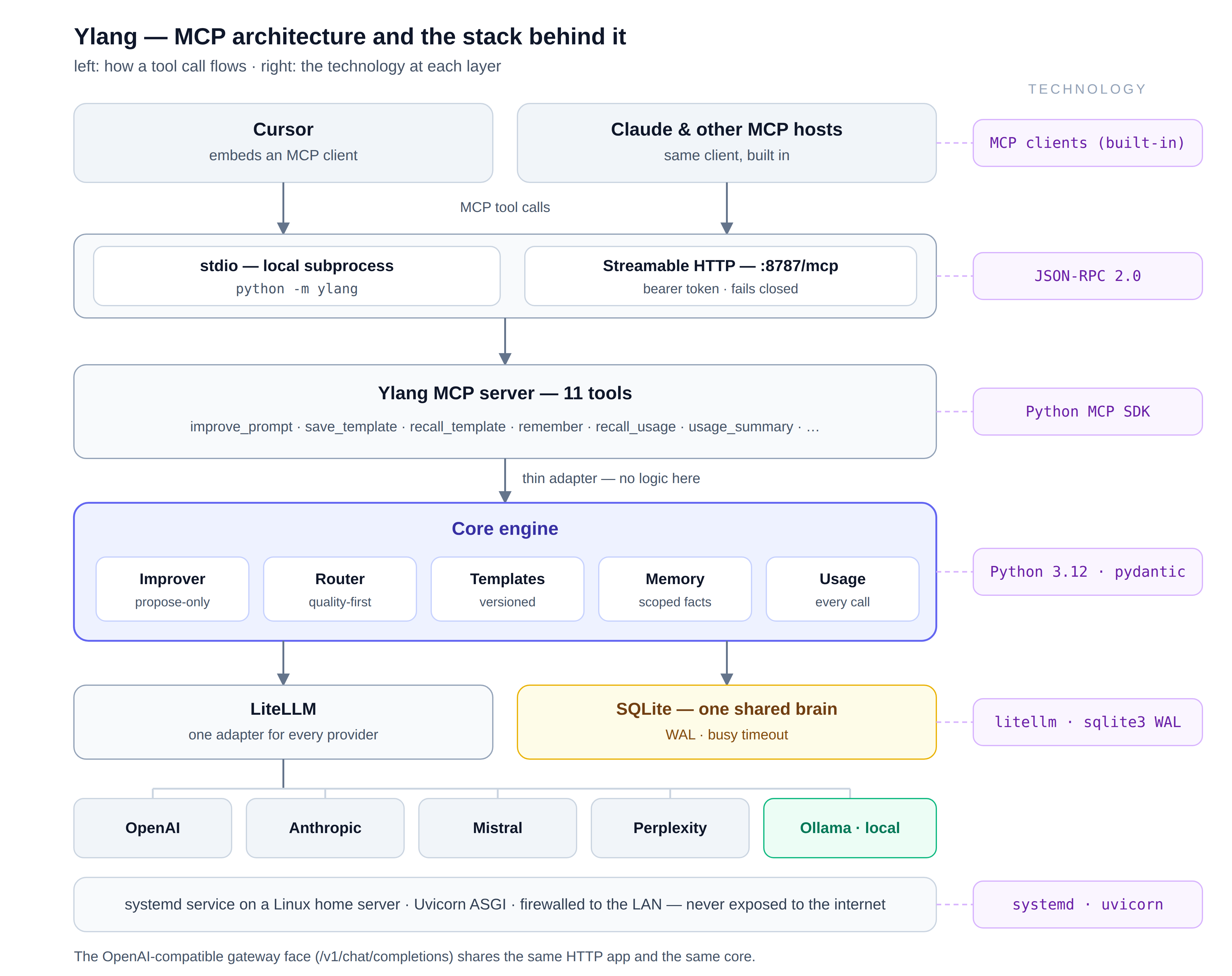 How an MCP tool call flows, with the technology at each layer.
Few days of real use
requests            64
tokens              113,805
success rate        96.9 %
total cost          $1.12
top model           claude-sonnet   33 calls · $0.82
local floor hit     1 call          $0.00
Routing behaved exactly as configured — the quality pick led, a cheaper model absorbed routine calls, and the local floor caught a failure. And a week of AI-assisted work cost less than a coffee, which says where the real value lies: not in saving money, but in making every interaction better and every cost visible.
The result is Ylang
That layer is now an open-source project: Ylang, MIT-licensed — github.com/Yann-0/ylang.
Two features are built into its seams and deliberately dormant until there is enough data: a budget meter for when several people share one server, and pattern learning that notices which prompts I keep rewriting and which models I actually prefer.
If you live across several AI tools and would rather they shared one brain you own: install it, connect your editor, and type something lazy. Then tell me the one thing I actually want to know — after a week, did you leave it running?
Comments
More Blog
View allcursorCursor Automations in 2026: wire event-triggered coding agents to Slack, CI, and timers
Cursor Automations in 2026: wire event-triggered coding agents to Slack, CI, and...
M
Manu ShuklaaiIndex Everything, or Read Everything? The Dilemma of Feeding Specs to AI in Multi-Repo Development
The specs exist. The AI just can't see them. I've always been the type who builds hobby...
S
Shunya ShidaamazonbedrockConnect Claude Code, Cursor and Codex to Amazon Bedrock's new console (2026)
Connect Claude Code, Cursor and Codex to Amazon Bedrock's new console (2026) Summary. On 5...
M
Manu ShuklaaiSpotting AI UI is too easy
There is a weird uncanny valley with LLM-generated UI right now. The code functions perfectly, but if...
H
Harish .saiSeven ranking frameworks, one search page, zero translation tables
I went down a rabbit hole this morning reading the late-2025 Juejin AI roundups side by side, and the...
N
ninghonggangmcpZendesk MCP: Let Claude Handle Your Support Tickets
Install guide and config at curatedmcp.com Zendesk MCP: Let Claude Handle Your Support...
C
curatedmcpReady-made automations for this
Workflows from the Neura Market marketplace related to this Cursor resource
- Learn JavaScript Coding with an Interactive RPG-Style Tutorial Gamen8n · $9.99 · Related topic
- Automate Email Sending from Obsidian Notes via Gmailn8n · $14.99 · Related topic
- Automate Sending Personalized Emails from Google Sheets with SendGridn8n · $9.99 · Related topic
- Automate Gmail Email Sending Using Google Sheets Datan8n · $9.99 · Related topic