
Back to Blog aitools
 cursor
 ai
ai amazonbedrock
 ai
ai ai
ai mcp
mcp
Best IDE for AI Development: 2026 Developer Guide
Iniyarajan June 2, 2026
0 views
Compare the best IDEs for AI development in 2026. Cursor vs Copilot Workspace vs Windsurf - which AI-powered IDE boosts developer productivity most?
Many developers still think that the best IDE for AI development is simply their favorite code editor with a ChatGPT tab open. We're here to correct this misconception. The landscape has fundamentally shifted in 2026, and the most productive AI developers are using purpose-built environments that integrate AI capabilities directly into their workflow.
 Photo by Daniil Komov on Pexels
We've reached a turning point where "vibe coding" — that intuitive flow state where AI feels like an extension of your thinking — isn't just possible, it's becoming the standard. The question isn't whether to use AI in your development process, but which IDE environment will give you the most seamless integration.
Table of Contents
- Why Traditional IDEs Fall Short
- Top AI-Powered IDEs in 2026
- Cursor: The Developer's Choice
- GitHub Copilot Workspace
- Windsurf and Cline Integration
- Performance Comparison
- Choosing the Right IDE
- Frequently Asked Questions
- Resources I Recommend
Why Traditional IDEs Fall Short
We've all been there — switching between VS Code, a browser with ChatGPT, and maybe Claude open in another tab. This fragmented approach breaks our flow and forces us to constantly context-switch. The best IDE for AI development needs to understand your entire codebase, not just isolated snippets.
Related: Best AI Coding Tools 2026: Complete Developer's Guide
Traditional IDEs treat AI as an afterthought. They bolt on chat interfaces or autocomplete features without rethinking the fundamental developer experience. But when we're building AI-powered applications, we need tools that understand the unique challenges of working with models, embeddings, and complex data pipelines.
Also read: AI Tools for Software Engineers: 2026 Performance Guide

Top AI-Powered IDEs in 2026
The AI development landscape has matured significantly. We're seeing three main categories emerge: AI-augmented traditional editors, purpose-built AI IDEs, and hybrid environments that bridge both worlds.
The leaders in each category bring different strengths. Some excel at code completion, others at architectural planning, and a few are pushing boundaries in collaborative AI pair programming.
Cursor: The Developer's Choice
Cursor has become the gold standard for developers serious about AI integration. What sets it apart isn't just the AI capabilities — it's how naturally those capabilities fit into your existing workflow.
Here's what makes Cursor special: it maintains context across your entire project, not just individual files. When you're working on a complex AI project with multiple model integrations, this contextual awareness becomes crucial.
// Cursor understands this iOS AI context
import Foundation
import SwiftUI

struct AIAssistantView: View {
    @StateObject private var assistant = AIAssistant()

    var body: some View {
        VStack {
            ChatInterface(messages: assistant.messages)

            HStack {
                TextField("Ask anything...", text: $assistant.currentInput)
                Button("Send") {
                    Task {
                        await assistant.processQuery()
                    }
                }
            }
        }
        .onAppear {
            // Cursor suggests relevant iOS AI patterns here
            assistant.initializeModel()
        }
    }
}
The AI in Cursor doesn't just autocomplete — it understands patterns specific to AI development. It knows when you're setting up model inference, handling embeddings, or implementing RAG pipelines.
GitHub Copilot Workspace
GitHub took a different approach with Copilot Workspace. Instead of building a new IDE, they've created an environment that feels like having a senior developer sitting next to you, thinking through problems at a higher level.
Copilot Workspace excels at the planning phase. When you're architecting a new AI feature, it helps you think through the implications before you start coding. This is particularly valuable for complex AI projects where the architecture decisions you make early will determine success or failure.
Windsurf and Cline Integration
Windsurf represents the cutting edge of AI IDE development. It's built specifically for the "vibe coding" workflow — where you describe what you want at a high level, and the AI helps you implement it step by step.
Cline, as an autonomous coding agent, integrates beautifully with Windsurf's environment. The combination creates something unique: an IDE that can take on substantial coding tasks independently while keeping you in the loop for architectural decisions.
# Windsurf + Cline understanding this AI pipeline
import torch
from transformers import AutoModel, AutoTokenizer
from langchain.embeddings import HuggingFaceEmbeddings
from langchain.vectorstores import FAISS

class AIKnowledgeBase:
    def __init__(self, model_name="all-MiniLM-L6-v2"):
        self.embeddings = HuggingFaceEmbeddings(
            model_name=model_name
        )
        self.vector_store = None

    async def index_documents(self, documents):
        """Cline can implement this entire method autonomously"""
        # The AI understands RAG patterns and suggests
        # appropriate chunking strategies
        chunks = self._chunk_documents(documents)
        self.vector_store = FAISS.from_texts(
            chunks, self.embeddings
        )

    def _chunk_documents(self, documents):
        # Windsurf suggests optimal chunking for this use case
        pass
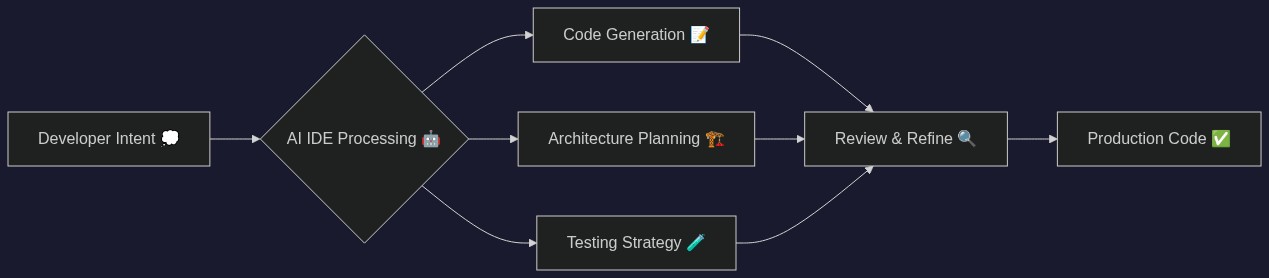
Performance Comparison
We've been testing these environments across different types of AI projects. Each has clear strengths:
Cursor wins for day-to-day coding productivity. The autocomplete is exceptional, and the context awareness means fewer interruptions to your flow.
Copilot Workspace excels at the beginning of projects. When you're still figuring out the architecture, it's invaluable for thinking through different approaches.
Windsurf + Cline is best for substantial feature implementation. When you have a clear vision but need help with the implementation details, this combination can handle more complex tasks autonomously.
Choosing the Right IDE
The best IDE for AI development depends on your specific workflow and project requirements. We recommend considering these factors:
Team Size: Larger teams benefit from Copilot Workspace's collaborative planning features. Solo developers often prefer Cursor's streamlined experience.
Project Complexity: Simple AI integrations work well in any modern IDE. Complex multi-model systems benefit from purpose-built AI environments.
Development Phase: Early-stage projects benefit from planning-focused tools. Production maintenance favors reliable autocomplete and refactoring support.
For most developers in 2026, we recommend starting with Cursor for its balance of power and usability. Once you're comfortable with AI-assisted development, explore Windsurf for more autonomous coding tasks.
Frequently Asked Questions
Q: Can I use traditional IDEs like VS Code for AI development?
Yes, VS Code with GitHub Copilot remains viable for AI development, but you'll miss the contextual awareness and AI-specific features that purpose-built environments provide. The productivity difference becomes significant on larger AI projects.
Q: How do AI IDEs handle sensitive code or proprietary models?
Most AI IDEs now offer on-device processing options or enterprise versions with strict data controls. Cursor Enterprise and GitHub Copilot Business both provide deployment options that keep your code local while still offering AI assistance.
Q: Which IDE works best for mobile AI development?
For iOS AI development using Apple's Foundation Models framework, Cursor provides the best Swift integration and understanding of on-device AI patterns. Android developers working with TensorFlow Lite often prefer the Windsurf environment for its superior model optimization workflow.
Q: Do AI IDEs work offline?
Most require internet connectivity for their full AI features, but several are adding offline modes. Cursor's latest version includes a limited offline mode for basic autocomplete, and Apple's Foundation Models integration works entirely on-device when properly configured.
Need a server? Get $200 free credits on DigitalOcean to deploy your AI apps.
Resources I Recommend
If you're serious about mastering AI development workflows, these AI coding productivity books provide deep insights into prompt engineering and AI-assisted development patterns that work across any IDE.
The future of development is undeniably AI-augmented. We're not just choosing between different text editors anymore — we're choosing between different paradigms of human-AI collaboration. The best IDE for AI development in 2026 isn't just about features; it's about finding the environment where you and AI work together most naturally.
Choose your tools thoughtfully. The IDE you pick today will shape how you think about and build AI-powered applications for years to come.
You Might Also Like
- Best AI Coding Tools 2026: Complete Developer's Guide
- AI Tools for Software Engineers: 2026 Performance Guide
- Best AI Tools for YouTube Creators in 2026
📘 Coming Soon: 10x Developer: Master Claude, Copilot & Cursor
The complete guide to AI coding tools that actually boost your productivity.
Follow me to get notified when it launches!
In the meantime, check out my latest book:
Building AI Agents: A Practical Developer's Guide →
Also check out: AI-Powered iOS Apps: CoreML to Claude
Enjoyed this article?
I write daily about iOS development, AI, and modern tech — practical tips you can use right away.
- Follow me on Dev.to for daily articles
- Follow me on Hashnode for in-depth tutorials
- Follow me on Medium for more stories
- Connect on Twitter/X for quick tips
If this helped you, drop a like and share it with a fellow developer!
Comments
More Blog
View allcursorCursor Automations in 2026: wire event-triggered coding agents to Slack, CI, and timers
Cursor Automations in 2026: wire event-triggered coding agents to Slack, CI, and...
M
Manu ShuklaaiIndex Everything, or Read Everything? The Dilemma of Feeding Specs to AI in Multi-Repo Development
The specs exist. The AI just can't see them. I've always been the type who builds hobby...
S
Shunya ShidaamazonbedrockConnect Claude Code, Cursor and Codex to Amazon Bedrock's new console (2026)
Connect Claude Code, Cursor and Codex to Amazon Bedrock's new console (2026) Summary. On 5...
M
Manu ShuklaaiSpotting AI UI is too easy
There is a weird uncanny valley with LLM-generated UI right now. The code functions perfectly, but if...
H
Harish .saiSeven ranking frameworks, one search page, zero translation tables
I went down a rabbit hole this morning reading the late-2025 Juejin AI roundups side by side, and the...
N
ninghonggangmcpZendesk MCP: Let Claude Handle Your Support Tickets
Install guide and config at curatedmcp.com Zendesk MCP: Let Claude Handle Your Support...
C
curatedmcpReady-made automations for this
Workflows from the Neura Market marketplace related to this Cursor resource
- Automated AI-Powered Workflow Maintenance with Google Workspace Integrationn8n · $24.99 · Related topic
- Automate Your Website Development with AI-Powered Chat Workflown8n · $6.3 · Related topic
- Automate Employee Onboarding with Slack, Jira, and Google Workspace Integrationn8n · $24.99 · Related topic
- AI Resume Screening & Evaluation for HR with GPT-4 & Google Workspacen8n · $14.99 · Related topic