
Back to Blog claudecode
 cursor
 ai
ai amazonbedrock
 ai
ai ai
ai mcp
mcp
Claude Code vs Cursor — 90 days with both in 2026
Muhammad Moeed May 15, 2026
0 views
I used Claude Code and Cursor side by side for three months on production work. Here is where each one wins, where it loses, and the one I kept.
title: Claude Code vs Cursor — 90 days with both in 2026 published: true description: I used Claude Code and Cursor side by side for three months on production work. Here is where each one wins, where it loses, and the one I kept. tags: claudecode, cursor, ai, productivity canonical_url: https://moeed.app/posts/claude-code-vs-cursor/ cover_image: https://moeed.app/posts/claude-code-vs-cursor-hero.png
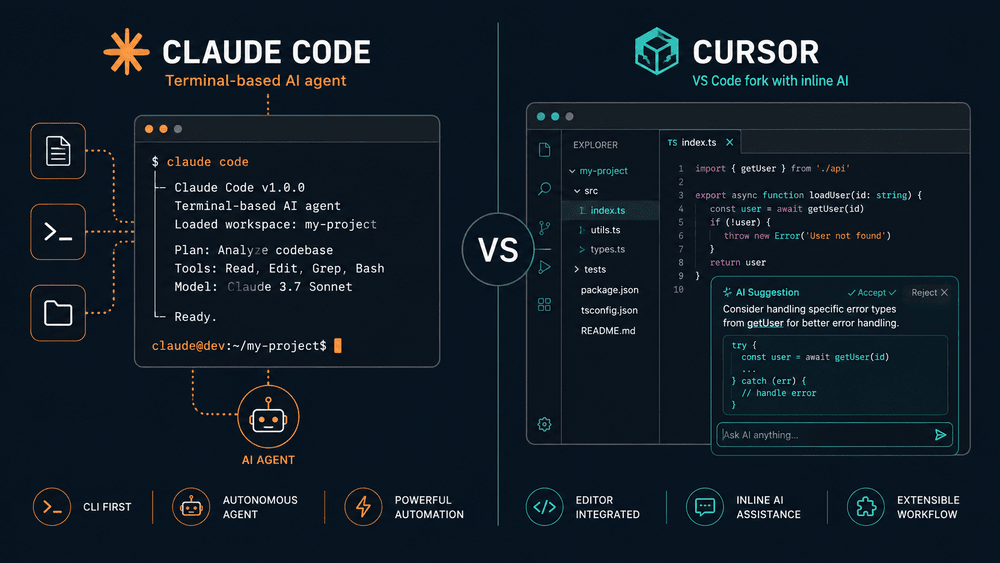
If you have already tried one of them, you are probably wondering whether the other is worth a switch. The short version is that Claude Code and Cursor are not competing for the same job, even though they look like they are. One lives in your terminal and behaves like a junior engineer with shell access. The other lives inside an editor and behaves like a very fast pair programmer sitting next to you.
I ran both on real work for ninety days. Some of it was a Next.js client project, some of it was a Python data pipeline, and a fair amount was housekeeping in my own blog. The picture that came out of that is more nuanced than the comparison posts I had read going in.
TL;DR
Claude Code is better when the task is large and the work happens across many files. Cursor is better when the task is small and you need to stay in the file you are looking at. Most working developers end up using both.
What they actually are
| Claude Code | Cursor | |
|---|---|---|
| Form | Terminal CLI (plus IDE extension) | Forked VS Code editor |
| Default working mode | Agentic — reads, plans, edits, runs cmds | Inline completion + chat + agent |
| Pricing | Pro $20 / Max $200 per month | Pro $20 / Ultra $200, free tier |
| Best for | Multi-file refactors, repo-wide work, CI | Single-file edits, fast iteration |
Cursor is an editor. Claude Code is an agent. That one sentence explains most of the differences below.
Where Cursor wins
I want to be honest here because the internet has decided Claude Code is the winner and Cursor is yesterday's news. That is not what I saw.
- Inline tab completion is still the best in the category. For small edits where you already know what you want, this beats any agent loop on raw speed.
- Diff review inside a real editor. Hunk-by-hunk accept/reject with keyboard shortcuts is genuinely nicer than reading the same diff in a terminal.
- Exploring an unfamiliar codebase. Right-click → "explain this function" while looking at the function is the fastest way to learn a new repo.
- Per-request model switching. Mix Opus 4.7, GPT-5, and cheaper models depending on the task.
Where Claude Code wins
These are the cases where I would not even open Cursor. The gap is large enough that there is no contest.
Large refactors across many files
The first time Claude Code paid for itself was a migration job. Rename a config option across thirty-eight files, update the types, fix every test, add a deprecation notice. In Cursor I would have done this with search-and-replace and a lot of cleanup. In Claude Code I described the task in two sentences and walked away for ten minutes. When I came back, it was done and the tests were passing.
For anything that touches more than four or five files, the agent loop is the right shape. You stop being a typist and start being a reviewer. That shift is the real product.
Long-running, autonomous work
Claude Code can run for thirty or forty minutes on a single task without losing the thread. It plans, executes, hits errors, debugs, and finishes. Ultraplan, the newer cloud-planning feature, pushes this even further by separating planning from execution.
Cursor's agent mode can do similar work, but I have never gotten a clean half-hour run out of it. It stops to ask questions or loses context. Claude Code is more comfortable with autonomy.
Running in CI and headless environments
Because Claude Code is a CLI, it runs anywhere a shell runs. Drop it into a GitHub Action and have it review PRs. Pipe data into it. Cursor is an editor, so it lives where editors live: on a developer's laptop. For team automation, this is a real gap.
Real cost over three months
People hand-wave about cost. Here are numbers I actually saw.
| Tool | Plan | Months | Real spend |
|---|---|---|---|
| Cursor | Pro $20/mo | 3 | $60 |
| Claude Code | Max $200/mo | 3 | $600 |
| Total | $660 |
That Claude Code spend looks high until you compare it to what those tasks would have cost in human hours. The refactor I mentioned above would have taken me a full day. Claude Code did it for about eight dollars of compute.
If you are on a tight budget, Cursor Pro at $20 is the better starting point. If you bill client work and your time is worth more than $50 an hour, Claude Code pays for itself inside the first project.
Which one to pick for which work
| Your situation | Pick |
|---|---|
| Solo developer, writing a lot of new code | Cursor |
| Bug fixes in a codebase you know well | Cursor |
| Multi-file refactor or migration | Claude Code |
| Writing tests for an existing module | Either |
| Reviewing a PR (especially in CI) | Claude Code |
| Learning a new codebase | Cursor for poking, Claude Code for summaries |
| Heavy automation, scripting, glue work | Claude Code |
| Very limited budget | Cursor Pro |
| Client work where your hourly rate is high | Claude Code Max |
The honest answer for most working developers is to use both. They are inexpensive enough together that the question is not which to pick, but how to set up your workflow so each one does what it is good at.
The setup I actually shipped
After ninety days, this is what stayed.
- Cursor for active coding sessions. Fast tab complete, quick diffs.
- Claude Code for everything else. Refactors, test runs, PR reviews, repo-wide search, anything I want running while I am doing something else.
- Both pointed at the same shared
.claude/folder so my hooks, skills, and MCP config travel with the repo. A server I write once works in both places. - A few small subagents for jobs I do often — diff review before commit, weekly change log.
Total: $220 a month for the two of them. Saved a lot of time, I have not measured it carefully enough to put a defensible number on it.
A few common questions I get asked about this
Is Cursor going to be replaced by Claude Code?
No. Cursor is an editor with AI. Claude Code is an agent in your terminal. Either can copy a feature, but the form factor of each one limits how much it can become the other.
Can I use Claude Code inside Cursor?
Yes — run the CLI in Cursor's integrated terminal. You lose the editor integration with the agent but keep Cursor's other features.
Does Cursor support MCP?
Yes. Same .cursor/mcp.json format. An MCP server you write once works in both.
Better for non-developers?
Cursor. CLIs have a learning curve not everyone wants to climb.
The full version
This is the dev.to cut. The full version on my blog goes deeper on:
- Speed, reliability, and memory benchmarks I tracked
- Editor lock-in concerns with Cursor
- A longer "common questions" section
- Decision rules I now follow when picking which tool to open
If you have the opposite experience from what I described above, I genuinely want to hear it. The most useful comparisons come from people whose work shape is different from mine.
Comments
More Blog
View allcursorCursor Automations in 2026: wire event-triggered coding agents to Slack, CI, and timers
Cursor Automations in 2026: wire event-triggered coding agents to Slack, CI, and...
M
Manu ShuklaaiIndex Everything, or Read Everything? The Dilemma of Feeding Specs to AI in Multi-Repo Development
The specs exist. The AI just can't see them. I've always been the type who builds hobby...
S
Shunya ShidaamazonbedrockConnect Claude Code, Cursor and Codex to Amazon Bedrock's new console (2026)
Connect Claude Code, Cursor and Codex to Amazon Bedrock's new console (2026) Summary. On 5...
M
Manu ShuklaaiSpotting AI UI is too easy
There is a weird uncanny valley with LLM-generated UI right now. The code functions perfectly, but if...
H
Harish .saiSeven ranking frameworks, one search page, zero translation tables
I went down a rabbit hole this morning reading the late-2025 Juejin AI roundups side by side, and the...
N
ninghonggangmcpZendesk MCP: Let Claude Handle Your Support Tickets
Install guide and config at curatedmcp.com Zendesk MCP: Let Claude Handle Your Support...
C
curatedmcpReady-made automations for this
Workflows from the Neura Market marketplace related to this Cursor resource
- Full Blog Content Automation with GPT-4, Claude & Ghost CMS Publishern8n · $24.99 · Related topic
- Deploy Code to GitHub with Natural Language via Slack & Claude 3.5n8n · $14.99 · Related topic
- Multi-Platform Price Finder: Scraping Prices with Bright Data, Claude AI & Telegramn8n · $24.99 · Related topic
- Automate Shopify SEO Content Creation with GPT-4 & Claude Multi-Agent Systemn8n · $24.99 · Related topic