
Back to Blog programming
 cursor
 ai
ai amazonbedrock
 ai
ai ai
ai mcp
mcp
Unlocking AI’s potential: How to quickly set up a Cursor MCP Server
𝚂𝚊𝚞𝚛𝚊𝚋𝚑 𝚁𝚊𝚒 March 11, 2025
0 views
The Model Context Protocol (MCP) is an open standard designed to facilitate interaction between large...
The Model Context Protocol (MCP) is an open standard designed to facilitate interaction between large language models (LLMs) and external data sources and tools. It provides a standardized way for AI models to connect to various data sources and tools, avoiding custom implementations that cause fragmentation.
MCP acts as a universal interface (like a USB-C port for AI applications), standardizing how apps give context to LLMs. With Anthropic's release of MCP for Claude models, we're witnessing a pivotal moment in AI development. The protocol has quickly gained widespread adoption across applications and enjoys robust community support for good reason. MCP represents a fundamental shift in how we build agentic applications—moving from isolated, proprietary connections to an open, connected ecosystem.
What are the benefits of Model Context Protocol?
Traditionally, integrating AI models with different data sources required custom solutions for each case, leading to increased complexity and maintenance challenges. MCP addresses this by providing a standardized framework, enabling developers to build AI applications seamlessly connecting to multiple data sources without needing custom integrations.
The implications for agentic applications are transformative:
- Seamless integration between LLMs and external tools
- Standardized function calling that works consistently across platforms
- Reduced development complexity when building AI-powered applications
- Future-proof architecture that will evolve with the AI landscape MCP represents a fundamental shift in building AI applications—moving from isolated, proprietary connections to an open, interoperable ecosystem where innovation can flourish.
How does MCP work?
The Model Context Protocol (MCP) establishes a standardized framework that allows AI applications to interact seamlessly with various data sources and tools. This interaction is achieved through a client-server architecture comprising MCP clients (hosts) and MCP servers.
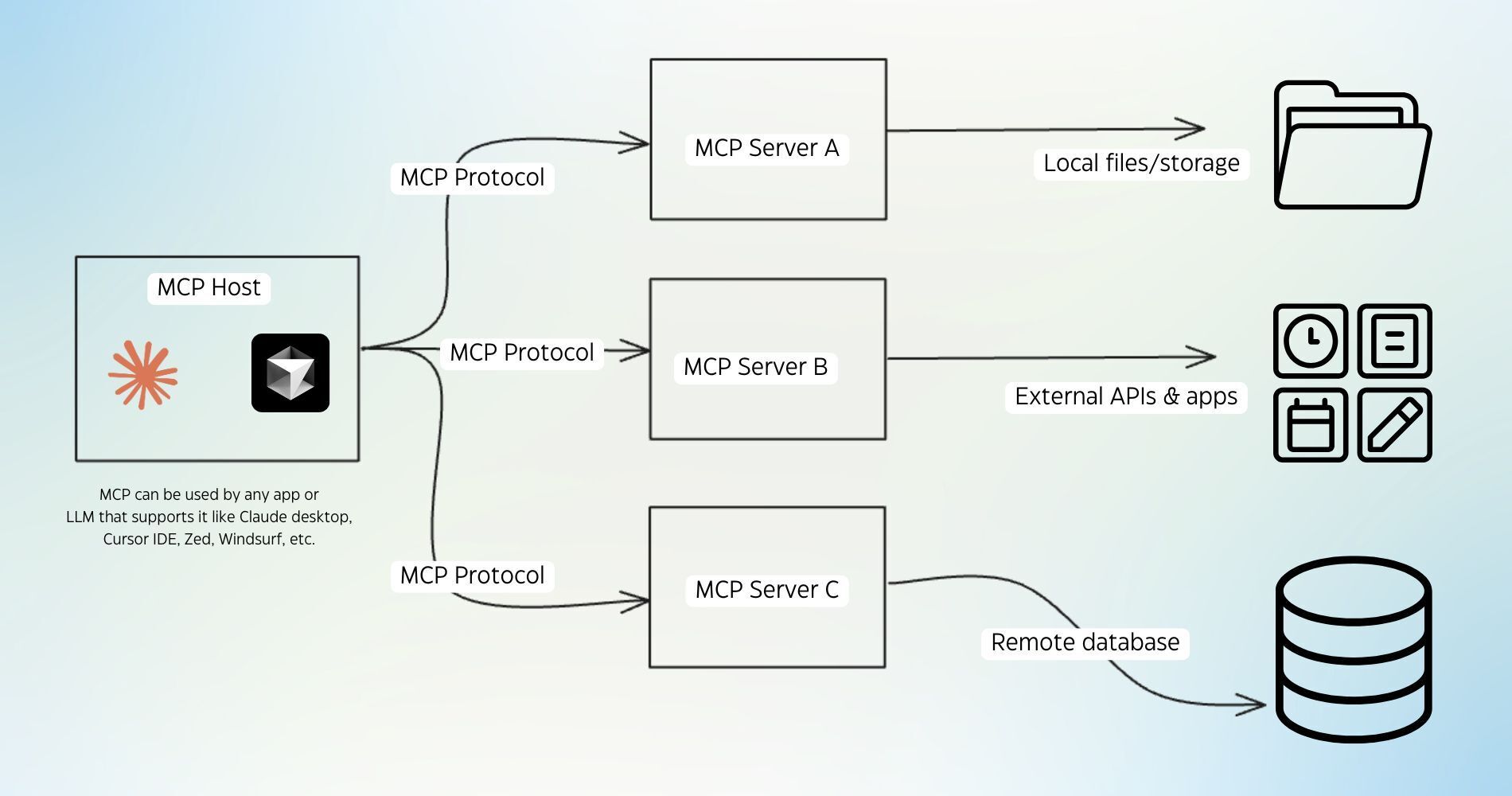
MCP Clients or Hosts: These are AI applications, such as Anthropic's Claude Desktop, Cursor AI IDE, other integrated development environments (IDEs), or your agentic app that initiate connections to access data through MCP.
MCP Servers: These are lightweight programs that expose specific capabilities via the standardized Model Context Protocol. They can securely access local data sources like files and databases or connect to remote services available over the internet through APIs.
In practice, an MCP client connects to an MCP server to request data or perform actions. For example, an AI coding agent could use an MCP server to retrieve information from a company's internal API specification, enabling it to develop user apps more efficiently following its standards.
This standardized interaction simplifies the integration process, allowing developers to build AI applications seamlessly connecting to multiple data sources without needing custom integrations for each case.
-
[Smithery](https://smithery.ai/) -
[MCP Server](https://mcpserver.dev/) -
[GitHub Model Context Protocol](https://github.com/modelcontextprotocol) -
[Cursor Directory](https://cursor.directory/mcp) -
[mcp-get](https://mcp-get.com/) -
[Glama Open-source MCP Servers](https://glama.ai/mcp/servers) -
[MCP.so](https://mcp.so/)
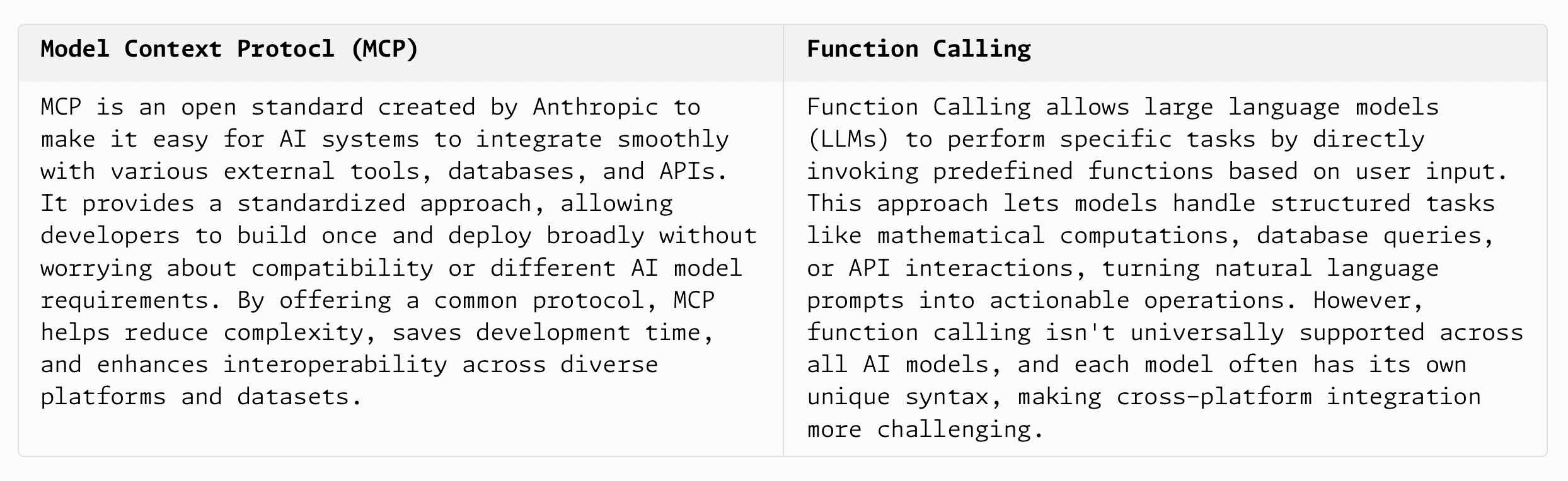
Difference between MCP and Function Calling
MCP provides a standardized framework for AI systems to interact with various tools and data sources, and Function Calling allows models to perform specific operations by invoking predefined functions.
Getting started with MCP with Cursor AI IDE
Cursor AI IDE comes with an MCP client, which supports an arbitrary number of MCP servers. To get started with MCP servers with Cursor. You can learn more about MCPs with Cursor here.
Let’s configure an MCP Server in Cursor.
- First, go to settings > cursor settings.
- Find the MCP servers option and enable it.
- We will use Firecrawl MCP to set up a powerful web scraping tool inside Cursor. You can read about Firecrawl MCP and how to get API keys here.
- Now go to your MCP server and click “Add new MCP server.”
- Provide the details in the following way. Please add your API keys instead of the placeholder.
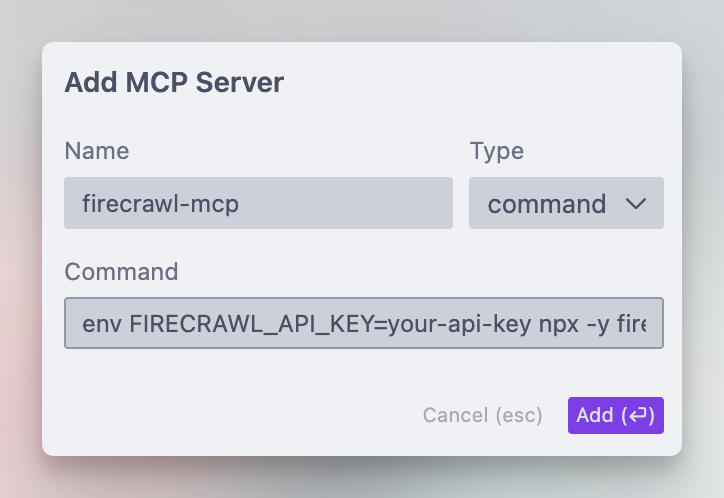
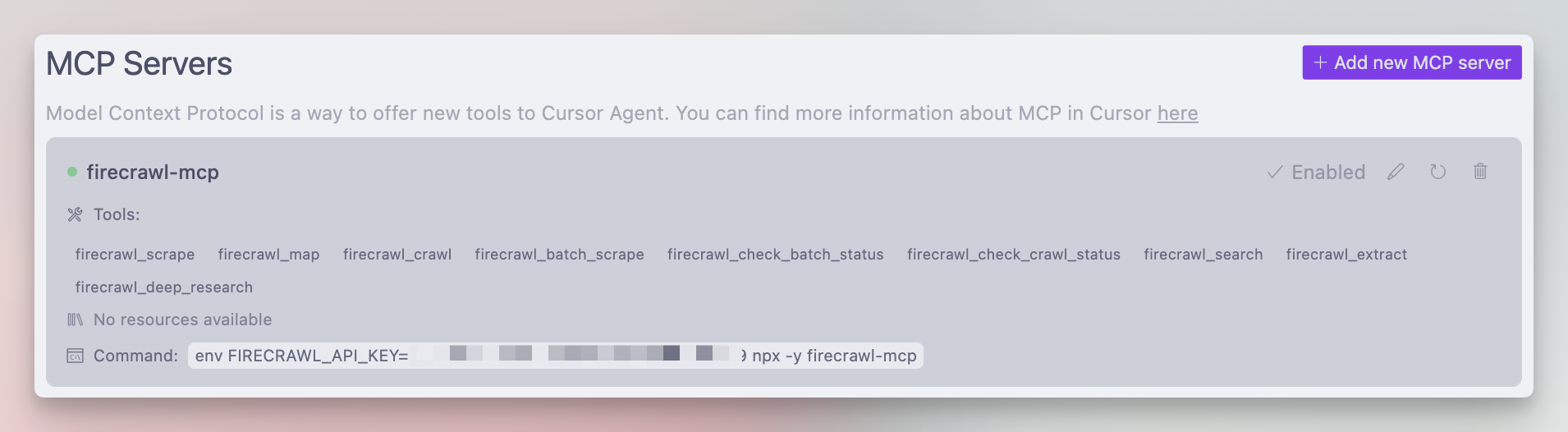
This will add the MCP server, then click on enable. A green dot will appear with a list of tools available to you. Your MCP server is active and ready to use.
Using the Firecrawl MCP Server
Cursor agents support MCP server calls when prompted. They automatically identify the need and use the required server. In this case, we are trying to scrape product data from Apideck’s website and build a catalog for it. Cursor automatically identified and used the firecrawl_scrape tool that was available.
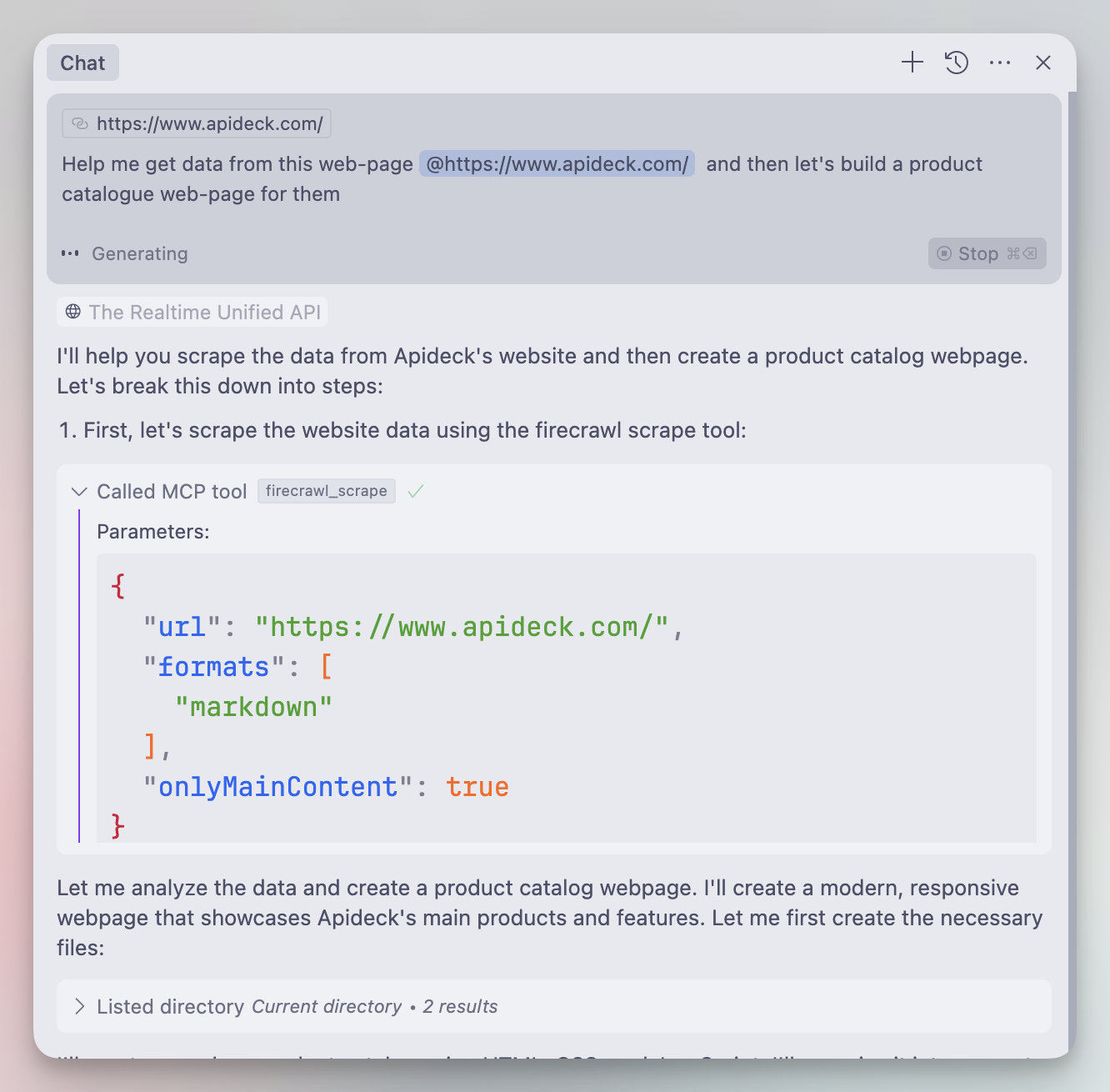
After finalizing the tool call, the markdown is generated with a perfectly scraped version of our website, including URLs and other relevant details. Chaining steps together is incredibly powerful—you can even enable the Cursor agent to run in YOLO mode for a more autonomous workflow.
Additional MCP Server examples
Developers have implemented MCP servers across multiple domains to extend the capabilities of Large Language Models (LLMs) inside MCP clients like Cursor.
- GitHub: Supports repository management, file operations, and integration with GitHub's API. An example MCP server for GitHub can be found here on the MCP repository.
- Slack: Provides channel management and messaging capabilities within Slack workspaces.
- Stripe: Integrating the Stripe API into agentic workflows via their Agent Toolkit which is MCP compatible.
- Cloudflare: Enables deployment and management of resources on the Cloudflare developer platform, allowing LLMs to interact with Cloudflare services.
- Neon: Facilitates interaction with the Neon serverless Postgres platform, providing scalable database operations for LLMs.
The MCP ecosystem continues to grow, with community-developed servers expanding its functionality. For instance, servers have been created to manage Docker containers, interact with Kubernetes clusters, and control Spotify playback. This extensibility allows developers to tailor AI integrations to specific workflows and applications, expanding the utility of LLMs. Anthropic, the company behind MCP, is developing an official Registry API to streamline the discovery process for official and community MCP servers. They provided a sneak peek of this initiative during the MCP workshop at the AI Engineering Summit.
Conclusion
Model Context Protocol (MCP) is a groundbreaking open standard transforming how large language models connect with external tools and data sources.
Instead of building a new web scraping tool or extension, we could simply use a set of protocols that quickly added the function to scrape web pages and extract data—giving our simple IDE advanced functionalities in just two minutes.
This way, MCP is changing the future of how we can provide access to data to our LLMs. If you use CRMs like Salesforce, Hubspot, etc., check out our Apideck CRM MCP server, which gives you easy access to data inside multiple CRMs.
Comments
More Blog
View allcursorCursor Automations in 2026: wire event-triggered coding agents to Slack, CI, and timers
Cursor Automations in 2026: wire event-triggered coding agents to Slack, CI, and...
M
Manu ShuklaaiIndex Everything, or Read Everything? The Dilemma of Feeding Specs to AI in Multi-Repo Development
The specs exist. The AI just can't see them. I've always been the type who builds hobby...
S
Shunya ShidaamazonbedrockConnect Claude Code, Cursor and Codex to Amazon Bedrock's new console (2026)
Connect Claude Code, Cursor and Codex to Amazon Bedrock's new console (2026) Summary. On 5...
M
Manu ShuklaaiSpotting AI UI is too easy
There is a weird uncanny valley with LLM-generated UI right now. The code functions perfectly, but if...
H
Harish .saiSeven ranking frameworks, one search page, zero translation tables
I went down a rabbit hole this morning reading the late-2025 Juejin AI roundups side by side, and the...
N
ninghonggangmcpZendesk MCP: Let Claude Handle Your Support Tickets
Install guide and config at curatedmcp.com Zendesk MCP: Let Claude Handle Your Support...
C
curatedmcpReady-made automations for this
Workflows from the Neura Market marketplace related to this Cursor resource
- AI-Driven Document Interaction Using Nextcloud and OpenAIn8n · $14.99 · Related topic
- Conversational AI for Snowflake Database Interactionn8n · $14.99 · Related topic
- AI-Enhanced WhatsApp Chatbot for Multimodal Interactionn8n · $19.99 · Related topic
- Automate Professional Engagement on X with AI-Powered Tweet Interactionn8n · $14.99 · Related topic