
The Comprehensive AI Agents Guide: What They Are, How They Work, and How to Build Them
This guide covers the fundamentals of AI agents: what they are, how they work, and how to build them. It is for product and engineering teams, developers, and anyone who wants to understand the core concepts and practical patterns behind agentic systems.
What You Need
Before building AI agents, you should have:
- A basic understanding of large language models (LLMs) and how they generate text.
- Familiarity with Python (for code examples).
- Access to an LLM API (such as OpenAI, Anthropic, or a local model via Hugging Face).
- An environment where you can install Python packages (e.g.,
pip install). - (Optional) A Hugging Face account if you want to publish agents on Hugging Face Spaces.
What Is an AI Agent?
An artificial intelligence (AI) agent is a software program that can interact with its environment, collect data, and use that data to perform self-directed tasks that meet predetermined goals. Humans set goals, but an AI agent independently chooses the best actions it needs to perform to achieve those goals. According to the official IBM documentation, an AI agent refers to a system or program that is capable of autonomously performing tasks on behalf of a user or another system by designing its workflow and utilizing available tools. AI agents can encompass a wide range of functionalities beyond natural language processing including decision-making, problem-solving, interacting with external environments and executing actions.
The AWS documentation defines an AI agent as a software program that can interact with its environment, collect data, and use that data to perform self-directed tasks that meet predetermined goals. Humans set goals, but an AI agent independently chooses the best actions it needs to perform to achieve those goals.
OpenAI's practical guide describes agents as systems that independently accomplish tasks on your behalf. A workflow is a sequence of steps that must be executed to meet the user's goal, whether that's resolving a customer service issue, booking a restaurant reservation, committing a code change, or generating a report. Applications that integrate LLMs but don't use them to control workflow execution (think simple chatbots, single-turn LLMs, or sentiment classifiers) are not agents.
Anthropic's engineering team categorizes all these variations as agentic systems, but draws an important architectural distinction between workflows and agents:
- Workflows are systems where LLMs and tools are orchestrated through predefined code paths.
- Agents are systems where LLMs dynamically direct their own processes and tool usage, maintaining control over how they accomplish tasks.
Key Principles That Define AI Agents
The AWS documentation lists several key principles:
- Autonomy: AI agents act autonomously, without constant human intervention. While traditional software follows hard-coded instructions, AI agents identify the next appropriate action based on past data and execute it without continuous human oversight.
- Goal-oriented behavior: AI agents are driven by objectives. Their actions aim to maximize success as defined by a utility function or performance metric.
- Perception: AI agents interact with their environment by collecting data through sensors or digital inputs. They can collect data from external systems and tools via APIs.
- Rationality: AI agents are rational entities with reasoning capabilities. They combine data from their environment with domain knowledge and past context to make informed decisions.
- Proactivity: AI agents can take initiative based on forecasts and models of future states. Instead of simply reacting to inputs, they anticipate events and prepare accordingly.
- Continuous learning: AI agents improve over time by learning from past interactions. They identify patterns, feedback, and outcomes to refine their behavior and decision-making.
- Adaptability: AI agents adjust their strategies in response to new circumstances. This flexibility allows them to handle uncertainty, novel situations, and incomplete information.
- Collaboration: AI agents can work with other agents or human agents to achieve shared goals. They are capable of communicating, coordinating, and cooperating to perform tasks together.
How AI Agents Work
At the core of AI agents are large language models (LLMs). For this reason, AI agents are often referred to as LLM agents. Traditional LLMs produce their responses based on the data used to train them and are bounded by knowledge and reasoning limitations. In contrast, agentic technology uses tool calling on the backend to obtain up-to-date information, optimize workflows and create subtasks autonomously to achieve complex goals.
According to the IBM documentation, there are three stages or agentic components that define how agents operate:
Goal Initialization and Planning
Although AI agents are autonomous in their decision-making processes, they require goals and predefined rules defined by humans. There are three main influences on autonomous agent behavior:
- The team of developers that design and train the agentic AI system.
- The team that deploys the agent and provides the user with access to it.
- The user that provides the AI agent with specific goals to accomplish and establishes available tools to use.
Given the user's goals and the agent's available tools, the AI agent then performs task decomposition to improve performance. Essentially, the agent creates a plan of specific tasks and subtasks to accomplish the complex goal. For simple tasks, planning is not a necessary step. Instead, an agent can iteratively reflect on its responses and improve them without planning its next steps.
Reasoning with Available Tools
AI agents base their actions on the information that they perceive. However, they often lack the full knowledge required to tackle every subtask within a complex goal. To bridge this gap, they turn to available tools such as external datasets, web searches, APIs and even other agents. When the missing information is gathered, the agent updates its knowledge base and engages in agentic reasoning. This process involves continuously reassessing its plan of action and making self-corrections, which enables more informed and adaptive decision-making.
Learning and Reflection
AI agents use feedback mechanisms, such as other AI agents and human-in-the-loop (HITL) to improve the accuracy of their responses. Feedback mechanisms improve the AI agent's reasoning and accuracy, which is commonly referred to as iterative refinement. To avoid repeating the same mistakes, AI agents can also store data about solutions to previous obstacles in a knowledge base.
The Agent Workflow: Think, Act, Observe
The Hugging Face Agents Course describes the core agent workflow as Think, Act, Observe. This loop is central to how agents operate. The agent thinks about what to do next, acts by calling a tool or generating a response, and observes the result to inform its next thought.
Agentic versus Nonagentic AI Chatbots
AI chatbots use conversational AI techniques such as natural language processing (NLP) to understand user questions and automate responses to them. These chatbots are a modality whereas agency is a technological framework. Nonagentic AI chatbots are ones without available tools, memory or reasoning. They can reach only short-term goals and cannot plan ahead. As we know them, nonagentic chatbots require continuous user input to respond. They can produce responses to common prompts that most likely align with user expectations but perform poorly on questions unique to the user and their data. Because these chatbots do not hold memory, they cannot learn from their mistakes if their responses are unsatisfactory.
In contrast, agentic AI chatbots learn to adapt to user expectations over time, providing a more personalized experience and comprehensive responses. They can complete complex tasks by creating subtasks without human intervention and considering different plans. These plans can also be self-corrected and updated as needed. Agentic AI chatbots, unlike nonagentic ones, assess their tools and use their available resources to complete information gaps.
Types of AI Agents
AI agents can be developed to have varying levels of capabilities. A simple agent might be preferred for straightforward goals to limit unnecessary computational complexity. In order of simplest to most advanced, there are 5 main agent types, according to the IBM documentation:
1. Simple Reflex Agents
Simple reflex agents are the simplest agent form that grounds actions on perception. This agent does not hold any memory, nor does it interact with other agents if it is missing information. These agents function on a set of so-called reflexes or rules. This behavior means that the agent is preprogrammed to perform actions that correspond to certain conditions being met. If the agent encounters a situation that it is not prepared for, it cannot respond appropriately. The agents are effective in environments that are fully observable granting access to all necessary information.
Example: If it is 8 PM, then the heating is activated, for instance, a thermostat that turns on the heating system at a set time every night.
2. Model-based Reflex Agents
Model-based reflex agents use both their current perception and memory to maintain an internal model of the world. As the agent continues to receive new information, the model is updated. The agent's actions depend on its model, reflexes, previous precepts and current state. These agents, unlike simple reflex agents, can store information in memory and can operate in environments that are partially observable and changing. However, they are still limited by their set of rules.
Example: A robot vacuum cleaner. As it cleans a dirty room, it senses obstacles such as furniture and adjusts around them. The robot also stores a model of the areas that it has already cleaned to not get stuck in a loop of repeated cleaning.
3. Goal-based Agents
Goal-based agents have an internal model of the world and also a goal or set of goals. These agents search for action sequences that reach their goal and plan these actions before acting on them. This search and planning improve their effectiveness when compared to simple and model-based reflex agents.
Example: A navigation system that recommends the fastest route to your destination. The model considers various routes that reach your destination, or in other words, your goal. In this example, the agent's condition-action rule states that if a quicker route is found, the agent recommends that one instead.
4. Utility-based Agents
Utility-based agents select the sequence of actions that reach the goal and also maximize utility or reward. Utility is calculated through a utility function. This function assigns a utility value, a metric measuring the usefulness of an action or how "happy" makes the agent, to each scenario based on a set of fixed criteria. The criteria can include factors such as progression toward the goal, time requirements or computational complexity. The agent then selects the actions that maximize the expected utility. Hence, these agents are useful in cases where multiple scenarios achieve a wanted goal and an optimal one must be selected.
Example: A customer can use a utility-based agent to search for flight tickets with the minimum travel time, regardless of the price.
5. Learning Agents
A learning agent continually learns from past experiences to enhance its performance. Using sensory input and feedback mechanisms, the agent adapts its learning element over time.
Key Components of AI Agent Architecture
An AI agent architecture contains the following key components, according to the AWS documentation:
Foundation Model
At the core of any AI agent lies a foundation or large language model (LLM) such as GPT or Claude. It enables the agent to interpret natural language inputs, generate human-like responses, and reason over complex instructions. The LLM acts as the agent's reasoning engine, processing prompts and transforming them into actions, decisions, or queries to other components (e.g., memory or tools). It retains some memory across sessions by default and can be coupled with external systems to simulate continuity and context awareness.
Planning Module
The planning module enables the agent to break down goals into smaller, manageable steps and sequence them logically. This module employs symbolic reasoning, decision trees, or algorithmic strategies to determine the most effective approach for achieving a desired outcome. It can be implemented as a prompt-driven task decomposition or more formalized approaches, such as Hierarchical Task Networks (HTNs) or classical planning algorithms. Planning allows the agent to operate over longer time horizons, considering dependencies and contingencies between tasks.
Memory Module
The memory module allows the agent to retain information across interactions, sessions, or tasks. This includes both short-term memory, such as chat history or recent sensor input, and long-term memory, including customer data, prior actions, or accumulated knowledge. Memory enhances the agent's personalization, coherence, and context-awareness. When building AI agents, developers use vector databases or knowledge graphs to store and retrieve semantically meaningful content.
Tool Integration
AI agents often extend their capabilities by connecting to external software, APIs, or devices. This allows them to act beyond natural language, performing real-world tasks such as retrieving data, sending emails, running code, querying databases, or controlling hardware. The agent identifies when a task requires a tool and then delegates the operation accordingly. Tool use is typically guided by the LLM through planning and parsing modules that format the tool call and interpret its output.
Learning and Reflection
Reflection can occur in multiple forms:
- The agent evaluates the quality of its own output (e.g., did it solve the problem correctly?).
- Human users or automated systems provide corrections.
- The agent selects uncertain or informative examples to improve its learning.
Reinforcement Learning (RL) is a key learning paradigm. The agent interacts with an environment, receives feedback in the form of rewards or penalties, and learns a policy that maps states to actions for maximum cumulative reward. RL is especially useful in environments where explicit training data is sparse, such as robotics, gaming, or financial trading. The agent balances exploration (trying new actions) and exploitation (using known best actions) to improve its strategy over time.
Reasoning Paradigms
There is not one standard architecture for building AI agents. Several paradigms exist for solving multistep problems.
ReAct (Reasoning and Action)
With the ReAct paradigm, we can instruct agents to "think" and plan after each action taken and with each tool response to decide which tool to use next. These loops, known as Think-Act-Observe, are used to solve problems step by step and iteratively improve upon responses. Through the prompt structure, agents can be instructed to reason slowly and to display each "thought." The agent's verbal reasoning gives insight into how responses are formulated. In this framework, agents continuously update their context with new reasoning. This approach can be interpreted as a form of Chain-of-Thought prompting.
ReWOO (Reasoning Without Observation)
The ReWOO method, unlike ReAct, eliminates the dependence on tool outputs for action planning. Instead, agents plan upfront. Redundant tool usage is avoided by anticipating which tools to use upon receiving the initial prompt from the user. This approach is desirable from a human-centered perspective because the user can confirm the plan before it is executed. The ReWOO workflow is made up of three modules. In the planning module, the agent anticipates its next steps given a user's prompt. The next stage entails collecting the outputs produced by calling these tools. Lastly, the agent pairs the initial plan with the tool outputs to formulate a response. This planning ahead can greatly reduce token usage and computational complexity and the repercussions of intermediate tool failure.
When to Build an Agent
Building agents requires rethinking how your systems make decisions and handle complexity. Unlike conventional automation, agents are uniquely suited to workflows where traditional deterministic and rule-based approaches fall short. Consider the example of payment fraud analysis. A traditional rules engine works like a checklist, flagging transactions based on preset criteria. In contrast, an LLM agent functions more like a seasoned investigator, evaluating context, considering subtle patterns, and identifying suspicious activity even when clear-cut rules aren't violated.
As you evaluate where agents can add value, prioritize workflows that have previously resisted automation, especially where traditional methods encounter friction:
- Complex decision-making: Workflows involving nuanced judgment, exceptions, or context-sensitive decisions, for example refund approval in customer service workflows.
- Difficult-to-maintain rules: Systems that have become unwieldy due to extensive and intricate rulesets, making updates costly or error-prone, for example performing vendor security reviews.
- Heavy reliance on unstructured data: Scenarios that involve interpreting natural language, extracting meaning from documents, or interacting with users conversationally, for example processing a home insurance claim.
Before committing to building an agent, validate that your use case can meet these criteria clearly. Otherwise, a deterministic solution may suffice.
Anthropic's engineering team recommends finding the simplest solution possible, and only increasing complexity when needed. This might mean not building agentic systems at all. Agentic systems often trade latency and cost for better task performance, and you should consider when this tradeoff makes sense. When more complexity is warranted, workflows offer predictability and consistency for well-defined tasks, whereas agents are the better option when flexibility and model-driven decision-making are needed at scale. For many applications, however, optimizing single LLM calls with retrieval and in-context examples is usually enough.
Agent Design Foundations
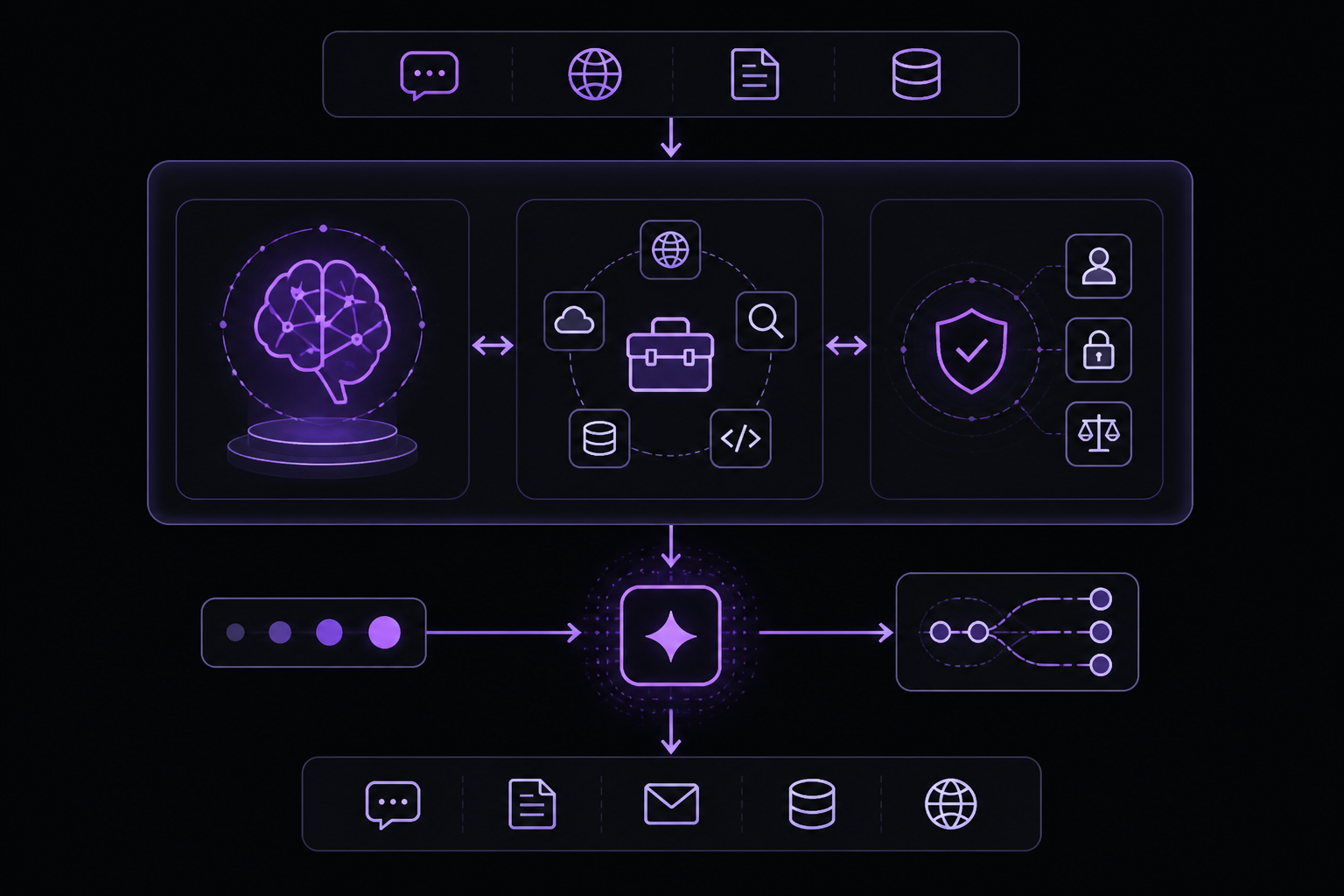
In its most fundamental form, an agent consists of three core components, according to OpenAI's practical guide:
- Model: The LLM powering the agent's reasoning and decision-making.
- Tools: External functions or APIs the agent can use to take action.
- Instructions: Explicit guidelines and guardrails defining how the agent behaves.
Here is what this looks like in code when using OpenAI's Agents SDK. You can also implement the same concepts using your preferred library or building directly from scratch.
weather_agent = Agent(
    name="Weather agent",
    instructions="You are a helpful agent who can talk to users about the weather",
    tools=[get_weather],
)
Selecting Your Models
Different models have different strengths and tradeoffs related to task complexity, latency, and cost. As we will see in the next section on Orchestration, you might want to consider using a variety of models for different tasks in the workflow. Not every task requires the smartest model. A simple retrieval or intent classification task may be handled by a smaller, faster model, while harder tasks like deciding whether to approve a refund may benefit from a more capable model.
An approach that works well is to build your agent prototype with the most capable model for every task to establish a performance baseline. From there, try swapping in smaller models to see if they still achieve acceptable results. This way, you don't prematurely limit the agent's abilities, and you can diagnose where smaller models succeed or fail.
In summary, the principles for choosing a model are simple:
- Set up evals to establish a performance baseline.
- Focus on meeting your accuracy target with the best models available.
- Optimize for cost and latency by replacing larger models with smaller ones where possible.
Defining Tools
Tools extend your agent's capabilities by using APIs from underlying applications or systems. For legacy systems without APIs, agents can rely on computer-use models to interact directly with those applications and systems through web and application UIs, just as a human would.
Each tool should have a standardized definition, enabling flexible, many-to-many relationships between tools and agents. Well-documented, thoroughly tested, and reusable tools improve discoverability, simplify version management, and prevent redundant definitions.
Broadly speaking, agents need three types of tools:
| Type | Description | Examples |
|---|---|---|
| Data | Enable agents to retrieve context and information necessary for executing the workflow. | Query transaction databases or systems like CRMs, read PDF documents, or search the web. |
| Action | Enable agents to interact with systems to take actions such as adding new information to databases, updating records, or sending messages. | Send emails and texts, update a CRM record, hand-off a customer service ticket to a human. |
| Orchestration | Agents themselves can serve as tools for other agents. | Refund agent, Research agent, Writing agent. |
For example, here is how you would equip the agent defined above with a series of tools when using the Agents SDK:
from agents import Agent, WebSearchTool, function_tool
import datetime

@function_tool
def save_results(output):
    db.insert({
        "output": output,
        "timestamp": datetime.datetime.now(),
    })
    return "File saved"

search_agent = Agent(
    name="Search agent",
    instructions="Help the user search the internet and save results if asked.",
    tools=[WebSearchTool(), save_results],
)
As the number of required tools increases, consider splitting tasks across multiple agents.
Configuring Instructions
High-quality instructions are essential for any LLM-powered app, but especially critical for agents. Clear instructions reduce ambiguity and improve agent decision-making, resulting in smoother workflow execution and fewer errors.
Best Practices for Agent Instructions
- Use existing documents: When creating routines, use existing operating procedures, support scripts, or policy documents to create LLM-friendly routines. In customer service for example, routines can roughly map to individual articles in your knowledge base.
- Prompt agents to break down tasks: Providing smaller, clearer steps from dense resources helps minimize ambiguity and helps the model better follow instructions.
- Define clear actions: Make sure every step in your routine corresponds to a specific action or output. For example, a step might instruct the agent to ask the user for their order number or to call an API to retrieve account details. Being explicit about the action (and even the wording of a user-facing message) leaves less room for errors in interpretation.
- Capture edge cases: Real-world interactions often create decision points such as how to proceed when a user provides incomplete information or asks an unexpected question. A robust routine anticipates common variations and includes instructions on how to handle them with conditional steps or branches such as an alternative step if a required piece of info is missing.
You can use advanced models, like o1 or o3-mini, to automatically generate instructions from existing documents. Here is a sample prompt illustrating this approach:
"You are an expert in writing instructions for an LLM agent.
Convert the following help center document into a clear set of instructions,
written in a numbered list.
The document will be a policy followed by an LLM.
Ensure that there is no ambiguity, and that the instructions are written as directions for an agent.
The help center document to convert is the following {{help_center_doc}}"
Orchestration Patterns
With the foundational components in place, you can consider orchestration patterns to enable your agent to execute workflows effectively. While it is tempting to immediately build a fully autonomous agent with complex architecture, customers typically achieve greater success with an incremental approach.
In general, orchestration patterns fall into two categories:
- Single-agent systems, where a single model equipped with appropriate tools and instructions executes workflows in a loop.
- Multi-agent systems, where workflow execution is distributed across multiple coordinated agents.
Single-agent Systems
A single agent can handle many tasks by incrementally adding tools, keeping complexity manageable and simplifying evaluation and maintenance. Each new tool expands its capabilities without prematurely forcing you to orchestrate multiple agents.
Every orchestration approach needs the concept of a 'run', typically implemented as a loop that lets agents operate until an exit condition is reached. Common exit conditions include tool calls, a certain structured output, errors, or reaching a maximum number of turns.
For example, in the Agents SDK, agents are started using the method, which loops over the LLM until either:
- A final-output tool is invoked, defined by a specific output type.
- The model returns a response without any tool calls (e.g., a direct user message).
Example usage:
Agents.run(
    agent,
    [UserMessage("What's the capital of the USA")]
)
This concept of a while loop is central to the functioning of an agent. In multi-agent systems, as you will see next, you can have a sequence of tool calls and handoffs between agents but allow the model to run multiple steps until an exit condition is met.
An effective strategy for managing complexity without switching to a multi-agent framework is to use prompt templates. Rather than maintaining numerous individual prompts for distinct use cases, use a single flexible base prompt that accepts policy variables. This template approach adapts easily to various contexts, significantly simplifying maintenance and evaluation. As new use cases arise, you can update variables rather than rewriting entire workflows.
""" You are a call center agent. You are interacting with
{{user_first_name}} who has been a member for {{user_tenure}}. The user's
most common complains are about {{user_complaint_categories}}. Greet the
user, thank them for being a loyal customer, and answer any questions the
user may have!
When to Consider Creating Multiple Agents
Our general recommendation is to maximize a single agent's capabilities first. More agents can provide intuitive separation of concepts, but can introduce additional complexity and overhead, so often a single agent with tools is sufficient. For many complex workflows, splitting up prompts and tools across multiple agents allows for improved performance and scalability. When your agents fail to follow complicated instructions or consistently select incorrect tools, you may need to further divide your system and introduce more distinct agents.
Practical guidelines for splitting agents include:
- Complex logic: When prompts contain many conditional statements (multiple if-then-else branches), and prompt templates get difficult to scale, consider dividing each logical segment across separate agents.
- Tool overload: The issue is not solely the number of tools, but their similarity or overlap. Some implementations successfully manage more than 15 well-defined, distinct tools while others struggle with fewer than 10 overlapping tools.
Multi-agent Systems
A multiagent system consists of multiple AI agents working collectively to perform tasks on behalf of a user or another system. Individual AI agents can be specialized to perform specific subtasks with accuracy. An orchestrator agent coordinates the activities of different specialist agents to complete larger, more complex tasks.
Workflow Patterns
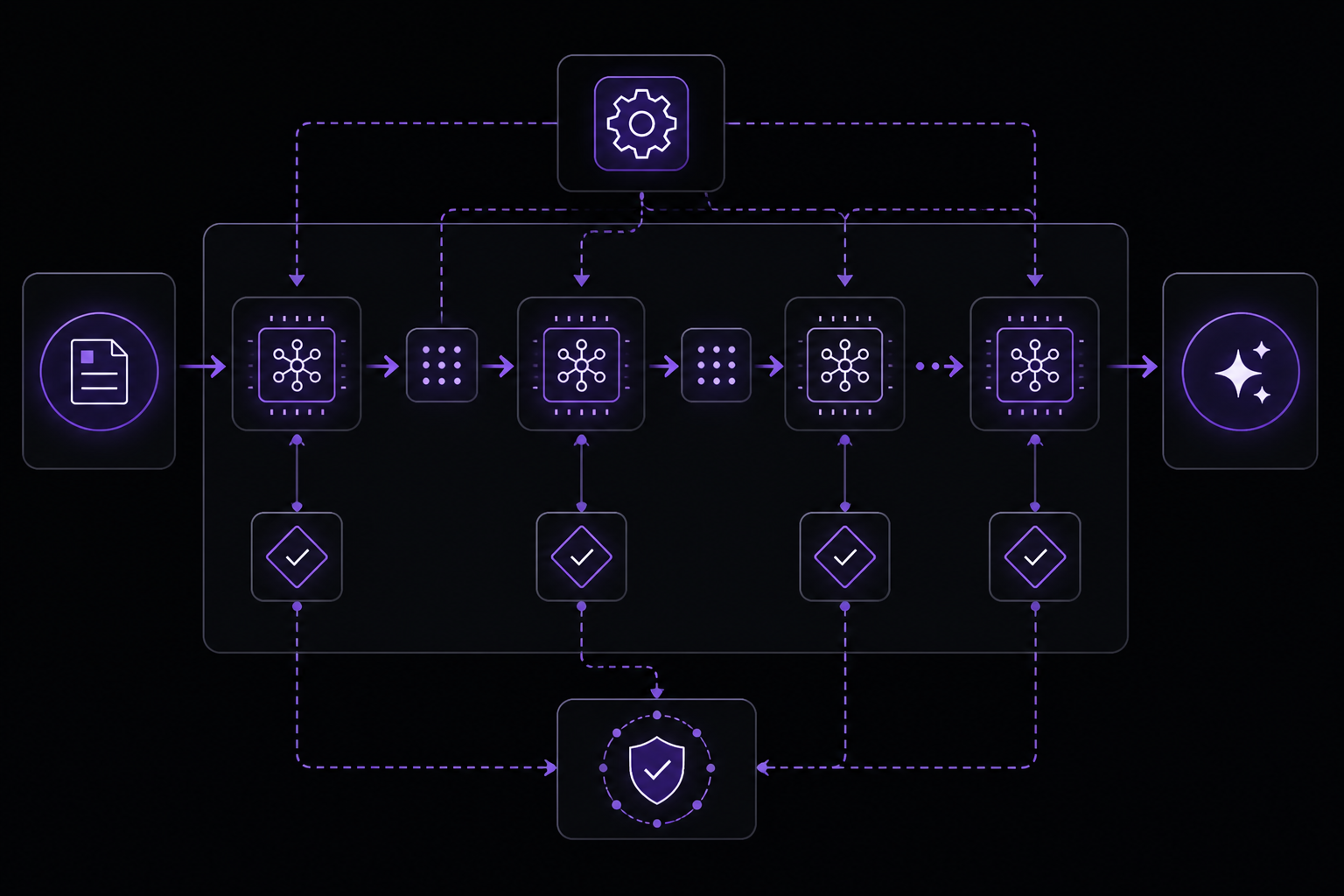
Anthropic's engineering team has identified several common workflow patterns for agentic systems:
Prompt Chaining
Prompt chaining decomposes a task into a sequence of steps, where each LLM call processes the output of the previous one. You can add programmatic checks on any intermediate steps to ensure that the process is still on track.
When to use this workflow: This workflow is ideal for situations where the task can be easily and cleanly decomposed into fixed subtasks. The main goal is to trade off latency for higher accuracy, by making each LLM call an easier task.
Examples where prompt chaining is useful:
- Generating Marketing copy, then translating it into a different language.
- Writing an outline of a document, checking that the outline meets certain criteria, then writing the document based on the outline.
Routing
Routing classifies an input and directs it to a specialized followup task. This workflow allows for separation of concerns, and building more specialized prompts. Without this workflow, optimizing for one kind of input can hurt performance on other inputs.
When to use this workflow: Routing works well for complex tasks where there are distinct categories that are better handled separately, and where classification can be handled accurately, either by an LLM or a more traditional classification model/algorithm.
Examples where routing is useful:
- Directing different types of customer service queries (general questions, refund requests, technical support) into different downstream processes, prompts, and tools.
- Routing easy/common questions to smaller, cost-efficient models like Claude Haiku 4.5 and hard/unusual questions to more capable models like Claude Sonnet 4.5 to optimize for best performance.
Parallelization
LLMs can sometimes work simultaneously on a task and have their outputs aggregated programmatically. This workflow, parallelization, manifests in two key variations:
- Sectioning: Breaking a task into independent subtasks run in parallel.
- Voting: Running the same task multiple times to get diverse outputs.
When to use this workflow: Parallelization is effective when the divided subtasks can be parallelized for speed, or when multiple perspectives or attempts are needed for higher confidence results. For complex tasks with multiple considerations, LLMs generally perform better when each consideration is handled by a separate LLM call, allowing focused attention on each specific aspect.
Examples where parallelization is useful:
- Sectioning:
- Implementing guardrails where one model instance processes user queries while another screens them for inappropriate content or requests. This tends to perform better than having the same LLM call handle both guardrails and the core response.
- Automating evals for evaluating LLM performance, where each LLM call evaluates a different aspect of the model's performance on a given prompt.
- Voting:
- Reviewing a piece of code for vulnerabilities, where several different prompts review and flag the code if they find a problem.
- Evaluating whether a given piece of content is inappropriate, with multiple prompts evaluating different aspects or requiring different vote thresholds to balance false positives and negatives.
Orchestrator-workers
In the orchestrator-workers workflow, a central LLM dynamically breaks down tasks, delegates them to worker LLMs, and synthesizes their results.
When to use this workflow: This workflow is well-suited for complex tasks where you cannot predict the subtasks needed (in coding, for example, the number of files that need to be changed and the nature of the change in each file likely depend on the task). Whereas it is topographically similar, the key difference from parallelization is its flexibility. Subtasks are not pre-defined, but determined by the orchestrator based on the specific input.
Example where orchestrator-workers is useful:
- Coding products that make complex changes to multiple files each time.
- Search tasks that involve gathering and analyzing information from multiple sources for possible relevant information.
Evaluator-optimizer
In the evaluator-optimizer workflow, one LLM call generates a response while another provides evaluation and feedback in a loop.
When to use this workflow: This workflow is particularly effective when we have clear evaluation criteria, and when iterative refinement provides measurable value. The two signs of good fit are, first, that LLM responses can be demonstrably improved when a human articulates their feedback; and second, that the LLM can provide such feedback. This is analogous to the iterative writing process a human writer might go through when producing a polished document.
Examples where evaluator-optimizer is useful:
- Literary translation where there are nuances that the translator LLM might not capture initially, but where an evaluator LLM can provide useful critiques.
- Complex search tasks that require multiple rounds of searching and analysis to gather comprehensive information, where the evaluator decides whether further searches are warranted.
Agents (Autonomous)
Agents are emerging in production as LLMs mature in key capabilities. Understanding complex inputs, engaging in reasoning and planning, using tools reliably, and recovering from errors. Agents begin their work with either a command from, or interactive discussion with, the human user. Once the task is clear, agents plan and operate independently, potentially returning to the human for further information or judgement. During execution, it is crucial for the agents to gain "ground truth" from the environment at each step (such as tool call results or code execution) to assess its progress. Agents can then pause for human feedback at checkpoints or when encountering blockers. The task often terminates upon completion, but it is also common to include stopping conditions (such as a maximum number of iterations) to maintain control.
Agents can handle sophisticated tasks, but their implementation is often straightforward. They are typically just LLMs using tools based on environmental feedback in a loop. It is therefore crucial to design toolsets and their documentation clearly and thoughtfully.
When to use agents: Agents can be used for open-ended problems where it is difficult or impossible to predict the required number of steps, and where you cannot hardcode a fixed path. The LLM will potentially operate for many turns, and you must have some level of trust in its decision-making. Agents' autonomy makes them ideal for scaling tasks in trusted environments. The autonomous nature of agents means higher costs, and the potential for compounding errors. We recommend extensive testing in sandboxed environments, along with the appropriate guardrails.
Examples where agents are useful:
- A coding Agent to resolve SWE-bench tasks, which involve edits to many files based on a task description.
- Anthropic's "computer use" reference implementation, where Claude uses a computer to accomplish tasks.
Building Agents with Hugging Face
Hugging Face provides tools and protocols that connect AI agents directly to the Hub. Whether you are chatting with Claude, building with Codex, or developing custom agents, you can access models, datasets, Spaces, and community tools.
Chat with Hugging Face
Connect your AI assistant directly to the Hugging Face Hub using the Model Context Protocol (MCP). Once connected, you can search models, explore datasets, generate images, and use community tools, all from within your chat interface.
Supported Assistants
The HF MCP Server works with any MCP-compatible client:
- ChatGPT (via plugins)
- Claude Desktop
- Custom MCP clients
Setup
- Open MCP Settings at huggingface.co/settings/mcp while logged in.
- Select your MCP-compatible client from the list. The page shows client-specific instructions and a ready-to-copy configuration snippet.
- Copy the configuration snippet into your client's MCP settings, save, and restart your client.
The settings page generates the exact configuration your client expects. Use it rather than writing config by hand.
What You Can Do
Once connected, ask your assistant to use Hugging Face tools among the ones you selected in your configuration:
| Task | Example Prompt |
|---|---|
| Search models | "Find Qwen 3 quantizations on Hugging Face" |
| Explore datasets | "Show datasets about weather time-series" |
| Find Spaces | "Find a Space that can transcribe audio files" |
| Generate images | "Create a 1024x1024 image of a cat in Ghibli style" |
| Search papers | "Find recent papers on vision-language models" |
Your assistant calls MCP tools exposed by the Hugging Face server and returns results with metadata, links, and context.
Coding Agents
Integrate Hugging Face into your coding workflow with the MCP Server and Skills. Access models, datasets, and ML tools directly from your IDE or coding agent.
Quick Setup
MCP Server: The MCP Server gives your coding agent access to Hub search, Spaces, and community tools.
For Cursor / VS Code / Zed:
- Visit huggingface.co/settings/mcp
- Select your IDE from the list
- Copy the configuration snippet
- Add it to your IDE's MCP settings
- Restart the IDE
For Claude Code:
claude mcp add hf-mcp-server -t http "https://huggingface.co/mcp?login"
Skills: Skills provide task-specific guidance for AI/ML workflows. They work alongside MCP or standalone.
# start claude
claude

# install the skills marketplace plugin
/plugin marketplace add huggingface/skills
Then, to install a Skill specification:
/plugin install hf-cli@huggingface/skills
Environment Configuration
Authentication: Set your Hugging Face token as an environment variable:
export HF_TOKEN="hf_..."
Or authenticate via the CLI:
hf auth login
Example Workflow
You: Find a text classification model that works well on short texts

Agent: [Searches Hugging Face Hub]
Found several options:
- distilbert-base-uncased-finetuned-sst-2-english (sentiment)
- facebook/bart-large-mnli (zero-shot)
...

You: Show me how to use the first one

Agent: [Fetches documentation]
Here's how to use it with transformers:

from transformers import pipeline
classifier = pipeline("sentiment-analysis",
model="distilbert-base-uncased-finetuned-sst-2-english")
result = classifier("I love this product!")
Using Frameworks
There are many frameworks that make agentic systems easier to implement, including:
- The Claude Agent SDK
- Strands Agents SDK by AWS
- Rivet, a drag and drop GUI LLM workflow builder
- Vellum, another GUI tool for building and testing complex workflows
These frameworks make it easy to get started by simplifying standard low-level tasks like calling LLMs, defining and parsing tools, and chaining calls together. However, they often create extra layers of abstraction that can obscure the underlying prompts and responses, making them harder to debug. They can also make it tempting to add complexity when a simpler setup would suffice.
We suggest that developers start by using LLM APIs directly: many patterns can be implemented in a few lines of code. If you do use a framework, ensure you understand the underlying code. Incorrect assumptions about what is under the hood are a common source of customer error.
Agentic RAG
Agentic RAG is the use of AI agents to facilitate retrieval augmented generation (RAG). Compared to traditional RAG systems, agentic RAG allows large language models to conduct information retrieval from multiple sources and handle more complex workflows.
Governance
AI agent governance refers to the processes, standards and guardrails that help ensure agentic systems are safe and ethical.
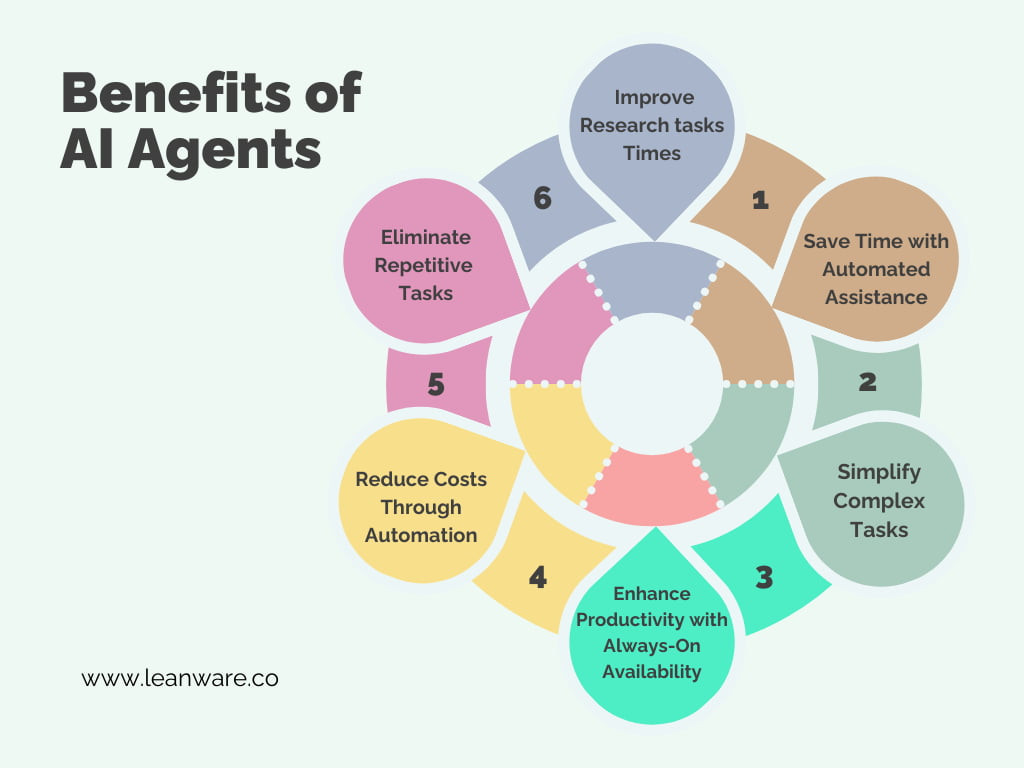
Benefits of Using AI Agents
According to the AWS documentation, AI agents can improve your business operations and your customers' experiences:
- Improved productivity: Business teams are more productive when they delegate repetitive tasks to AI agents. This way, they can divert their attention to mission-critical or creative activities, adding more value to their organization.
- Reduced costs: Businesses can utilize intelligent agents to minimize unnecessary costs resulting from process inefficiencies, human errors, and manual processes. They can confidently tackle complex tasks because autonomous agents follow a consistent model that adapts to changing environments.
- Informed decision-making: Advanced intelligent agents have predictive capabilities and can collect and process massive amounts of real-time data. This enables business managers to make more informed predictions at speed when strategizing their next move.
- Improved customer experience: Customers seek engaging and personalized experiences when interacting with businesses. Integrating AI agents allows businesses to personalize product recommendations, provide prompt responses, and innovate to improve customer engagement, conversion, and loyalty.
Troubleshooting
Based on community and official sources, here are common failure modes and how to address them:
- Agents fail to follow complicated instructions: If your agent consistently selects incorrect tools or fails to follow instructions, you may need to split your system into more distinct agents. Complex logic with many conditional statements is a sign that you need multiple agents.
- Tool overload: When agents have too many tools, especially overlapping ones, they may struggle to select the correct tool. Keep tools well-defined, distinct, and thoroughly documented. Consider splitting tools across multiple agents if the number exceeds 10-15.
- Compounding errors: Autonomous agents can make errors that compound over multiple turns. Mitigate this by extensive testing in sandboxed environments, using guardrails, and including stopping conditions (e.g., maximum iterations).
- High costs and latency: Agentic systems often trade latency and cost for better task performance. Use smaller, faster models for simpler subtasks and route complex tasks to more capable models. The ReWOO paradigm can reduce token usage by planning upfront.
- Obscured prompts and responses: Frameworks can create abstraction layers that make debugging difficult. Start with direct LLM API calls and only add frameworks when necessary. If you use a framework, ensure you understand the underlying code.
Going Further
After mastering the fundamentals, explore these advanced topics drawn from the source material:
- Multiagent systems: Learn how multiple AI agents can work collectively, with an orchestrator agent coordinating specialist agents.
- Agentic RAG: Combine agents with retrieval augmented generation to handle complex information retrieval workflows.
- Governance: Study the processes, standards, and guardrails for safe and ethical agentic systems.
- Frameworks: Experiment with the Claude Agent SDK, Strands Agents SDK by AWS, Rivet, or Vellum for building and testing complex workflows.
- Hugging Face integration: Connect your agents to the Hugging Face Hub using MCP and Skills to access models, datasets, and community tools.
- Real-world use cases: Explore applications in customer service, human resources, sales, procurement, software design, IT automation, code generation, and conversational assistance.
- The Hugging Face Agents Course: Take the full course at huggingface.co/learn/agents-course to earn certification and build practical skills with
smolagents. - Anthropic's cookbook: Review sample implementations for common patterns like prompt chaining, routing, parallelization, orchestrator-workers, and evaluator-optimizer.
The #1 AI Newsletter
The most important ai updates, guides, and fixes — one weekly email.
No spam, unsubscribe anytime. Privacy policy